



OfficerCrader
Members
-
Joined
-
Last visited
Everything posted by OfficerCrader
-
 HAHAH Good pic huh? I love the model and skins.... even if it s county
 -
I am so sorry guys I never responded to this. When you all began to respond I was away at the Police Academy. Since I have been back I have been so busy working I have not be able to even touch 0.4 As far as my issue last year, I will go back in my notes and see what file was giving me grief. I can tell you for sure it was not Dinput, Scripthook or rage. I recall it being from a mod. I will check for you all since sounds like someone is still having the issue.
-
 Amazing! I couldn't believe my eyes when I saw this when I woke up today. I never thought it could be done. Thank so much! Now I can secure scenes a lot easier! thank you again!
- 299 comments
- 25 reviews
-
-

- 2
-
-
-
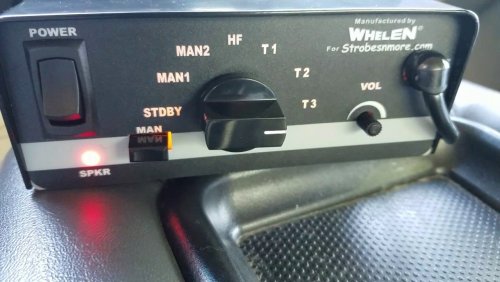 Thank you! Yes, I just noticed that as well. Updating the siren in a few minutes with that fixed and a new vid. sorry about that!
- 18 comments
- 4 reviews
-
I figured since I always take screen shots, I might as well upload them somewhere! Enjoy😎
-
From the album: PatrolPics
-
Make sure you download the 2.0.0 version. I just listened to the first version (higher pitch/grainy sound) and the version I just released and they are different. I redid it completely because I found a video with the siren actually being used through a speaker outdoors.
- 18 comments
- 4 reviews
-
SOLVED-- this was due to a corrupt file I located.
-
Hello, yesyerday I had a fresh install of everything. New mods folder, scripts updated, etc. I launched Rage and everything was perfect. Go on duty all the scripts load up successfully and no crashes at all. Boot up the PC this morning and launch Rage and the game crashes at the loading screen. I try launching just regular gta and same thing happens. long story short after re-installing and reasearching all day I narrowed it down. Currently i I have ScripthookV, Rage, and Lspdfr installed the main directory folder. Also, I have a mods folder but nothing has been put into it yet so the files in that are vanilla still. I try to run Rage or regular GTA and get the loading screen crash. I take out the vanilla mod folder.... crash. Put it back in and take out dinput8.dll and it loads up perfect. After backtracing and cross elimating everything it is Dinput8.dll. I tried a fresh download and reinstall but still got the same result. i feel it's so random how after nothing was changed it all of sudden doesn't work. if anyone could please shed some new light on this and help me out that would be great. I'm at a loss on what to do. Thanks in advanced!
-
 Hopefully soon! every time I go on duty LSPDFR crashes. I narrowed it down this mod. Once I take it out everything else loads fine!
- 1,196 comments
- 127 reviews
-
-
-
-
-
Greetings, I release to you my attempt at creating a siren. This siren is currently used by the Portland Police Bureau. My main reason for this release would be to give back to community. I have been into LSPDFR for quite some time now and feel I should try to do something (audacity is the only program I knew how to use). Please bare with me this siren is a work in progress. I would highly appreciate good/ bad feed back. I'm looking to update this as I gain anyone's advice. As of now it seems pretty loud in my game and the looping is good. The only thing I have noticed is at the top end of the wail the sound fades a little (maybe someone has an idea on how to fix). Enjoy, thanks! Video I used:
- 18 comments
- 4 reviews
-
-
- 2
-
-
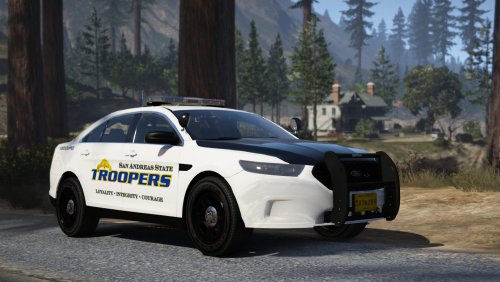 Wow!!! Cars look awesome! Been looking for a state trooper pack for a long time and now.... this master piece has been created! Keep up the great work!
- 50 comments
- 26 reviews
-
-
- 1
-
-
I may be totally off. It's a shot in the dark but the last photo of three officers looking like theyre doing an area check together with flashlights...... is this maybe some type of cover/ back up that will stay on scene with you?🤔 So so excited to see more. Thank you guys!!!
-
 Yes, they all work. Unfortunately traffic policer has a little issue with the new game patch and RPH. It works solid but some of us are getting FPS drop when making contact with the driver on traffic stops.
- 3,646 comments
- 306 reviews
-
-
- 2
-
-
Same here! Some of my best work comes from traffic stops hahah. Little tirck I am doing in the meantime is pulling up the traffic stop menu asap then closing it once I reach the rear and of their vehicle. Yea, it's a anoying having the menu up but when it's open there's no FPS drop!
- 3,646 comments
- 306 reviews
-
A lot of people experiencing the same thing! As well as myself. At first RageNativeUI was suspected to be the cause (which it had some dealing with it) but after that recent update it helped a little bit the FPSdrop is still pretty harsh. Hopefully we we will get an update soon! I am am just happy to know we have people in the community willing to work of these things!
- 3,646 comments
- 306 reviews
-
 Yup. I have been just pulling the menu up as soon as I can and not closing it until I reach the rear of their vehicle lol.
- 1,178 comments
- 137 reviews
-
Hey, I have the exact same issue as you. As well as some others I have talked to. I am on the newest version of RageNatveUI but I personally still get the lag when I approach the car on a traffic stop then it goes away once I open the Traffic stop menu or walk back to my patrol car.
- 1,178 comments
- 137 reviews
-
 Does anyone have a good realistic ELS config setup?? Like where the range of lights is not super far and brightness off the walls is not to bright. I like being able to see the reflections off my surroundings but sometimes I can see it pretty far away. I have messed with the numbers but cant find a good set up. Anyone mind on sharing theirs if it is a pretty realistic one??? Thanks for any help or ideas.
- 2,700 comments
- 241 reviews
-
 Amazing! This is what a lot of us have been waiting for!!! It slows everything down to a more realistic feel. For example, a simple hazard tow... usually you can do this kind of quick in game. Now on top of searching the car for items of value and calling the tow we now can fill a tow forum out and lodge it (saves into a XML file) It may just be me maybe but I feel like it slows everything we do down! It so awesome! I wish there was a way to build it into the game so we don't have to Alt-tab out of the game all the time! Hope to see updates. Keep up the great work!
- 79 comments
- 28 reviews

