


AngeloCosma
Members
-
Joined
-
Last visited
Everything posted by AngeloCosma
-
Good luck buddy, cheers. You AMD or Nvidia? Win7?
-
Was that what fixed it for you? How did you save your story game? I am assuming you were / are able to load back from it?
-
Help guys, I have literally tried everything I can do hours and hours of searching and I can't find a solution. I am getting the dreaded BEX64 error and I have taken all the necessary steps to mitigate the crash but to no avail. Latest windows updates, Direct X is good, Nvidia drivers up to date. Manual latest GTA launcher. All 3 exes are admin. AV is off, ran GTA repair tool, verified all rpfs via MD5 checker. Disabled and re-enabled Display adapter. This is my launcher log, and there clearly is something wrong but don't know why.
-
Thank you Sam and LSPDFR TEAM!!!
-
Is there a way to replace the GTA V car names with the actual RW name. Like Corvette vs the Conquette or whatever GTA calls it. Some are not so obvious, my example is however. Does that mod exist? A quick google search and didn't come up with anything, (It was a very quick search)
-
What about when you are signed in?
-
Try a different browser.
-
Looking at the photo of the computer on page one, the date is in Euro format (Day, Month, Year). Since the sim is taking place in Los Angeles would it be possible to have the computer show the date in lower right corner to the US Format of Month Day Year? No worries if you can't I was just curious if it was interchangeable.
-
Is there a way to replace the GTA V car names with the actual RW name. Like Corvette vs the Conquette or whatever GTA calls it. Some are not so obvious, my example is however.
-
Still crashing on Splash screen CPU usage goes to zero. Updated graphics drivers, updated launcher, running admin on all exe's, removed entire mods folder. I don't know what to do further.
-
It says I have a newer version than the link you provided, and I can't uninstall it until "All Rockstar games are removed" which I most certainly do not want to do.
-
Is anyone currently experiencing BEX64 error on GTA5.exe? I am and the splash screen goes black and I can never get into the game. Using an EVGA 780GTX and my system was running great before the update. I have never seen this error before, I looked online but a lot referred to the launcher as the faulting module, mine is the GTA5.exe. I don't know what to check and I followed all the install / update instructions to the "T" BTW this is the Retail non-steam version. Any help guys, because right now I am stuck. :-(
-
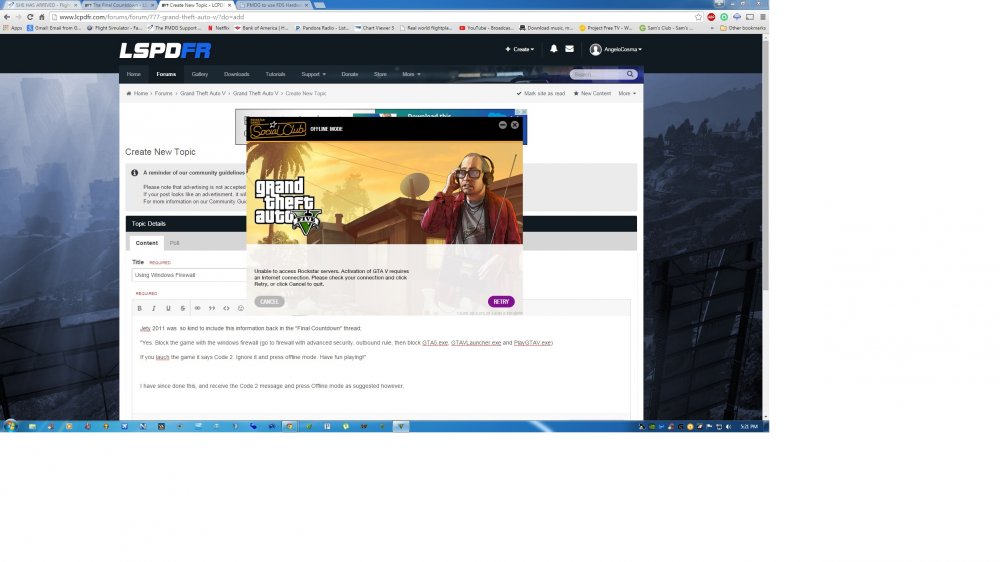
Jety 2011 was so kind to include this information back in the "Final Countdown" thread; "Yes. Block the game with the windows firewall (go to firewall with advanced security, outbound rule, then block GTA5.exe, GTAVLauncher.exe and PlayGTAV.exe) If you lauch the game it says Code 2. Ignore it and press offline mode. Have fun playing!" I have since done this, and receive the Code 2 message and press Offline mode as suggested however, this message pops up. Is there a way to continue to play single player, with the firewall on? Right now the game just keeps closing after that message.
-
Do you think down the road, when LSPDFR has all the features that LCPDFR 1.1 had that the Xbox controls will seem 1:1? As of now I use my 360 controller for driving walking etc, but all the mods releasing rely heavily on the keyboard. Do you think we will get the D-Pad functionality back for ID Checks, issue tickets, frisk etc. Right now it seems rather cumbersome to constantly switch between keyboard and controller, and while I still did it in GTAIV, it was way less. I would like to continue using the 360 controller so hopefully I am not the odd man out here. What do you guys think?
-
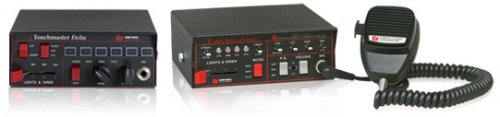 Is there an option for the other chirp priority tone? Also I noticed the air horn is not the actual sound, sounds a lot like default horn from GTA4.
 -
Awesome! Can't wait to go try it out after work.
-
So the above mentioned mod is worth looking at? I just hate that the steering is so damn sensitive and overzealous using a Xbox controller and in IV I loved it. Will this provide more realistic inertia. The thing that irks me the most is when driving a car that's LARGER than whatever I hit, say a 4-door vs a Prius in game, if it collide with that at 70mph in game, I stop cold and he barely moves. So irritating. Thanks for the info guys!
-
Yeah I saw that while browsing around. Has anyone found, or is using something they like and would recommend? If not the IV handling then at least the physics, I don't think its realistic in a CVPI to tap and 2 door sports car, and you stop violently as if rear ending a bus.
-
Is anyone feeling like the physics and handling in V is kind of off or funny feeling. When hitting another car in V its like hitting a brick wall, and the steering and stopping seems hyper sensitive. I am much more a fan of IVs handling, what are your guys' view on this, am I alone on this or do you agree? I swapped the handling.meta from here http://www.dev-c.com/gtav/ but it still feels toyish, and I am still not happy with it. Does anyone here have any recommendations, or are we stuck with Vs physics for a while longer?
-
Don't worry Hertz, just post your question in the rage hook support thread, you will get an answer there.
-
Lol TAB, I feel dumb for not thinking of that. Thanks!
-
Maybe someone can suggest XPADDER or list default controller commands with LSPDFR? Even suggesting what keys to perhaps assign to the DPAD via Xpadder would be helpful. Also when typing in the console, (P) also pauses and un-pauses the game. So when typing "repair" it can be rather troublesome.
-
These posts are hilarious, so excited for tonight! Would anyone be kind enough to answer my question. I have yet to update GTA 5, will do that as soon as I get home. I have the fire fighter mod, must that be removed, and also I do not have ragehook installed. Is that part of the LSPDFR installation upon release, or must I install it prior? Is there any difficulties installing it? Thanks for the help guys.
-
Thats some good s*it, until I saw who uploaded it, I thought it was another teaser. So stoked for release, we are basically here people.
-
I use it to control my ELS. The only real buttons I've mapped with XPadder is the D-Pad. Everything else has a function in game that I don't want to duplicate in Xpadder. So the Up, Down, Left, Right control siren change tone, air-horn, lights stage up one level and siren off regardless of lights stage. This makes driving so much easier and being able to do some great siren intersection clearing combos and control all the lights.


