


Space.
Members
-
Joined
-
Last visited
Everything posted by Space.
-
 Not sure why the log would cut off, I played for 5-10 minutes. I'll join the discord, thanks.
 -
Strangely, when I added it back in today, GTA V just crashed in the loading screen. I removed FirstCallouts and the game launched first time. I tried loading with FirstCallouts 3 or 4 times and it always crashed at the same point (when LSPDFR loaded). I've put below 2 RPH logs, one from when the game crashed, and one from when the game launched successfully. Game crash (w/ FirstCallouts): RagePluginHook_07052019_191654.log Successful launch (w/o FirstCallouts): RagePluginHook_07052019_192127.log
-
-
Yeah I did that as soon as I downloaded the plugin, I went through all of my LSPDFR plugins and put them back in 1 by 1 and FirstCallouts was the only thing that caused the issue. Perhaps there's some compatibility issue with another plugin? The issue is non-existent if LSPDFR is unloaded so I'm very sure it's not hardware related. I use Computer+, Interaction+, LSPDFR+, PeterUCallouts, PoliceSmartRadio, StopThePed, UltimateBackup, AirportCallouts, AssortedCallouts, Station19Callouts, TaccoHighwayCallouts, TrafficPolicer, UnitedCallout and WildernessCallouts. My FirstCallouts .ini: [General] //Used for more detailed logging, only set this to true if you know what you are doing DebugLogging = false //Can be set to a number from 1 to 10. Division = 1 //Set this to a valid unit type, unit types can be found here: Grand Theft Auto V/lspdfr/audio/scanner/FirstCalloutsAudio/UNIT_TYPES //Choose a unit type from the UNIT_TYPES folder. UnitType = KING //Can be set to a number from 1 to 24. Beat = 12 //This will let you repair any vehicle by pressing the RepairVehicleKey if the engine is dead //If you disable this, the BrokenDownVehicle callout will still function, this only turns off the vehicle repair function for every random car. VehicleRepairFeature = false //This will give you a notification to repair a vehicle if it's engine is dead and you are near it VehicleRepairHelp = false [Keybindings] //A list of valid keys can be found here: https://docs.microsoft.com/en-us/dotnet/api/system.windows.forms.keys?redirectedfrom=MSDN&view=netframework-4.7.2 //Note: If you set one of these to "None" some callouts and features will not work properly. //The key used to speak with subjects InteractionKey = Y //The key used to repair the closest vehicle RepairVehicleKey = T RepairVehicleModifier = None //The key used to end a current running callout EndCalloutKey = End [Multipliers] //Sets the chance how often the suspect will flee in the Stolen Vehicle callout //Set to 1 if you only want the suspect to flee, increasing this will give you a higher chance that the suspect will pull over //Default value is 3, this gives you a 50/50 chance. StolenVehicleFleeChance = 3 //Sets the chance how often the suspect will flee in the Poisoned Customer callout //Set to 1 if you only want the suspect to flee, increasing this will give you a higher chance that the suspect will pull over //Default value is 3, this gives you a 50/50 chance. PoisonedCustomerFleeChance = 3 [Callouts] //Set to false to disable a callout PoisonedCustomer = true StolenVehicle = false SniperSpotted = true WeaponInSuitcase = true PersonWithFireArmInPublicTransport = true GangShootout = true BrokenDownVehicle = true DrugOverdose = true
-
Since the most recent update when I have this installed I'm always at 40-45 fps on duty, significantly less than the 60-70 fps I usually have. Removing the plugin does indeed fix the issue though I'm not sure what the issue could be. Any chance you could take a look at this? Thanks. Just an FYI, I have an i7-8700k and a 2080ti, 16GB of RAM at 3200Mhz with GTA V installed on my HDD (I do have an SSD).
-
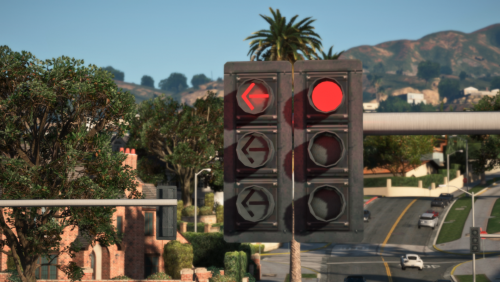 A bit unrelated but what visual mods are you using in the screenshots? It looks great, the saturation is on point! Love this little change though, makes a bigger difference than you would think.
- 53 comments
- 11 reviews
-
-

- 1
-
-
Hello, whenever I try to apply ped props (ie: hats, glasses, etc) they don't appear on peds, I've tried it through the outfits.xml and agency.xml. Outfits.xml: <Variation> <Name>Male Short Sleeve</Name> <ScriptName>male_c</ScriptName> <Gender>male</Gender> <Components> <Component id="1" drawable="121" texture="0" /> <Component id="3" drawable="30" texture="0" /> <Component id="4" drawable="35" texture="0" /> <Component id="5" drawable="52" texture="0" /> <Component id="6" drawable="51" texture="0" /> <Component id="7" drawable="8" texture="0" /> <Component id="8" drawable="56" texture="0" /> <Component id="9" drawable="13" texture="0" /> <Component id="10" drawable="0" texture="0" /> <Component id="11" drawable="190" texture="0" /> </Components> <Props> <Prop id="0" drawable="10" texture="6" /> </Props> </Variation> Agency.xml: <Ped prop_head="10" prop_tex_head="6" outfit="lspd.male_c" inventory="patrol">mp_m_freemode_01</Ped> Not sure what I'm doing wrong, if anything. If someone could help me out I'd really appreciate it, thanks.
-
 I'm not sure, I can suggest a reinstall of LSPDFR+ but other than that you'd have to contact Albo or possibly create a thread on the forums.
- 1,178 comments
- 137 reviews
-
The LSPDFR+ folder is included in the download, but I assume the CourtCases.xml would be created on first run or whenever you get your first court case.
- 1,178 comments
- 137 reviews
-
-
-
That's great news! Thanks for your reply.
-
Hello, I think it would be nice to have the option to disable the radar 'expanding' when you receive a callout because with people who have things around the radar (PLD, maybe a fuel bar) it sort of just ends up in the middle of the radar which seems rather messy to me, and probably annoys some other people too. I noticed we have the option to disable the pursuit camera focus so I think this would tie in well with the ability to choose between the new 0.4 features, or the simple 0.3 way.
-
Every time I go on duty I'm told that the LSPDFR+ and LSPDFR traffic stop keys conflict even though they don't, and if I use the option to automatically unbind the LSPDFR key it just reloads LSPDFR and throws the same message at me again. I've tried reinstalling, to no avail.
- 1,178 comments
- 137 reviews
-
-
- 1
-
-
I too would be interested in something like this though I'm not sure how it'd work.
-
Ah, of course! Not sure why I didn't think about that, thanks. 🙂
-
Hello, In my opinion having so many agencies is really messy and confusing, especially when dealing with stuff in the .xml files but when I try to remove an agency from the agency.xml LSPDFR will crash, is there any way around this? Thanks.
-
.thumb.png.bd97e37b7859461caf18a0863f388296.png) I wasn't able to fix the model itself but I did manage to resolve the issue with LSPDFR. In the backup.xml you can customize the clothing of the backup units. I have a customized backup.xml with this already done, I'd be happy to send it to you if you would like it. Send me a private message if you're interested! 🙂
I wasn't able to fix the model itself but I did manage to resolve the issue with LSPDFR. In the backup.xml you can customize the clothing of the backup units. I have a customized backup.xml with this already done, I'd be happy to send it to you if you would like it. Send me a private message if you're interested! 🙂- 33 comments
- 6 reviews
-
-

- 1
-
-
 I'm not sure if you missed my previous comment but the license plate seems to flicker. I've attached an image below.
- 175 comments
- 25 reviews
-
 The second issue I've noticed on callouts where there's an abandoned vehicle and I try to manually enter the plate. I experienced it yesterday with a kidnapping call from CheepsCallouts where they're inside the abandoned warehouse area. I tried to search the plate and it crashed my game.
- 1,743 comments
- 172 reviews
-
-
- 1
-
-
Something I've noticed with the most recent build is that sometimes the PoliceSmartRadio PlateCheck and Computer+ doesn't give the same result. For example yesterday I had a situation where I stopped a vehicle that had a felony warrant for the registered owner in PSR but in Computer+ the registered owner's name was different and had no warrants. Another thing I've noticed is that if you try to manually search for a vehicle that's apart of a callout but isn't recognised by Computer+ (ie. not pulled over) it can sometimes cause GTA 5 to crash. Maybe this has something to do with displaying the warrant and stolen markers as it seems pretty consistent that stolen vehicles and vehicles with wanted registered owners cause this, while the clean plates don't crash the game.
- 1,743 comments
- 172 reviews
-
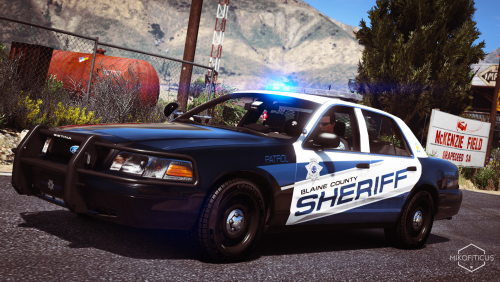 Hey, would you be able to (or let me know how to do it myself) add some plates to the '15 Tahoe livery please? I'm using Maurice97's RX2700 vehicle pack and noticed there are no plates. He posted some templates in the comments section, which are here: https://mega.nz/#!jdQWGZwB!xIzbtlHDbqpBkiYvGqzbrBRKRU0Q7bI5YutZR4DbqUs Thanks! 🙂
- 25 comments
- 10 reviews
-
I've been looking around and seen that 4k textures on custom vehicles might be contributing to the issue so I went ahead and changed them all to 2048x2048 and it didn't SOLVE the issue but definitely gave me longer in-game before the issues started to arise. I also found that removing (no hate to this guy because his vehicles are awesome) medic4523's Fire & EMS vehicles also helped, which is a terrible shame because I really enjoy them.
-
-
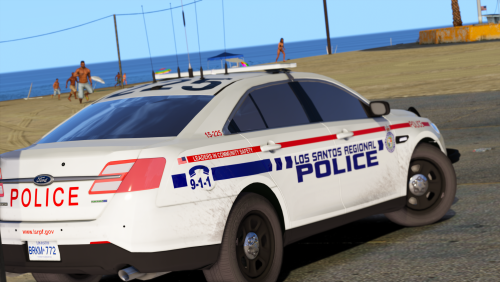 Yeah I had some problems with the 2013 Tahoe and 2011 CVPI though with another one of your packs it seemed to work.
- 21 comments
- 7 reviews
.thumb.png.bd97e37b7859461caf18a0863f388296.png)
