



iStrong
Members
-
Joined
-
Last visited
Everything posted by iStrong
-
Regarding the police computer: Sam said that when opening the police computer, LSPDFR automatically disables the keys so nothing conflicts. If conflicts HAPPEN then that is some other mod/plugin/script causing that, not LSPDFR.
-
 Same :) I've only recorded 1 episode so far, but i have the mod in there aswell. Played today too and it was constantly raining :D
- 125 comments
- 11 reviews
-
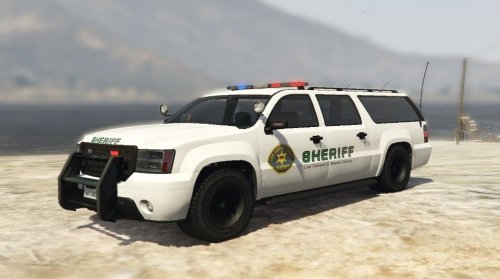 I saw the sheriff.ytd and sheriff2.ytd in some other patchday and i replaced it there, haven't yet played to see if it works, but i think it will.
- 9 comments
- 2 reviews
-
Just a note. In your readme it says to replace the texture in patchday3ng, but i think that doesn't work. I replaced it in patchday3ng and ingame the textures were still the same. I think the textures should go in some other place.
- 9 comments
- 2 reviews
-
Just change the siren key to something else, yourself. For example i changed the siren key to middle mouse button, and it doesn't conflict any more. And i think MMB is even better than E because i can finally turn right and change the siren tone at the same time. Also, this is only an early version, don't expect it to be perfect.
-
Well technically one way to "pull out of a pursuit" is by just letting the suspect get away. If the AI is not chasing them, or are too far away, then the suspect just escapes. That kind of does exactly what you described.
-
My last advice to you and your fellow console gamers who want something like this, is to wait for Police 10-13. The developers of Police 10-13 have confirmed that the game will also launch on consoles(Xbox 1 and PS4). That is your only resort for something like this. If it's going to be any good, great there you have it. Your wish come true. Just have patience because the game is in early alpha stages still.
-
Try it near a bench for example. It will make your ped sit. Also if you have a coffee in your hand, you can drink the coffee whilst sitting on the bench. I found that to be pretty neat.
-
Nice textures, i really like em. Also the white granger suits the sheriff department much more than the black and white one.
- 9 comments
- 2 reviews
-
-

- 1
-
-
Good to know :) I've been using the mod for a day now and i'm enjoying it. Well done!
- 125 comments
- 11 reviews
-
Can't wait for that :) Hopefully you callout makers will have a good variety of regular code 2 callouts like drunk in public, suspicious activity, peace disturbance, people having an argument and so on, alongside action packed ones :D That would be great.
-
-
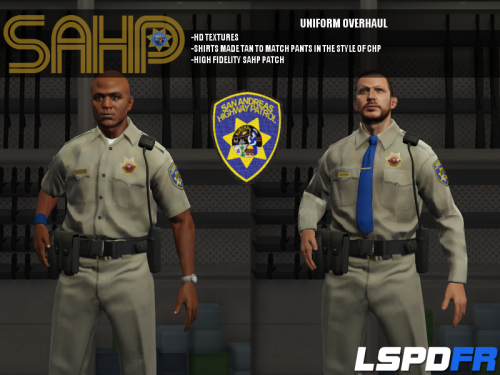 Great stuff man loving it! I have a suggestion and a request if you like, is it at all possible for you to add the vapid interceptor(the ford taurus one) with the sahp textures as an addon vehicle? That would be great. Maybe even the police granger? Then we'd have 4 different sahp vehicles to choose from alongside the normal sheriff and lspd cars, and that would be fantastic. Just a suggestion though, maybe it's not possible, but i hope it is! I'd totally love that.
- 95 comments
- 17 reviews
-
What about if it's snowing in real life? Will this make it snow ingame too? Or is snow not implemented? Or what about hail? :D
- 125 comments
- 11 reviews
-
-
 I can confirm the stuttering issue on my end aswell. Was pulling my hair out figuring out what the hell was causing this, tried lowering the graphics settings, didn't help then i thought, this mod runs alongside the game at all times and it tries to control tons of peds at once so it must be this mod that's causing this and indeed it was. Running latest LSPDFR and latest version of gta 5. I know you are aware of this issue, just saying it happens to me too. Hopefully you'll get it fixed.
- 268 comments
- 44 reviews
-
Sure thing, just a suggestion is all. I think if it'd be implemented one day, it would enhance the experience a bit.
-
So i was wondering if it's at all possible to make it so the people reply or react to your speech, whenever you use the speech options in the interaction menu? I feel it's weird to approach someone and say hello, even wave at them and they just don't even care and don't notice you are even there. Maybe it's possible to implement it somehow, just like in the vanilla gta 5 you could press e to greet someone, and they replied to you? Maybe if you provoke them and your officer like says "Don't even try that!" and the ped replies "Sorry, or damn sorry". I know the peds have these sorts of speech lines, so i'm wondering maybe it's possible somehow? I feel that would add to the immersion a bit.
-
Oh really? I never thought something like that could be possible to do, but if that's possible, then i think that would be really cool indeed.
-
That is impossible.
-
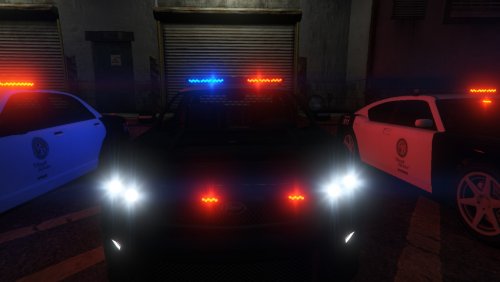 So either i did something wrong, or this mod replaces the amber parking lights that i installed with another mod. If so, is it possible that you'd implement the parking lights into the police models somehow?
- 35 comments
- 4 reviews
-
 Really good mod! However, if i would like to change the keys around, for example i want my indicator keys to be different, how do i know the number for that key? If for example i wanted indicator left to be number 2(not numpad) and indicator right to be number 3, how do i do that? Help would be appreciated.
- 220 comments
- 55 reviews
-
No, and there never will be, because it's impossible to mod something like this for the consoles. Strictly PC only.
-
Yea if somebody could make it like it is in ELS, it'd be great.
-
Have you added any ELS enabled modded vehicles to the game? ELS won't work on default cars.

