


Lou9896
Insiders
-
Joined
-
Last visited
Everything posted by Lou9896
-
 Yes its Blaine County. Also I already tried it with a clean file and double checked the prerequisites. I'm installing prerequisites as they say to install them unless there's a special way I need to install then for your mod. I should note I haven't tried back up from lspdfr I have only been trying back up from ultimate back up.
- 939 comments
- 23 reviews
-
TBH your pack is so amazing I didn't even notice the rain jacket🤣. Also I had this issue on 2.5 and 2.6. Also I know I could have changed it myself but I figured I'd let you know so it can be fixed for everyone.
- 939 comments
- 23 reviews
-
Having an issue using the snow files. All the peds are fine except for EMS, they have seem to like having invisible legs (see photos). I have all the required modifications installed and have tried reinstalling them in a clean mods folder but I still get the no legs issue. Any help would be appreciated.
- 939 comments
- 23 reviews
-
-
 Love the plugin the only thing i would love to see is an option to have a modifier key in the ini so it could be RShfitkey + T instead of just T (Just an example). I ask this as all the main keys are already mapped. Seems odd that lots of plugins don't give you the option for a modifier key in the ini. KEEP UP THE GREAT WORK!!!
- 238 comments
- 24 reviews
-
-

-

- 3
-
-
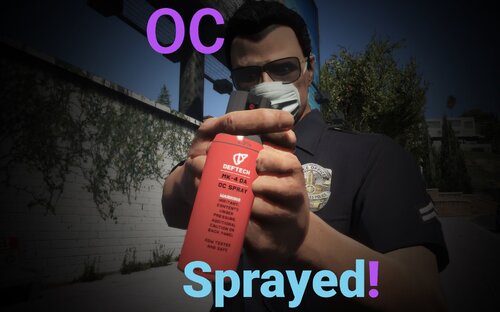 I know this is an odd question and from what I can gather the answer is no but the OC Spray have a Weapon hash? I ask as my trainer store load outs like this (See Below) and when ever I save a load out with the spray it doesn't save it. So naturally I have to add it through F4 console every time I load my load out ( which is no big deal). So i figured I ask. Keep up the great work. P.S. I'm more familiar with vehicles then weapons so sorry if this is a dumb question
 -
-
 Love the idea. Best Museum ever Was wondering if you could add support for this pack?
- 269 comments
- 17 reviews
-
My only fix to this is to not patrol in the city. So I only play as BCSO and SAHP. I only patrol in areas like Grapeseed, Harmony, Paleto Bay, Sandy Shores and the highways outside of the city. As when I patrol in the city the fame drop once on duty is horrendous and I cant patrol more then ten minutes with out CTD. Also I found if you have issues with textures not loading or loading in at extremely low resolution for a moment One add this line to your lspdfr.ini or change it to false (it should already be there). Main.PreloadAllModels = false Then I found that if you play in Windowed Borderless switching to Windowed for a few seconds then back to Windowed Borderless normally fixes the issue for at least a while. My Specs just to prove I'm not on a potato. Intel Core i7 7700 @ 3.60GHz 64GB DDR4 @ 2400MHz NVIDIA GeForce RTX 2080 Ti P.S. Adding these lines to your lspdfr.ini do (at least for me) make a difference. Granted for me I still CTD in the city when on duty but things are a lot smoother. Networking.DisableServerCommunication = True Networking.DisableDiscordRichPresence = True Main.DisableAmbientScriptHooks = True AmbientSpawn.MaxCopsInArea = 0 WorldEvents.IntervalMultiplier = 0.0f Ambient.DisableAmbientGameCopSpawnBlock = false AmbientSpawn.MaxCopsInArea = 0
-
 LOL. Sadly so true
 -
I was adding items into vehicleitems.xml for stop the ped but now whenever I go into the game and try and search a vehicle it always tells me that it finds nothing of Interest. I know that it's definitely not the amount of lines or the size of the file that's causing the issue as there are other XML out there with more items and lines than mine. I am sure that somewhere I made an issue with the formatting but I am not sure where. Any ways I was hoping somebody could look over my file and tell me where I went wrong or what the issue is. Thanks in advance. VehicleItems.xml Here is an example of a larger XML that works just fine. Not my xml VehicleItems.xml Alright I Figured this out there was a line that wasnt closed properly. it was <Item> ex <Item> and it needs to be <Item> ex </item>. Feel so dumb. Don't code on 1 hour of sleep kids.
-
-
 You can can still do what that menu did through the wardrobe menu as long as you know what slot the accessory was from and the number (i.e. Hat 47 is lspd hat). Though I will say i also do miss that menu and hopefully wait its return. Looking forward to the update whenever it comes out. Rather have it done right and perfect then fast. Plus I'm sure the accessory menu will be awesome once its brought back. P.S. Love your work keep it up
- 631 comments
- 71 reviews
-
Right now in Los Santos the COVID-19 Pandemic spreading and you are patrolling to enforce the social distancing laws but every where you look the streets are filled and no ones staying home. This mod aims to fix that and make Los Santos stay home! This is a simple mod to cause GTA V to spawn less traffic and peds then simply setting the in-game sliders to 0. This is perfect for those who want to patrol in Los Santos during the COVID-19 Pandemic. Please do not re-upload this mods to other sites!
-
-
 I had the same issue but only with airport_fire.ymap and cgas-lsia.ymap as the files had 0 kb. Replacing both files with the ones from 1.0 caused my server to have an infinite loading screen. Downgrading the whole buildings file back to 1.0 solved the issue.
- 496 comments
- 33 reviews
-
 Yes someone has to manually go through and confirm the mod is "safe" it can take up to a couple days. This isn't the creators fault. So just be patient until then
 -
Just a heads up Ravalli has seemed to have left this community as he hasn't signed in, in over 2 years so don't expect for things to be added
-
Please read all rules before posting. (Rule 2 is the one you have broken.) Since you missed them here they are below. Please follow these rules when posting here to have a vehicle added: Make sure the vehicle is not already and add-on by the author. I will NOT add them You must provide a link to the vehicle(s) you want added and ONLY as a text link, do NOT post as a banner/thumbnail. Make sure its not already part of my pack -------------------------------------------------------- This is a topic for @Ravalli's car pack. You should ask your question in a game help topic or start your own. otherwise no one will help you . it's kinda just rude to going posting things in the wrong place.
-
You broke rule 2. 2. You must provide a link to the vehicle(s) you want added and ONLY as a text link, do NOT post as a banner/thumbnail.
-
@ETFStorm Please read all rules before posting.(rule 2 applies to you the most.) Since you missed them here they are below. Please follow these rules when posting here to have a vehicle added: Make sure the vehicle is not already and add-on by the author. I will NOT add them You must provide a link to the vehicle(s) you want added and ONLY as a text link, do NOT post as a banner/thumbnail. Make sure its not already part of my pack
-
In general. Just showing all rules so you see them. Also it is not my pack. It is @Ravalli's pack. I just kinda moderate the posts for him.
-
@Brad Philips Townley please read all rules before posting. Since you missed them here they are below. Please follow these rules when posting here to have a vehicle added: Make sure the vehicle is not already and add-on by the author. I will NOT add them You must provide a link to the vehicle(s) you want added and ONLY as a text link, do NOT post as a banner/thumbnail. Make sure its not already part of my pack
-
I do not know if you are willing to start a boat section for police vehicles but if you are here is one http://www.lcpdfr.com/files/file/13232-4-seats-police-dinghy-template-inc/
-
@RavalliCould you also add these when you get a chance http://www.lcpdfr.com/files/file/12859-annis-pinnacle-police-vehicle/? http://www.lcpdfr.com/files/file/12913-declasse-rancher-los-angeles-county-sheriff-paramedicrescue-unit/? http://www.lcpdfr.com/files/file/12668-sheriff-fib-replacement-pack-els-style-lights-2013-tahoe-2013-charger-2011-cvpi/ http://www.lcpdfr.com/files/file/13112-1989-chevrolet-caprice-lasd/


