



GravelRoadCop
Members
-
Joined
Everything posted by GravelRoadCop
-
How's the ambulance turning out ? I'm excited for it !
-
No, unfortunately it does not change the distance bloom intensity. I will take a look into this and see what can be done. I cannot disclose information on this at this time, sorry. No.
-
If they are driving ELS equipped vehicles, it will work. You have to option to enable or disable AI ELS.
-
This has been brought to Lt.Caine's attention. We'll see if we can re-arrange some pattern order to achieve the Tomar pattern format, because like you, I'm a huge fan of Tomar and I do agree that ELS needs this. It's up to him if he wants to follow up on this or not. It might be a complicated, laborious process. I have no information on this at this time, sorry.
-
Great. Make sure you have one ready for ELS ; )
-
Fantastic portfolio you have there ! Do you happen to have a Tomar Blade/Scorpion Light bar model in your possession ?
-
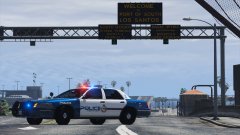 It's just a concept that I thought of while I was working on this. It's not based on any department specifically. Well, I did use the gold coloring for POLICE from the Calgary Police Service vinyl package. Glad you liked it !
 -
If I remember correctly, there's over 130 patterns that it will cycle through.
-
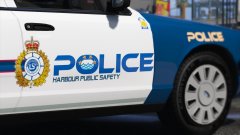 Canadian *
 -
Here's a video on this : Emergency Lighting System V by @Lt.Caine ELS CVPI - @Bxbugs123 Release Date : Not confirmed This video demonstrates one of the features available in ELS. As you can see in the video, activating any of the ELS tones will enable the pull-over command script executed by LSPDFR mod. ELS depicted in the video is still a work in progress, and may be subject to change in final version. As for the manual tone, it is NOT a feature of ELS -- It's only an audio file acting as AMBULANCE_WARNING so I can use it when pulling people over. It's a Code 3 Mastercom B Manual tone. IMPORTANT! Please be advised that the ELS depicted in the video is far from the finished product and people should not expect final quality of the program and treat it only as a minor sneak peak + a chance to help us make the ELS better by providing feedback. The video is not meant to be a teaser, or to evoke high hopes from the members on the forum, and the audience, but rather to help you understand where the program currently stands right now, and how far we have left to go in order to deem it as a finished product. The testers have opened access to the alpha version of the program for testing purposes only and want supporters to be able to see what they are supporting. Playing the alpha might be frustrating and tedious due to the bugs and work-in-progress content. There will be BUGS ! This is important because we do not want viewers to think they are seeing the final product when we are still just in alpha development Lastly, do not ask for a release date. It will be announced when it's ready.
-
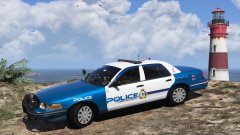
From the album: GravelRoadCop
I designed this template today. What do you think ? Emergency Lighting System designed by Lt.Caine CVPI Model designed by Bxbugs123 Template designed by GravelRoadCop -
From the album: GravelRoadCop
I designed this template today. What do you think ? Emergency Lighting System designed by Lt.Caine CVPI Model designed by Bxbugs123 Template designed by GravelRoadCop -
From the album: GravelRoadCop
I designed this template today. What do you think ? Emergency Lighting System designed by Lt.Caine CVPI Model designed by Bxbugs123 Template designed by GravelRoadCop -
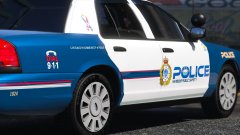
From the album: GravelRoadCop
I designed this template today. What do you think ? Emergency Lighting System designed by Lt.Caine CVPI Model designed by Bxbugs123 Template designed by GravelRoadCop -
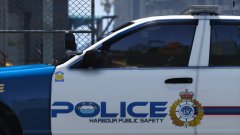
From the album: GravelRoadCop
I designed this template today. What do you think ? Emergency Lighting System designed by Lt.Caine CVPI Model designed by Bxbugs123 Template designed by GravelRoadCop -
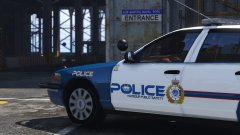
From the album: GravelRoadCop
-
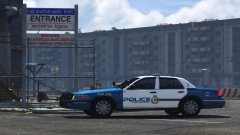
From the album: GravelRoadCop
I designed this template today. What do you think ? Emergency Lighting System designed by Lt.Caine CVPI Model designed by Bxbugs123 Template designed by GravelRoadCop -
I know. ELS sirens will trigger drivers to pull over on your command when using LCPDFR pullover command, or at the very least it is in the build that I was given to test out.
-
Yes, it will work using ELS. Air horn, siren manual tone, any activation of siren utilized by ELS will make them pull over.
-
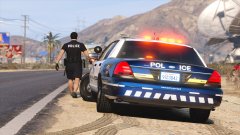 Nope, it's my custom blue shade that I applied on the textures.
 -
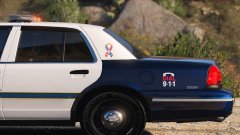 I suppose you have a fair point there. I'll work on this.
 -
Erhm. Are you referring to the silver reflective tape line ?
-
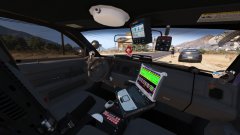
From the album: GravelRoadCop
-
From the album: GravelRoadCop
-
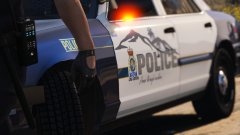
From the album: GravelRoadCop


