Sgt.Kanyo
Members
-
Joined
-
Last visited
Everything posted by Sgt.Kanyo
-
 Can you add the steady burn lights please? That is the only thing that's missing.
- 49 comments
- 24 reviews
-
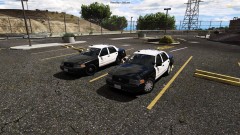 Is this gonna be yet another unreleased LAPD CVPI?
 -
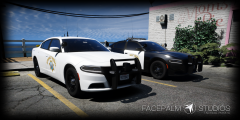 I think Sentinel's CHP Pack is very close to the real one, and not just for a mod, but all together. The only reason I mentioned that it's already been made, is because there are so many other beautiful cars the CHP has. I for one don't like the look of the new Tahoe, but yet I'd love to have a proper one with correct lighting (including the headlights, parking lights, side lights etc.), same goes for the RAM pickup or the F150. I mean the resources are all over the place to make that happen. So creating an already made perfect (or for some people near perfect) vehicle is just wasteful IMO. @Tactical Potato Don't get me wrong, it looks very nice from the picture.
 -
What is this? More CHP Chargers? What for, there's already a perfect CHP Charger pack out. Why not make something different?
-
Yes my problem was that by default the asi support plugin was disabled that's why it didn't work for me. However my problem now is that even though simple trainer work, the default keys are used, instead of the one saved in the .ini. Also in LSPDFR whenever I'm calling for backup, the units do not move, they just stand still. The manual transmission work seems to be working very buggy too. For example a lot of features don't work there and even the gear changing didn't work.
-
Okay so I've been using ASI Support instead of Scripthook V and I never had one crash in game with it. While ASI Support does not have every feature that Scripthook V has, for example the Simple Trainer's default values are used instead of the one I stored in the .ini files, when I ask for backup while in a pursuit, the backup units do not move or do anything at all and also certain mods like Manual Transmission mod don't seem to work properly with it, it still has NO CRASHES AT ALL. Any idea what causes these crashes with Scripthook V? I think the script itself is a POS, since ASI Support seems to work very well. Also in case there's no fix for Scripthook V can we fix these bugs in ASI Support, so that every feature will work?
-
Rear looks nice, but this is what the front reminds me of:
-
A marked LAPD CVPI from you would be pretty badass. I've been contacted by 3 people so far making LAPD CVPIs, only 1 of them were showing progress. With you, we know it'll be released and it'll be nice.
-
-
Well since you hate explorers, how about some Commercial Enforcement CHP vehicles? Like the F series or the Ram? Honestly any of the current CHP pick up trucks work for me. They are so weird with their tiny ass wheels, but I love it lol There's an almost nice F150 CHP truck in the CHP pack, but it has enormous wheels which just ruins the immersion for me.
-
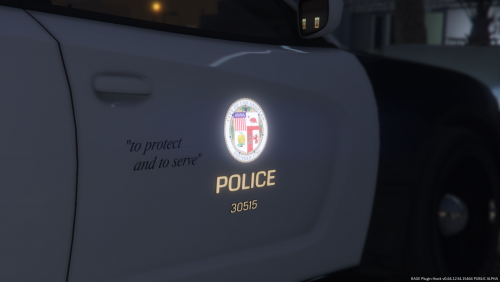 There are a lot more inaccuracies than that. I wouldn't call this LAPD pack. I'm not saying it's bad, it's just not LAPD.
- 18 comments
- 8 reviews
-
I don't understand. Some of the asi mods work, but some of them don't, why is that? For example I have my mods folder, but ELS doesn't work, and Simple Trainer doesn't work either.
-
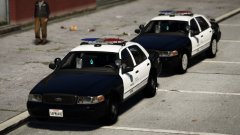 "to protect and to serve" that's the slogan of LAPD not LSPD And why would we need yet another "it's close enough bro" LAPD police car, that has a 10 million polygon airfreshner lol If you will try to make this an accurate LAPD police car and you will actually release it to public, I'll help. If not, then what's the point.
 -
Should we even start listing the problems? Or you won't bother releasing it?
-
I'd love to see a nicely made, realistic LAFD Ambulance. Doesn't matter if it's the RAMbulance, or an E series, but please make it a quality one. I'm currently using a Rambulance with an LAFD skin on it, which doesn't even have steady burns let alone other missing details, but it's still better then the released LAFD E series. So if anyone does decide to make one, please make it a good one. Proper lighting, exterior and a good base model. I don't really care about the interior, since I won't be driving it, although that'd be a plus to have a nice one.
-
If you call a game crashing based on a random number generator between 1 minute - 60 minutes, I'd say I have a pretty fucking stable game. But then again, noone does, so no my game is utter crap. And there's no way to diagnose it, because this game lets you know it crashed with an unhandled exception, but after that it can't be bothered.
-
Some people are working on LAPD cars, 2 of them even contacted me asking for help, but ever since I did I haven't heard any updates from them, so some nice LAPD cars will be very much welcome. Also been searching for a lot of pictures to check wether the CHP Charger's slicktop does actually have that offset on the rear lightbar and it does lol Kind of a weird solution from CHP, they should have just put the speed radar (I'm assuming that's what's left of it) on the top of the lightbar imo.
-
Amazing job on the cars. I love how you didn't forget about the side markers on the Charger. Also loving the new taillights on the CVPI. What's next on the list?
-
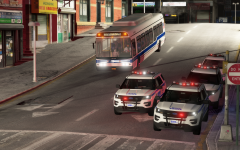 It is indeed an LC map. I've sent him the link in a private message, because I didn't really want to advertise it, in case Rockstar tries to take it down, but anyway here's the link to the YT video:
 -
I've tested out several timecycle modifiers using a trainer and while some only increases the bloom (meaning even street lights will glow like hell), there are some modifiers that only change the emmisive lights intensity. @0taku I don't like the idea behind coronas as they are just light sprites pulled in front of a light source. I even have my coronas disabled. From what I can see they can't imitate the light properly anyway. For example on the NYPD cars I use currently the top lightbar has red and blue coronas, while the front of the car only emits red, and there's only a tiny part of blue at the back. @PSource I'm not modifying files in Zmodeler, I'm just trying to edit the Timecyc or visualsettings. Most of the vehicle mods are locked anyway, so it wouldn't even be possible.
-
So my problem is that my lights look pretty nice close up, but from a distance they look faded. Led lights should be visible very well even from a big distance. I know of some Timecycle Modifiers that has this effect, but I want this to be permanent, and I only need the lights to get stronger in intensity. Any idea how I would do that?
-
-
-
I dunno I just hit Ctrl + S with bit depth on "auto-detect".
-
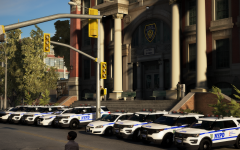
From the album: NYPD