



Original Light
Friends of LSPDFR
-
Joined
-
Last visited
Everything posted by Original Light
-
Please do not thread hijack, create your own thread. Your post has been hidden.
-
Hi guys, I was wondering if anyone else here watches Breaking Bad. It's on the final season, and everything is going to start wrapping up. If you watch it, feel free to discuss anything about it here. Remember to use spoiler tags if your post contains spoilable plot details. For those of you that don't know how: Nick
-
Happy birthday Sarge.
-
MODERATOR NOTICE Everyone, in the future, just ignore thread hijackers. Quoting them only makes more of a mess, and derails the entire topic. Report and move on. @Gonzo5090: Create your own topic. If you continue posting in this one after everyone told you the right thing to do, you will get a warning in your log. Thanks.
-
ELS V7 is the newest and most stable version of ELS, but it's more complicated than ELS V6, which some still prefer because of that reason. I personally like the features of V7, but I find V6 more simple and easy to understand. It's entirely up to you.
-
People would trust R* more if they brought RDR to the PC. Because they didn't, some are worried that they may do the same with GTA V.
-
Please create your own topic, don't thread hijack. Your post has been hidden.
-
MODERATOR NOTICE Topic moved to LCPDFR/Discussion (since this basically relates to LCPDFR.) I believe that mod you're talking about is LCPDFR! You can call many types of backup by using the following keys: Left ALT and B simultaneously - Requests a patrol vehicle with 2 officers as code 3 assistance. Left ALT and N simultaneously - Requests a special law enforcement vehicle with 2-4 swat/noose/esu officers. Left ALT and V simultaneously - Requests a gunship helicopter which follows your character, with 4 swat/noose/esu officers which shoot at hostile peds in your area. Left CONTROL and M simultaneously - Requests an ambulance with two paramedics, which will automatically treat the closest dead or unconscious ped. Left CONTROL and F simultaneously - Requests a Firetruck with 2-4 firefighters, which puts out any fires close to the player. You can find a full list of all LCPDFR keys in this topic: '?do=embed' frameborder='0' data-embedContent>> Enjoy, Nick
-
Since you say that, I might give Fallout 3 a try. Would you say it's more buggy than New Vegas, or about the same?
-
I like New Vegas, but I'm only saying that because I haven't played Fallout 3. I've personally had many crashes with it (I'm using Windows 7), but if you get past that, it's a great game. It's Skyrim with guns!
-
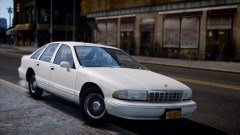 The car and the graphics look very realistic. Nice picture.
 -
Happy birthday LCPDFR!
-
We're done here.
-
MODERATOR NOTICE @OP: Your other topic has been deleted. Do not create more than one topic regarding the same thing, doing so may result in a warning or infraction. At everyone else, just report and move on. Do not backseat moderate.
-
MODERATOR NOTICE Topic moved to LCPD First Response/Discussion Are you pressing Shift?
-
Looks a bit like PPM.
-
MODERATOR NOTICE Topic moved to Gameplay/Misc Modifications
-
Holy shit, I can't stop laughing:
-
I'm in that weird part of LCPDFR again.
-
MODERATOR NOTICE Topic moved to Gameplay/Misc Modifications
-
MODERATOR NOTICE Topic moved to LCPDFR Discussion.
-
Somebody's read my profile feed too much.
-
Simply PM them, you've already created a topic.
-
It seems like they made the headlights taller, it looks more like a CVPI now. Also, is that a blue oval on the grille?
-
https://www.jctgaming.com/shop/#!/~/product/id=2136762
