


Creators: Due to background reprocessing of files, approvals and file security checks may be delayed. Thanks for your patience.

Stealth22
Friends of LSPDFR
-
Joined
-
Last visited
Everything posted by Stealth22
-
There was one for GTA IV. I think Lt Matt Jeter has one in the works for GTA V. I could be wrong on that though.
-
Too bad it's not the second generation PI sedan, with the newer headlights. Can't wait though!
-
 Yup. Guys, please ensure you read all the instructions and changelogs carefully. Sometimes things change behind the scenes, and components become incompatible. I try to avoid it whenever possible, but sometimes I have to do things a certain way in order to save work or headaches down the road. Because I'm a software developer for a living, I don't like to get into lazy programming habits. If you leave one thing for later, it becomes twice as much work to fix down the road.
- 423 comments
- 73 reviews
-
-

- 1
-
-
If you spawn them in the air, wouldn't they just fall to the ground?
-
No, it's compatible. You likely have an old Stealth.Common DLL. Comments like, "it's crashing" aren't helpful unless you post a log file.
-
I agree. But the goal with Keep Calm right now is to minimize the effect as much as possible. Trying to circumvent a core function of the game is no cakewalk.
-
Right, so I guess that was it, lol. I had Post FX set at normal thinking it was a worthless setting that would just waste VRAM. Guess I was completely wrong on that one! All of the credit for solving this issue goes to Jeff. Thanks again, @JFavignano!
-
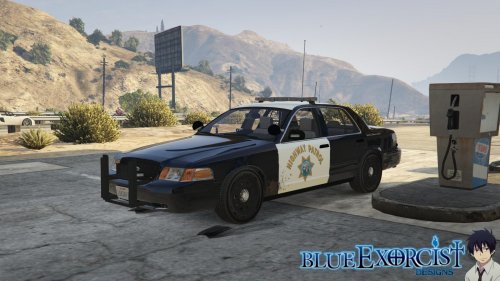 Check all of your vehicle.rpf archives in the DLC folders. There might be a police4.ytd texture that is overwriting the CHP one.
- 77 comments
- 10 reviews
-
Is that require flag on by default? If so, that throws my theory out the window.
-
Ever since the CVPI's started coming out, I don't have any Staniers in my fleet anymore, so I have no clue whether the issue is "fixed" or not. Until recently, I was running GTA V with the default visualsettings.dat, so I never actually tried to use the corona mod fully again. But I am using v6.5 of the corona mod, as well as various custom vehicles. I have never seen the issue come back, although I would imagine that most of the custom vehicles have better LED textures. Also, I never used to get the bright lighting effects that you would see in @JFavignano's videos. I thought it was just my graphics card, but Jeff pointed me to an in-game graphics setting. My Post FX setting was set to Normal. I cranked it up to Ultra, and all of a sudden, my lights are so much brighter now, and look way more in-line with Jeff's vehicles. For those wondering, the performance hit is next to nil for that setting. Moving it from Normal to Ultra cost maybe 10MB on the "video memory" bar in the graphics settings menu. Although I doubt that counter is accurate. I've read about other people who have cranked up their settings and ignored the limit with no issues. FYI, I'm running a GTX 750 with 2GB of VRAM, so I don't have the latest and greatest in terms of video hardware. If you need to save some VRAM, turn your MSAA down to 2X or 4X, or even turn it off, if you're so inclined. The game won't look as great, but I have mine set to 2X, and I think it looks good enough. I'm not OCD about the anti-aliasing, but some people may not like it set so low. But if you have a lower-end system, I would not turn it up that high. MSAA is very VRAM-intensive, and it will eat up a LOT of resources. So many thanks to Jeff for telling me about that, it makes my game look SO much better, especially with the new version of the corona mod. Again, I don't know if the issue is "actually" gone in terms of the Stanier, but if you install some custom vehicles, it seems to go away. And while I have no inclination to run the default vehicles to test, I have a feeling that the problem may not be as bad with Post FX turned up, especially if you replace the default LED textures.
-
 @F5544, do you know how R* did this with the default Stanier? Remember, the default LSPD Stanier has two lightbars, and it spawns randomly just fine. I wonder if it has to do with the ID of the extra? Like, maybe extras 1 and 2 are hardcoded as lightbars, and R* has programmed the game to always (at random) spawn at least one of those two extras on police vehicles?
- 139 comments
- 21 reviews
-
-
So I downloaded this Sheriff CVPI by @F5544, as well as his LSPD MX7000 CVPI. The LSPD vehicle has only the one lightbar, which, in my first patrol with it installed, never spawned for me on AI vehicles. I never had to call any Sheriff backup, so I'm not sure on that one. The Sheriff CVPI has two lightbars, and both vehicles have multiple extras, including two possible options for ram bars. My question, @Lundy, is, if I add this FLAG_EXTRAS_ALL flag, are the vehicles going to spawn with every extra? In other words, will the Sheriff car have two lightbars, two ram bars, etc? The name seems to suggest that, so I'm just wondering. Thanks! EDIT: I just realized something. I posted this in your LSPD CVPI's comment thread, F5544. But I thought I'd post it here too. The default LSPD Stanier has two lightbars, and it would always spawn with at least one of them equipped. I was thinking, there has to be a way to do that with custom vehicles. What if it's based on the ID number of the extra component? What if R* hardcoded the game to always recognize Extra ID's 1 and 2, for example, as lightbars? And the game might be programmed to always spawn the vehicle with at least one of those extras enabled? I think one of the vehicles had a lightbar in extra slot #3, if I am not mistaken. I'm curious to test that out, to see if that is indeed the case. Because if you take a look at the vehicle selection screen, between the Stanier, Buffalo, Interceptor, Sheriff Stanier, and Unmarked Stanier, Extras 1 and 2 are ALWAYS there as some sort of optional component, either a lightbar (Stanier), spoiler (Buffalo), or a ram bar (unmarked), and I have never seen those vehicles spawn without at least one of those two extras. That has to be it!
-
I think most of these are planned for the future...either by myself or other developers. I saw at least one that I've had in the back of my mind, and I know of two developers who have at least one of your ideas in mind as well. The problem with house-related calls is, there is no way for developers to get a random house in the GTA V world. We can get the nearest road near the player's location (or any specific location), but not the nearest 24/7, or the nearest house, or any sort of nearby building. Those sorts of callout locations have to be gathered manually. Most developers would also not want you to respond to a burglary in Davis when you're all the way up in Paleto Bay, so checking the distance narrows it down even further. If you only patrol around Davis, and I only pick 3 house locations for a particular call, guess where you'll be responding to every time that call comes in? There are/were efforts planned to gather a large list of locations, but I don't think any headway has been made with that yet.
-
I know there is one in the works. I can't divulge the name of the modeler, but it is coming.
-
Spawning a single vehicle isn't an expensive operation. If you're doing a lot of stuff, the game may lock up for the player in some situations. The only thing to keep in mind when using fibers (or threads, outside the RPH world), is that if your function has to return something, the method calling your fiber/thread operation needs to wait for it to complete. Which, unless you do it properly, will lock up the main thread anyway.
-
I'm assuming you set the relationships between SECURITY and PLAYER (and COP) to like? (it has to be done in both directions...i.e. SECURITY likes PLAYER, and PLAYER likes SECURITY)
-
So correct me if I'm wrong, but this calculates distance based on the actual driving distance, as opposed to radius distance "as the crow flies"? In other words, 40 meters behind you on the freeway is closer than 10 meters away on the opposite side. Nice idea! You may not have to run it in a separate fiber, but you're right, it is better to. But you would need to wait for the function to finish... Or put the calling function in the same separate fiber.
-
I can't find the code where I was doing something similar. I'll need to search for it to see what I did. But for your purposes, you could store a global Dictionary object...use Rage.PoolHandle for the key, and a String (Or a List<String>, for multiple things) that would store what is in that ped's pocket. Then, when you do a ped search, just search your Dictionary for that ped's handle to find the String (or String List) for what is in their pocket.
-
I have done this. I'm not near my computer at the moment, but I'll post again here sometime tonight or tomorrow with an example.
-
Yeah, I would say so. Its a very minor thing, but OnStar is a Chevy system, so Ford vehicles like the CVPI don't have it. You can just take that part out entirely, and just make it a plain rear view mirror. But again, its very minor, so no real big rush for that.
- 139 comments
- 21 reviews
-
Haha no worries. Yeah, its actually part of the OnStar system in General Motors (Chevrolet, GMC, Cadillac, etc) vehicles. I don't think the police editions are equipped with it though, since there's no real need for it. This is what the mirror controls for OnStar look like: The power button on the left side is for the auto-dimming function, in case the driver wants to disable it. It has been a long time since I have ridden in a Crown Vic (the front seat, of course, lol), but as far as I know/remember, there is nothing special about the rear view mirrors in them. Its just a plain old rear view mirror. I don't even think the CVPI's came with auto-dimming mirrors either.
- 139 comments
- 21 reviews
-
Awesome, I've been waiting for this!! Can't wait to drive it! I find it funny how a Ford vehicle has a Chevy OnStar rear view mirror though haha. I know I'm nitpicking though.
- 139 comments
- 21 reviews
-
-
- 1
-
-
You're running an old version of the Stealth.Common DLL. Update it with the one from the latest download package.
- 423 comments
- 73 reviews
-
 There are no errors in that log. You're going to have to post your entire log file (ensure its in a spoiler tag, or upload it to pastebin.com). Keep Calm is not an LSPDFR plugin, so it should not be crashing LSPDFR. If it was causing a game crash, there should be an error in the log file. Personally, I think your issues are stemming from another plugin or mod. But I need to see the entire log file to be sure.
- 268 comments
- 44 reviews


