


Stealth22
Friends of LSPDFR
-
Joined
-
Last visited
Everything posted by Stealth22
-
 There's definitely something going on there... [29/01/2016 15:02:56.581] LSPD First Response: Error while processing callout: Unknown Trouble: Object reference not set to an instance of an object. at Stealth.Plugins.Code3Callouts.Models.Callouts.CalloutTypes.UnknownTrouble.OnArrivalAtScene() [29/01/2016 15:02:56.581] at Stealth.Plugins.Code3Callouts.Models.Callouts.CalloutBase.Process() [29/01/2016 15:02:56.582] at Stealth.Plugins.Code3Callouts.Models.Callouts.CalloutTypes.UnknownTrouble.Process() [29/01/2016 15:02:56.582] at ?????????????????????????????????????????.?????????????????????????????????????????() I was testing with the newest (un-released) update, although nothing changed with this callout since 0.5.2...I don't think I changed anything, anyway. I can try again with v0.5.2 I guess, or take a look at the code again, since I know its happening on arrival. The next update will be coming out soon enough, so I'll make sure to take another look before I release it.
- 423 comments
- 73 reviews
-
I tested the Unknown Trouble call several times tonight. I forced it to spawn the homicide and false call variants only. Each time, the homicide detective popup appeared (you have to walk right up to the body though), and the search blip cleared properly, whether I ended the call prematurely or not. I also inspected the source code for this call, and it seems fine; I have several lines in there cleaning up the blip, especially whenever the callout is ended. Has anyone else seen this at all? What versions of GTA V, RPH and LSPDFR are you guys running? I was testing with GTA build 573, RPH 34, and LSPDFR 0.3.
- 423 comments
- 73 reviews
-
Any ideas on how to solve this one, @LMS?
-
Do you know which variant of the call you got? When precisely did you end it? (Was it the homicide, or the false call?) I'll see if I can reproduce that in testing.
- 423 comments
- 73 reviews
-
They didn't forget to pay the bill, the host shut them down for high web traffic. They're waiting to get the switch turned back on.
-
The installation process is manual; folders were never created automatically.
- 423 comments
- 73 reviews
-
-

- 1
-
-
 This mod cannot be described as anything less than a work of genius! I don't take the time to write reviews as much as I should, but I just had to come here and write one for this mod! Great work!!!
- 2,346 comments
- 236 reviews
-
-
- 1
-
-
 I haven't had a chance to try this out, but I've seen a video of it in action, and it looks amazing! Great job! I can't wait to try it for myself!!
- 149 comments
- 29 reviews
-
I know it was this way before 0.3. One of the changes in 0.3 was to make it not affect peds that were in a vehicle... http://www.lcpdfr.com/lspdfr/features/ Stop & Identify A short progress bar will now be filled when stopping pedestrians Occupants of vehicles will no longer be affected. You can now arrest suspects directly from these interactions (see below)
-
@Sam, I don't know how difficult this will be for you or @LMS to reproduce, but I thought I should bring it to your attention anyway. I was doing some testing on one of my new callouts the other day. I was trying to 'stop' my ped by holding down E on the keyboard. It worked and all, but a few drivers passing by also parked their vehicles and stepped out. I was under the impression that this feature was supposed to only affect peds that were on foot. Now this may have just been a one-off, but I wanted to let you guys know anyway. I was definitely running LSPDFR 0.3, and RPH 0.34. It was 2 or 3 days ago now, and I don't remember exactly when it was, so I doubt I'll be able to provide you with a log. If I see it again, I'll definitely save the log file for you, though. It happened on the freeway just outside Sandy Shores, if I remember correctly.
-
Would this be something that could be controllable via an INI file, perhaps? Personally, I haven't noticed any problems, but I haven't been able to just sit down and play lately because I've been so busy developing on my plugins. I don't mind the AI traffic on T-stops, actually. If it gets too crazy, I just use my Traffic Control plugin to slow them down. That usually makes them pretty calm.
-
I'd be interested in having a conversation with both of you on this subject...
-
Added a tip to the original post re: branching your source code.
-
Use the OnDutyStateChanged event handler (when onDuty = false) to clean up your code when the player goes off duty.
-
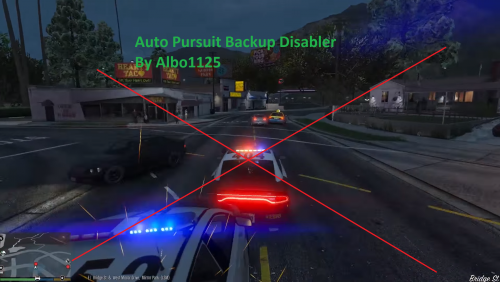 I have yet to try this, but @JFavignano, you asked for this in Friday's video. Sooo...ask and you shall receive, I guess. Courtesy of @Albo1125!
- 57 comments
- 15 reviews
-
-
- 1
-
-
Thanks for the detailed info. Sounds like it broke with 0.3. I'll look into it
- 423 comments
- 73 reviews
-
-
-
Nope, you can make them on the fly. As long as your list is globally declared, you're good.
-
-
[1/22/2016 12:18:38 PM.911] ERROR: Could not load plugin from "C:\Program Files (x86)\Steam\steamapps\common\Grand Theft Auto V\Plugins\Code 3 Callouts.dll". Assembly Code 3 Callouts.dll (Code 3 Callouts, Version=0.5.1.0, Culture=neutral, PublicKeyToken=null) does not have the required Plugin attribute. You've installed it incorrectly. It goes in the Plugins\LSPDFR folder, and you should not be loading it with RPH, LSPDFR loads it automatically. The instructions in the readme clearly say: - Copy the Code 3 Callouts.dll and Code 3 Callouts.ini files into the "Grand Theft Auto V\Plugins\LSPDFR" directory.
- 423 comments
- 73 reviews
-
-
- 1
-
-
There are different variations of that callout. But if you see the dead body, the help popup at the top left tells you to call a homicide detective, but I forget what I set the key for that to. It should let you end it with CTRL + Y, though...or at least, I think so.
- 423 comments
- 73 reviews
-
I just realized something. GetAttachedBlip may not work. I remember trying the same thing with Keep Calm when I had that bug where fleeing suspects would just drive at a leisurely pace. GetAttachedBlip was not returning a blip for me, even though there was clearly a blip. That may have changed with 0.3 though. I had to get LMS to help me with that bug, and in the end, I used the IsPersistent property.
-
You could also use a LINQ query, if you wanted to do some action on ALL cops if any one of them are within 20 metres. int nearbyCops = (from x in myCops where x.DistanceTo(Game.LocalPlayer.Character.Position) <= 20.0f select x).Count(); if (nearbyCops > 0) { foreach (Ped cop in myCops) { //do something } } //You can also get a list of nearby cops and only do an action on those nearby cops... List<Ped> nearbyCopList = (from x in myCops where x.DistanceTo(Game.LocalPlayer.Character.Position) <= 20.0f select x).ToList(); if (nearbyCopList.Count > 0) { foreach (Ped cop in nearbyCopList) { //do something } } //Or get the closest cop... Ped closestCop = (from x in myCops where x.DistanceTo(Game.LocalPlayer.Character.Position) <= 20.0f select x).FirstOrDefault(); // if closestCop is null, no cop within 20 meters was found //Or a list of cops sorted by how close they are... List<Ped> nearbyCopList = (from x in myCops where x.DistanceTo(Game.LocalPlayer.Character.Position) <= 20.0f orderby x.DistanceTo(Game.LocalPlayer.Character.Position) select x).ToList();
-
That would probably work. Just make sure you check if the Blip exists though. Blip b = ped.GetAttachedBlip(); if (b.Exists()) b.Delete();

