TF75Chris
Members
-
Joined
-
Last visited
Everything posted by TF75Chris
-
 Man...I have no idea what the problem is then man I'm really sorry. I'd recommend starting a thread in the support section and asking some others. I'm really sorry I can't be of more help 😕
- 35 comments
- 4 reviews
-
Again sorry for the delay, been really busy. So you reinstalled the EUP configurations and you said the males have the SJPD unforms but the females don't? Do the males still have the pilot patch or is that fixed? If it's just the females that don't have SJPD uniforms then double check to make sure that those are properly installed (in OpenIV, they'll be in all the "mp_freemode_f"s or whatever it's called, not near a computer). The files in my mod replace the textures of the base LSPD uniforms, therefore if the females are wearing just standard LSPD unforms, the textures have not been replaced if that makes sense
- 35 comments
- 4 reviews
-
-
For sure man, So you don't need Open IV for it. I spent a while just typing all the instructions and then realized it would be easier if I just attached mine and you can just put it in your GTA directory and it should fix it. If not let me know and we'll try some other things. I'm no wizard at this but I'm pretty sure it's just a problem with your config. Installation location is your GTA V main directory -> "lspdfr" -> "custom" then just place the file there. GTA V Directory.zip
- 35 comments
- 4 reviews
-
-
Well luckily EUP comes with several variants of badge models with different shapes, so all I really had to do was get a picture of an SJPD badge and lay it over the texture for the BCSO badge, then swap LSPD badge model for the BCSO one in OpenIV, then put my SJPD texture on it.
- 35 comments
- 4 reviews
-
-

- 1
-
-
Sorry for the late reply guys, been extremely busy in paramedic school. Hmm, that's really odd. If it works for you but not the AI, my guess would be that it's in the config files for LSPDFR (in your LSPDFR folder or custom backup if you're using that). I'd say first check to make sure that the AI cops are not set up to have "decal_x" or whatever it's called in the config files if that makes any sense. Sorry I'm on my phone right now so I can't give you the actual names of anything lol. If that's confusing I'll hop on my computer and explain it more clearly. But that's awesome about your friend, thanks for sharing that! You need to download "Improved LSPD Officer" (link in description) and then replace those textures. EUP files go in the EUP folders. No they should only replace LSPD if you put them in the right spots and have your LSPDFR AI configs set up right
- 35 comments
- 4 reviews
-
I hadn't thought about it, but now I am lol
-
 Hmm...and I'm sure you guys are, but I have to ask anyway; you're using the latest Rage right?
- 3,646 comments
- 306 reviews
-
 enable edit mode, right click on dlclist.xml, adn add "<Item>dlcpacks:/eup/</Item>" at the bottom, before </paths> so it looks like this:
- 2,349 comments
- 238 reviews
-
-
Check to make sure you have EUP listed in your dlc list in mods/update.rpf/common/data. That'd be my guess
- 2,349 comments
- 238 reviews
-
-
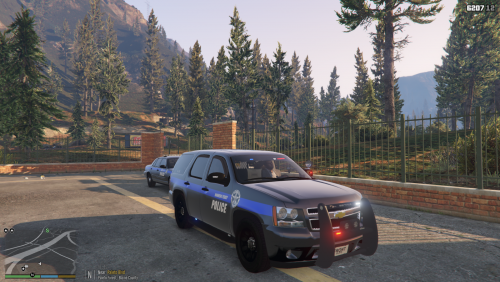 Wow haha this is awesome. Never expected to see any skins from up there. Haven't been up there for a few years (I'm in southern ID) but if I remember correctly these a pretty accurate, nice job! Also, IDAHO FTW!!
 -
You should just be able to press tab to re holster it
-
No problem, I still love it just the way it is, thanks!
-
It works just fine, I'm using it. It's non dependent of RPH so you won't have to worry about it when LSPDFR ever updates
-
First let me say I'm loving the update, it's brings so much awesomeness. For those of you who still can't get it to work, keep fighting to figure it out, it's worth it. One of my favorite new features is the flashlight. I just have a couple of ideas/suggestions for it (and if these are already implemented, sorry! Also please tell me how to use them lol). 1. The ability to quick draw your gun with the flashlight equiped. I love the animation of taking out/putting away the flashlight, however putting away and drawing your gun seems a little slow. Ideally I would love to hold the flashlight in the left hand and draw with the right while continuing to use the flashlight (even though I know you can have a weapon mounted light) but I understand the limitations and that may not be feasible. So, my next idea is to add a quicker swap to pistol when the flashlight is out. I'd hate to get shot and die because I had to casually put my flashlight away to draw lol. 2. The ability to aim the flashlight (sort of like vanilla) Small, simple suggestion. I would like to be able to aim the light high (like up a staircase) or low (like approaching a stopped vehicle or dead body). Don't get me wrong I much prefer the 0.4 flashlight to the vanilla, and if it never changes I'd still be happy, but it would just be nice. 3. Hand of holster with flashlight. Sort of a combination of 1 and 2, I'd love to see compatibility with the Cop Holster mod/LSPDFR hand on holster mod by switching the flashlight to the left hand so you could have your hand on your gun ready to draw. Anywhere, there it is. Thanks again Devs for all your hard work. Lemme know what you all think/if you have any more ideas about the flashlight! Oh one last thing, if any of you kick-ass modders out there are reading this, maybe an early Christmas present of a new flashlight model? 🙂
-
Literally a whole pinned topic about this
-
-
Holy crap guys, you've outdone yourself with this update. I'm loving everything about it. The ambiance is awesome and I finally just got in a pursuit and it was literally the best pursuit I've been, it went so smooth, the AI (both PD and suspect) were actually smart (especially the suspect actually, he did a lot of moves that almost lost the pursuing units lol) and I'm loving the immersion of having your own character. Everything is working smooth and it's amazing, thank you guys for your hard work. Oh and the flashlight is the coolest thing ever.
-
Yep still working, a couple of compatibility issues though. For instance I'd recommend changing the key bindings in one of them because they overlap, but you can get by without it (hold down B for Ultimate Backup menu, then sort of tap it again a couple times for LSPDFR backup menu)
-
-
These are all working: Better EMS Stop the Ped Police Tape Ultimate Backup (with key binding conflicts though) 1033 Search Warrant
-
Update: you're right, it was caused by the call-out. Just arrested a ped without a call out, used the partner option at the jail and it worked fine