
RDWAIFU
Members
-
Joined
-
Last visited
Everything posted by RDWAIFU
-
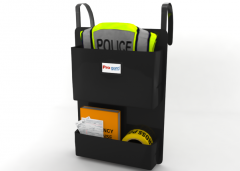 Mannnn, that looks awesome, gotta find someone who made a good NYPD CVPI to put it in their car
 -
I had another idea "Unit requesting a roadblock" A vehicle pursuit is in progress, and a pursuing unit requested a roadblock. Should you accept the callout, you will be shown the normal pursuit in progress stuff, but you are directed to go to a blip. The suspect should be made follow a certain path until it passes the roadblock, as to ensure you're not sitting in a road for no reason. So, instead of chasing the suspect, you have to park your cruiser in a marker, and those who like detail can place police barriers with PoliceHelper or other mods. When you park in the marker, a radio message should tell you whether to shoot at the suspect or not. There should also already be other units at the roadblock. Not sure how possible this is, but I thought it was cool
-
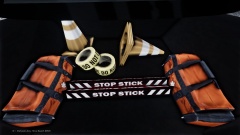 Ah, okay, thanks. I do remember that equipment being in the back of a NYPD Highway Patrol SUV, if anyone knows the vehicle I'm on about, let me know!
 -
What vehicle is this? I remember those being in the back of a nice NYPD Highway Patrol Tahoe
-
Hold Left ALT, there should be a box that appears, that's what your aiming
-
Thanks mate!
-
I can't find any good G4S skins or anything like them that say New York Police Dept. On them, so I'm sticking with Gruppe 6 as I can't find good Guards either
-
Could someone edit this Gruppe 6 Texture to say "...deadly force by the New York Police Dept." Please?
-
The NYPD is still better than the LCPD, but happy birthday!
-
It is problem It is BIG problem
-
Why can't people understand that others don't like having a HUGE trainer filled with options for one thing. I hate using trainers.
-
Thanks pal!
-
I don't have the default background, I have something else. Attachment related I'm talking about the box where you log on, it says LCPD and can't be changed,
-
Oh god Please don't remove invincible cars. I need invincible cars to survive. I have OCD, i need my cars to be invincible or I go mad at every scratch!
-
[ POLICE2 ] Active = 1 Halogen_Only = 0 Color_Light1L = 0 Color_Light2L = 0 Color_Light3R = 0 Color_Light4R = 0 Color_Light7L = 3 Color_Light8C = 3 Color_Light9R = 3 Offst_SLights = 0 That is the Police car I need to change in the ini file, I'm not sure what one to change to make the secondary lights blue, as a car I'm using has an LED Display board and it is blue, not yellow. What do I change?
-
If you change a car in the TrafficFlow mod ini file to "Stockade" you will see a Securicar spawn every so often, and a Gruppe 6 driver will be in it
-
I have the department names on my ini file set to "NYPD" and "New York Police Department", but I've seen that they do nothing. Why not have them change the police computer from "LCPD - We see it all we know it all". You could also have in the ini the motto of the police department, so you wouldn't have to have "We see it all, we know it all" on the computer. >inb4 inseri comes along saying "why would you want to change LCPD blah blah blah cant have other department blah blah blah I've also noticed that, if you put "Stockade" in the trafficflow ini, pull over a Stockade, a Gruppe 6 security officer is always in it, and hwen you search his ID, it says "LCPD Officer database is currently offline" or something like that, what features will that have and can that be applied to the fat security guard ped that spawns at certain locations? EXTRA: Try and change it that when pulling over a stockade with a gruppe 6 security guard in it, that they don't run, because when they run, the game can't compute as security guards count as police officers, therefore crashing the game, as the game can't make him run AND try catch himself.
-
-
I noticed this once too I was cruising along and I saw a guy hand something to another guy, then they started walking off. When I told them to stop, they ran, so I tasered one of them, detained him, then chased and arrested the other, one turned out to have a weapon, the other, had drugs
-
It's a sad world Last year a Detective of An Garda Siochana was shot in the head with a shotgun by 3 men trying to rob a money delivery to a credit union He didn't even know they were there, he was looking inside a car, and they shot him in the back of the head, his weapon holstered They murdered him in cold blood. Detective Adrian Donohoe. The Gardai know who did it, they just don't have the evidence. The FBI, Dutch police, American Police Departments and the Interpol are helping the Gardai in investigating the death, and so far at least 4 million hours of CCTV footage has been reviewed. It's believed 2 of the men fled to America, while 1 of them is still in Ireland. It's sad to think that the Gardai arrested the men, but didn't have the evidence to prosecute them. But one thing is for sure, none of the helping parties is going to give up until they bring those cold blooded murderers to justice. It was the first death on an on duty officer in 30 years in Ireland.
-
Thank you so much, this worked perfectly!
-
As far as I'm aware, guards are allowed guns, and police officers (duh), discovering an FBI/FIB agent could be a thing too, but I think the Security guard showing up on the Computer makes more sense.
-
Say hello to '?do=embed' frameborder='0' data-embedContent>>
-
Yeah, this would be a good idea too, some people want to rob and mug others, some just want to prevent that happening
-
He's right, Alt+E should make your officer radio in that your status is open, making the symbol disappear