


LMS
Management Team
-
Joined
Everything posted by LMS
-
 I'd be best if you create a topic in the LML support section and include the install.xml you are using to load the cars. Also please keep in mind that if you are creating your own RPFs that you will need OpenIV.asi to allow the game to load them (unless you properly re-encrypted the RPF). Have you followed the install instructions and tested the mod shown there?
- 325 comments
- 17 reviews
-
-

- 1
-
-
Can you show me your install.xml you created for one of these vehicles?
-
I am not sure why it has been removed, but I updated the article with another vehicle for you to try. Thanks for the heads up!
-
I don't think there is much of a benefit to using an older version. IsPlayerAvailableForCalls returns true when the player has made themselves available for callouts, it does not take into account menus etc.
-
I will see if I can make it look less suspicious to anti virus software in the next version. The file itself is clean and there is nothing to worry about.
- 325 comments
- 17 reviews
-
-
- 1
-
-
There is no such event currently. You could however use the new function in LSPDFR 0.4.6 IsPlayerInStationMenu and whenever it evaluates to true wait until it is false again, then compare their last agency (if any) to the new one. That should probably cover most cases of the player switching an agency and you can adjust your callouts accordingly.
-
LSPDFR 0.4.6 brings three minor additions to the API: IsPlayerInStationMenu - Returns a value indicating whether the player is currently in any station menu such as selecting an agency or vehicle PlayerWentOnDutyFinishedSelection event - Fired when the player has left the police station menu after going on duty PedSwitchedWeaponAnimated event - Fired when the player switches weapon using the new holster/unholster animation in LSPDFR 0.4.6 In addition please note that LSPDFR now targets .NET Framework 4.7 and as such you might be required to re-target in order to compile against the new dll. Please find an updated XML documentation attached. LSPD First Response.XML
-
No, it has nothing to do with LSPDFR or RPH.
-
You can Alt+Tab out of the game and then run it.
-
Could you please post your logfile? Most likely something else is using the port.
-
-
Yes, that's correct.
-
Lenny's Mod Loader features a simple API in version 0.1 allowing you to query what mods are currently enabled. Please note that this parses the mods.xml file again and is not a reflection of what is in the game (but in most cases equal to what has been loaded into the game). These functions can be found in the ModManager.Core.dll file inside the ModManager.Core.API.Functions class.
-
The general idea of Lenny's Mod Loader is to provide an easy way to install file modifications. This is achieved in two different ways depending on whether existing resources in the game are to be 'replaced' or if new resources are added to the game as 'addons'. To replace resources, the game file system can be modified on a per-file basis allowing you to quickly change the content of files without touching any RPFs. To add new resources, the new content can be loaded from disk directly into the game, again without the need for any RPF changes. Goodbye to patchday17 and dlclist.xml. Certain mods, such as vehicles, can even be loaded at runtime, making choosing your new favorite ride a breeze. You can find more information on the dedicated Lenny's Mod Loader page here: https://www.lcpdfr.com/lml/index/ Getting Started Guide: https://www.lcpdfr.com/wiki/lml/lml-installation-guide-first-steps-r75/
- 325 comments
- 17 reviews
-
-
-

- 61
-
-
We have uploaded a few examples to give you a better idea of how to use the install.xml tags. They cover various usecases from addon vehicles to replacing a single vehicles.meta entry. Please find the link below.
-
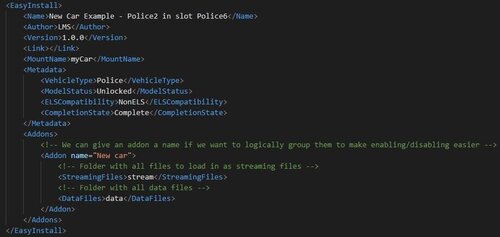 This file contains a few examples to help you understand how to use the install.xml file. Please find a brief description of each example below: AddonCar - Based on Rockstar's POLICE2 it shows how to add a car as an addon car, i.e. using POLICE2 also in POLICE6 Badge - Adds a new prop named prop_lspd_badge to the game. Based on Sam's Badge. PedComponents - With the newly added support for ped components, I have included an example on how to add another shirt (jbib) to the female multiplayer model. Once loaded, index 325 will have a black casino vest (the vest itself makes your upper arms disappear, this is just the model). It also shows to adjust the hairstyle on selection of the component. Shield - Based on Sniper's Shield this showcases how to re-use a ydr for multiple different textures. VehiclesMetaChange - Shows how to replace a single xml file entry, in this case changing the handling for NINEF to AMBULANCE.
 -
Please follow the instructions linked below to install Lenny's Mod Loader. I also recommend you follow the steps under "Testing your first mod" to make sure everything works properly. Keep in mind that while many mods will work out of the box, there will also be many mods that need to be configured by their authors to work properly with LML (or you can download them and create an install.xml yourself for them). We also recommend to install the latest gameconfig file to make sure your game can support new resources.
-
I don't think something like this exists, but there are a few things you could try. You could generate random positions until you find one that is in the zone you want (could be slow). You could also get the coordinates of zones of interest, this could be their center or anywhere really. Then using that position you could generate a few random positions and most will be in your target zone.
-
Looking for a video tutorial? Check out our tutorial here and a guide including the installation of Coastal Callouts by Acepilot2k7 here. This guide is guided at end users to aid with the installation of Lenny's Mod Loader and understanding its features. For mod developers we suggest to refer to the install.xml guide as well the example packages such as 50 Addon Car Example. Installing Lenny's Mod Loader Installing Lenny's Mod Loader is very simple. After downloading the files, simply copy the content of the "ModLoader" folder to your game root folder. Make sure that files such as vfs.dll are in the game's root folder and that you have a "lml" subfolder in that folder, too. Check out the image below to see what your folder should look like after installation. The "ModManager" folder can be anywhere. Installing Mods All mods will be installed in the lml folder inside their own subfolder. For instance, a new vehicle mod might be located in "GTA V/lml/newVehicle". The heart of the installation is the install.xml file which describes how to load a mod. Many files will not yet have such an install.xml file, so we recommend you take a look at our wiki and the examples you can find in the LML subforum if you want to convert a mod to LML. Automatic Installation All mods that have the LML OneClick Tag on the downloads page support automatic installation while the game is running and be used installed using the Downloads Manager which is included in your LML installation. Some mods without the tag will still work out of the box as they follow a relatively simple file structure. LML tries to guess how to install a mod and create an install.xml based on that, however this might not always work correctly. Most FiveM mods are supported out of the box as they follow clear guidelines. Mods with an LML tag only are supported by LML officially but cannot be installed at runtime, mostly because they require modifications of game files early on in the loading process, so that modifying them in a running game is no longer possible. Manual Installation Generally speaking you can install any mod you normally use OpenIV for using LML. Simply create a new folder in the lml subfolder, copy the files in there and create an install.xml to load it. The next time you start the game, your mod will be automatically added to the mods.xml file and loaded. Consult the wiki and the LML forums for more information. Testing your first mod To make sure everything is running properly, please start the game after installing LML. Once the game is up and running, open the Mod Manager and navigate to the Downloads view. After a few moments it should detect the running game and say "Connected to game" in the left corner. That means that LML is set up properly! Now head over to https://www.lcpdfr.com/files/file/22882-non-els-2016-chevrolet-tahoe-christmas-tree-fivem-ready which we are going to use as a test mod. Click on "Download with Mod Manager" and wait until you can see the download appearing in the downloads list. Once downloaded and installed, you will be prompted whether you wish to load the mod into your running game. Select yes and switch back to the game. You are now able to spawn the vehicle you just downloaded by opening the console (F4 by default) and typing in "spawn 16tahoe". Congratulations, you just installed your first addon vehicle! (Please note that by default the car has no siren sound and the grill and window lights do not show as they are extras) I've created an example car that shows how you can easily add an addon vehicle here (feel free to replace the files with your preferred vehicle):
-
I updated the included RPH version and we will release a smaller update with some new content in a few days.
-
It really depends on the mod you are using, they will have different requirements. But I don't think the LUA Hook is widely used anymore (might even be broken).
-
We have not yet noticed any issues fortunately and hope to go live soon (RDR2 took its toll..)
-
What do you mean by "when going on duty"? Right after the selection has finished, GetCurrentAgencyScriptName should return what you want.
-
Sounds like a lot of good progress, best of luck! Looking forward to future updates.
-
It depends on Alexander Blade's ScriptHook, so keep an eye open for updates on that.

