LMS
Management Team
-
Joined
Everything posted by LMS
-
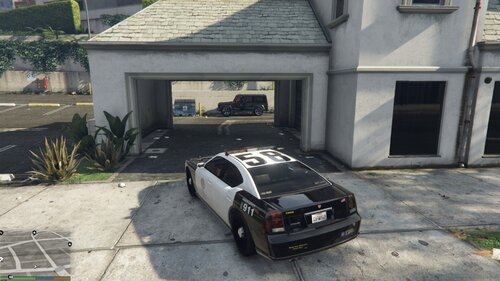 You don't have to if you don't want to. If you leave them as in, all values will be based on POLICE2. If you plan to add many vehicles and don't want to copy this folder, you can also check out my 50 slots example below. All you need to do there is to copy the model and texture files into the stream folder and give them a name such as POLICE120. No need to touch any data files, it will just work when you restart the game and spawn POLICE120.
- 26 comments
- 1 review
-
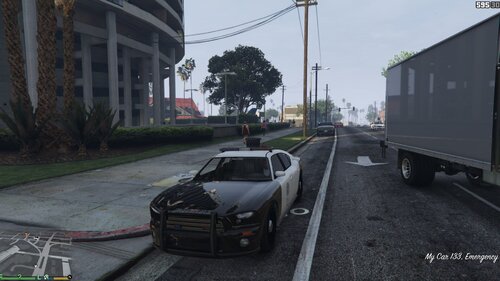 This example for Lenny's Mod Loader adds 50 (!) new police slots to the game, all based on POLICE2. The slots range from POLICE100-POLICE149. Please note that only POLICE100 and POLICE133 will have models (both the POLICE2 model) as I did not want to include models for all vehicles and two cars should be enough to understand how it works. Those two are the only ones that will spawn in-game by default. The data files are all set up so all you need to do is copy the model of your choice into the streaming folder, give them a name from POLICE100-POLICE149 and the next time you start the game, your new police car will be in that slot. Of course you can modify the entries for every slot, e.g. to change a vehicle's handling, but it is not necessary to get started. Why 50 slots? Because why not. I recommend to install this gameconfig first so the game can handle all the new cars.
 -
Yes, sure, this model is based on POLICE2, so if you want to install a new skin for that one, just replace the police6.ytd file with your new textures and in-game POLICE6 will have the new textures.
- 26 comments
- 1 review
-
This is just an example for people that for instance want to upload their own mod or want to add addon vehicles themselves that are not yet officially supported by LML. Say you want to use a vehicle mod that is not yet supported, you would do the following: 1.) Download this package via OneClickService 2.) It is now in your game folder in the lml subfolder 3.) Replace the files in the stream folder (police6 etc.) with the police vehicle you'd like to use If you want to use more addon vehicles, simply duplicate the folder and rename the entries to a different slot (e.g. police7). Make sure to also change the stuff in vehicles.meta. Again, this is only necessary if you want to add cars yourself that do not work with LML yet.
- 26 comments
- 1 review
-
Yes, imagine this being a totally different car (POLICE6) that currently just happens to look and function like POLICE2. You can change it all the way you want. If you want to have more addon vehicles via LML, I recommend copying this example and changing the stream files names to say POLICE7 and then adjust vehicles.meta, carvariations.meta (if you need it) and names2.gxt2 to POLICE7.
- 26 comments
- 1 review
-
Some general knowledge of programming and C# is recommended to get started, so I'd suggest looking into some beginner tutorials for that. Resources for LSPDFR development can be found here: https://github.com/LMSDev/LSPDFR-API If you prefer videos, this series by @Albo1125 might help you: https://www.youtube.com/playlist?list=PLEKypmos74W96pL9HW8BTQsyGtBTIyOst
-
This example for Lenny's Mod Loader shows you how easy it is to make any vehicle an addon vehicle. The game's default POLICE2 will be added again as POLICE6, including a custom display name when entering the vehicle in-game ("My Car"). If you wish to add a different vehicle as POLICE6, simply replace the files in the "stream" folder. Ideally you create a new LML subfolder for each new vehicle and modify the stream and data files accordingly.
- 26 comments
- 1 review
-
-

-

- 4
-
-
I unfortunately don't know anything about that.
-
I saw your post, but unfortunately I cannot help with EUP.
-
There is no key in the latest version of LSPDFR. You can use the Police Radio to request a new callout. If you'd rather use a key instead, please open the RAGE Plugin Hook console and type "bind X StartCallout". This will bind the command "StartCallout" to the X key, so you can then use X to start a new one immediately.
-
Thanks everyone for the kind words! We hope to have some more news on this soon to make reloading/testing out new models and textures even easier than currently. Stay tuned! It is already available, please check the top of the forums section - you should see a new forums for Community Insiders. Feel free to PM me if you are still having issues.
-
Hey, what are you looking for exactly? Feedback on your ideas, how to get started with development or something else? Those all sounds like cool things, but I am not entirely sure what you are asking for.
-
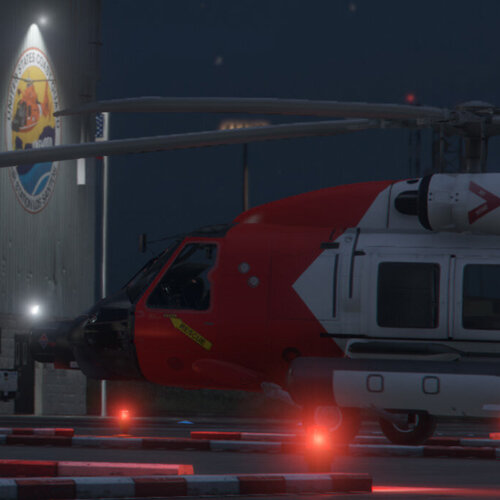 We are happy to announce our latest project Lenny's Mod Loader - a unique way of installing and maintaining mods in Grand Theft Auto V. Stop worrying about where to place things, stress no longer over confusing files or folders and effortlessly enable or disable the loading of individual mods as you please. While still in early stages of development, Lenny's Mod Loader already provides many useful features to make modding more fun. Ultimately we hope to provide a fully-fledged Mod Manager UI allowing you to quickly install, remove, enable and disable modifications. Stay tuned for further updates and make sure to check out the full post.
 -
It's been a while since our last major update, and as you might've guessed from the title, there's a good reason for this... It has taken us a lot of work to get to this point but we can finally proudly announce our latest project: Lenny's Mod Loader. Modding. Reinvented. Most people on this forums will have had their fair share of issues when it comes to installing mods, be it that you replaced the file in the wrong place, forgot to reinstall mods after an update or just found yourself in a situation without any installation instructions at all. We aim to make this a thing of the past and focus on what modding should be: fun! With Lenny's Mod Loader you can replace files and load new mods with just a few clicks - without ever touching an RPF. Many mods, such as addon vehicles, can even be loaded directly from the website into your running game, allowing you to quickly test our new vehicles in a matter of seconds. Many mods can be loaded directly into your running game - just one click away! Release Information Lenny's Mod Loader will be released later this year as a beta test. We are currently looking at a public release around December, but might release a little earlier if testing goes well. Being a completely new project, we would like to get in as much test coverage as possible to ensure a smooth public release. This is why we will make LML available as early access software for our Community Insiders. Future Development We are only at the beginning of our journey and there are still many things that we would like to add to Lenny's Mod Loader. Ultimately we hope to provide you with a fully-fledged user interface to easily manage your mods, all integrated into our website to make sharing and discovering new mods as easy as possible. We hope you will join and support us on our way and are looking forward to your suggestions on how we can make modding more fun for everyone! For a much more in-depth look at LML, check the: LML Homepage: www.lcpdfr.com/lml LML Wiki: www.lcpdfr.com/wiki/lml Early Access: https://www.patreon.com/lcpdfr
-
Are you talking about LSPDFR or about a different mod for sirens?
-
Plugins generally use more CPU than GPU so the behavior is expected. Should you see unusually high FPS drops, you can tweak your lspdfr.ini settings and see if that helps:
-
Many good ideas in here already for Red Dead, let's all hope our good friends at Rockstar don't make it too difficult to mod so we can get going quickly. Thank you for your contribution and enjoy LSPDFR!
-
Hi Heemse, welcome to our forums! I hope you have a great time here and find plenty of mods to enjoy. If you have any problems, be sure to check out our support section. Best wishes from Germany!
-
Could you elaborate a bit on what you mean when you say the game freezes? Does the application itself stop responding?
-
This guide describes how to install a replacement vehicle that does not yet have an install.xml file Converting an replacement vehicle for usage with LML is very simple and often even less work than adding an addon vehicle. If you want to convert a replacement vehicle to an addon vehicle instead, check out our guide here. Concept When installing replacement vehicles, you usually either directly replace the files in an RPF or use the mods folder to replace them. Either way, you have to know the path of the vehicle you want to replace. The same does not apply to mods installed via LML in most cases. For vehicle mods that replace the model and/or the texture, you do not need to know the path, making installation very simple. More complex mods might require you to specify the game path to override, these examples can be found in our install.xml documentation. Folder Layout Create a new subfolder in your "lml" folder. We like to keep things clean, so we move all files (the model and the textures such ytd and yft) into a subfolder called "replace". This is it for the folder! Install.xml Now to make LML correctly load the files, we have to provide it with some information on our mod. Since this is a simple mod, not much needs to be specified. Create a new file called install.xml in the folder of your mod. You can find an example install.xml below that will make your replacement vehicle work out of the box. We recommend you change the name of the mod to identify it easily. If you vehicle has some special requirements such as data files, please visit the LML subforums and the install.xml documentation for more elaborate examples. <EasyInstall> <Name>Replacement Car</Name> <Author>You</Author> <Version>1.0.0</Version> <Link></Link> <Metadata> </Metadata> <Replacements> <Replacement name="New Police Car"> <FileReplacements>replace</FileReplacements> </Replacement> </Replacements> </EasyInstall> That's it! Your vehicle will now appear modded in the game.
-
Necessary Files Replacement vehicles usually lack the necessary files to function as addon vehicles. Sometimes they just include a new texture pack, sometimes they include a new model and textures but no data files. Depending on what you already have, different files need to be created. Scenario 1: Textures only This is the scenario where you need to do the most work. Since there is no model data to work with, but you need a model for an addon car, you first need to export the model yft from the game. So if you have say police2.ytd for a new texture pack, you need to locate and export police2.yft and export it. Usually the mod's readme has the location of where to put the texture. In the same location you will find the model file. Export it and put it in the same folder your texture is in. Now you have Scenario 2. Scenario 2: Model and texture file Equipped with a model and a texture file, all there is left is telling the game about the new vehicle. For this, it needs at least a new entry in the vehicles.meta file. At the end of the post you can find an example vehicles.meta entry where all you need to change is the name of the vehicle to match the name of the texture and model files. Since replacement files are supposed to replace existing files, you should rename the model and texture file to a new and unused name first, such as police6. Use this name in the vehicles.meta file then. Scenario 3: Model, texture and data files Some replacement models might offer a replacement handling or vehicles.meta entry. This makes it even easier for us. Simply copy the entry and move it to a new file only containing that one entry. Then adjust the name in the data file to the name of your model, such as police6. You now have all the files necessary to load a vehicle as an addon vehicle. Check out our guide here on how to proceed. Vehicles.meta Template
-
This guide describes how to install an addon vehicle that does not yet have an install.xml file Converting an addon vehicle for usage with LML is very simple in most cases. If it is a FiveM resource, chances are LML is able to create an install.xml file automatically. Try downloading the vehicle using LML and see if it works. Folder Layout Create a new subfolder in your "lml" folder. We like to keep things clean, so we move all streaming files (the model and the textures such ytd and yft) into a subfolder called "streaming". For data files, for instance vehicles.meta and handling.meta we do the same, placing them in a subfolder called "data". This is it for the folder! Install.xml Now to make LML correctly load the files, we have to provide it with some information on our mod. Since this is a simple mod, not much needs to be specified. Create a new file called install.xml in the folder of your mod. You can find an example install.xml below that will make your addon vehicle work out of the box. We recommend you change the name of the mod to identify it easily. If you vehicle has some special requirements such as audio gamedata, please visit the LML subforums for more elaborate examples. <?xml version="1.0" encoding="utf-8"?> <EasyInstall> <Name>My Car</Name> <Author>You</Author> <Version>1.0.0</Version> <Link></Link> <Metadata></Metadata> <Addons> <Addon name="My Car"> <StreamingFiles>stream</StreamingFiles> <DataFiles>data</DataFiles> </Addon> </Addons> </EasyInstall> You are now able to spawn the vehicle by using the RPH console in-game and typing "spawn" followed by the name of the vehicle (the name specified in the vehicles.meta and/or the name of the streaming files).
-
The mods.xml folder allows you to enable and disable mods as well as specifiy their load order. It will be auto-generated if not present and can be found in the lml folder. New mods will be automatically added and are enabled by default. The tag IsExtension in an install.xml file allows you to indicate that a given mod package is extending another mod. If set to true, the extension package will automatically be added as the last item in the mods.xml load order (the default is new mods are added at the top) so it can overwrite other mods loaded first. Load order / Overwriting mods The new load order feature specifies the order in which LML loads both, data and streaming files into the game. This is usually not important, unless you want to overwrite files from another mod. If you install a new car model NINEF in one folder and then download a separate texture pack for this model, you may not want to overwrite the texture file in the original NINEF folder. Instead, to keep things separated and clean you can have a separate folder with just the texture in it. By moving this mod down the load order list, its texture file will be loaded last, i.e. it will be the one the game uses. A few words of caution regarding overwriting. For streaming files the parser is usually smart enough to detect multiple files with the same name and will only ever send the last one according to the load order to the game. This just makes the process a bit quicker and prevents the game from reloading a resource multiple times. For data files this is obviously not possible, since they do not have unique names. Hence all data files are sent to the game and it is up to the game to respect the load order. Most data file parsers in the game reject new entries with the same name, which means that internally we send the overwritten data file first instead of last, to make sure it is used. All other entries with the same name are then rejected by the game. Alas, things are not always that simple and a few data file parsers, such as carvariations respect the last loaded file, so here we flip the load order again. This is nothing you need to worry about too much, but something to keep in mind when playing around with less common data files in case you run into issues. The log file also indicates the order in which the files are sent to aid debugging. If you find a file parser that requires overwritten files to be sent last, just tell me and I will make the necessary changes.
-
That's precisely our issue. That being said, in the future we might introduce a car selection menu similar to GTA:O or garage access, but I cannot say for sure.
-
Do you get the effect as if the console is open, i.e. cops ignore you, PTFX effects disappear etc.?