


LMS
Management Team
-
Joined
Everything posted by LMS
-
Verhaftest du die Leute denn mit LSPDFR oder einem Plugin? Wenn du LSPDFR nutzt, dann kannst du mit E (glaube ich) den Verdächtigen greifen und dann am Auto wenn du es gedrückt hältst die neue Animation nutzen.
-
Log looks all good now - who knows what happened.. Glad to hear it's working now though 🙂
-
Can you please post your vfs.log when using just the gameconfig?
-
That is indeed an issue with the vehicle creation itself then, not the IsValid/Exists check. It should not happen very often (I don't think I've had it once in my five years in V) but it apparently can occur for some people. Best to catch and handle accordingly. Basically the game could not create the vehicle and is telling you that.
-
Higher livery support is done via AdvancedHook which is not compatible with the Complete Wdition. Given the complexity of that feature it is also unlikely I will port it.
-
As Luke has pointed out there are some technical challenges on updating the hooks, especially without source code. I managed to port most of what is needed to run LCPDFR yesterday but it is quite crashy at the moment. See discussion here:
-
I updated most things for the latest patch, but it is quite unstable unfortunately. I will see if I can fix a few things here and there but I fear that LCPDFR will not work as well as on the older builds.
-
There is little reason to ever use IsValid as it does not perform a null check. Use Exists which is an extension method and hence can perform a null check. That way you will never get any exceptions you need to handle but instead just get false.
-
I was able to fix the C++ ScriptHook earlier today, will have to see how much work SHDN, AdvancedHook and LCPDFR are. If it is reasonable and only takes a few hours, I will probably update them.
-
Multiple people have reported this so it is probably an issue with our callout. I will have a look and see if we can make them more aggressive in the next update. The backup behavior is unchanged and might be because of a plugin or ini settings. By default, nearby units will respond unless many other units are already in the chase.
-
Add "Ambient.DisableEscapedSuspectEncounter = true" to your config file. You can find all settings here:
-
Only one way to find out 🙂
-
If you use the ped constructor without specifying a model, it will pick a random one.
-
We will definitely make it an option and not change any existing behavior if we end up implementing it, so be assured you can still take care of your "pals". Areas do have a crime status behind the scenes which also takes things such as time into account. Were you looking to override these? I don't think there is a viable case here, it would only encourage people to continue with their behavior of blocking newer versions. It's frustrating and I get that, but I'd recommend to push for a change in plugins that do have these blocks instead of us supporting that behavior.
-
If you are using LSPDFR for the first time, please re-download the latest build 7383 as the previous version contained an error. Since we take some extra steps to make it possible to shoot friendly cops, I think it should be possible to undo those changes without break anything else. I will have a look and see if adding an option makes sense. No changes to the pursuit system in this release. Does that happen in any situation or only when the suspects have better weapons (more gunpower) than the cops? We adjust the combat tactics based on whether the cops are outgunned so they do not run into assault rifle fire when only having a pistol.
-
That is an oversight and should now be fixed. Please re-download the mod.
-
 We have released a minor update for LSPDFR which adds the ability to re-discover lost suspects, new frisking items, improvements to the pause menu as well as bug fixes. LSPDFR 0.4.7, and full release notes, can be found here: https://www.lcpdfr.com/downloads/gta5mods/g17media/7792-lspd-first-response/
 -
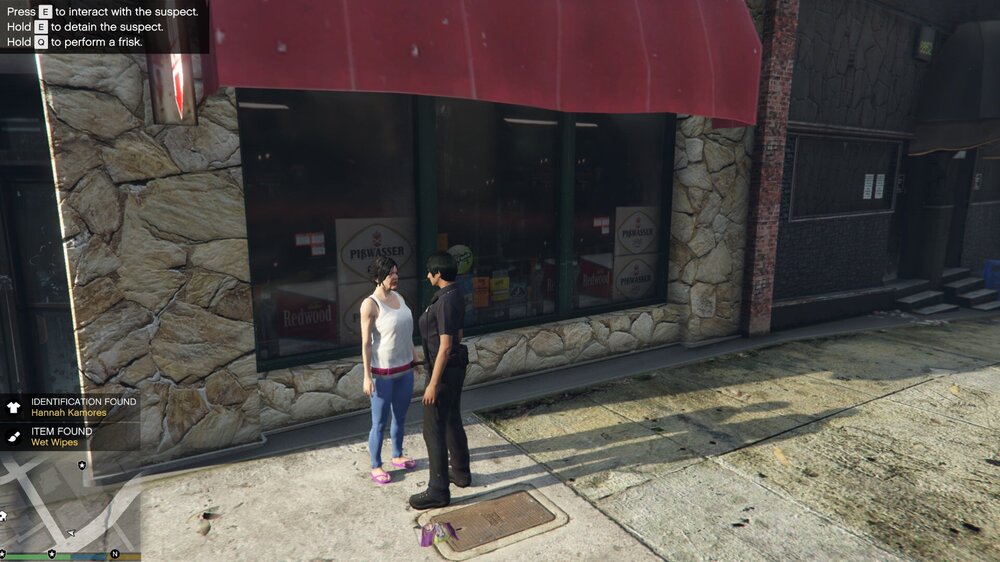
Hi everyone! Since it looks like that many of us will be stuck at home for a while (the record numbers at LCPDFR.com suggest not everyone is taking home-office too seriously...), we would like to do our part in fighting isolation and boredom and provide you with a new update. While we are not quite ready to release our next major update yet, we have been busy over the past few days to come up with a few additions and fixes that we hope you will enjoy. Get your revenge on escaped suspects! One feature that has been requested quite a few times is re-encountering escaped suspects. We had originally planned to release this among a greater rework of callouts but managed to include a first version in 0.4.7 already. Every suspect that was able to escape during a pursuit now has a chance to be encountered again. While the chances are higher around the position the suspect was last seen it could be anywhere on the map. A subtle minimap flash will indicate a nearby suspect. If you get close to the vehicle, a small blip will appear and the suspect will try to flee if you continue to approach. We hope this gives you a bit of realism as well as help you get your revenge on your nemeses. At the same time we believe there are many ways this can be improved in the future, such as changing vehicles, spawning them in different scenarios, encountering suspects in a traffic stop and more. The feature and frequency can be managed via ini settings. How many rolls of toilet paper are you carrying? Frisking has also received some improvements. We added many new items that can be found such as car keys or wallets. In addition, the Covid-19 scare did not leave ordinary citizens of Los Santos unaffected and you are more likely to find items such as hand sanitizer or wet wipes on them. These special items can be disabled via the ini. Hoarder or just careful? People in Los Santos are not unaffected by the Covid-19 outbreak For details on all of our changes, see our changelog here: https://www.lcpdfr.com/downloads/gta5mods/g17media/7792-lspd-first-response/ We would also like to thank all of our amazing Patreons that are supporting us! To further show our appreciation, we are working on including the complete list of supporters in the credits and will share more news on this soon. If you would like to learn more about our Patreon program, you can find it here: https://www.patreon.com/lcpdfr It currently includes early access to our new modification for Red Dead Redemption, RDRFR!
-
I think that Status is currently broken and always returns Preparing (@PNWParksFan had a similar issue recently iirc). You can try to use WaitForCompletion in a new GameFiber since that way it won't block your current thread. Spawn a new fiber and run the task logic there. Alternatively, spawn a new fiber and do all the timer bar logic there. Note that it is perfectly safe to share variables between fibers since they are ticked one after another.
-
Can you include your log as well? I can have a look then.
-
Most likely not as the dependencies (mostly the C++ ScriptHook which is needed by SHDN which we use) will not work.
-
To add to what Luke said, perhaps you are creating the blip twice (or multiple times) so that you are only deleting one.
-
Are they just idling/standing still or what are they doing?
-
You have a different crash, just in the same component. I will fix that one, too.
-
Not much I can suggest then unfortunately, except for perhaps seeing if you can narrow it down to one mod.


