


thetastycat
Members
-
Joined
-
Last visited
Everything posted by thetastycat
-
Gotcha. I was able to change the fire truck horn via VEHICLES_HORNS_FIRETRUCK_WARNING , even though it was a different filename than the one listed, but would love to change the other as well! Seems like the people who have released siren packs should know...
-
Would love to update the primary fire truck siren - anybody have any idea what audio string it is?
-
.thumb.jpg.c8e24672d78442ee47dacc9a2d80c000.jpg) Thanks for this!! Would you consider making one with all blue lights? Great work - nothing like this available anywhere else!
Thanks for this!! Would you consider making one with all blue lights? Great work - nothing like this available anywhere else!- 28 comments
- 7 reviews
-
 Seriously, these are *fantastic* models - would you *please* consider updating them with ELS?
- 445 comments
- 108 reviews
-
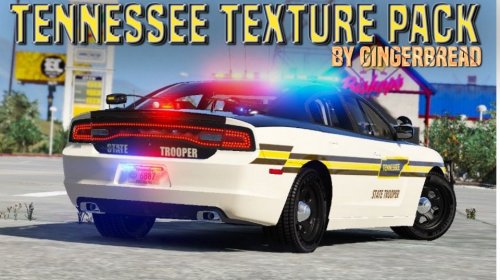 Gingerbread, this is fantastic. Thank you so much! Models look awesome and nothing quite as awesome as rocking a patrol car from your own jurisdiction. I am having some trouble with the 2016 THP Explorer skin - TheHurk has since updated the model twice, and the latest one is ELS, which is amazing. Half of the vehicle looks good but the other half is pretty messed up - would you mind looking at it? Thank you!!
- 34 comments
- 4 reviews
-
Seriously, just one reply to this thread? Can't imagine the amount of work that went into this - thank you guys so much. At least the number of downloads speak to how many people are enjoying this mod!
-
Works! Brilliant. Sooo...if I wanted to change it to just one key (such as pageup), would I change this line in the trainerv.ini file? CarColorKey=163 // Car Fix, Flip Wash, Color Default RCTRL it's the "1" and "3" here that I'm interested in, looks like - any easy way to make them PgUp and PgDown instead? I do know that the code for those two keys is 33 and 34 respectively. Thanks very much!!
-
Thanks Kilyin - trying it now!
-
Hey all - seems like I should be able to set up hotkeys through Simple Trainer to repair and clean my vehicle since I can do it through the menus, but it's cumbersome to do so, especially in a chase when I've just nuked my headlights. I think it's in the .ini file, and I've read the instructions in there, but it ain't making it through my thick head. Any ideas? Many thanks!
-
Well mystery solved...after a lot more digging I saw that Open IV has a search function, in which I discovered a *third* vehicles.rpf in patchday5, which contained only three or so vehicles, and one of them was the other car that did work. So - I put the new car in there and it's working fine. I put another one in as well, ignoring the two vehicles.rpf files that the readme said to use! Oh well - at least it works!
-
So the plot thickens! Just to experiment I renamed all the Blaine County files, which were originally sheriff.ytd, etc. to the police3.ytd, etc, and put the files in the same two locations above, still getting the stock interceptor. Any ideas? Thanks again, all.
-
Hey all - this is probably as easy as it gets, but I can't get a replacement vehicle to work. It's the Blaine County Sheriff car from the site here. The readme says: Install Location: x64e vehicles.rpf AND patchday3ng. So, in OpenIV, I've placed these files into mods/x64e.rpf/levels/gtav/vehicles.rpf AND mods/update/x64/dlcpacks/patchday3ng/dlc.rpf/x64/levels/gta5/vehicles.rpf. Are these the correct paths? I did previously install a BxBugs CVPI LASD 1.4, which I installed with a package installer through OpenIV, and in game, that's the only custom police car that appears. I think that both these cars may be headed for the sheriff slot, so I was expecting that the Blaine County car may have overwritten the other one, but only the BxBugs car is showing up still. Any ideas? Many, many thanks all!
-
I'm going to make a huge sign that says NOOB and wear it around my neck right now at Walmart!! Thanks again, guys.
-
Guys, I'm an idiot - never even though of that. Be right back! Noob of the Millennium: <---------------- THIS GUY. Works perfectly in game. Sorry to waste all of your time, guys - can't believe I didn't just try it. So strange that it's so poorly-behaved in Spark/OIV but works just fine ingame. Really appreciate all the help, guys.
-
Yeah, I've done it several times; I've even downloaded from the author's website. It's just the .wdd, .wft, and .wtd files - nothing more. It looks for all the world like a corrupted file, but judging by the comments in the download section of gta4-mods.com, it appears to be working just fine for everyone else! That's what I just can't understand...if it was a GTA/LCPDFR problem, sure, there's a host of reasons it could be just me, but just these 3 files, opening with OpenIV/Spark? So strange.
-
Sorry to say I'm not sure what unlocked means :/ Definitely the love child of an alien and the Statue of Liberty though.
-
Hey all - I'm trying to import one of the Juliet Starling peds (http://www.gta4-mods.com/player/juliet-starling-striped-bikini-f17960) and something is not right. When I view the .wdd in Spark, this is how it appears: Also, all the green weird stuff here also appears as different colors other times I open it in Spark. When I open the .wdd in OpenIV, there's three files to click on the left; when I click "head_000_r", it crashed OpenIV. This is a widely-used ped, so I'm thinking I'm just doing something wrong. This is a legal copy (from gamestop/impulse, NEVER AGAIN), and I've imported lots of other vehicles and peds without issue. Many thanks for any help, everybody.
-
Seriously, this is beautiful!! How's it coming?
-
Makes PERFECT sense. Thanks a lot, sK - I sure appreciate it!
-
Yes, I believe the skin is transparent - it's not white like it appears above. It's the same color as whatever is behind it. That's what I can't figure out! I did think just now to color the background with paint, so I can get it the color I want, but in principle, the above should be working! Thanks for the move, mod - didn't mean to put it in the wrong place.
-
Hey all - first, thanks so much for this mod. It's a ridiculous amount of fun. Second, I'm not sure this is the right place to ask about this, but since it is a police car slot, I thought it might be LCPDFR related. I want to change the color of a slicktop CVPI that I've put in the fbi slot. I've replaced police_sign_1, 2, 3, and 4 with a "blank," which looks like this: (sorry that it's so big) So basically just the licence plates. Then I edited the color of the FBI-car slot in carcols.dat, changing the first two numbers (which were 0 for black) to 105 for a nice dark tan, but the car still spawns black. I thought this would do it, but I'm sure I'm missing something simple - any ideas? Many, many thanks, all, and keep up the great work. PS - I know I've not uploaded any logs but I don't think they would be relevant here - I'm happy to do so if needed. ETA: This is how the car appears in OpenIV. Strange - I would have expected the entire surface to be that whitish color, but several sections are still appearing black. I promise all of the police_sign files are assigned that "blank" above...
.thumb.jpg.c8e24672d78442ee47dacc9a2d80c000.jpg)
