


thetastycat
Members
-
Joined
-
Last visited
Everything posted by thetastycat
-
Hey all - really weird situation here. I can get Warning Lights to come on Stage 3, but not Stage 2. I have to activate them manually, which is also the EMS key, which is inconvenient. And when they do come on, it's to flash Pattern E-000 instead of E-034. Here's my code from the .xml: <!-- WRNL --> <WRNL LightingFormat="leds" > <PresetPatterns> <Lstg2 Enabled="true" Pattern="34" /> <Lstg3 Enabled="true" Pattern="30" /> </PresetPatterns> <ForcedPatterns> <MainHorn Enabled="false" Pattern="0" /> <SrnTone1 Enabled="false" Pattern="0" /> <SrnTone2 Enabled="false" Pattern="0" /> <SrnTone3 Enabled="false" Pattern="0" /> <SrnTone4 Enabled="false" Pattern="0" /> <PanicMde Enabled="false" Pattern="0" /> <OutOfVeh Enabled="false" Pattern="0" /> </ForcedPatterns> <ScanPatternCustomPool Enabled="false" Sequential="true" > <Pattern>0</Pattern> <Pattern>0</Pattern> <Pattern>0</Pattern> </ScanPatternCustomPool> </WRNL> For what it's worth, Warning Lights to come on Stage 3 at the correct flash pattern of E-030. Any ideas? Many thanks!
-
.thumb.png.debb2e8fd42b234303e9e2473fb894e8.png) I'm having the same problem with the FPIU - makes it hard to drive at night with no headlights :/ otherwise fantastic work!! TheGreatHah, any chance for an update to fix the FPIU headlights? Many thanks for this awesome pack!
I'm having the same problem with the FPIU - makes it hard to drive at night with no headlights :/ otherwise fantastic work!! TheGreatHah, any chance for an update to fix the FPIU headlights? Many thanks for this awesome pack!- 100 comments
- 39 reviews
-
-

- 2
-
-
Hey all - so update. I sent EVI a PM asking if he would kindly allow me to use his Liberty. PMs here tell you whether or not they've been read, and I was puzzled that he hadn't read it for several days. Then I happened to notice that he hasn't even visited the forum since May of 2016. Anybody happen to know if there's another way to get a hold of him or if he's active anywhere else? Barring that, any chance anybody knows of an alternative to his Whelen Liberty? Seems that absolutely everybody uses his that's got anything similar :/ Thanks all!
-
Thanks for the advice - might as well do my best to get it right. I think good lighting/ELS makes or breaks a vehicle, so I'm going to start there, and if it happens than I'm able to create something actually worth sharing, I'll work on the interior. So many questions up front though - and hard to find answers without bugging veteran modders :/
-
Thanks very much, Toy - I do have a lot of etiquette questions as I'm understanding that there is some sensitivity in the community, likely spurred on by some unethical "borrowing" of other people's labor-intensive work. Yeah, I hadn't come across an Impala-specific pushbar yet; there's really not many Impalas at all, actually. So I think I'd rather have the vehicle be closer to the Metro Nashville cars I'm trying to copy than be 100000% LSPDFR Armchair Quarterback satisfiable! Pushbars are quite similar IRL anyway (at least between sedans) so I really wouldn't lose sleep over it. Hey, another etiquette question while I have you: I couldn't care less about vehicle interiors since I play with an outside view 100% of the time, but I know some people really do care; do any modders basically cut and paste an interior layout from another modder (of course with the proper credits)? Or is the expectation that if you're going to create a car that you'll include your own interior? Basically the whole reason I'm getting into modding is because there's so few Impalas, and most of them have really quirky things about them, so to make the Metro Impalas I think I'm just going to have to do it myself........
-
Thanks Thero!! Digging in now!
-
Haha...as a brand new modder this thread is of high interest as well as high entertainment. Anybody ever end up making a video? We noobs would really appreciate it!
-
Perfect - thanks Six! Didn't realize he was a member here. I really appreciate it!
-
Hey all - I've been wanting to make a skin for a Metro Nashville Impala, but I just can't find an existing model that's anything close to what I need. So - I think I'm going to make the jump and try to make my own vehicle. Here's what I'm hoping to end up with: I've got Zmodeler I've downloaded an Impala from "Vehicles & Parts" here as well as a spotlight, ram bar (don't think it was intended for Impala but it's something) and some other things. What I can't figure out is where to get a Whelen Liberty (everyone uses one by EVI, but I can't seem to find it anywhere) - and do you think this even is a Whelen Liberty? Was my best guess. I'd much prefer to do research than clog up forums with noob questions, but if anybody could point me toward the right lightbar I would really, really appreciate it! Any other tips would be greatly appreciated as well. Thanks all!
-
 This is a must for those of us in blue-only jurisdictions - huge thanks to GeneralFord1 for a colossal amount of work!! We really appreciate it and makes the game so, so much better.
- 380 comments
- 31 reviews
-
-
- 3
-
-
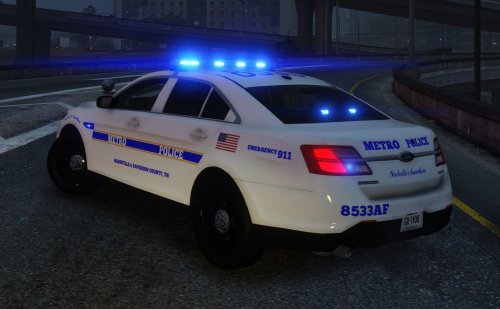 INSTALLATION: Replace police3.ytd (or whichever slot you want to use) with the new one using OpenIV. If you have trouble, let me know - especially when you're new at this it can be really confusing. Also including just tau_sign_1.dds if you'd prefer to only replace the skin itself. ___________________________________________________ This skin works with several FPIS', but it's originally intended for thegreathah's Venice PD ELS Pack, which is a great FPIS: http://www.lcpdfr.com/files/file/15718-venice-police-department-inspired-pack-els/ Since Metro Nashville is all blue (with some amber in the rear lightbar), I highly recommend downloading GeneralFord1's All-Blue lighting for this car: http://www.lcpdfr.com/files/file/15702-all-blue-lighting-for-different-models/ The ELS file I'm including is intended for this setup - hope you like it. This is my first mod of any kind, so happy to have constructive criticism. I'd like to figure out how to make the LEDS on the rambar all blue or blue/white and instead put amber in the back, like blue/amber at the bottom of the windshield to more closely resemble Metro. But my modding career is like 12 hours old at this point so no promises :) The only thing that is mine is the skin - many thanks to everyone else for the great FPIS and other textures. Hope you enjoy! theTastyCat
- 1 comment
- 1 review
-
-
- 1
-
-
Nailed it - thank you very much!!!
-
Hey all - at least around here, Code 3 is only for life and death situations - which a prisoner transport is not. Anybody know of (or could create!) a mod that makes prisoner transports respond Code 1 or 2 (here Code 2 is respond expediently but no lights/sirens.) In fact, would be awesome if they would turn lights on when arriving at the scene for safety, then off again as they depart. File this under incredibly picky but would be awesome/greater immersion!
-
 I am such an idiot - I thought it was working but it wasn't. So I tried again, being sure to do everything in order; turns out I hadn't navigated into the /sfx folder first - ridiculous. Now working like a charm - thanks again!!
- 221 comments
- 40 reviews
-
-
- 1
-
-
Haha - so I just tried it one more time before detailing the steps, and guess what - it's working :S Probably user error as usual! Caramel, thanks so much for being willing to help - these sirens make all the difference in the world!
- 221 comments
- 40 reviews
-
Yeah, weird - I've used this awesome pack for like a year, been away for a few months, and went to put the Galls Street Thunder back in, but the sirens aren't changing in the game - any ideas?
- 221 comments
- 40 reviews
-
Rolled back to an earlier version of the trainer and it's working - I suspect that patching the file with RDE vehicle spawn stuff may have been the culprit!
-
Hmm...I can't get "read only" to stay un-checked for my GTA folder...maybe this has something to do with it??
-
Hey all - downloaded Realism Dispatch Enhanced, and at the same time updated Native Trainer to the new version. Spawning, teleporting, etc. works just great, but my vehicle still takes damage even with Car God Mode on, and though I freeze the in-game time, it keeps on progressing. This is really weird - any ideas? Thanks a lot! So interesting...under the weather menu, I can change the weather by choosing a weather type, but nothing happens when I try "force weather." So weird.....
-
-
 Hey all - I can't find the right vehicles.meta file for FBI2 anywhere. Can anybody point me to it? The model is in dlcpacks/rde, but I sure can't find it in the vehicles.meta. Many thanks!!!!
- 1,509 comments
- 85 reviews
-
 Maybe that is what is happening to me as well - but as soon as the plugin begins to load, it freezes the game, so all I can see is what's on the console before I have to restart my PC.
- 125 comments
- 11 reviews
-
Man, this looks like *such* an awesome mod but I'm striking out big time. Just tried my fourth additional API key and still nothing. Every time I load the plugin, it seems to load (like shows the .ini data in the console window), but the game freezes and even if I try the task manager, all I can get is a black screen every time and have to restart my PC to do anything. Any ideas at all? This is a *fantastic* idea and I'd love to use it!! Help would be very much appreciated.
- 125 comments
- 11 reviews
-
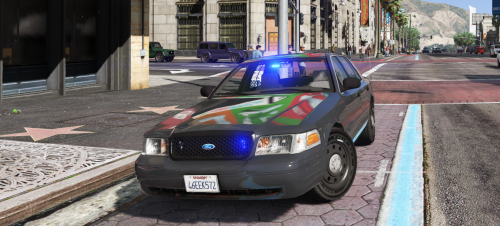 I added the Liveries flag too and not getting any different liveries :/ I DID notice that that black trim panel on the back wasn't black and is supposed to be...so maybe this is the same issue?
- 17 comments
- 10 reviews
-
Thanks for this! Really nice to have. A few suggestions : 1. Would you consider a few color skins? If I don't want white I have to manually change the color in a trainer every time. The color in your demo pics is great, for instance. 2. Maybe the option of a push bumper for the front? 3. Maybe some window tint in the front as well? Otherwise really appreciate the minimal look. Quality!
- 17 comments
- 10 reviews
.thumb.png.debb2e8fd42b234303e9e2473fb894e8.png)
