




Firstyminator
Members
-
Joined
-
Last visited
Everything posted by Firstyminator
-
-
-
-
Well there are more objects on the ELS car. But should not have anything to do with weight ingame. Thats configures in the handling file. But if the vehicle feels sloggy, it could be that the centre of mass is way out. ELS cars are often secondhand modified vehicles, and the centre point of the vehicle could be off some when exported. +1 ninjastyle :)
-
You will notice the filesizes of the vehicles you download. The stock vehicle models are often under 1mb. And high poly ones could be up to 3-8 megabytes. The texture files are also alot bigger, as the textures are resized from 512x512 pixels to at leaste 1024x1024 ( most 2048x2048 ) So the game has to load the model 3-8 megabytes, and the texture files 3-5,megabytes depending on liveries and details.
-
-
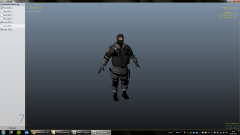
From the album: Norsk Politi Klan
-
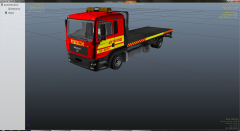
From the album: Norsk Politi Klan
-
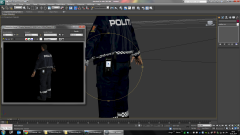
From the album: Norsk Politi Klan
-
Just want to add this up in there. But also helped another guy with this issue today, and what i did for him was to "Control PanelAll Control Panel ItemsPrograms and Features" And then Change/Repair the .NET Framework 4.5 installation. (repair) That cured his issue.
-
Hmm. still got the crash. Now i got default Nhelipilot and Swat, and default Noose vehicles + FIB. Very strange. Same issue with or without ELS enabled, as it seems like an ELS crash in the logfile. No other scripts active. Load GTA -> Alt + p -> console :forceduty -> Get down to the streets and ALT+N. Crash. Sometimes the Noose, Fbi, and Nstockade spawns. But 90% of the time, crashes straight to desktop.
-
Yes i do :) But does it only spawn Nhelipilot and swat? Or does it spawn other peds as well, do you know ? :)
-
Well was not that either. All noose vehicles now stock. And same issue. Maybe an issue with the Ped models then, darn :) back to the drawing board :)
-
Goddamn :) could be that the fbi model does not support 4 seats then. Gotta test it :) Would be cool if they added a config where you could set what police vehicles NOOSE should use. To actually in some cases "force" the default noose response vehicle :)
-
Ah, fbi also? :) Might be that one then :)
-
Hello! I am having some issues with LCPDFR Crashing with an exception in AdvancedHook.log when calling for backup from NOOSE ( alt+n ) The problem does not exist when using original files, so it must be related to one of the vehicles or ped's added. Could you guys tell me what units ( vehicles ) the Script will call? What types of vehicles? only Noose, Nstockade, and Pstockade? Or is there another vehicle in the list of Noose units in the Script? I've replaced Noose and Nstockade with original vehicles, So one time the game spawned it, and it did arrive. Next time - it crashed. Eliminated ELS and any other scripts. Disabled them while doing these tests.
-
That would be awesome :) Too bad it seems hardcoded into GTAIV. Should be a way to go around this?
-
-
anytime :) And good luck with the skins m8! :)
-
Ped templates is created using the original Skin for that ped. For example uppr_diff_000_a_uni.png and lowr_diff_000_a_uni.png Open the file in your favorite painter, and duplicate the image, and put it on top of the original ( CTRL+A then CTRL+C ) then (CTRL+V to paste ) Then put it exactly on top of the original, and change the original transparency to lets say 40%, Then you will be seing the old skin underneath the new image you pasted in. Now you can delete everything in the newly pasted image, and then start to create your skin over the same spots as the background image shows. Like this
-
Yeah i can see that the game flowed past the other similar errors, even the Script.Lights one. I will be driving on the trusted roads here on and forth :) No other bugs did occurr during the gameplay this time! So well done with the fix! As always! Thanks for prompt reply! :)
-
Ah! So the last line ( [AudioDatabase] GetAudioFileForAction: No file found for: CARSON_ST ) is not the actual crash? Lol, you mean that GTAIV crashes randomly? Never occurred :) lol!
-
Hello! :) LCPDFR1.0 hotfix working like a charm! all my issues seems to be fixed, so it runs smooth as silk! I am getting a crash i've never seen before, and its possibly related to soundfiles in use(?) Here is my end of the logfile: ( full logfile attached ) I dont know why it does change the time format.. might that be an issue? ( WARNING - 10:21:55 PM and then WARNING - 22:24:03 ) [WARNING - 10:14:51 PM] [AudioHelper] formattedStreet Mohawk_Ave [WARNING - 10:14:51 PM] [AudioHelper] audioFilePath F:SteamLibrarysteamappscommonGrand Theft Auto IVGTAIVlcpdfrAudioPoliceScannerStreetsMOHAWK_AVE.wav [WARNING - 10:14:51 PM] [AudioHelper] streetName Mohawk_Ave [WARNING - 22:16:27] [AudioDatabase] GetAudioFileForAction: No file found for: HEMATITE_ST [WARNING - 10:16:30 PM] [soundEngine] PlayExternalSound: IO error while opening wave stream from F:SteamLibrarysteamappscommonGrand Theft Auto IVGTAIVlcpdfrAudioResidentAmb_ResidentTASER_DEPLOY.wav. File already in use? [WARNING - 10:16:30 PM] [soundEngine] PlayExternalSound: IO error while opening wave stream from F:SteamLibrarysteamappscommonGrand Theft Auto IVGTAIVlcpdfrAudioResidentAmb_ResidentTASER_DEPLOY.wav. File already in use? [WARNING - 10:18:45 PM] [Chase] DeployRoadblockForClosestSuspect: Failed to find suspect [WARNING - 10:18:51 PM] [Chase] DeployRoadblockForClosestSuspect: Failed to find suspect [WARNING - 10:19:12 PM] [Chase] DeployRoadblockForClosestSuspect: Failed to find suspect [WARNING - 10:21:55 PM] [script.Lights] Process: Not a valid police vehicle, hence siren manager instance is missing. Forcing creation [WARNING - 22:24:03] [AudioDatabase] GetAudioFileForAction: No file found for: WENROHRONON_AVE [WARNING - 22:24:03] [AudioDatabase] GetAudioFileForAction: No file found for: CASSIDY_ST [WARNING - 10:25:49 PM] [soundEngine] PlayExternalSound: IO error while opening wave stream from F:SteamLibrarysteamappscommonGrand Theft Auto IVGTAIVlcpdfrAudioPoliceScannerRANDOMCHAT_03.wav. File already in use? [WARNING - 22:27:34] [AudioDatabase] GetAudioFileForAction: No file found for: WALTON_LANE [WARNING - 22:32:54] [AudioDatabase] GetAudioFileForAction: No file found for: CARSON_ST
-
I think there is no problem modding the actual modelfile, or its textures. But rather a problem with removing and adding more models to a ped. For example i've added in my ped pack, more uppr_ lowr_ and suse_ parts, and added them into the gta data files to be able to use them. I think its when you add anything into pedVariations.dat you will be on thin ice - for now :) My guess is that this will be fixed pretty soon :)
-
Actually, no need :) But im not sure how well it works with 1.0 yet.. Not my favorite of doing it tho. But i guess its the way :) '?do=embed' frameborder='0' data-embedContent>>


