


.PNG.18f8ea70e987beeffa4adc9920eed481.PNG)
zachsem
Members
-
Joined
-
Last visited
Everything posted by zachsem
-
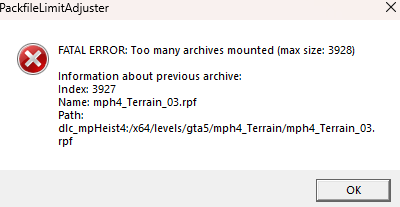
Problem solved, reinstalled Pack File Limit Adjuster and all is well
-
This only happens when I add the most recent dlc to the dlclist. What's being added to dlclist: <Item>dlcpacks:/mp2023_02/</Item> <Item>dlcpacks:/patch2023_02/</Item> <Item>dlcpacks:/mp2023_02_g9ec/</Item>
-
This is not a new vehicle for singleplayer, which is why it works.
-
You can already do so by editing GTA5>LSPDFR>data>agency.xml
-
Trying to have custom ai outifts, everything is working except my units have a snorkle on the ears section. I've converted it from EUP, but I don't see why it's spawning stuff on the ears
-
Yes, you can quite easily. Go to your LSPDFR folder>data>agency.xml. You'll see a section that looks like what I attached below for each department. Add, edit, or remove "<Vehicle>(Vehicle Name)</Vehicle>" to change the vehicles.
-
Sure, what's the issue you're having?
-
No problem, I had the issue myself and surprisingly didn't find too much other than people saying just to get Jurisdictions+. Glad I could help!
-
No, I edited the comment after you saw it I guess, i'm referring to the location issue of the RageUI
-
Location should be fixed, thanks! RagePluginHook.log Updated RegularCallouts. I removed PoliceSmartRadio and Traffic Policer, but it didn't fix it from crashing so I added them back.
-
I asked earlier, but I think Charlie might of skipped it. I wasn't sure where exactly it's supposed to be installed to, it seems I have two of them. Edit: I think I did it. RagePluginHook.log
-
Replaced them except for smart radio, but now I can't seem to get the game not to crash. Edit: I guess the radio requires traffic policer so disregard. RagePluginHook.log
-
Shoot, I see, I misunderstood and thought the 3 you listed were his, my bad.
-
RageNativeUI is supposed to go where? Looks like I have one in the gta5 root folder and in my lspdfr plugins folder No luck after removing those and updating the others RagePluginHook.log
-
Weird it shows I downloaded those, but maybe I forgot to actually move them into the gta5 folders and actually update them. I'll give this a shot. Albo1125's plugins don't work anymore?
-
I attached the full log in my post. The spoiler is just the error part of it.
-
Whenever I encounter an ambient street race between 2 cars and attempt to pull one of the cars over I get this error: RagePluginHook.log
-
Whenever I have a traffic stop that turns into a pursuit as I approach the door, 95% of the time the suspect drives for 5-10 seconds and then stops. I feel like another traffic stop is being initiated for some reason after the pursuit starts. When I get back to the car to pursue after the suspect drives away it says to get out and wlak up to the door to talk to the suspect, but we’re still in pursuit. I attached the part of the log from my last traffic stop where it happened.
-
-
When you call for backup are you calling for noose backup or something else?
-
Increase your Plugin Timeout Threshold to 60000
-
Increase your Rage Plugin threshold to 60000
-
Increase your Rage Plugin threshold to 60000
-
Increase your Rage Plugin Threshold to 60000
-
Increase your Rage Plugin Threshold to 60000
.thumb.PNG.24997ab41c5dcd6b1c7eac3faec26200.PNG)

.thumb.png.072d51545c6a2afc8cc3fdc68771ba5e.png)