


Leaderboard





Popular Content
Showing content with the highest reputation on 05/11/2026 in Files
-
2 points
 This is a simple script that is based on ragehook to make cars move over when only having your emergency lights running not your siren no keys because it works as a standalone script what I basically mean is it doesn't need any user interaction it does everything by itself I am trying to enhance the "default" without script behavior so the pullover behavior or "move over" behavior is improved because to be honest when I play the game every time I get to a crowded area in gta v I keep crashing into people because they don't move over correctly. So I guess the gist of what I am trying to say is be respectful, don't say the obvious everyone knows this works without a script by default in gta v. Also just wanted to say if you appreciate & like my work please consider giving me a donation as every bit helps considering how that makes me & my work feel appreciated and encourages me to continue making great scripts like this. Please Follow community guidelines when posting, as in be respectful don't use rude language,etc. Support - what to do if you encounter a bug or have problems: Please leave a comment (not a review). Include your RAGEPluginHook.log file, located in your Grand Theft Auto V folder in a spoiler so it doesn't make the page too long for people not interested on reading the log. Also, please provide an accurate description of what happened. This allows me to help you as fast as possible without having to ask you for this information I need to help you, as if I don't get this information I cannot help you because I will not know what is causing the problem and will result in delayed resolution of the problem due to asking you for the needed information before proceeding.... please as said above provide this information with your initial comment (not a review) to allow the most quick resolution of the problem as possible. Leaving a review for support issues is against community guidelines, and will not even be answered at all, will be reported instantly instead. README/Install Instructions: extract the dll file from the zip file using 7-zip or winrar or whatever and then copy the dll file to your plugins folder to here C:\Program Files (x86)\Steam\steamapps\general\Grand Theft Auto V\plugins and that is where you place the dll file to make this script work If you have your game on any other drive replace the C:\ part with your drive you have the game on. User Submitted Videos: FirstThirtyMinutes: If any of you post a video review/or use my script in your video's please notify me about it and I will feature your videos here like I did for firstthirtyminutes. Please do not re-upload, reverse engineer, modify, redistribute, or in any other way violate the copyright of this modification. DMCA Takedown Requests & actions will be taken if this is violated. Do you have questions? Or do you need help with the script? Please make a comment, not a review for support and your question/support issue will be handled as soon as possible. Important Notice regarding Obfuscation Used to Protect Copyright Due to using Max Obfuscation Settings inside the .Net Framework Obfuscator that is used to protect copyrighted logic & such inside the software/plugin, it is likely a antivirus might see the obfuscation and several other obfuscation settings like anti-tamper/anti debug/etc that are used to further protect and prevent copyright infringement of the software/plugin as a False Positive. To Date as of 8/23/2023 there has only been one lesser known antivirus named "Ikarus" that has even thought this plugin is a virus/trojan which it is not and is only due to the extreme protection settings set in the .Net Framework Obfuscator used to protect the software/plugin that causes this.2 points
 -
Mack Walk-In Rescue Livery MEDIC4523
Fdarr reacted to MTDesigns237 for a file
1 point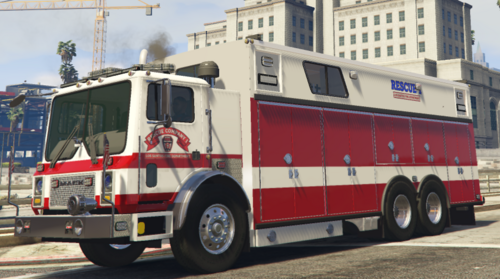 This is a LSFD Rescue 1 livery for Medic4523's Walk-in mack rescue Credits to: Medic4523 - Truck/vehicle MTDesigns- Livery1 point
 -
1 point
 Emergency Lighting System V brings one of the most popular modifications ever created for a GTA title (ELS-IV) to Grand Theft Auto V. ELS-V will add a whole new dimension to your patrols. With a fresh look and many more features than its predecessor, it's also sure to brighten up your game and satisfy the emergency lighting enthusiast in anyone. DESCRIPTION − ELS provides an alternate and incredibly in-depth way of controlling emergency vehicle lights and sounds. − ELS requires vehicle models specifically designed to make use of its features. − ELS includes over 200 unique lighting patterns scattered across 4 light groups and lighting formats. NOTES − Please consult the ELS USER GUIDE and other provided documentation prior to using ELS. − As of V1.00 ELS is not compatible with any form of multiplayer. − A visual enhancement mod is recommended to improve the appearance of ELS lights in game. BASIC INSTALLATION − A GTAV ScriptHook must be installed for any .asi modification to work. The original may be found HERE. − Using script modifications in GTA Online can result in a temporary or permanent ban from the service. − 1. Place ELS.asi, ELS.ini, the ELS folder, and AdvancedHookV.dll inside your main GTA V game directory. − 2. Download and install (a) pro-ELS vehicle model(s). − 3. Start your game. CREDITS − ELS is coded by Lt.Caine. − AdvancedHookV and vehicle damage feature coded by LMS. − ELS-V testing team (alphabetical order): Albo1125, BxBugs123, GravelRoadCop, PoliceWag, and Prophet.1 point
 -
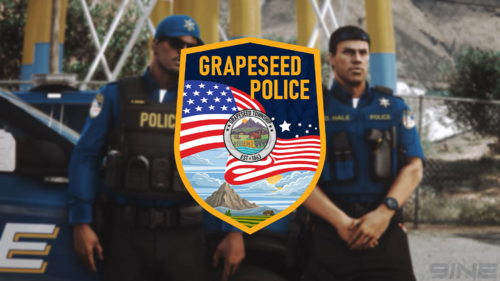 Grapeseed Police Department Contains:Class A Uniform Class B Uniform Class C Uniform Dress Pants Cargo Pants Windbreaker Class A Sweaters (2 Variants) Class B Sweaters (2 Variants) Class A & Class B Undershirts Soft Vest Raincoat (2 Variants) Winter Jacket (3 Variants) Baseball Cap (4 Variants) Required:Twizz Blaine County Sheriff’s Office 6-Point Star Third-Party Textures (Free):Elevio Modifications Legend Vest (2 Variants) Reece Designs 2024 Patrol Vest (2 Variants) Reece Designs 2024 Uniform Vest (2 Variants) Third-Party Textures (Paid):Elevio Modifications Hat (4 Variants) PDS Booster Pointblank Vest (4 Variants) Lewis H. Polo Shirts C4M Traverse Vest (3 Variants) PDS Polo PDS Winter Jacket (3 Variants) Notes:This pack is built around a small-town Grapeseed PD structure, so it’s kept fairly minimal and realistic in terms of resources and equipment. There is no dedicated K-9 uniform included only Vest textures. BDU uniforms are also not included, again small department Id assume such situations requiring that level of gear would realistically be handled by outside assistance such as BCSO or other county units. At the moment, this pack also does not include female EUP, as it’s really made for my own gameplay setup and I Rarely use Female Characters. If there’s enough interest, I may look into adding it in a future update. Livery used In screenshots1 point
 -
EUP Menu
LAPDFR GET reacted to PieRGud for a file
1 point EUP Menu is a carefully-built menu for the popular Emergency Uniforms Pack modification. EUP Menu allows you to easily apply EUP clothing to your MP peds. It also includes a character creator exactly like GTA Online's character creation system. You can edit, save and even share your favourite characters. Making your own awesome police officer has never been easier. Don't like the predefined clothing options? The wardrobe feature has got your back. You can create and save your own outfits with ease. Sunny day? Why not put on some shades. Hate your face? A mask solves everything. Sarge not giving you that promotion? Screw the system. Stick that patch on and promote yourself. Want to relive Die Hard? Throw on a vest and a helmet. It's time to kill some terrorists. What happened to the Accessories menu?: As EUP grew, the Accessories menu became more and more outdated, and wasn't able to fully encapsulate all EUP has to offer. It will be completely revamped and brought back in a future menu update. Requirements: 1) RAGE Plugin Hook 0.37+ 2) RAGENativeUI 1.8.1+ 3) EUP Law & Order 8.3 4) (Optional but highly recommended) EUP Serve & Rescue 1.5 Installation: 1) Place RAGENativeUI.dll into your root GTAV folder (if you don't already have it). 2) Extract the contents of Plugins in the archive into your GTAV Plugins folder. 3) Open the RPH console in-game (default F4) and type "LoadPlugin EUPMenu.dll" (without quotations). Note: If you are upgrading from a previous version of EUP, please make sure to delete presetoutfits.ini in the Plugins/EUP folder before running the menu. This will allow it to generate the latest presetoutfits.ini file. Your custom outfits may need some adjusting for EUP 8.3, but your saved characters will work fine. Credits: - @AlexBraun for the EUP character creation system - @alexguirre for RAGENativeUI and contributing code related to fetching all loaded RPF archives Want to see the full FAQ? Have a question? Need help? https://discord.gg/aTQfepT Join our EUP Discord above and take a look at #faq channel. If it doesn't have the answer you're looking for, you can ask for help in the #eup-support channel.1 point
 -
1 point
 Early access is available on Ko-Fi support on multiplayer ped and vehicle customization in DefaultRegions.xml + a lot of realistic AI-Voices in dialogue based callouts! adds 19 new callouts with multiple variations & locations a Donator+ role at the discord server (add your discord name to your Kofi account) 19 extra callouts only in the Kofi beta version: Spoiler This is MCCallouts: 31 different exiting callouts! Available in 🇺🇸 🇩🇪 🇫🇷 🇨🇿 🇷🇺 🇹🇭 🇯🇵 🇮🇹 🇵🇱 🇪🇸 🇻🇳 🇨🇳 🇧🇷 🇮🇩 & many more to follow! Comes with its own Menu! Different outcomes & multiple locations! Compatible with PolicingRedefined, StopThePed & UltimateBackup! You want to be a part of MCCallouts? Do you have questions or have found a bug? You’ll also find support there. Feel free to join our new discord server: https://discord.gg/utNranQJSr It is required to install Enable All Interiors Mod: https://de.gta5-mods.com/scripts/enable-all-interiors-wip Spoiler The MCMenu comes with a lot of useful features. Equip a rifle, gear & heal up or request a specific callout! MCCallouts supports English 🇺🇸, German 🇩🇪, French 🇫🇷, Czech 🇨🇿, Russian 🇷🇺, Thai 🇹🇭, Japanese 🇯🇵, Italian 🇮🇹, Polish 🇵🇱, Spanish 🇪🇸, Vietnamese 🇻🇳, Chinese 🇨🇳, Portuguese 🇧🇷 & Indonesian 🇮🇩 at this time, configurable in the .ini. You want to help translating? You can either do that on https://github.com/yasd2/MCCallouts-Translations or on my discord server linked at the top. Open the downloaded MCCallouts folder, then drag-&-drop all files in the main gta folder. Spoiler © 2025 MCCallouts by Yasd. All rights reserved. Do not modify or share it without my consent.1 point
 -
 Seatbelt by Faya Discord Server / Installation / Progress Board Fasten your seatbelt to stay securely inside the vehicle, preventing ejection or being pulled out. If you forget to fasten it, a chime will play to remind you. You can choose from up to 16 different chimes and 2 different fastening and unfastening sound effects. Important information: Want to hold to fasten your seatbelt instead? Set HoldToFasten to true in the Seatbelt.ini Press Left CTRL on the keyboard or DPad Up on the controller to fasten or unfasten your seatbelt. You can customize these keys in the settings. Press F4 and enter "OpenSeatbeltSettings" to open the settings menu. Audio & Visual Cues: Once you step into a vehicle, you'll see a seatbelt indicator, meaning you do not have your seatbelt fastened. Once you start driving without your seatbelt on, the indicator will start blinking, and a chime will start playing. Customization: There are currently sixteen seatbelt chimes to choose from and four seatbelt sound effects to choose from. If you prefer a different keybind, you can change the keyboard key or the controller button in the settings file. Settings Menu: There is a settings menu you can use by opening the RAGEPluginHook console (F4) and entering "OpenSeatbeltSettings", this will open up a menu where you can change the settings in-game. Chime Linking: You can link different chimes to different vehicles, so as an example, you can link the Dodge chime to your Dodge Charger or your Chevrolet chime to your Silverado. Non-linked vehicles will use the value of the ChimeSound setting. Quick Exit Feature: You can quickly exit the vehicle by double-tapping the vehicle exit key. You will exit the vehicle, and the player won't close the door after exiting, although you can choose to have the player close it by setting "LeaveDoorOpenOnQuickExit" to false. Miscellaneous: When fastening or unfastening, your character will play an animation. If you're using a controller, it will vibrate when interacting. When fastened, you will not be able to leave the vehicle, nor will peds be able to pull you out of it. You can even add custom chimes if you'd like; just place the .wav file in "Plugins/Seatbelt Media/Chimes" and update the ChimeSound setting to that audio file name. Current chimes Aston Martin, Audi, BMW, BMW 2, Chevrolet, Chrysler, Dodge, Ford, Ford 2, Hyundai, Mazda, Mazda 2, Mercedes, Misc 1, Subaru, Tesla Asking for support in a review is not allowed. Please message me here instead.1 point
 -
686 Callouts
Mo3zPain reacted to Charlie686 for a file
1 point 11/01/26 - 686 Callouts has updated to introduce Custom Pursuits! You can now create your own pursuit callouts (customising pursuit speeds, vehicles, weapons & more). Read the Custom Pursuit section of the file description for more information. 686 Callouts v2.1.2.0 Designed with stability, replayability, and configurability in mind. 686 Callouts is compatible with Stop The Ped, Callout Interface & ExternalPoliceComputer. Join 10,000+ people in LSPDFR-TS, the home of 686 Callouts. Receive support, provide suggestions & use our automatic log reader. 686 Callouts with AI Voices & 8 exclusive callouts (including SWAT RAID) is now available on Ko-Fi for £2.99! Standout Features 23 Callouts. Offensive Weapon Reported | You are given a precise description of the suspect, and you need to track them down. Photography of a Police Station | Inspired by the videos online. Large Vehicle Pursuit | For those who prefer pursuits that don't exceed 100 MPH. Stolen Pedal Bike | A stolen bike has been spotted, and you need to apprehend the rider. Vehicle on Sidewalk | You need to get the sidewalk cleared, but maybe this isn't just an innocent mistake. Disorientated Individual | Camera operators have raised concerns over an individual. Suspected Stalker | First, establish the situation with the victim, then speak to the suspect. Stolen Item | After conversing with the victim, you'll be given access to a GPS tracker to track down the suspect. Fare Dodger | Station staff have contacted you about a fare dodger, you need to question them. Vehicle Fire | You've received a call from an informant, and need to prevent someone innocent coming in harms way. Kidnapping | A taxi slant at a Kidnapping call. With 4 outcomes, it will keep you on your toes. Solicitation | Inspired by Assorted Callouts, there are 5 outcomes where you might need to go incognito. Subway Disturbance | A witness reports some concerning information, keep the subway violence-free! Car Bomb | Defuse the bomb & hope that it doesn't attempt an explosive getaway. Protest | Face off an angry crowd of both protestors & members of the public. Aircraft In Distress | An aircraft needs to make an emergency landing - meet it at the runway. With 8 outcomes, who knows why? Alleyway Robbery | Inspired by More Robberies, this is a simple callout taking advantage of hidden locations across Los Santos. High Risk Escort | Inspired by Protection Squad, lead a convoy between Mission Row and Bolingbroke Penitentiary. Attempted Break-In | A difficult callout - locate the suspicious items around a property to see if you can crack the case. Terrorist Attack | Experience a shootout like never before! Can you stop the danger to the public before they're all dead? Lane Closure | Close a lane of traffic to allow the mechanic to attempt repairing a vehicle. VIP Evacuation | Attackers have taken a VIP hostage! Infiltrate the area and lead an extraction. Area Surveillance | Head to an area and provide a police presence. Keep an eye on your surroundings! Translation System. 686 Callouts features the most in-depth and advanced translation system found in any callout pack, ever. Play 686 Callouts in any of the included 17 languages, to experience callouts in the most immersive way for you. Everything can be translated - even the notifications when a call becomes available. Languages include 🇬🇧 🇯🇵🇷🇺🇵🇱🇪🇸🇩🇪🇹🇷🇨🇿🇸🇰🇨🇳 and more! Outcomes. 686 Callouts tries to achieve a level of replayability not found elsewhere. Most callouts don't just feature 1/2 outcomes, but 5 or 6. There's a real sense that no callout is the same, and you have to approach each call with a level of uncertainty. Career Statistics. Featuring an in-built statistics system, 686 Callouts will hold you accountable with an accurate reflection of your actions as an officer. Naturally, configurability for this can be found in your included .ini file. Custom Pursuits V2 (NEW) Within 686 Callouts, you can create your own pursuit callout and create an unlimited number of pursuits, with the ability to share your pursuit files with your friends and customise them with options such as: Minimum & maximum speeds Pursuit difficulty Vehicle & Ped models Weapon probabilities & models And so much more.... Get started at Plugins/LSPDFR/686Callouts/Data/Pursuits. Crash Prevention. 686 Callouts includes extensive crash prevention. Inevitably, you may run into a problem. To provide the stability needed for a smooth patrol, there are several systems in place to ensure 686 Callouts runs without causing any issues. What to expect in the future I am actively working on the early access version of 686 Callouts, which brings new callouts, new mechanisms & AI Voices for my members. It is available here. FAQ & more details How do I install 686 Callouts? Drag & drop the 'Plugins' folder, the 'lspdfr' folder and the 'CalloutInterfaceAPI' file into your GTAV folder. Someone told me to remove 686 Callouts, should I? No. Do not fall victim to poor advice. Get in touch with me directly. What configurability is offered? A lot. Just check the .ini file! Can I translate your plugin? Yes - please contribute via the GitHub repository. 686 Callouts is great, but don't take my word for it -- take theirs! Officer Benzo. Double Doppler. Geoffery_Gamer. SSTGaming. SteveTheGamer55. unitedOrange66. ___ © 2021 Charlie686. 686 Callouts is copyrighted; you may not modify or redistribute it in any capacity without my express approval.1 point
 -
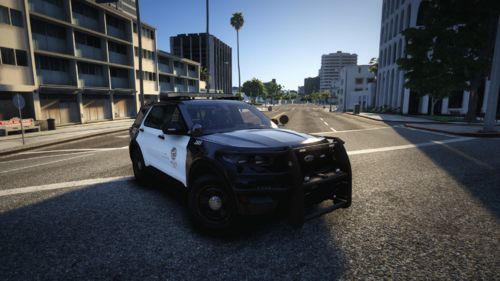 Features on this vehicle: -Fully functional Traffic advisor (Left, Right, Diverge and Warning patterns). -2 Steady Burns Stages. -3 Realistic lighting stages. -Takedowns. -Left and Right alleys. -Functional Spotlight. -Indicators + TA function. -Hazard lights + TA function. -3 sirens + Horn. -Door kills (When the doors are opened they kill the light on the corresponding side of the lightbar so they don't blind you). -Brake override (When you brake the rear lights stop flashing). -Horn override. -360 environmental lights (every lights has an environmental, there are no different lights attached to the same siren). Switch between modes by pressing "J" 1. Stage 1. 2. Stage 2. 3. Stage 3. 4. Steady Burns Full Red & Blue lights. 5. Steady Burns Full Red & Blue lights. Main Keys Cycles through main stages = J Reverse cycles through main stages = Left Shift + J Go directly to stage 3 = O Toggle stages = K Toggle Siren = G Cycle through sirens = T Reverse Cycle through sirens = Left Shift + T Horn = E Manual siren = R Siren 1= 1 Siren 2= 2 Siren 3= 3 Toggle Takedowns = Left Shift + Up Toggle Left Alley lights= Left Shift + Left Toggle Right Alley lights= Left Shift + Right Cycles through Traffic Advisor stages = I Reverse cycles Traffic Advisor stages = Left Shift + I Key to enable/disable the Interior Light = Up Key to trigger the left indicator = Left Key to trigger the right indicator = Right Key to trigger the hazard lights = Down Installation instructions: - Start OpenIV and go to Mods/update/common/data; - Make sure you are in editing mode; - Open the dlclist.xml file; - Add the line: ''<Item>dlcpacks:/2020fpiu/</Item>'' right after the last item before "</Paths>"; - Now go to "Mods/update/x64/dlcpacks", - In the download file you will find a folder called "DLC" and inside another folder called "2020fpiu" drop this folder inside dlcpacks in OpenIV; - For the Vehicle to work with Dynamic Lighting System v2.0.0 you will need the content within "DLS v2 Files", just drop the "plugins" folder in the main gtaV folder. - If you have a MODIFIED DLS.INI, MAKE A BACKUP or add the following lines to the existing one [TOGGLE_TKD] Key=Up KeyModifier=LShftKey [TOGGLE_LA] Key=Left KeyModifier=LShftKey [TOGGLE_RA] Key=Right KeyModifier=LShftKey THESE FILES MODIFY THE VEHICLE CONFIGURATION AND THE MAIN DLSV2 CONFIGURATION BUT YOU WILL NEED THE PLUGIN, WHICH YOU WILL FIND HERE: ALSO YOU WILL NEED SIREN SETTING LIMIT ADJUSTER:1 point



This leaderboard is set to London/GMT+01:00