


![LSMPD 'Addon DLC' [Part two]](http://s3-gallery.int-cdn.lcpdfrusercontent.com/monthly_2017_12/large.20171226213955_1.jpg.f101a906ece0631cef8c5120c4caf2f4.jpg "LSMPD 'Addon DLC' [Part two]")

![LSMPD 'Addon DLC' [Part two]](http://s3-gallery.int-cdn.lcpdfrusercontent.com/monthly_2017_12/small.20171226213955_1.jpg.92f6ff687061ce5cff145a96d57d7e63.jpg)
![LSMPD 'Addon DLC' [Part one]](http://s3-gallery.int-cdn.lcpdfrusercontent.com/monthly_2017_12/small.20171226123659_1.jpg.557c579427066aec6ffa2890157864fc.jpg)

.gif.67f97e2d727f2a0d8f97497ee135a44c.gif)
LSMPD 'Addon DLC' [Part two]

By Jedahdiah
- 3,220 views
- View Jedahdiah's images
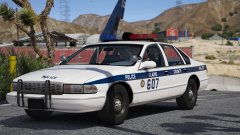
As promised - Part two: the LSMPD Caprice Patrol Vehicle
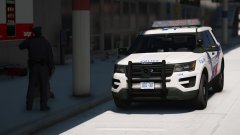
With the release of the Expedition and the Caprice by Him1250, I'll be adding to my LSMPD pack with a sort of 'free addon DLC' style pack.
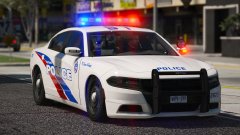
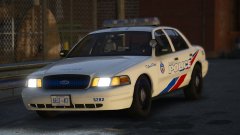
The pack with feature three new vehicles: LSMPD Patrol and Supervisor Expedition, a LSMPD Patrol Caprice and a LSMPD Detention and Police Support van.
With the addition of the 'Addon DLC' pack, the original pack will receive some TLC and the vehicles have been updated and a few bugs have been fixed. It'll come with a new carcols file, ready for my Toronto Style LSPD Pack that's coming soon.
Hopefully will get this out in the next few days.


Recommended Comments
Join the conversation
You can post now and register later. If you have an account, sign in now to post with your account.