Skip to content
View in the app

A better way to browse. Learn more.

LCPDFR.com

A full-screen app on your home screen with push notifications, badges and more.

To install this app on iOS and iPadOS
  1. Tap the Share icon in Safari
  2. Scroll the menu and tap Add to Home Screen.
  3. Tap Add in the top-right corner.
To install this app on Android
  1. Tap the 3-dot menu (⋮) in the top-right corner of the browser.
  2. Tap Add to Home screen or Install app.
  3. Confirm by tapping Install.

LSPD Interceptor 1.0.1

(2 reviews)

4 Screenshots

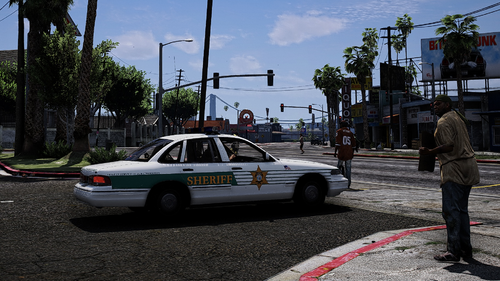
LSPD Skin for Interceptor - Skin by Yorpie

This is a skin for the Interceptor, based on the real LAPD Ford Interceptor. All police markings 
are from the game itself to retain the LSPD feeling.

This is a skin for Lt. Caines Interceptor, so you have to download that first.
http://www.lcpdfr.com/files/file/8329-v-interceptor-default-type/

INSTALLATION
Use OpenIV to open the file “update/x64/dlcpacks/patchday4ng/dlc.rpf/x64/levels/gta5/vehicles.rpf”.
In the RPF file, find and replace the police3.ytd with the one provided in the download.
I highly recommend using the 'mods' folder so you don't overwrite the original game stuff. 

I hope the skin looks good to you, if you notice any bugs or have any suggestions about it, feel free to post.
Enjoy!

What's New in Version 1.0.1

Released

First of all, I uploaded the CORRECT files this time, facepalm for myself.

Second, I increased the size of the city seal a little bit.

I hope you'll like it :D

User Feedback

Recommended Comments

Requies

Insiders

Looks like your LSSD textures were uploaded here too, instead of the LSPD files. Textures look great though! Just wana be able to see them in game. :P

Mitchell

Members

Yeah :( The files included are for the LSSD, not LSPD.

olddutch7

Members

It works and it's good, but the LSPD skin on the car is not the one shown in the picture your advertising. Can we get the skin that is in the picture?

Yorpie

Members Author

(edited)

Oh god, first I forgot the screenshots, now the correct textures. Will be updated shortly.

EDIT: Alright, directly extracted from the game so they will definitely be the right files now, sorry for the inconvenience, I hope you'll like the textures ingame! Have a fun game!

Edited by Yorpie

olddutch7

Members

haha! All good, thanks a lot! :)

ConstableSly

Members

Love your textures! Do you plan to do versions for the mapped Vapid Stainer too with the realistic LAPD/LASD style markings?

Yorpie

Members Author

Love your textures! Do you plan to do versions for the mapped Vapid Stainer too with the realistic LAPD/LASD style markings?

Plan? The texture has already been made with the universal templates! Now someone just needs to make the Stanier mapped. Also have a skin for the Buffalo and the Granger :)

price101

Members

Plan? The texture has already been made with the universal templates! Now someone just needs to make the Stanier mapped. Also have a skin for the Buffalo and the Granger :)

When will the Buffalo and Granger LSPD skins be available. I love the new LSPD skins for the interceptor and stainer. Awesome work!

Yorpie

Members Author

(edited)

When will the Buffalo and Granger LSPD skins be available. I love the new LSPD skins for the interceptor and stainer. Awesome work!

Its a waiting game for the Granger, untill someone releases a mapped version of it. About the buffalo, I did make an LSSD skin but the vehicle itself is rather buggy so I'm also waiting for an update of it or a new version for which I'll also make both skins, unless people really want to see an LSPD skin for the Buffalo. 

EDIT: A mapped Granger has been released, LSPD skin incomiiiiing!

Edited by Yorpie

Create an account or sign in to comment

Latest Mods

Account

Navigation

Search

Search

Configure browser push notifications

Chrome (Android)
  1. Tap the lock icon next to the address bar.
  2. Tap Permissions → Notifications.
  3. Adjust your preference.
Chrome (Desktop)
  1. Click the padlock icon in the address bar.
  2. Select Site settings.
  3. Find Notifications and adjust your preference.