Skip to content
View in the app

A better way to browse. Learn more.

LCPDFR.com

A full-screen app on your home screen with push notifications, badges and more.
To install this app on iOS and iPadOS
  1. Tap the Share icon in Safari
  2. Scroll the menu and tap Add to Home Screen.
  3. Tap Add in the top-right corner.
To install this app on Android
  1. Tap the 3-dot menu (⋮) in the top-right corner of the browser.
  2. Tap Add to Home screen or Install app.
  3. Confirm by tapping Install.

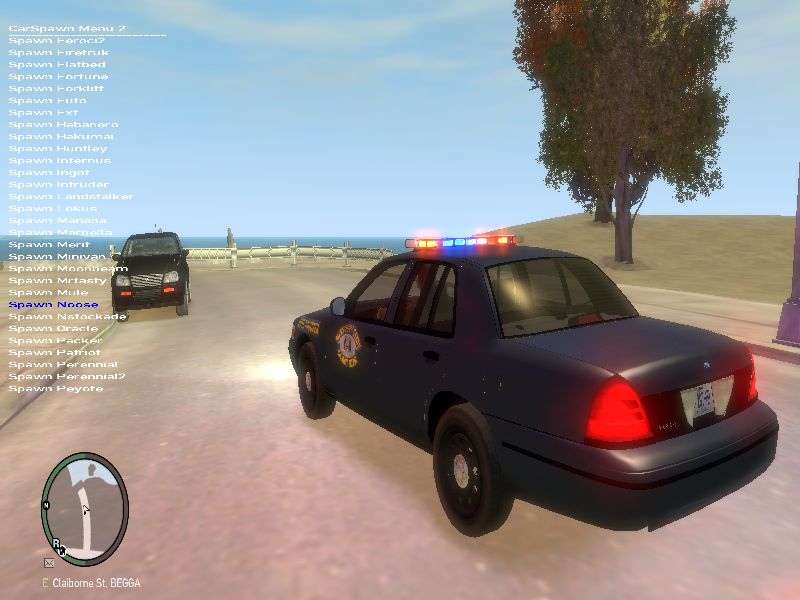
Missouri Highway Patrol CVPI v1.0

(2 reviews)

5 Screenshots

This is a modified Crown vic with similar MHP lighting patterns and MHP skins. The lighting configuration isn't perfect but its as close as I could get it. It still looks awesome though.

User Feedback

Recommended Comments

PoliceEnforcer777

Members Author

***Use with Strobes Mod

Dhruv

Members

Er...that looks like a Whelen Edge to me.

Slimory

Members

That i think is a Whelen Liberty

l3ubba

Members

It is a Whelen Liberty

trw1000

Members

Looks good

dralis83

Members

Love the car looks great, but was wondering if you are able to fix the players feet from not showing under the car! lol, you can see his feet flintstoning it from the drivers side door view

PoliceEnforcer777

Members Author

I haven't had this problem before...anyone else having it?

Akutarebuke

Members

Looks good, only issue I have is the light configuration on the bar is backwards. There's more blue on the right side when you're behind it on the real cars than the left.

CrearBIn

Members

Major issue that I have is that at least near me I have yet to see a MSHP CVPI with those rims.

Jared449

Members

when i try to extract them, it says a file is broken or in an unknown format. how do I fix it?

Create an account or sign in to comment

Latest Mods

Account

Navigation

Search

Search

Configure browser push notifications

Chrome (Android)
  1. Tap the lock icon next to the address bar.
  2. Tap Permissions → Notifications.
  3. Adjust your preference.
Chrome (Desktop)
  1. Click the padlock icon in the address bar.
  2. Select Site settings.
  3. Find Notifications and adjust your preference.


