Skip to content
View in the app

A better way to browse. Learn more.

LCPDFR.com

A full-screen app on your home screen with push notifications, badges and more.

To install this app on iOS and iPadOS
  1. Tap the Share icon in Safari
  2. Scroll the menu and tap Add to Home Screen.
  3. Tap Add in the top-right corner.
To install this app on Android
  1. Tap the 3-dot menu (⋮) in the top-right corner of the browser.
  2. Tap Add to Home screen or Install app.
  3. Confirm by tapping Install.

Entity Persistence - Keeps entities persistent! 1.0.1

(21 reviews)

2 Screenshots

If updating to v1.0.1, you should replace your .ini with a fresh one from the download. Many important default settings were changed.

Caution: This plugin is EXPERIMENTAL.

This may cause a performance hit on your game, depending how you adjust the settings in the included .ini file. The default settings should provide functionality without impacting performance aside from possible drops of 2-3 frames and more at times. If you get less performance than this, please PM me.

You may want to back up your save file. Note that this does not have a chance of messing up your save file unless you save over it in-game. I'm not sure if this actually can mess up your save, but if you want to be on the safe side, go to "C:\Users\<username>\Documents\Rockstar Games\GTA V\Profiles\<some number>" and back up the files with SGTA in their name. 


Information

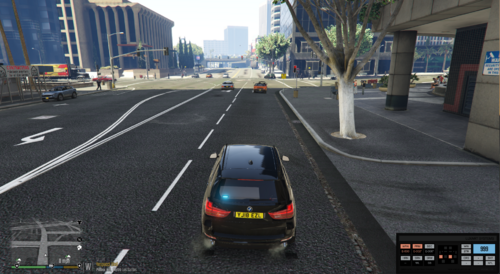
Annoyed when you get out of your stolen car and walk a few feet away, only to turn around and find it gone? Or maybe you just stopped a criminal's car, and he ran a few blocks before you caught up. Maybe when you got back to the suspect's vehicle, you find that it's mysteriously gone, along with his friend's corpse, who was more violent and paid the price.

Now, you don't have to worry about these random disappearances. Once you've loaded this plugin, it will automatically add anything within a radius you set to a list. Anything in the list will be kept persistent and won't disappear until you get far enough away. Once you do, it will be removed from the list and therefore, it will no longer be persistent.

No longer do you have to worry about crime scenes looking like nothing ever happened.

Persistence - the continued or prolonged existence of something.


Installation and Usage

You need the Rage Plugin Hook for this to work. This has been tested with version 0.42.969.8470 , but it should work with newer versions. If it does not, send me a message so I can fix it. Again, I'd like you to keep in mind that this is experimental. The game wasn't meant to have this many entities all persistent at once. Use at your own discretion.

When you have that installed, drop both the .dll and the .ini into your Plugins folder. Once you're in-game, press F4 to bring up the Rage Hook console, and type 'LoadPlugin EntityPersistence.dll' (without the apostrophes). It will probably say something about the plugin not being verified. Just hit the up arrow, and then enter again. It should load correctly. Everything after that is taken care of by the plugin itself. This does include a console command to unload the plugin gracefully. By that, I mean it removes persistence from all entities that were made persistent before unloading. I recommend using this before unloading all plugins or exiting the game.


Configuration

In the included .ini file, you can edit multiple things. The default settings seem to work fine with the lowest performance drop, but if you find you want to change something, be sure to read the comment associated with it carefully to know what impact it might have. The comments show the default setting and what it was tested at. The default radius values are pretty large already, so if you encounter any performance problems, you can tone those down by increments of 32 (personal preference, you can change them by whatever you like). The options are explained in the .ini but I'll put the non-advanced ones down here anyway.

  • VehiclePersistence - Determines if vehicles will be added to the persistence list.
  • VehiclesUnoccupiedOnly - Only add vehicles if they're unoccupied.
  • PedPersistence - Determines if pedestrians will be added to the persistence list. 
  • PedsDeadOnly - Only add peds if they're dead.
  • PersistenceRemoveRadius - The distance from the player at which to remove persistence from entities.
  • PersistenceAddRadius - The distance from the player at which to add persistence to entities.
  • OnlyOnFoot - Whether entities are made persistent at any time, or just when the player isn't in a vehicle.
  • RemoveOnPersistenceRemove - Determines if entities will get removed when their persistence gets removed. More of a fail-safe than anything.


Planned Features

  • Performance improvements
  • More performance improvements
  • Even more performance improvements


Miscellaneous

Please, give me any bug or crash reports. I'll try my best to fix them. If you have a great idea of something that would work well with the system already in place, then go ahead and tell me; if I think it would fit well, then I'll do my best to add it.


What's New in Version 1.0.1

Released

  • If PersistenceRemoveRadius is zero, entities will not lose persistence until the max count is reached, and then they will lose persistence in the order they gained it as the list is added to
  • Updated default values in .ini. It is recommended to replace your current .ini with a new one from the download and tweak as you see fit.

User Feedback

Recommended Comments

FtDLulz

Members Author

2 hours ago, HomerS said:

@FtDLulz Updated to Ragehook 50 and the issue is still there.

I'll be working on this today. It shouldn't take too long to do unless the error is severe.

FtDLulz

Members Author

(edited)

14 hours ago, HomerS said:

@FtDLulz Updated to Ragehook 50 and the issue is still there.

I can't seem to reproduce this issue. Could you PM me your EntityPersistence.ini and your RagePluginHook.log file and tell me any other mods you have loaded?

Edited by FtDLulz

HomerS

Members

5 hours ago, FtDLulz said:

I can't seem to reproduce this issue. Could you PM me your EntityPersistence.ini and your RagePluginHook.log file and tell me any other mods you have loaded?

Yep!

DicheBach

Members

What would be the best way to test that this mod is working for me?


I've been wanting something like this so I could create an enormous pileup on the interstate, and I did try that. But it wasn't entirely clear that stuff wasn't despawning. I think once stuff explodes and burns up maybe it despawns anyway?


There did seem to be more cars piling up than I've ever seen before, but I'd like to do something to test exactly how much more "persistence" I'm getting.

metl

Members

Love the mod idea, but it doesn't work right for me. It causes vehicles to not stop when lit up (they just keep driving) and if I shoot any ped (including a viscous dog) then every ped that comes within this mod's range start attacking me. For more info, here's a thread I started until finally tracking it down to this mod.


viperwolf

Members

this still works and performs as it says.

Is this a GTA 5 thing, where the tow trucks will tow a vehicle for a few blocks and then just drop the cars off in the street? I never noticed until i started using this mod, bc the car are still there hehe. Is there a way to have the tow trucks not drop them off that way?

FHOG

Members

On 4/26/2017 at 8:01 PM, viperwolf said:

this still works and performs as it says.

Is this a GTA 5 thing, where the tow trucks will tow a vehicle for a few blocks and then just drop the cars off in the street? I never noticed until i started using this mod, bc the car are still there hehe. Is there a way to have the tow trucks not drop them off that way?

I have the same problem. I love this mod but because of the issue I stopped using it.

Pio

Members

I downloaded this and whenever I tow a car the tow truck will just drop it not too far away. Is it because of this mod and how do I fix it?

palregeni

Members

Hello, I love the mod and it worked perfectly for me until 28th July. Probably the newest GTA 5 update caused a fatal error on EntityPersistence plugin loading: 


'UNHANDLED EXCEPTION DURING REMOTE PLUGIN TICK' error (Exception type: System.AccessViolationException; Exception message: Attempted to read or write protected memory. This is often an indication that other memory is corrupt.) This is a fatal error and forces the user to kill the GTA process from Task Manager.


What I tried:

- I downgraded the RAGE Hook to the last (working) version, but the problem persisted. (RPH was also upgraded so I suspected it causes the problem)

- Unblocked all files recursively under GTA 5 dir. :)

- "reinstalled" the EP mod (means using the default .ini file)

- tweak the .ini file (decrease max num of persisted entities, change the retrivalmethod)


I use Steam. Do you guys have the same problem?


Cheers!

palregeni

Members

It seems that EP is not broken. Probably every RAGE-based mod would have crashed if I used any other than EP. I had to have "Disable counter measures against online vehicles being removed in singleplayer" leave unchecked. Also, I have to start RPH when GTA 5 window is about to appear otherwise the graphical overlay doesn't work at all, making EP mod crash (but in this case at least GTA process survived).

techgamer15

Members

Is it at all possible to make gun magazines persistent (and maybe spent casings), just to make police shootouts more realistic??

Phaxol

Friends of LSPDFR

On 7/31/2017 at 9:33 AM, palregeni said:

Hello, I love the mod and it worked perfectly for me until 28th July. Probably the newest GTA 5 update caused a fatal error on EntityPersistence plugin loading: 


'UNHANDLED EXCEPTION DURING REMOTE PLUGIN TICK' error (Exception type: System.AccessViolationException; Exception message: Attempted to read or write protected memory. This is often an indication that other memory is corrupt.) This is a fatal error and forces the user to kill the GTA process from Task Manager.


What I tried:

- I downgraded the RAGE Hook to the last (working) version, but the problem persisted. (RPH was also upgraded so I suspected it causes the problem)

- Unblocked all files recursively under GTA 5 dir. 🙂

- "reinstalled" the EP mod (means using the default .ini file)

- tweak the .ini file (decrease max num of persisted entities, change the retrivalmethod)


I use Steam. Do you guys have the same problem?


Cheers!

Same problem, happens randomly when clicking on a ped in Computer+.

Marquess

Members

(edited)

"Annoyed when you get out of your stolen car and walk a few feet away, only to turn around and find it gone? Or maybe you just stopped a criminal's car, and he ran a few blocks before you caught up. Maybe when you got back to the suspect's vehicle, you find that it's mysteriously gone, along with his friend's corpse, who was more violent and paid the price."


I seriously never ran into this. Not sure why it is happening to so many people...

Edited by Marquess

Having a crash with your mod. 


Occurred during a traffic stop once I had a suspect in custody (The driver) I use Computer+ and the game crashed the second I logged into that mod. 


Log attached. 

See bottom of Log. 

I hope this gets fixed literally first traffic stop running this mod and have crashes. I haven't edited your .ini. 

RagePluginHook.log

Ocean25

Members

i've installed this but whenever i turn my back the suspects car disappears??


Jacke1012

Members

Does this work with LSPDFR 4.0?


Create an account or sign in to comment

Latest Mods

Account

Navigation

Search

Search

Configure browser push notifications

Chrome (Android)
  1. Tap the lock icon next to the address bar.
  2. Tap Permissions → Notifications.
  3. Adjust your preference.
Chrome (Desktop)
  1. Click the padlock icon in the address bar.
  2. Select Site settings.
  3. Find Notifications and adjust your preference.