





Hello my fellow South Africans! In a recent post I said I would release my ELS that I use, so here it is! This ELS pack includes every single emergency services vehicle in-game (excluding policeold cars and dlc cars). This pack has ELS for the following vehicle models: firetruk, ambulance, police, police2, police3, police4, sheriff, sheriff2, riot, pranger, policet, policeb, policeb2, fbi, fbi2. Like I said, this covers all emergency vehicles excluding the dlc vehicles and policeold models. Most of these have custom patterns for every siren (wail, yelp, prty, etc.).
PLEASE NOTE: ON SOME VEHICLES, THE 3 AND 4 KEY SIRENS DO NOT WORK! THIS IS A DECISION I MADE, YOU ARE MORE THAN WELCOME TO CHANGE IT IN THE .xml's PROVIDED. AS WELL AS ALMOST ALL OF THESE HAVE ALL BLUE LIGHT REFLECTIONS. IF YOUR VEHICLE HAS RED LIGHTS ON IT, ITS GONNA REFLECT BLUE ON BUILDINGS, ITS UP TO YOU TO CHANGE IT IN THE XML.
Installation Instructions (YOU DO NOT NEED OPEN IV FOR THIS):
1. Follow this directory via File Explorer: GTA V -> ELS -> pack_default
2. Drag and drop all the xml's in the pack into the pack_default folder. (NOTE: A popup will appear saying that all the files have the same names. Simply click the replace button and they will be replaced!!)
3. Enjoy!
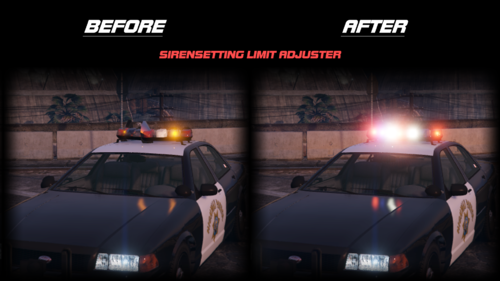
These ELS Lights look absolutely stunning so I hope you guys enjoy it! More posts coming soon.
2 Screenshots
Custom ELS Pack For GTA V
Credits - Me




Recommended Comments
Create an account or sign in to comment