Skip to content
View in the app

A better way to browse. Learn more.

LCPDFR.com

A full-screen app on your home screen with push notifications, badges and more.

To install this app on iOS and iPadOS
  1. Tap the Share icon in Safari
  2. Scroll the menu and tap Add to Home Screen.
  3. Tap Add in the top-right corner.
To install this app on Android
  1. Tap the 3-dot menu (⋮) in the top-right corner of the browser.
  2. Tap Add to Home screen or Install app.
  3. Confirm by tapping Install.
Due to overzealous filtering on Microsoft’s side, some emails to Outlook and Hotmail addresses may not be delivered. If you’re affected, please use a different email address or try again later.

pdComp Modern UI Pack | Meridian 3.01

(2 reviews)

19 Screenshots

pdComp Modern UI Pack | Meridian

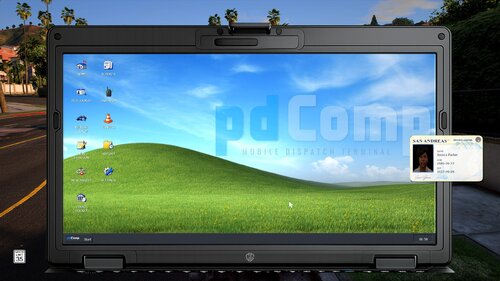
Giving pdComp a fresh coat of paint. The pack includes redesigned icons (each with its own app lore, if you're into that) and renamed apps so they feel less generic. PED LOOKUP becomes CrossID, VEHICLE LOOKUP becomes PlateWatch, and so on, plus new wallpapers, matching cursors, and Getac-inspired bezels for both the laptop and tablet. It's all built to feel like one cohesive set. Nothing over the top, just a more modern spin on the default look.

Need help? If something's not working right, leave a comment below or shoot me a DM. I'm always happy to take a look and get it sorted, and honestly, it only helps me catch and fix whatever's going wrong. Don't be shy!

⚠️ Requires pdComp. This is an add-on pack, so you'll need pdComp installed for it to work.

App lore

Meridian apps (the main platform):

  • Hub — the home screen / launcher

  • Dispatch — live calls and unit status (CAD)

  • Reports — writing and storing reports (RMS)

  • History — log of everything you've run

  • Settings — system settings

Lookups (Atlas):

  • CrossID — look up a person (wants, warrants, history)

  • PlateWatch — look up a vehicle/plate (registration, owner, stolen)

Everything else:

  • Sentinel — live ALPR cameras + speed radar

  • eCite.gov — write citations/tickets

  • Custody — booking and arrests

  • CourtLink — court records and docket

THE LONG VERSION — company stories

The section above is the quick reference. Below is the full backstory for each fictional company, for

anyone who wants the world behind the icons. None of it is real — it exists to make the tablet feel like

it came from a world with its own vendors, contracts, and grudges.


MERIDIAN PUBLIC SAFETY


Meridian is the giant nobody remembers signing up for. It has been the dispatch-and-records backbone

since the late 80s, back when "computer-aided" meant a green screen and a lot of patience. Over the years

it swallowed every smaller vendor around it, and now half the departments in the region run on Meridian

whether they like it or not.


Everyone complains about it. The interface is dated, the menus are buried three deep, and every officer

has a story about it freezing mid-report. But nobody can rip it out, because Meridian isn't one app — it's

dispatch and records and evidence and scheduling, all tangled together, so pulling the plug takes down the

whole department at once. So the contract just quietly renews, year after year, and Meridian keeps cashing

the check.


That's the joke: it's the most important software on the tablet and the one everyone likes the least. If

it happened on shift, it's buried in Meridian somewhere — you just have to click through four screens to

find it.


ATLAS


Atlas is the data company, and it's proud of being boring. No cameras, no AI gimmicks, no flashy

dashboard — it does two things and does them fast: tell you who a person is, and tell you what a car is. It

sits on top of the criminal index and the DMV like a front counter that never closes, and it's been

quietly right about ten thousand plate checks in a row.


The company line is basically "ask the system, get the truth," and officers trust it precisely because it

never tries to be clever. CrossID and PlateWatch are built as twins — same magnifying glass, one green for

people and one blue for vehicles — so it feels like one reliable tool, not two products.


Where it gets interesting is Atlas's cold war with Sentinel. Atlas thinks it owns "identity" — it's the

official record of who and what. Sentinel thinks records are old news when you've got cameras watching in

real time. Atlas calls Sentinel reckless. Sentinel calls Atlas slow. Both are a little bit right.


SENTINEL


Sentinel is the villain nobody can quit — and it didn't start out in policing at all. Sentinel got big in

private surveillance. Gated communities, HOAs, apartment complexes, retail parking lots, private security

firms — that's where the first cameras went up. If you drove into a fancy neighbourhood or a mall lot a few

years back, a Sentinel reader already logged your plate. The company built a massive private network one

subdivision at a time, and nobody was really paying attention while they did it.


Then they figured out the real money: hand that network to the government. Once Sentinel had cameras on

half the private property in the region, offering the feed to police departments was an easy pitch —

instant coverage, no install cost to the city, hotlist hits straight to the terminal. So the same network

that started out watching shoppers and suburbs is now the thing that pings the tablet when a stolen car

rolls past. Cameras on poles and overpasses, speed radar, real-time alerts. When a plate lights up before

the car is even in view, that's Sentinel.


That origin is exactly why it's controversial. There's a permanent privacy lawsuit hanging over it — how

long the footage is kept, who gets to search it, and the uncomfortable fact that a private company quietly

built a surveillance dragnet and then rented it to the state. City council fights about it every few

months. Civil-liberties groups hate it. Departments keep signing the contracts anyway, because the hits

are just too good to give up.


Everyone's uneasy about where Sentinel came from, and everyone uses it anyway. Plenty of story hooks in

there — a leaked retention memo, a council vote, a defense attorney asking exactly how a "random" stop knew

where to be.


COURTLINK STATE JUDICIARY


CourtLink is the one part of the system that isn't a company — it's the courts' own platform, and it does

not care about anyone's convenience. It's where a citation or an arrest stops being an officer's paperwork

and becomes the official record. Once it's in CourtLink, it's filed, it's real, and it's out of your hands.


It's deliberately cold. No sales rep, no feature requests, no nicer version next year. It's government

infrastructure — take it or leave it, except you can't leave it. Court Docket is the half officers actually

deal with day to day: hearing dates, continuances, and the notification that ruins a day off by announcing

a subpoena.


eCITE.GOV / STATUTE LABS


eCite.gov has the best origin story in the lineup. On paper it's the official state e-citation portal —

very government, very .gov. But the software underneath was built by Statute Labs, a tiny company started

by one burned-out traffic cop who could not take the paperwork anymore.


The whole idea was speed: scan the license, pick the violation, and let the app auto-fill the vehicle code

so nobody's squinting at a statute number on the shoulder of a highway at night. It caught on because it

actually respected the officer's time, which is rare in government software. So it ends up with a split

personality — an official state portal with a scrappy startup's DNA underneath. It's the one piece of

mandated software cops are quietly glad exists.


CUSTODY / IRONCLAD SYSTEMS


Custody is the grim one, by design. Officially it's the Inmate & Custody Management System (ICMS), built by

Ironclad Systems — a contractor that does detention software and nothing else. No consumer products, no

friendly branding, just booking and jail management for agencies that need every step logged.


It tracks a person from the moment the cuffs go on: charges, prints, mugshot, property inventory, cell

assignment, chain of custody. Everything timestamped, everything audited, because this is the software that

gets subpoenaed when something goes wrong in a holding cell. Heavy and humorless — Custody is the paperwork

end of the worst night of somebody's life, and it doesn't pretend otherwise.


HOW THEY FIT TOGETHER


The one-paragraph version: Meridian is the landlord everyone's stuck renting from. Atlas is the reliable

clerk down the hall. Sentinel is the flashy new tenant everyone gossips about. CourtLink and Ironclad are

the government offices that were here before any of them and will be here after. They all share one tablet,

Install Guide

Drag and drop the plugins folder into your main GTA V directory. That's it.

Choosing A Bezel

If you want to customize them to your own liking, download GIMP and open the XCF file in the Laptop Bezels or Tablet Bezels folder. If not, I've included a couple of ready-made variants in those folders. To install, simply choose the one you like and rename it to "bezel" for the laptop, or "tablet" for the tablet bezel. Then copy and paste it into your pdComp folder:

plugins → LSPDFR → pdComp → assets

Choosing a Wallpaper
  1. Pick a wallpaper from pdComp → assets → Wallpapers

  2. Copy it into pdComp → assets

Important: The wallpaper you want must be in the assets folder, or it won't load.

Setting Your Wallpaper

Option 1: Edit config.ini
Open config.ini, change the Wallpaper line to your file, and save

[Desktop]
Wallpaper = desktop-background2.png

Option 2: Change it in game

  1. Open pdComp

  2. Go to Settings → Appearance

  3. Change the wallpaper .png name to the one you want

  4. Go off duty, then back on duty, the new background should load on return

Option 3: Replace the default file

  1. Pick the background you want (e.g. desktop-background4.png)

  2. Rename it to desktop-background.png (the default name)

  3. Save, overwriting the original — no config edits needed

Choosing a Cursor
  1. Browse cursors in pdComp → assets → Cursors

  2. Copy the one you like into pdComp → assets

  3. Drag the current cursor file back into the Cursors folder (as a backup)

  4. Rename your new cursor to cursor

Term of Use (TOS)

Please do not redistribute, re-upload, or share these textures anywhere, whether modified or not. You may not use them in your own packs, resell them, or claim them as your own work. These files are for personal use only. If you'd like to feature or reference this pack, please link back to the original download page instead of re-uploading the files.

Edited by Zeepsopjes

What's New in Version 3.01

Released

Change Log

V3.01

  • Updated the localization.json for newest version of pdComp

V3

  • Added completely new app icons

  • Added a new localization.json that renames the apps to match

  • Fixed a gap in the laptop bezel — it should now be fully centered

  • The transparent icons are no longer part of this download. V2.2.2 stays available for anyone who prefers that set.

  • Removed the vehicles with transparent backgrounds — pdComp reads those files as JPG, and JPG can't have a transparent background.

V2.2.2

  • Fixed the Bezel XCF files so the call sign text is now actually editable and added PSD file for Photoshop and other editors. Thanks to everyone who reported this!

V2.2.1

  • Fixed the positioning and sizing of the tablet.

V2.2

  • Added a Getac Laptop Bezel in two variants: full black, and black & white

  • Added a Getac Tablet Bezel in two variants: full black, and black & white

  • Added a fully customizable XCF file. You can change your call sign and choose which sticker you'd like to use (or none at all). The taskbar is now fully customizable too, from your call sign to the position of the icons.

2.1

  • Added a Bezel with a taskbar

  • Added a PSD for the Bezel to add your own call-sign to it

  • Added multiple cursors including with Blue Line Flag.

  • Removed background from all vehicle images (this is optional)

2

  • Resized all icons to 100x100

  • Removed the glassy outline on the icons the game didn't render it well, so icons now look smooth instead of jagged

  • Redesigned the following icons: vehicle lookup, court docket,new citation, and new arrest


Short Description

V3 - New Icons, New Wallpapers, and More

AI disclosure

The author has disclosed that AI tools were used in creating the following aspects of this file:

  • Description
  • Images
  • Mod and Mod Content (Moderate)

60% human / 40% AI Wallpapers | Created the base and logo placement, then used AI to quickly generate the full set. Icons | Made the transparent icon myself, then had AI generate the rest in a matching style. Bezel | Used AI to add more detail to the texture.

User Feedback

Recommended Comments

If I went with the Lore Friendly file how would and drag and dropped; how would I get the City of Los Santos with the beaver and bigfoot to be my background exactly? Thanks.

Zeepsopjes

Members Author

41 minutes ago, originalgamester said:

If I went with the Lore Friendly file how would and drag and dropped; how would I get the City of Los Santos with the beaver and bigfoot to be my background exactly? Thanks.

There are two ways I am aware of

  1. You either open the config.ini and change wallpaper name png to the one you like. In your case that would be:
    [Desktop]
    Wallpaper = desktop-background2.png

    Or while in game open pdComp -> Settings -> Appearance -> Change name of wallpaper png -> Go off duty -> Go back on duty

CossackGames

Members

1 hour ago, Zeepsopjes said:

There are two ways I am aware of

  1. You either open the config.ini and change wallpaper name png to the one you like. In your case that would be:
    [Desktop]
    Wallpaper = desktop-background2.png

    Or while in game open pdComp -> Settings -> Appearance -> Change name of wallpaper png -> Go off duty -> Go back on duty

You can always just rename the file to match the one I ship and replace the default file as well!

Just fyi, I noticed the "assets" folder is named "assest" in the download which may mess people up if they drag and drop the whole thing in.

Zeepsopjes

Members Author

(edited)

17 minutes ago, CossackGames said:

You can always just rename the file to match the one I ship and replace the default file as well!

Just fyi, I noticed the "assets" folder is named "assest" in the download which may mess people up if they drag and drop the whole thing in.

Thanks for the heads up! I just reuploaded it with the correct spelling 😅

Edited by Zeepsopjes

brotherinblue10

Members

You are awesome! I've been struggling with Photoshop, trying to get stuff right. You saved my sanity!!!!! <3

Zeepsopjes

Members Author

On 7/31/2026 at 8:15 PM, brotherinblue10 said:

You are awesome! I've been struggling with Photoshop, trying to get stuff right. You saved my sanity!!!!! <3

Glad that you like it man! If you have any suggestions feel free to let me know!

TomatFullkeju

Members

riverside county please :))

brotherinblue10

Members

On 8/2/2026 at 5:08 AM, Zeepsopjes said:

Glad that you like it man! If you have any suggestions feel free to let me know!

My only other suggestion would be to possibly make another set of icons that shows up better on the yellow background

Zeepsopjes

Members Author

(edited)

3 hours ago, jadenplayzyt1 said:

I have a question where did you get your tablet and computer textures because they look very similar to my mod https://www.lcpdfr.com/downloads/gta5mods/datafile/54688-california-texture-pack-for-pd-comp/

Hi Jaden, you're right, it's the one from your mod. I had a look yesterday and mistakenly thought they were the originals from pdComp. I'm actually working on a custom bezel right now that I'll upload later today. My apologies! In the meantime, I'll credit yours for the bezels. Again, sorry about that, it wasn't my intention!

Edited by Zeepsopjes

Zeepsopjes

Members Author

On 8/2/2026 at 4:34 PM, TomatFullkeju said:

riverside county please :))

It’s underway!

On 8/4/2026 at 6:27 PM, brotherinblue10 said:

My only other suggestion would be to possibly make another set of icons that shows up better on the yellow background

Thanks for the suggestion! I’m actually working on a new set of icons right now that are way better, and they’ll come in both color and transparent versions.

I actually use the yellow background myself at the moment and don’t run into this problem. Could you shoot me a DM with a screenshot showing what’s not visible for you? Maybe it’s something I can take a look at and fix.

brotherinblue10

Members

12 hours ago, Zeepsopjes said:

It’s underway!

Thanks for the suggestion! I’m actually working on a new set of icons right now that are way better, and they’ll come in both color and transparent versions.

I actually use the yellow background myself at the moment and don’t run into this problem. Could you shoot me a DM with a screenshot showing what’s not visible for you? Maybe it’s something I can take a look at and fix.

Not that it's not visible, just hard to see for the transparent logos imo... but my glasses are thick thick lol. I pay more for thin lenses, and they're still kind of thick LMAO. I prefer the darker backgrounds anyway, so I don't flashbang myself lol.

where do I drop that bezel.xcf file? Right into the assets folder?

Zeepsopjes

Members Author

1 hour ago, originalgamester said:

where do I drop that bezel.xcf file? Right into the assets folder?

XCF is for GIMP and PSD is for Photoshop, these are the raw files where you can tweak the bezel or taskbar however you like. Once you’re happy with it, just export it as a PNG. That file you can then drag and drop in pdComp assets folder

28 minutes ago, Zeepsopjes said:

XCF is for GIMP and PSD is for Photoshop, these are the raw files where you can tweak the bezel or taskbar however you like. Once you’re happy with it, just export it as a PNG. That file you can then drag and drop in pdComp assets folder

Oh okay my mistake I thought "Fixed the Bezel XCF files so the call sign text is now actually editable" that meant in game when I switched status it would show on PDcomp screen lol

Ickthy

Members

These assets are incredible dude! I've got my own icons I use for my own pdComp setup, so I think I'll skip out on the ones you included; however, I'll most definitely have to try out some of those bezels. Thanks for making these ❤️

Create an account or sign in to comment

Account

Navigation

Search

Search

Configure browser push notifications

Chrome (Android)
  1. Tap the lock icon next to the address bar.
  2. Tap Permissions → Notifications.
  3. Adjust your preference.
Chrome (Desktop)
  1. Click the padlock icon in the address bar.
  2. Select Site settings.
  3. Find Notifications and adjust your preference.