Skip to content
View in the app

A better way to browse. Learn more.

LCPDFR.com

A full-screen app on your home screen with push notifications, badges and more.

To install this app on iOS and iPadOS
  1. Tap the Share icon in Safari
  2. Scroll the menu and tap Add to Home Screen.
  3. Tap Add in the top-right corner.
To install this app on Android
  1. Tap the 3-dot menu (⋮) in the top-right corner of the browser.
  2. Tap Add to Home screen or Install app.
  3. Confirm by tapping Install.

Police Presence 1.0.0

(0 reviews)

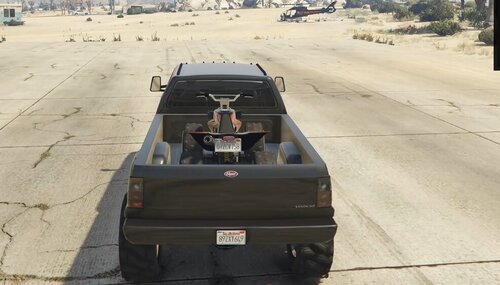
1 Screenshot

Police Presence is a lightweight realism plugin for LSPDFR that makes nearby civilian traffic react to the presence of an on-duty police officer.

Instead of modifying GTA V's traffic AI or forcing scripted behaviour, the plugin applies subtle speed and driving adjustments to nearby civilian vehicles, creating a more natural feeling of police presence during patrols.

Civilian drivers react according to a configurable compliance percentage, ensuring that traffic does not behave identically and preserving variety and realism.

Features

  • Automatic activation when going on duty.

  • Automatic deactivation when going off duty.

  • Configurable police presence radius.

  • Configurable driver compliance percentage.

  • Configurable maximum traffic speed.

  • Progressive speed reduction.

  • Reduced driving aggression.

  • Original vehicle speeds restored automatically.

  • Lightweight and performance-friendly.

  • Fully configurable through PolicePresence.ini.


Short Description

A lightweight LSPDFR plugin that makes nearby civilian traffic react realistically to the presence of an on-duty police officer.

AI disclosure

The author has disclosed that AI tools were used in creating the following aspects of this file:

  • Description
  • Images

User Feedback

Recommended Comments

sergeant nolan

Members

I dont really understand how this plugin works, whats the difference to realistic traffic ai or whats better

Ziter

Members Author

9 hours ago, sergeant nolan said:

I dont really understand how this plugin works, whats the difference to realistic traffic ai or whats better

They are actually quite different, despite both affecting traffic.

Police Presence does not replace or rewrite GTA V's traffic AI. Instead, it simulates the effect of an on-duty police officer being nearby.

When you are on duty, nearby civilian drivers have a configurable chance of becoming more cautious. Those drivers reduce their speed and drive less aggressively while they remain within the configured police-presence radius. Once they leave the area, their original driving behaviour is restored.

Realistic Traffic AI, on the other hand, focuses on changing the general behaviour of traffic across the game by modifying how AI vehicles drive in many different situations.

So they have different goals:

  • Police Presence → Simulates how civilian drivers react to a nearby police officer.

  • Realistic Traffic AI → Changes the overall behaviour of GTA V traffic.

Which one is "better" depends on what you're looking for. If you want traffic to behave more cautiously specifically around police vehicles, Police Presence was designed for that purpose.

Vagneto

Members

I'll give it a try, and thanks for sharing.

0pheIia

Members

(edited)

Can you make an xml where the user can add there unmarked / undercover vehicles? That way those vehicles are exempt from this plugin or something similar.

Later Note: Is there anyway to make the vehicles recognize that their coming up too a stop sign? that way vehicles no longer drive straight through / fail to come to a complete stop.

Edited by 0pheIia

Ziter

Members Author

(edited)

4 hours ago, 0pheIia said:

¿Podrías crear un archivo XML donde el usuario pueda añadir sus vehículos sin distintivos o encubiertos? De esa forma, esos vehículos quedarían exentos de este complemento o de algo similar.

Nota posterior: ¿Existe alguna forma de que los vehículos reconozcan que se acercan a una señal de stop? De esa manera, los vehículos ya no la cruzarían sin detenerse por completo.

Thank you for the suggestions.

An XML configuration file for excluded vehicle models is technically possible and fits the purpose of Police Presence. It could allow users to add unmarked, undercover or other custom police vehicles that should not be affected by the plugin. I will consider this for a future update.

Stop-sign recognition is much more complex. GTA V does not provide a simple, reliable way for a lightweight plugin to identify every stop sign and determine which traffic lane or vehicle should obey it. Implementing that properly would require significantly more traffic and intersection control, which is closer to a complete traffic-AI modification than the intended scope of Police Presence.

For that reason, stop-sign behaviour is not currently planned, as I want to keep the plugin focused, lightweight and compatible with the game’s existing traffic system.

Edited by Ziter

Create an account or sign in to comment

Account

Navigation

Search

Search

Configure browser push notifications

Chrome (Android)
  1. Tap the lock icon next to the address bar.
  2. Tap Permissions → Notifications.
  3. Adjust your preference.
Chrome (Desktop)
  1. Click the padlock icon in the address bar.
  2. Select Site settings.
  3. Find Notifications and adjust your preference.