Skip to content
View in the app

A better way to browse. Learn more.

LCPDFR.com

A full-screen app on your home screen with push notifications, badges and more.

To install this app on iOS and iPadOS
  1. Tap the Share icon in Safari
  2. Scroll the menu and tap Add to Home Screen.
  3. Tap Add in the top-right corner.
To install this app on Android
  1. Tap the 3-dot menu (⋮) in the top-right corner of the browser.
  2. Tap Add to Home screen or Install app.
  3. Confirm by tapping Install.

INTENSE EFFECT (SFX) 1.0.8

(1 review)

1 Screenshot

INTENSE EFFECT

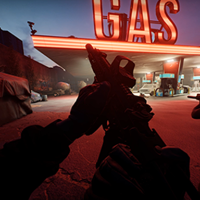
Adds a cinematic vignette effect that reacts dynamically to combat situations, bringing a new level of intensity and immersion to GTA V.

The vignette pulses with every shot you fire, darkening the edges of the screen to simulate the adrenaline and stress of a firefight. When enemies are shooting nearby — even if you're behind cover — the effect still triggers, capturing that tense feeling of being pinned down under heavy fire.

Features:

  • Vignette pulses on every shot fired by the player

  • Reacts to nearby enemy gunfire even through walls and cover

  • Separate intensity levels for direct threats vs nearby shooting

  • Smooth fade out between shots

  • Fully cleans up on unload — no stuck effects

  • (new) Sound Effects when enemies miss bullets around the player

Requirements:

  • RagePluginHook

  • NAudio

Mod recommended to use with:

  • Immersive Effects

Installation: Drop IntenseEffect.dll into your Grand Theft Auto V/plugins/ folder and launch the game with RagePluginHook.

Edited by xDuvii

What's New in Version 1.0.8

Released

IntenseEffect v1.0.8 — Changelog
NEW: Hearing stun (ear ring)
  • A loud, unprotected gunshot fired close to you (pistol ~1.5m, rifle/shotgun ~4m) stuns your hearing: an instant ear ring plus muffled game audio.

  • Shock → recovery → focus: the ring holds at full for 2.5s, then smoothly fades out over 7s as your character regains awareness. Further gunfire doesn't extend it.

  • After recovering you stay focused (auditory exclusion): no new stun until things have been calm for 45 seconds.

  • Loudness depends on distance (real inverse-distance falloff) and weapon type. Suppressed weapons barely affect you; shotguns, snipers and heavy weapons hit hardest.

  • Triggered by partners and enemies alike. Your own weapon does not stun you.

  • Smooth fade-out with no audible cut at the end.

  • Uses ring.wav (looped from its steady middle section, normalized).

NEW: Hearing muffle
  • While stunned, all game audio (gunfire, sirens, voices, traffic) goes muffled, and clears as the ring fades.

NEW: Distortion blur
  • Enemy bullets passing within 5m of you blur the screen with a small camera jolt.

  • Partners firing next to you also cause blur/jolt, scaled by distance and weapon.

  • The blur stacks with repeated near misses and fades out on its own.

NEW: Knockdown fade
  • A punch, gunshot, vehicle impact or any damage that knocks you into ragdoll fades the screen to near black. It stays dark while you're down and fades back in as you get up.

  • Ragdolls without damage (tripping, light bumps) don't trigger it.

IMPROVED: Whiz / crack
  • Fixed enemies not being detected (hostile peds with no relationship set[255] are now recognized), so whiz/crack sounds play correctly.

  • Partners (cops, SWAT, army, group members) are never treated as enemies, so friendly fire no longer triggers whiz, crack or blur.


Short Description

INTENSE EFFECT, CINEMATIC VIGNETTE EFFECT

User Feedback

Recommended Comments

Michael21107

Members

3 hours ago, xDuvii said:

Installation: Drop IntenseEffect.dll into your Grand Theft Auto V/plugins/ folder and launch the game with RagePluginHook.

Unless you have RPH set to load all plugins, you also need to set this one to load on startup or load it manually afterwards.

dirkasdiaper

Members

Plugin makes my screen uncontrollably flicker everytime i turn els on for some reason. Other than that pretty good mod. Makes the game more immersive

xDuvii

Members Author

7 hours ago, dirkasdiaper said:

Plugin makes my screen uncontrollably flicker everytime i turn els on for some reason. Other than that pretty good mod. Makes the game more immersive

Thanks for that info, i'll check that out and see if i can come with any fix.

xDuvii

Members Author

(edited)

11 hours ago, dirkasdiaper said:

Plugin makes my screen uncontrollably flicker everytime i turn els on for some reason. Other than that pretty good mod. Makes the game more immersive

I checked it and everything looks fine with it from my end, so it's not the plugin. what kind of flickering are you seeing? if it's a blur effect on the top of the screen, i'll address that in the next update.

Edited by xDuvii

dirkasdiaper

Members

5 hours ago, xDuvii said:

I checked it and everything looks fine with it from my end, so it's not the plugin. what kind of flickering are you seeing? if it's a blur effect on the top of the screen, i'll address that in the next update.

Same flickering that activates when i shoot my weapon. From my understanding it seems to the conflicting with custom visualsettings config, more accurately with brighter emergency lights customization.

5 minutes ago, dirkasdiaper said:

Same flickering that activates when i shoot my weapon. From my understanding it seems to the conflicting with custom visualsettings config, more accurately with brighter emergency lights customization.

xDuvii

Members Author

sorry to tell you but you might have something else running beside my mod. I have quantv and extreme ELS and don't have anything like that.

15 minutes ago, dirkasdiaper said:

Same flickering that activates when i shoot my weapon. From my understanding it seems to the conflicting with custom visualsettings config, more accurately with brighter emergency lights customization.

i will check and get back to you if i do.

2 minutes ago, xDuvii said:

are you using any kind of vignette effect outside of the mod?

i will check and get back to you if i do.

17 minutes ago, xDuvii said:

are you using any kind of vignette effect outside of the mod?

update: i have no vignette on problem still happening, and using the most basic quantv preset with no effects still has the problem

xDuvii

Members Author

3 minutes ago, lspdfrplayer69420 said:

i will check and get back to you if i do.

i will check and get back to you if i do.

Just now, lspdfrplayer69420 said:

update: i have no vignette on problem still happening, and using the most basic quantv preset with no effects still has the problem

ok, I just tested and it does happen in my end but less noticible. thanks i'm going to work on that.

dirkasdiaper

Members

Its weird cuz its not just this mod but other mods like bodycam axon has this flickering problem. Almost as if everytime i configure with my plugins file this happens; ever since i downloaded the paid quant v this has been happening (could be a coincidence, but this is just from my experience so far)

xDuvii

Members Author

1 hour ago, dirkasdiaper said:

Its weird cuz its not just this mod but other mods like bodycam axon has this flickering problem. Almost as if everytime i configure with my plugins file this happens; ever since i downloaded the paid quant v this has been happening (could be a coincidence, but this is just from my experience so far)

The problem is because QuantV has modified timecycle file, which mess with the plugins for some reason. i'd to improvise by replacing the timecycle code to adding a box with bunch of layers on top of it to make the vignette feeling look almost the same. it's either that or make the mod disable when emergency lights are on which isn't what I wanted.

(edited)

UPDATE: i have found that putting emergency lights preset in quant V to default then turning all the settings up make the weird grey flashing go away with lights on. the bright and very bright setting gave me problems

UPDATE: problem still occurs

Edited by lspdfrplayer69420

Anyway to prevent this plugin from spamming the Rage log?

xDuvii

Members Author

16 hours ago, JM Modifications said:

Anyway to prevent this plugin from spamming the Rage log?

I uploaded the file again it shouldn't show anymore

BryGoaty

Members

thank you so much

Create an account or sign in to comment

Account

Navigation

Search

Search

Configure browser push notifications

Chrome (Android)
  1. Tap the lock icon next to the address bar.
  2. Tap Permissions → Notifications.
  3. Adjust your preference.
Chrome (Desktop)
  1. Click the padlock icon in the address bar.
  2. Select Site settings.
  3. Find Notifications and adjust your preference.