
Skip to content
View in the app

A better way to browse. Learn more.

LCPDFR.com

A full-screen app on your home screen with push notifications, badges and more.

To install this app on iOS and iPadOS
  1. Tap the Share icon in Safari
  2. Scroll the menu and tap Add to Home Screen.
  3. Tap Add in the top-right corner.
To install this app on Android
  1. Tap the 3-dot menu (⋮) in the top-right corner of the browser.
  2. Tap Add to Home screen or Install app.
  3. Confirm by tapping Install.

4 Screenshots

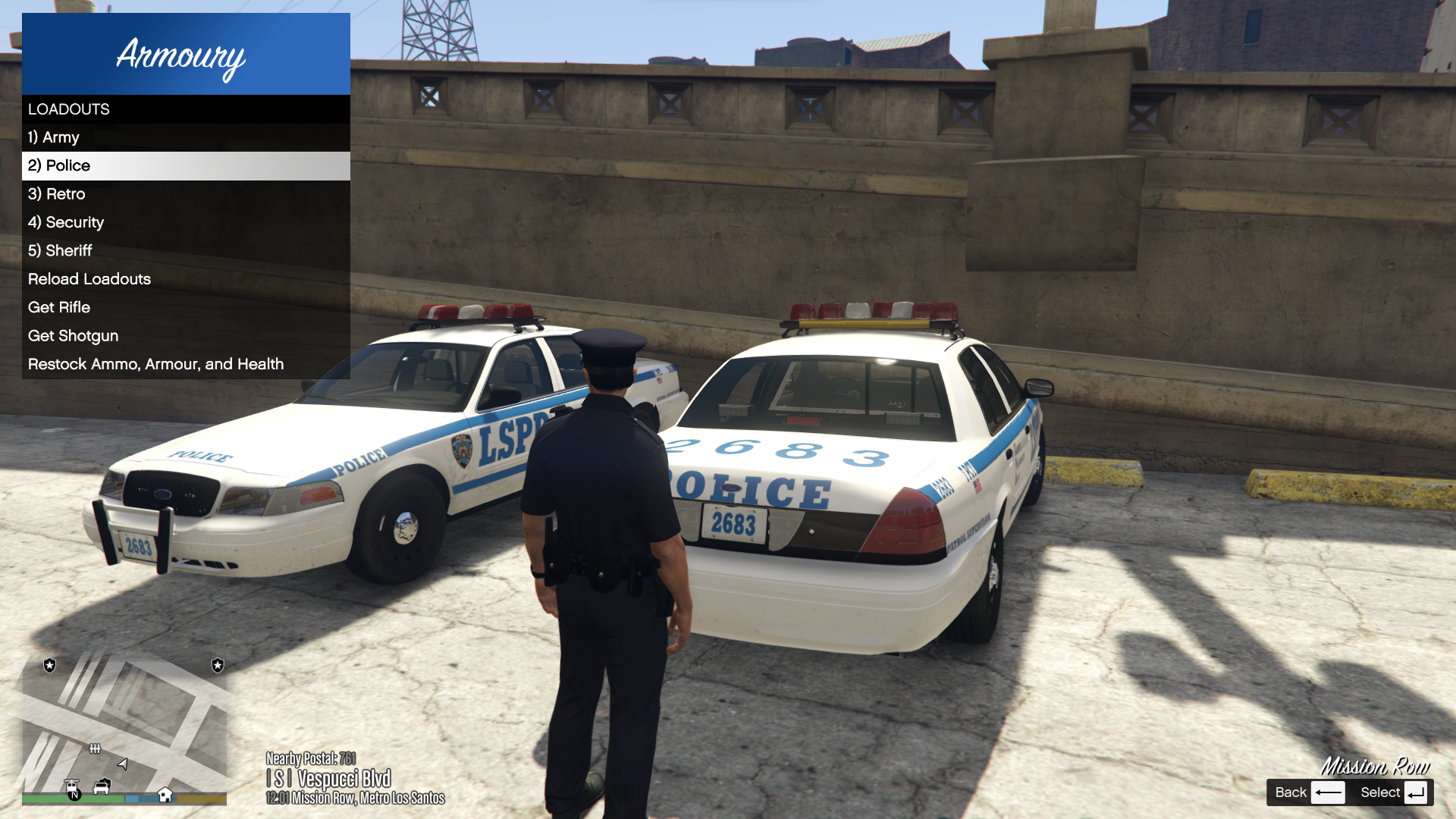
Armoury

This plugin was inspired by the Realistic Weapon System in BejoIjo's Stop the Ped.


Armoury allows the player to define custom loadouts each in their own file. These loadouts are accessible and reloadable through an in-game LemonUI menu.


Please note, in order to use the loadouts feature of Armoury, you must be near or inside a Police vehicle.


Please leave any suggestions in the comments, I'd love to make this mod the best that it can be!


Armoury is open source! You can find the public GitHub repo here: https://github.com/SteveOhByte/Armoury


I recommend installing UpdateBuddy to easily install all future updates of Armoury!


F.A.Q.

   - Q: Does this work with add-on weapons?

      - A: Yes, however due to how add-ons are handled by the game, they cannot be present in a default loadout.

   - Q: How do I edit the .lc files?

      - A: LiteConfig or .lc files are simple text files, you can edit with any text editor such as Notepad.

   - Q: Can this manage AI Loadouts?

      - A: No, Armoury is strictly a player loadout management tool.

   - Q: How do I give weapons specific tints?

      - A: Weapon tints are defined similarly to weapon components, and there is an example in the Riot.lc file. You can provide either a tint index (a number), or one of the following strings to apply a tint to any weapon:

Spoiler

For regular weapons:

BLACK

GREEN

GOLD

PINK

ARMY

LSPD

ORANGE

PLATINUM


For mk2 weapons:

BLACK

CLASSIC_GRAY

CLASSIC_TWO_TONE

CLASSIC_WHITE

CLASSIC_BEIGE

CLASSIC_GREEN

CLASSIC_BLUE

CLASSIC_EARTH

CLASSIC_BROWN_AND_BLACK

RED_CONTRAST

BLUE_CONTRAST

YELLOW_CONTRAST

ORANGE_CONTRAST

BOLD_PINK
BOLD_PURPLE_AND_YELLOW
BOLD_ORANGE
BOLD_GREEN_AND_PURPLE
BOLD_RED_FEATURES
BOLD_GREEN_FEATURES
BOLD_CYAN_FEATURES
BOLD_YELLOW_FEATURES
BOLD_RED_AND_WHITE
BOLD_BLUE_AND_WHITE
METALLIC_GOLD
METALLIC_PLATINUM
METALLIC_GRAY_AND_LILAC
METALLIC_PURPLE_AND_LIME
METALLIC_RED
METALLIC_GREEN
METALLIC_BLUE
METALLIC_WHITE_AND_AQUA
METALLIC_RED_AND_YELLOW


Edited by SteveOhByte
Tints guide

What's New in Version 1.1.6

Released

- Allowed armour equipment field to be a true/false value OR a number from 0 to 100


Short Description

Easy loadout management!

User Feedback

Recommended Comments

Armouredivision

Members

6 hours ago, SteveOhByte said:

Could you explain a bit more what you mean by that?

In the main config file, there is already a "Default Loadout:" field, which will automatically give you that loadout when you go on duty.

I had renamed the default file. Sorry.

Dodo McGee

Members

(edited)

Hello
Having trouble getting an addon weapon to work. The addon works fine by itself, but when I try and retrieve it from the armoury nothing happens.
The addon I'm trying to load is WEAPON_LBD.
Any ideas what I'm doing wrong?
Thanks
Could contain: text, screenshot, font, number
(EDIT: As you can see I have two other addon weapons added, which are both working fine)

***FIXED*** - I'm dumb, I forgot to add the field for ammo

Edited by Dodo McGee

SteveOhByte

Insiders Author

4 hours ago, Dodo McGee said:

Hello
Having trouble getting an addon weapon to work. The addon works fine by itself, but when I try and retrieve it from the armoury nothing happens.
The addon I'm trying to load is WEAPON_LBD.
Any ideas what I'm doing wrong?
Thanks
Could contain: text, screenshot, font, number
(EDIT: As you can see I have two other addon weapons added, which are both working fine)

***FIXED*** - I'm dumb, I forgot to add the field for ammo

Thanks for making a note, actually!

I'll add in the next update a sort of default ammo amount, so that forgetting doesn't just break the whole loadout.

Flas4hPT

Members

(edited)

Good mod

Edited by Flas4hPT

LongQu

Members

Hey bud,


The updates been great and plugin has been working no issues.


I found that the opening & closing animation can be quite long and was wondering if you could update the trunk animations, I use Trunk Control in conjunction with this mod and I found the trunk control animations to be quicker, mostly cause it breaks up the opening & closing animations into 2 seperate


Not sure if its simple enough here, but would be great if you could


1. Press the restock or grab weapon key

2. Trunk opens, animation plays to grab equip, then trunk just remains open.

3. Press the keys again to play a quick animation and close the trunk, and have it just stand there rather than play the walk away from the trunk animation.


Not sure if you get my drift.


Again great plugin and love the customization options with it.

SteveOhByte

Insiders Author

On 7/31/2024 at 11:34 PM, LongQu said:

Hey bud,


The updates been great and plugin has been working no issues.


I found that the opening & closing animation can be quite long and was wondering if you could update the trunk animations, I use Trunk Control in conjunction with this mod and I found the trunk control animations to be quicker, mostly cause it breaks up the opening & closing animations into 2 seperate


Not sure if its simple enough here, but would be great if you could


1. Press the restock or grab weapon key

2. Trunk opens, animation plays to grab equip, then trunk just remains open.

3. Press the keys again to play a quick animation and close the trunk, and have it just stand there rather than play the walk away from the trunk animation.


Not sure if you get my drift.


Again great plugin and love the customization options with it.

Good ideas! I'll look into getting these implemented as new options for the next update soon 🙂 

Bear16

Members

This could be my own issue, but I've tried backwards and forwards to get the weapon_carbinerifle to load with zero success.


I've tried using your previous version, your current version, with/without Fast Draw script, but nothing seems to load it in my inventory.


Without Armoury, it loads fine via STP for example.


My other weapons in Armoury are loading fine though, combat pistol, baton, stun gun.


This is what I currently have in my loadout:


Equipment: weapon_combatpistol, weapon_stungun, weapon_pumpshotgun, weapon_carbinerifle, weapon_nightstick, weapon_flashlight, weapon_flare

weapon_combatpistol_ammo: 48
weapon_combatpistol_components: COMPONENT_AT_PI_FLSH

weapon_pumpshotgun_ammo: 32
weapon_pumpshotgun_components: COMPONENT_AT_AR_FLSH

weapon_carbinerifle_ammo: 150
weapon_carbinerifle_components: COMPONENT_AT_AR_FLSH, COMPONENT_AT_SCOPE_MEDIUM

Rifle: weapon_carbinerifle
Shotgun: weapon_pumpshotgun

Armour: True
Medkit: True
Fire Extinguisher: True


Any help would be appreciated.  Thanks!

SteveOhByte

Insiders Author

12 hours ago, Bear16 said:

This could be my own issue, but I've tried backwards and forwards to get the weapon_carbinerifle to load with zero success.


I've tried using your previous version, your current version, with/without Fast Draw script, but nothing seems to load it in my inventory.


Without Armoury, it loads fine via STP for example.


My other weapons in Armoury are loading fine though, combat pistol, baton, stun gun.


This is what I currently have in my loadout:


Equipment: weapon_combatpistol, weapon_stungun, weapon_pumpshotgun, weapon_carbinerifle, weapon_nightstick, weapon_flashlight, weapon_flare

weapon_combatpistol_ammo: 48
weapon_combatpistol_components: COMPONENT_AT_PI_FLSH

weapon_pumpshotgun_ammo: 32
weapon_pumpshotgun_components: COMPONENT_AT_AR_FLSH

weapon_carbinerifle_ammo: 150
weapon_carbinerifle_components: COMPONENT_AT_AR_FLSH, COMPONENT_AT_SCOPE_MEDIUM

Rifle: weapon_carbinerifle
Shotgun: weapon_pumpshotgun

Armour: True
Medkit: True
Fire Extinguisher: True


Any help would be appreciated.  Thanks!

Hi! This is a strange one... Does your pump shotgun work correctly from this loadout?

You can send me a direct message, could you attach the whole loadout's .lc file in a message to me so that I can test it in my own game?

Thanks!

Bear16

Members

9 hours ago, SteveOhByte said:

Hi! This is a strange one... Does your pump shotgun work correctly from this loadout?

You can send me a direct message, could you attach the whole loadout's .lc file in a message to me so that I can test it in my own game?

Thanks!

So this was my own issue not realizing that in order for the weapon to spawn in my inventory, I just need to take out that line within the config.  


Thanks again @SteveOhByte, great plugin!

1 hour ago, Bear16 said:

So this was my own issue not realizing that in order for the weapon to spawn in my inventory, I just need to take out that line within the config.  


Thanks again @SteveOhByte, great plugin!

Would you mind sharing what line you removed?  Genuinely interested!

Bear16

Members

On 8/12/2024 at 8:26 PM, GTA 5 Jedi Master said:

Would you mind sharing what line you removed?  Genuinely interested!

Probably just easier if I copy and paste what @SteveOhByte clarified for me.  Basically it's the Armoury scripts way of kinda still having "realistic weapons" feature, or at least that is how it seems to me after having the clarity now of how it works.


----------------------------------------------------------------------------------------------------------------------------------


The mod allows you to have it automatically in your inventory, OR have to select it manually.


If you want it to always be there, then in the loadout you just don't make it under the rifle option.


For example, in this file you have to select "Get Rifle" in order to get it.

Equipment: weapon_combatpistol, weapon_stungun, weapon_pumpshotgun, weapon_pumpshotgun_mk2, weapon_carbinerifle, weapon_nightstick, weapon_flashlight, weapon_flare

weapon_combatpistol_ammo: 48
weapon_combatpistol_components: COMPONENT_AT_PI_FLSH

weapon_pumpshotgun_ammo: 32
weapon_pumpshotgun_components: COMPONENT_AT_AR_FLSH

weapon_pumpshotgun_mk2_ammo: 32

weapon_carbinerifle_ammo: 150
weapon_carbinerifle_components: COMPONENT_AT_AR_FLSH, COMPONENT_AT_SCOPE_MEDIUM

Rifle: weapon_carbinerifle
Shotgun: weapon_pumpshotgun
Less Lethal: weapon_pumpshotgun_mk2

Less Lethal Title: Beanbag Gun

Armour: True
Medkit: True
Fire Extinguisher: True


But in this file, where I've removed the "Rifle: weapon_carbinerifle" slot, it will automatically be added to your inventory.
 

Equipment: weapon_combatpistol, weapon_stungun, weapon_pumpshotgun, weapon_pumpshotgun_mk2, weapon_carbinerifle, weapon_nightstick, weapon_flashlight, weapon_flare

weapon_combatpistol_ammo: 48
weapon_combatpistol_components: COMPONENT_AT_PI_FLSH

weapon_pumpshotgun_ammo: 32
weapon_pumpshotgun_components: COMPONENT_AT_AR_FLSH

weapon_pumpshotgun_mk2_ammo: 32

weapon_carbinerifle_ammo: 150
weapon_carbinerifle_components: COMPONENT_AT_AR_FLSH, COMPONENT_AT_SCOPE_MEDIUM

Shotgun: weapon_pumpshotgun
Less Lethal: weapon_pumpshotgun_mk2

Less Lethal Title: Beanbag Gun

Armour: True
Medkit: True
Fire Extinguisher: True

1 hour ago, Bear16 said:

Probably just easier if I copy and paste what @SteveOhByte clarified for me.  Basically it's the Armour


Crazy shit!  Thank you for sharing that info.  Gonna try it out shortly.  

Feddepower

Members

Great plugin, I was wondering i f it's possible to add tints to different guns. For example I want to use the green stun gun for the LSPD but yellow for the sheriffs. Right now I haven't found a way but that could very well be my bad. And otherwise you can try to implement it?

SteveOhByte

Insiders Author

4 hours ago, Feddepower said:

Great plugin, I was wondering i f it's possible to add tints to different guns. For example I want to use the green stun gun for the LSPD but yellow for the sheriffs. Right now I haven't found a way but that could very well be my bad. And otherwise you can try to implement it?

Per-weapon tints have been added in the latest update! Info on how to use them is in the description, or check out the example Riot.lc loadout included.

Kuboszka

Members

(edited)

Hello,


Overall this mod is fantastic ^^ Just keep in mind of the keyboard settings f.e. "Control", not "LControlKey" because it wont work

Edited by Kuboszka

Armouredivision

Members

(edited)

I found an issue. I use the "Less Lethal" slot for Lidar Gun (Vintage Pistol). And Equipping it then storing it back in the vehicle removes ALL the Pistol ammo from my loadout.


Here is the config


Equipment: weapon_pistol, weapon_stungun, weapon_pumpshotgun, weapon_vintagepistol, weapon_carbinerifle, weapon_nightstick, weapon_flashlight

weapon_pistol_ammo: 60
weapon_pistol_components: COMPONENT_AT_PI_FLSH, COMPONENT_PISTOL_VARMOD_LUXE

weapon_pumpshotgun_ammo: 16
weapon_pumpshotgun_components: COMPONENT_AT_AR_FLSH, COMPONENT_PUMPSHOTGUN_VARMOD_LOWRIDER

weapon_vintagepistol_ammo: 32

weapon_carbinerifle_ammo: 60
weapon_carbinerifle_components: COMPONENT_AT_AR_FLSH, COMPONENT_AT_SCOPE_MEDIUM, COMPONENT_CARBINERIFLE_VARMOD_LUXE

Rifle: weapon_carbinerifle
Shotgun: weapon_pumpshotgun
Less Lethal: weapon_vintagepistol

Less Lethal Title: ~p~Lidar Gun

Armour: True
Medkit: True
Fire Extinguisher: True


Edited by Armouredivision

SteveOhByte

Insiders Author

On 10/1/2024 at 4:07 AM, Armouredivision said:

I found an issue. I use the "Less Lethal" slot for Lidar Gun (Vintage Pistol). And Equipping it then storing it back in the vehicle removes ALL the Pistol ammo from my loadout.


Here is the config


Equipment: weapon_pistol, weapon_stungun, weapon_pumpshotgun, weapon_vintagepistol, weapon_carbinerifle, weapon_nightstick, weapon_flashlight

weapon_pistol_ammo: 60
weapon_pistol_components: COMPONENT_AT_PI_FLSH, COMPONENT_PISTOL_VARMOD_LUXE

weapon_pumpshotgun_ammo: 16
weapon_pumpshotgun_components: COMPONENT_AT_AR_FLSH, COMPONENT_PUMPSHOTGUN_VARMOD_LOWRIDER

weapon_vintagepistol_ammo: 32

weapon_carbinerifle_ammo: 60
weapon_carbinerifle_components: COMPONENT_AT_AR_FLSH, COMPONENT_AT_SCOPE_MEDIUM, COMPONENT_CARBINERIFLE_VARMOD_LUXE

Rifle: weapon_carbinerifle
Shotgun: weapon_pumpshotgun
Less Lethal: weapon_vintagepistol

Less Lethal Title: ~p~Lidar Gun

Armour: True
Medkit: True
Fire Extinguisher: True


Thanks for letting me know!

I'm pretty swamped at the moment, so it may be a while before I can put together a fix for this, sorry!

beandotmp3

Members

Hey, awesome mod and have been using it for a while, but I have a question.

If I add a MK2 weapon to my loadout, it doesn't have any ammo. Is there something I'm missing? Here's the loadout: 


Equipment: weapon_combatpistol, weapon_stungun, weapon_pumpshotgun, weapon_carbinerifle_mk2, weapon_nightstick, weapon_flashlight, weapon_flare

weapon_combatpistol_ammo: 48
weapon_combatpistol_components: COMPONENT_AT_PI_FLSH

weapon_pumpshotgun_ammo: 32
weapon_pumpshotgun_components: COMPONENT_AT_AR_FLSH

weapon_carbinerifle_mk2_ammo: 150
weapon_carbinerifle_mk2_components: COMPONENT_CARBINERIFLE_MK2_CLIP_ARMORPIERCING, COMPONENT_AT_AR_AFGRIP_02, COMPONENT_AT_AR_FLSH, COMPONENT_AT_SCOPE_MACRO_MK2, COMPONENT_AT_MUZZLE_06, COMPONENT_AT_CR_BARREL_02

Rifle: weapon_carbinerifle_mk2
Shotgun: weapon_pumpshotgun

Armour: True
Medkit: True
Fire Extinguisher: True

SteveOhByte

Insiders Author

On 12/29/2024 at 1:06 AM, beandotmp3 said:

Hey, awesome mod and have been using it for a while, but I have a question.

If I add a MK2 weapon to my loadout, it doesn't have any ammo. Is there something I'm missing? Here's the loadout: 


Equipment: weapon_combatpistol, weapon_stungun, weapon_pumpshotgun, weapon_carbinerifle_mk2, weapon_nightstick, weapon_flashlight, weapon_flare

weapon_combatpistol_ammo: 48
weapon_combatpistol_components: COMPONENT_AT_PI_FLSH

weapon_pumpshotgun_ammo: 32
weapon_pumpshotgun_components: COMPONENT_AT_AR_FLSH

weapon_carbinerifle_mk2_ammo: 150
weapon_carbinerifle_mk2_components: COMPONENT_CARBINERIFLE_MK2_CLIP_ARMORPIERCING, COMPONENT_AT_AR_AFGRIP_02, COMPONENT_AT_AR_FLSH, COMPONENT_AT_SCOPE_MACRO_MK2, COMPONENT_AT_MUZZLE_06, COMPONENT_AT_CR_BARREL_02

Rifle: weapon_carbinerifle_mk2
Shotgun: weapon_pumpshotgun

Armour: True
Medkit: True
Fire Extinguisher: True

Thanks for letting me know about this issue!

Turns out mk2 weapons can have ammo fine, but not special ammo (such as the piercing you've tried there). I'm looking into how to fix this, but have so far come up empty. I'll update if I can work out a method of giving special ammo.

On 10/1/2024 at 4:07 AM, Armouredivision said:

I found an issue. I use the "Less Lethal" slot for Lidar Gun (Vintage Pistol). And Equipping it then storing it back in the vehicle removes ALL the Pistol ammo from my loadout.


Here is the config


Equipment: weapon_pistol, weapon_stungun, weapon_pumpshotgun, weapon_vintagepistol, weapon_carbinerifle, weapon_nightstick, weapon_flashlight

weapon_pistol_ammo: 60
weapon_pistol_components: COMPONENT_AT_PI_FLSH, COMPONENT_PISTOL_VARMOD_LUXE

weapon_pumpshotgun_ammo: 16
weapon_pumpshotgun_components: COMPONENT_AT_AR_FLSH, COMPONENT_PUMPSHOTGUN_VARMOD_LOWRIDER

weapon_vintagepistol_ammo: 32

weapon_carbinerifle_ammo: 60
weapon_carbinerifle_components: COMPONENT_AT_AR_FLSH, COMPONENT_AT_SCOPE_MEDIUM, COMPONENT_CARBINERIFLE_VARMOD_LUXE

Rifle: weapon_carbinerifle
Shotgun: weapon_pumpshotgun
Less Lethal: weapon_vintagepistol

Less Lethal Title: ~p~Lidar Gun

Armour: True
Medkit: True
Fire Extinguisher: True


This issue has been fixed in the latest update 🙂

Mathox

Members

Is there a way to put armor stats from 0 to 100 ?

SteveOhByte

Insiders Author

On 2/24/2025 at 11:59 AM, Mathox said:

Is there a way to put armor stats from 0 to 100 ?

Thanks for the suggestion! Added this in version 1.1.6

JMA.50

Members

I have switched out the carbine rifle for the mk2 one. I added the correct components with them (see attached) but they will not appear in game. I just get the base gun only. Any help would be great. Also don't mind the less lethal weapon as I'm working on my game.


Equipment: weapon_combatpistol, weapon_stungun, weapon_pumpshotgun_mk2, weapon_carbinerifle_mk2, weapon_nightstick, weapon_flashlight, weapon_flare, weapon_ball


weapon_combatpistol_ammo: 250
weapon_combatpistol_components: COMPONENT_AT_PI_FLSH


weapon_pumpshotgun_mk2_ammo: 250


weapon_carbinerifle_mk2_ammo: 250
weapon_carbinerifle_components: COMPONENT_AT_AR_AFGRIP_02, COMPONENT_AT_AR_FLSH, COMPONENT_AT_SIGHTS, COMPONENT_CARBINERIFLE_MK2_CLIP_02


Rifle: weapon_carbinerifle_mk2
Shotgun: weapon_pumpshotgun_mk2
Less Lethal: weapon_ball


Less Lethal Title: None


Armour: True
Medkit: True
Fire Extinguisher: True

SteveOhByte

Insiders Author

9 hours ago, JMA.50 said:

I have switched out the carbine rifle for the mk2 one. I added the correct components with them (see attached) but they will not appear in game. I just get the base gun only. Any help would be great. Also don't mind the less lethal weapon as I'm working on my game.


Equipment: weapon_combatpistol, weapon_stungun, weapon_pumpshotgun_mk2, weapon_carbinerifle_mk2, weapon_nightstick, weapon_flashlight, weapon_flare, weapon_ball


weapon_combatpistol_ammo: 250
weapon_combatpistol_components: COMPONENT_AT_PI_FLSH


weapon_pumpshotgun_mk2_ammo: 250


weapon_carbinerifle_mk2_ammo: 250
weapon_carbinerifle_components: COMPONENT_AT_AR_AFGRIP_02, COMPONENT_AT_AR_FLSH, COMPONENT_AT_SIGHTS, COMPONENT_CARBINERIFLE_MK2_CLIP_02


Rifle: weapon_carbinerifle_mk2
Shotgun: weapon_pumpshotgun_mk2
Less Lethal: weapon_ball


Less Lethal Title: None


Armour: True
Medkit: True
Fire Extinguisher: True

It looks like you may just have a typo for the components, you have a weapon_carbinerifle_mk2, but the components are just set for a weapon_carbinerifle

JMA.50

Members

1 hour ago, SteveOhByte said:

It looks like you may just have a typo for the components, you have a weapon_carbinerifle_mk2, but the components are just set for a weapon_carbinerifle

Do you know where I can find the attachment list? all the websites I see have those attachment names.

SteveOhByte

Insiders Author

5 hours ago, JMA.50 said:

Do you know where I can find the attachment list? all the websites I see have those attachment names.

You had written "weapon_carbinerifle_components: COMPONENT_AT_AR_AFGRIP_02, COMPONENT_AT_AR_FLSH, COMPONENT_AT_SIGHTS, COMPONENT_CARBINERIFLE_MK2_CLIP_02" when it should have been "weapon_carbinerifle_mk2_components: COMPONENT_AT_AR_AFGRIP_02, COMPONENT_AT_AR_FLSH, COMPONENT_AT_SIGHTS, COMPONENT_CARBINERIFLE_MK2_CLIP_02"

Try using this corrected file:

Equipment: weapon_combatpistol, weapon_stungun, weapon_pumpshotgun_mk2, weapon_carbinerifle_mk2, weapon_nightstick, weapon_flashlight, weapon_flare, weapon_ball


weapon_combatpistol_ammo: 250
weapon_combatpistol_components: COMPONENT_AT_PI_FLSH


weapon_pumpshotgun_mk2_ammo: 250


weapon_carbinerifle_mk2_ammo: 250
weapon_carbinerifle_mk2_components: COMPONENT_AT_AR_AFGRIP_02, COMPONENT_AT_AR_FLSH, COMPONENT_AT_SIGHTS, COMPONENT_CARBINERIFLE_MK2_CLIP_02


Rifle: weapon_carbinerifle_mk2
Shotgun: weapon_pumpshotgun_mk2
Less Lethal: weapon_ball


Less Lethal Title: None


Armour: True
Medkit: True
Fire Extinguisher: True

Create an account or sign in to comment

Latest Mods

Account

Navigation

Search

Search

Configure browser push notifications

Chrome (Android)
  1. Tap the lock icon next to the address bar.
  2. Tap Permissions → Notifications.
  3. Adjust your preference.
Chrome (Desktop)
  1. Click the padlock icon in the address bar.
  2. Select Site settings.
  3. Find Notifications and adjust your preference.











