
Skip to content
View in the app

A better way to browse. Learn more.

LCPDFR.com

A full-screen app on your home screen with push notifications, badges and more.

To install this app on iOS and iPadOS
  1. Tap the Share icon in Safari
  2. Scroll the menu and tap Add to Home Screen.
  3. Tap Add in the top-right corner.
To install this app on Android
  1. Tap the 3-dot menu (⋮) in the top-right corner of the browser.
  2. Tap Add to Home screen or Install app.
  3. Confirm by tapping Install.

4 Screenshots

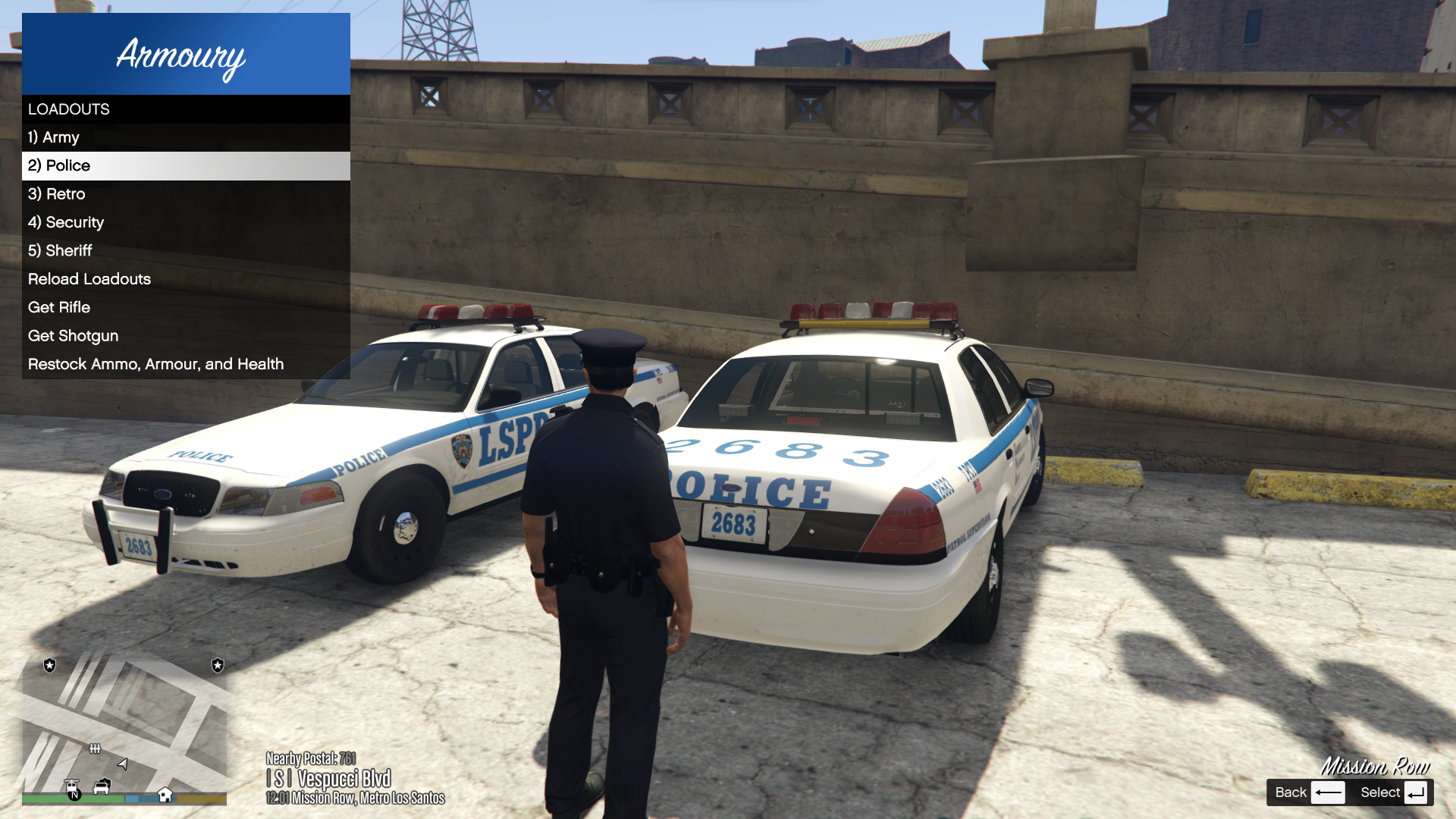
Armoury

This plugin was inspired by the Realistic Weapon System in BejoIjo's Stop the Ped.


Armoury allows the player to define custom loadouts each in their own file. These loadouts are accessible and reloadable through an in-game LemonUI menu.


Please note, in order to use the loadouts feature of Armoury, you must be near or inside a Police vehicle.


Please leave any suggestions in the comments, I'd love to make this mod the best that it can be!


Armoury is open source! You can find the public GitHub repo here: https://github.com/SteveOhByte/Armoury


I recommend installing UpdateBuddy to easily install all future updates of Armoury!


F.A.Q.

   - Q: Does this work with add-on weapons?

      - A: Yes, however due to how add-ons are handled by the game, they cannot be present in a default loadout.

   - Q: How do I edit the .lc files?

      - A: LiteConfig or .lc files are simple text files, you can edit with any text editor such as Notepad.

   - Q: Can this manage AI Loadouts?

      - A: No, Armoury is strictly a player loadout management tool.

   - Q: How do I give weapons specific tints?

      - A: Weapon tints are defined similarly to weapon components, and there is an example in the Riot.lc file. You can provide either a tint index (a number), or one of the following strings to apply a tint to any weapon:

Spoiler

For regular weapons:

BLACK

GREEN

GOLD

PINK

ARMY

LSPD

ORANGE

PLATINUM


For mk2 weapons:

BLACK

CLASSIC_GRAY

CLASSIC_TWO_TONE

CLASSIC_WHITE

CLASSIC_BEIGE

CLASSIC_GREEN

CLASSIC_BLUE

CLASSIC_EARTH

CLASSIC_BROWN_AND_BLACK

RED_CONTRAST

BLUE_CONTRAST

YELLOW_CONTRAST

ORANGE_CONTRAST

BOLD_PINK
BOLD_PURPLE_AND_YELLOW
BOLD_ORANGE
BOLD_GREEN_AND_PURPLE
BOLD_RED_FEATURES
BOLD_GREEN_FEATURES
BOLD_CYAN_FEATURES
BOLD_YELLOW_FEATURES
BOLD_RED_AND_WHITE
BOLD_BLUE_AND_WHITE
METALLIC_GOLD
METALLIC_PLATINUM
METALLIC_GRAY_AND_LILAC
METALLIC_PURPLE_AND_LIME
METALLIC_RED
METALLIC_GREEN
METALLIC_BLUE
METALLIC_WHITE_AND_AQUA
METALLIC_RED_AND_YELLOW


Edited by SteveOhByte
Tints guide

What's New in Version 1.1.6

Released

- Allowed armour equipment field to be a true/false value OR a number from 0 to 100


Short Description

Easy loadout management!

User Feedback

Recommended Comments

SteveOhByte

Insiders Author

2 hours ago, OfficerScept said:

Is there a limit of how many attachments we can have?

None I added, so if you're running into one, it's possible the base game has a limit. The attachments list simply tries to add each attachment to the weapon, but if they're incompatible, it would fail.

LongQu

Members

Hey man,


This plugin is working so effortlessly, been looking for something like this for ages, works with ADDON weapons, can add/modify loadouts whilst ingame without any issues

SteveOhByte

Insiders Author

15 minutes ago, LongQu said:

Hey man,


This plugin is working so effortlessly, been looking for something like this for ages, works with ADDON weapons, can add/modify loadouts whilst ingame without any issues

Thanks! I'm glad you like it.

That's exactly why I made it, I was wanting to use the STP feature but be able to switch loadouts, and decided to try and make it as smooth as possible. Thanks for trying it out!

cristian304

Members

The loading of weapon its work with the unit of backup or only player?? Its possibile add weapon or prop of the ems and fire?? Thanks 

Charlie686

Members

Hey SteveOhByte!

Before my comment, I just want to say it's great to see you back around.

As someone with a popular callout pack now, I want to lend my thanks to you for making your awesome tutorials which I remember watching quite some time ago! If you didn't know already, you've inspired a lot of people with them.


That aside, I was wondering if there is a reason you include your libraries in GTAV/Plugins/LSPDFR? Usually that directory is specifically reserved for the LSPDFR plugin .dll files themselves, and not others.

Common libraries tend to go in the GTAV folder. For example, LemonUI.RAGEPluginHook actually instructs users to install that file to the GTAV folder ("Copy all of the files from the RPH folder inside of the compressed file to the root of your GTA V installation directory.") whereas you've included it in the Plugins/LSPDFR directory.

Furthermore, other libraries such as NAudio.dll are actually used by other plugins - and installed into the GTAV folder. Moving these libraries to the GTAV folder would not require the user to have duplicates of the same file in different locations!


All the best & happy LSPDFR coding again!  :rolleyes:


SteveOhByte

Insiders Author

2 hours ago, Charlie686 said:

Hey SteveOhByte!

Before my comment, I just want to say it's great to see you back around.

As someone with a popular callout pack now, I want to lend my thanks to you for making your awesome tutorials which I remember watching quite some time ago! If you didn't know already, you've inspired a lot of people with them.


That aside, I was wondering if there is a reason you include your libraries in GTAV/Plugins/LSPDFR? Usually that directory is specifically reserved for the LSPDFR plugin .dll files themselves, and not others.

Common libraries tend to go in the GTAV folder. For example, LemonUI.RAGEPluginHook actually instructs users to install that file to the GTAV folder ("Copy all of the files from the RPH folder inside of the compressed file to the root of your GTA V installation directory.") whereas you've included it in the Plugins/LSPDFR directory.

Furthermore, other libraries such as NAudio.dll are actually used by other plugins - and installed into the GTAV folder. Moving these libraries to the GTAV folder would not require the user to have duplicates of the same file in different locations!


All the best & happy LSPDFR coding again!  :rolleyes:


Thanks so much for the comment! I'm not sure how "back" I am yet, starting with a small plugin like this one for now. I might have to make some updates to those tutorials if I can find the time.


Moving the commons to the root directory is a good idea, to be honest I hadn't really put much thought into it. Essentially, just had it all together because that's how it's built. I'll be making that change in the next update. Thanks for the suggestion, and I'm glad to see those old videos helped someone!


~ Cheers

On 1/28/2024 at 3:50 PM, cristian304 said:

The loading of weapon its work with the unit of backup or only player?? Its possibile add weapon or prop of the ems and fire?? Thanks 

Hi! I'm not sure I 100% understand the question, but I'll do my best.


If you're asking if this can work for AI, no. The menu provided only affects the player. If you want to edit how EMS and Fire arrive that would depend on how you summon them, maybe SpecialUnits.xml from UltimateBackup could help you out? My mod is only for the player, sorry.

Charlie686

Members

On 1/30/2024 at 1:35 PM, SteveOhByte said:

Thanks so much for the comment! I'm not sure how "back" I am yet, starting with a small plugin like this one for now. I might have to make some updates to those tutorials if I can find the time.


'starting' with a small plugin sounds like you have plenty left to do! :P

Thanks for taking my feedback onboard. Best!

LongQu

Members

Hey bud,


Been using the plugin and its great, effortless to setup diff loadouts and swap out on the fly.

A few questions/suggestions:

Would it be possible to add bindable hotkeys for the "Rifle", "Shotgun", "Restock/Armour/Health"? and is it possible to have the Fire extinguisher to be saved in the vehicle, so that its not always in inventory?


Probably some other things, but cant think of them atm

SteveOhByte

Insiders Author

On 2/27/2024 at 3:18 AM, LongQu said:

Hey bud,


Been using the plugin and its great, effortless to setup diff loadouts and swap out on the fly.

A few questions/suggestions:

Would it be possible to add bindable hotkeys for the "Rifle", "Shotgun", "Restock/Armour/Health"? and is it possible to have the Fire extinguisher to be saved in the vehicle, so that its not always in inventory?


Probably some other things, but cant think of them atm

Those are good ideas!
I'll be working on implementing them as soon as I find the time!

sirazzkick76

Members

i have the most updated LSPDFR and when I load up the game and go on duty it says armoury 1.0.5 is out of date. Any idea since this is the most recent version.

JohnC

Members

I'm unable to get this working with add-on weapons, am I doing something wrong?

Specifically I want a loadout with:


FN509 - 


And the collapsible baton - https://www.gta5-mods.com/weapons/prolaps-telescopic-baton-sp-fivem-add-on


I have attempted to change the Police.lc file to state:


Equipment: weapon_FN509MRDLELE, weapon_colbaton, weapon_stungun


But this causes a crash when I attempt to load LSPDFR and go on duty.  


SteveOhByte

Insiders Author

8 hours ago, JohnC said:

I'm unable to get this working with add-on weapons, am I doing something wrong?

Specifically I want a loadout with:


FN509 - 


And the collapsible baton - https://www.gta5-mods.com/weapons/prolaps-telescopic-baton-sp-fivem-add-on


I have attempted to change the Police.lc file to state:


Equipment: weapon_FN509MRDLELE, weapon_colbaton, weapon_stungun


But this causes a crash when I attempt to load LSPDFR and go on duty.  


It should work fine with add-on weapons. I just tried it out with the pistol you provided a link to, and it works. Are you sure your config file is correct? This is the one I have attached it to:


Equipment: WEAPON_FN509MRDLE, weapon_pumpshotgun, weapon_flashlight, weapon_flare, weapon_fireextinguisher

WEAPON_FN509MRDLE_ammo: 48

weapon_pumpshotgun_ammo: 32
weapon_pumpshotgun_components: COMPONENT_AT_AR_FLSH

Rifle: weapon_carbinerifle
Shotgun: weapon_pumpshotgun

Medkit: True


JohnC

Members

23 hours ago, SteveOhByte said:

It should work fine with add-on weapons. I just tried it out with the pistol you provided a link to, and it works. Are you sure your config file is correct? This is the one I have attached it to:


Equipment: WEAPON_FN509MRDLE, weapon_pumpshotgun, weapon_flashlight, weapon_flare, weapon_fireextinguisher

WEAPON_FN509MRDLE_ammo: 48

weapon_pumpshotgun_ammo: 32
weapon_pumpshotgun_components: COMPONENT_AT_AR_FLSH

Rifle: weapon_carbinerifle
Shotgun: weapon_pumpshotgun

Medkit: True


Thank you for your help, I managed to make it work.  If I tried to put add-on weapons in the default police loadout, that loads on start of LSPDFR, it crashed.  But this was easily solvable by making a custompatrol.lc and adding everything in there and switching to it when I'm in the police car.  

Thank you!  

BlueLine Vibes

Members

(edited)

@SteveOhByte  Just wanted to pop in and say thank you for your time creating this plugin.  Works great with addon weapons.  Was trying to give you a tip via PayPal link next to your download button, but getting this message This organization can't accept donations right now.  not sure if this is a lspdfr site issue or not.


I will try again soon. Thanks again.

Edited by BlueLine Vibes

SteveOhByte

Insiders Author

On 6/26/2024 at 1:10 PM, BlueLine Vibes said:

@SteveOhByte  Just wanted to pop in and say thank you for your time creating this plugin.  Works great with addon weapons.  Was trying to give you a tip via PayPal link next to your download button, but getting this message This organization can't accept donations right now.  not sure if this is a lspdfr site issue or not.


I will try again soon. Thanks again.

Thank you so much! I had no idea that one was broken, so thanks for letting me know, I believe it should be fixed now.

Please feel no pressure to donate! My mods are, and forever will be free 🙂

BlueLine Vibes

Members

(edited)

6 hours ago, SteveOhByte said:

Thank you so much! I had no idea that one was broken, so thanks for letting me know, I believe it should be fixed now.

Please feel no pressure to donate! My mods are, and forever will be free 🙂


Coffee is on me, thanks!

If you ever get a chance in the future, I did notice that on the majority of the vehicles, the trunk for some reason does not fully extend up.  Not a big deal for me, but just thought I would mention it here.

Edited by BlueLine Vibes

Dogeonytb

Members

Hello it would be nice if we have option to have 3rd weapon slot like grab rifle, grab shotgun and grab beanbag

SteveOhByte

Insiders Author

1 hour ago, Dogeonytb said:

Hello it would be nice if we have option to have 3rd weapon slot like grab rifle, grab shotgun and grab beanbag

Thanks for the suggestion! It has been added 🙂

MattWestGaming

Members

Been watching @BlueLine Vibes use this on his latest videos and looks nice! will defiantly be a relief not having to keep adding the missing flashlight on night patrols lol.


Going to download later!

Armouredivision

Members

Suggestion:

1) Can you make it so that we can replace the text displayed in the menu for "Rifle" "Shotgun" and "Less Lethal". It will let us set up whichever weapon we want.


2) Also please add trunk opening and grabbing animation for equipping these.


SteveOhByte

Insiders Author

2 hours ago, Armouredivision said:

Suggestion:

1) Can you make it so that we can replace the text displayed in the menu for "Rifle" "Shotgun" and "Less Lethal". It will let us set up whichever weapon we want.


2) Also please add trunk opening and grabbing animation for equipping these.


Thanks for the suggestion! Both have been added 🙂

Armouredivision

Members

Also, can you make it so that the last selected loadout automatically gets equipped when going on duty instead of having to equip it from the armory.

Add a setting to enable/disable this feature for personal preference.

SteveOhByte

Insiders Author

3 hours ago, Armouredivision said:

Also, can you make it so that the last selected loadout automatically gets equipped when going on duty instead of having to equip it from the armory.

Add a setting to enable/disable this feature for personal preference.

Could you explain a bit more what you mean by that?

In the main config file, there is already a "Default Loadout:" field, which will automatically give you that loadout when you go on duty.

Create an account or sign in to comment

Latest Mods

Account

Navigation

Search

Search

Configure browser push notifications

Chrome (Android)
  1. Tap the lock icon next to the address bar.
  2. Tap Permissions → Notifications.
  3. Adjust your preference.
Chrome (Desktop)
  1. Click the padlock icon in the address bar.
  2. Select Site settings.
  3. Find Notifications and adjust your preference.


