


2011 Crown Vic releasing but is still actively being worked on, let me know if you find any bugs or issues with it. I will also be adding radar.
I also just threw a quick livery on this car, I have included a template if you want to make one I may make a better one later if I get time.
Edited by gamerscope3679
What's New in Version 1.0.7
Released
I know I said last update for a while but I found some LOD'S that I had to fix so I'm releasing and updated version.
This is going to be the last update for a while, I still plan on adding a radar in the future.
Short Description
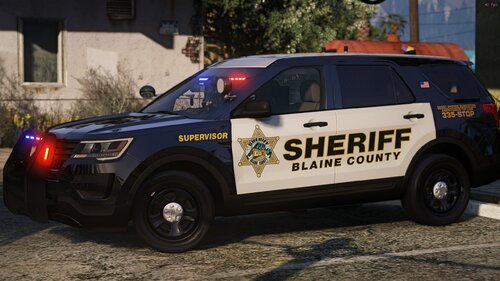
2011 BCSO/Sandy Shores Crown Vic.
----2011 Ford Crown Victoria Police Interceptor-----
*Model from Forza horzion 3 ripped by DMN
Hevaily Edited by -Ess-
Converted for use in V by -Ess-
Texutered by -Ess-
*Wheels by -Ess-
texuter by -Ess-
*Weather Shileds by -Ess-
texuter by -Ess-
*Unity spotlight by -Ess-
texuter by -Ess-
*Spec Tweaks by Nolan8024
------Lod info-------
L0 94,800
L1 34,800
L2 13,950
L3 6,000
Shout outs
Nolan - For taking time to help me with specs and keep me motivated on the re-work
CJ24 - For answering any questions I had.
Officerunderwood - For giving advice and references
EVI - Also for giving advice and references
Wolfrunner86 - For making sure I keep working on it.
Oleg - As buggy as Zmod is, without it we wouldn't be making car mods for GTA V so thanks.
PUSH BAR
model - Recon#0701
textures - Recon#0701
reference - Setina Mfg.
- Whelen Justice by Dannyboy1909
- Converted and edited for IV by IronicRainbow
- Materials and Textures assembled by Fabe
Console
Original purchased from turbosquid
Set up andretextured by Officer Wade (Keith)
Whelen Avenger scratch made and texuterd by 0taku
=======Terms of Use============
1. Do not claim model as your own
2. Do not convert to other games without checking with me first.
3. When releasing file must be in a locked state.
4. You MAY NOT sell or profit from any part/texuter of this model in any state, personal or public.
Violating any of these terms at any point voids the license to use, at which any and all copies need to be destroyed
=========Dislaimer===========
The people listed in the credits are in no way repsoable for any damage
that may happen from using this file.
Panasonic Toughbook CF-54 The Oof 1000
CF-51 by OfficerUnderwood
Trunk Organizer
Credits:
- Please credit me By stating my Username in the credits "MortyNL"
Information:
Textures have been used from Google.
Entire model has been scratch modeled by me
Gun Rack
Black-Rac Rack modeled and textured by Frost88
M4 Rifle off Turbosquid and converted by Frost88
Stopsticks
Model-Fletcher
Textures-TkPhantom
Dash Cam
-Watchguard PX-2 Modeled,Textured and UV mapped by Dan with da Van
*Model from Forza horzion 3 ripped by DMN
Hevaily Edited by -Ess-
Converted for use in V by -Ess-
Texutered by -Ess-
*Wheels by -Ess-
texuter by -Ess-
*Weather Shileds by -Ess-
texuter by -Ess-
*Unity spotlight by -Ess-
texuter by -Ess-
*Spec Tweaks by Nolan8024
------Lod info-------
L0 94,800
L1 34,800
L2 13,950
L3 6,000
Shout outs
Nolan - For taking time to help me with specs and keep me motivated on the re-work
CJ24 - For answering any questions I had.
Officerunderwood - For giving advice and references
EVI - Also for giving advice and references
Wolfrunner86 - For making sure I keep working on it.
Oleg - As buggy as Zmod is, without it we wouldn't be making car mods for GTA V so thanks.
PUSH BAR
model - Recon#0701
textures - Recon#0701
reference - Setina Mfg.
- Whelen Justice by Dannyboy1909
- Converted and edited for IV by IronicRainbow
- Materials and Textures assembled by Fabe
Console
Original purchased from turbosquid
Set up andretextured by Officer Wade (Keith)
Whelen Avenger scratch made and texuterd by 0taku
=======Terms of Use============
1. Do not claim model as your own
2. Do not convert to other games without checking with me first.
3. When releasing file must be in a locked state.
4. You MAY NOT sell or profit from any part/texuter of this model in any state, personal or public.
Violating any of these terms at any point voids the license to use, at which any and all copies need to be destroyed
=========Dislaimer===========
The people listed in the credits are in no way repsoable for any damage
that may happen from using this file.
Panasonic Toughbook CF-54 The Oof 1000
CF-51 by OfficerUnderwood
Trunk Organizer
Credits:
- Please credit me By stating my Username in the credits "MortyNL"
Information:
Textures have been used from Google.
Entire model has been scratch modeled by me
Gun Rack
Black-Rac Rack modeled and textured by Frost88
M4 Rifle off Turbosquid and converted by Frost88
Stopsticks
Model-Fletcher
Textures-TkPhantom
Dash Cam
-Watchguard PX-2 Modeled,Textured and UV mapped by Dan with da Van


![[ELS-Hybrid | Addon] Sandy Shores 2011 CVPI Pack](http://s3-screenshots.int-cdn.lcpdfrusercontent.com/resize/500/-/monthly_2026_06/1.thumb.png.0352936a973262bab2cefb608858e393.png)




![[RELEASE] LASD/LSSD Livery Pack [WIP / Expanding]](http://s3-screenshots.int-cdn.lcpdfrusercontent.com/resize/500/-/monthly_2026_08/21FPIUGANGU.thumb.png.f0e6002acd0292503460afc05196e30a.png)

![[FiveM Ready] Ko's Tactical Weapon Reanimations](http://s3-screenshots.int-cdn.lcpdfrusercontent.com/resize/500/-/monthly_2026_07/thumb.png.b283ec2bda81273e772accb09e4fee78.thumb.png.5420bd422737991c0354bba03593a37c.png)


Recommended Comments
Create an account or sign in to comment