
Skip to content
View in the app

A better way to browse. Learn more.

LCPDFR.com

A full-screen app on your home screen with push notifications, badges and more.

To install this app on iOS and iPadOS
  1. Tap the Share icon in Safari
  2. Scroll the menu and tap Add to Home Screen.
  3. Tap Add in the top-right corner.
To install this app on Android
  1. Tap the 3-dot menu (⋮) in the top-right corner of the browser.
  2. Tap Add to Home screen or Install app.
  3. Confirm by tapping Install.

vdH Vanilla Cars Textures MegaPack v.1.2

(36 reviews)

6 Screenshots

1. CONTENT

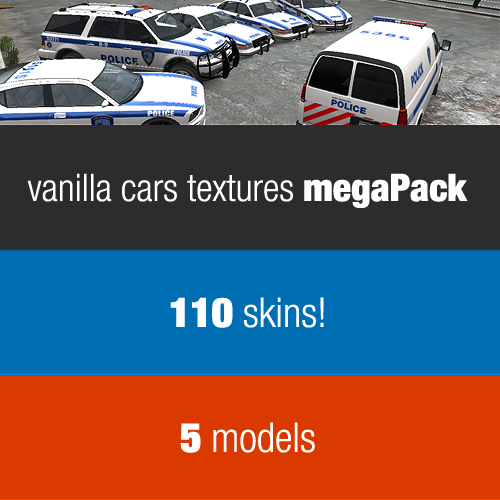
Over 100 skins for 5 models of vanilla car models. All in GTA universe, but based as much accurately as it was possible on

their real life counterparts.

Additional modded lights textures and badges variants.

Strongly recommended to use with Area Livery Mod.

2. SUPPORTED MODELS

Vapid Police Cruisers (32 skins)

- Enhanced Vapid Police Cruiser by EKALB 1.1

- Vapid Police Cruiser Slcktop By Ekalb 1.0

Declasse Merit Police (24 skins)

- PACK / POLC-V3.6V AND POLP-V3.5V by Lt.Caine

http://gtapolicemods.com/downloads.php?do=file&id=422

Bravado Buffalo Police Interceptor (21 skins)

- Bravado Buffalo Slicktop/MX7000 by Ekalb 1.0

- Bravado Buffalo Police [LCPD Vector] By Ekalb 1.0

Dundreary Landstalker (20 skins)

- Landstalker Rx2700 V1.0 by F5544

Vapid Speedo (15 skins)

- Speedo-DEV 1.0 by Scyattica

Those are only example models. You may find other models compatible with this pack. Unfortunately the latest ELS pack of vanilla cars from Lt.Caine isn't compatible.

If you know more good models compatible with this pack let me know.

Remember that some models have integrated light and/or badges textures into model, so it's a bit harder to change them.

3. INSTALL

First of all backup your files!

If you don't know how to install textures get yourself an OpenIV and... head to google and/or youtube. There are many guides how to do this and are way better then my tries of explain something.

4. COPYRIGHTS

All made by meeeee, vdH Abraxas. Orignal textures by Rockstar

This pack is LCPDFR.com exclusive, so don't reupload it.

Apart from that do with these files whatever you like. Just credit me if you use something in your projects. Basically use it as you want and don't be a dick.

Source files are attached.

Thanks to Rockstar, PoliceCarWebsite and whole LCPDFR community

What's New in Version v.1.2

Released

  • 1.2
  • Fixed text on all NOOSE TRU skins
  • Added 11 new skins:
  • Alderney City Police (Buffalo)
  • LC Depratment of Homeless Services Police (Speedo)
  • LC Parks Enforcement (Landstalker)
  • U.S. Park Police (Cruiser, Landstalker)
  • U.S. Park Sevice (Merit)
  • U.S. Postal Police (Cruiser)
  • U.S. Forest Service (Cruiser)
  • The Exchange Police (Cruiser, Buffalo)
  • Waterfront Commission Police (Cruiser)

User Feedback

Recommended Comments

PhoenixFire

Members

Love this! Absolutely love this! Great job :) Also, I found some ELS Vanilla Vehicles compatible with these skins. They look amazing! Once again, great work.

jzheng05

Members

This pack was my first time modding any vehicles/textures in the game. Incredibly simple to install and makes a great addition to LCPDFR.

HookerHeels

Members

These are amazing! Makes going vanilla almost worth it!

edytexas9275

Members

Anyone why we can't get to the speedo anymore?

ineseri

Friends of LSPDFR

It was taken down by the author, In the future, support requests goes into the forum not the review field. 

edytexas9275

Members

Sorry, my bad.

michiganpolice

Members

OMG THIS IS AWESOME GTEAT JOB!

MuratFisch

Members

please help: I open the vanilla police.wtd in the vehicles.img but there are only badges and lights and no liveries. i tried to replace the liveries in police2.wtd but it only changed the texts on the car (you know Courtesy, respect etc.). how do I install these textures?

The Loot

Members

See section 2 of the description: Supported Models. These textures are designed for modded vehicles, not vanilla.

imadoofus

Members

For some reason the site isn't letting me access the Speedo. Know what's up with that?

The Loot

Members

I believe that file was removed from the site.

Mood93

Members

Love this! Absolutely love this! Great job :) Also, I found some ELS Vanilla Vehicles compatible with these skins. They look amazing! Once again, great work.

gamepro552

Members

The Speedo page links me to a LCPDFR - Error page. Is the link down?

Hullian111

Members

(edited)

NOPE, SORTED

Edited by Hullian111

Hullian111

Members

VERY IMPORTANT UPDATE

There is a fix for the Landstalker! With a more lore friendly lightbar!

If this doesn't strike your fancy, then try this method for this file, and see if it works.

(as quoted from Yard1) "Make sure that you have added ext_all and ext_strong in the vehicles.ide."

Hullian111

Members

WARNING - AS OF 23/12/16, GTAPOLICEMODS HAS BEEN LOST. THE MODEL FILES FOR THE MERIT TEXTURES, UNLESS YOU HAVE THEM ALREADY, ARE GONE. PLEASE FIND A LEGAL MIRROR WITH THE SAME TEMPLATE.

Hullian111

Members

4 hours ago, Officer GILLETTE ABDI said:

Make a skin Pack for Declasse Premier

Friendly reminder - skin is nearly four years old now, and Abraxas hasn't been active lately, so chances are that it'll be a little hopeless to ask for it.

Wehrmachgt

Members

Ayo, i know this is 2023 and i am lCould contain: vehicle, transport, land vehicle, wheel, car, tire, police car, police, sedan, outdooriterally the only one who still plays LCPDFR but... As you can see on the screenshot the textures are misaligned, Does anyone know why?

Wehrmachgt

Members

Omg, just read the comments and the mod description.. Oh my god, i lost my backup.

Can anyone send me original Merit and Vapid textures? I don't wanna reinstall my GTA IV!

Create an account or sign in to comment

Account

Navigation

Search

Search

Configure browser push notifications

Chrome (Android)
  1. Tap the lock icon next to the address bar.
  2. Tap Permissions → Notifications.
  3. Adjust your preference.
Chrome (Desktop)
  1. Click the padlock icon in the address bar.
  2. Select Site settings.
  3. Find Notifications and adjust your preference.










