
Skip to content
View in the app

A better way to browse. Learn more.

LCPDFR.com

A full-screen app on your home screen with push notifications, badges and more.

To install this app on iOS and iPadOS
  1. Tap the Share icon in Safari
  2. Scroll the menu and tap Add to Home Screen.
  3. Tap Add in the top-right corner.
To install this app on Android
  1. Tap the 3-dot menu (⋮) in the top-right corner of the browser.
  2. Tap Add to Home screen or Install app.
  3. Confirm by tapping Install.

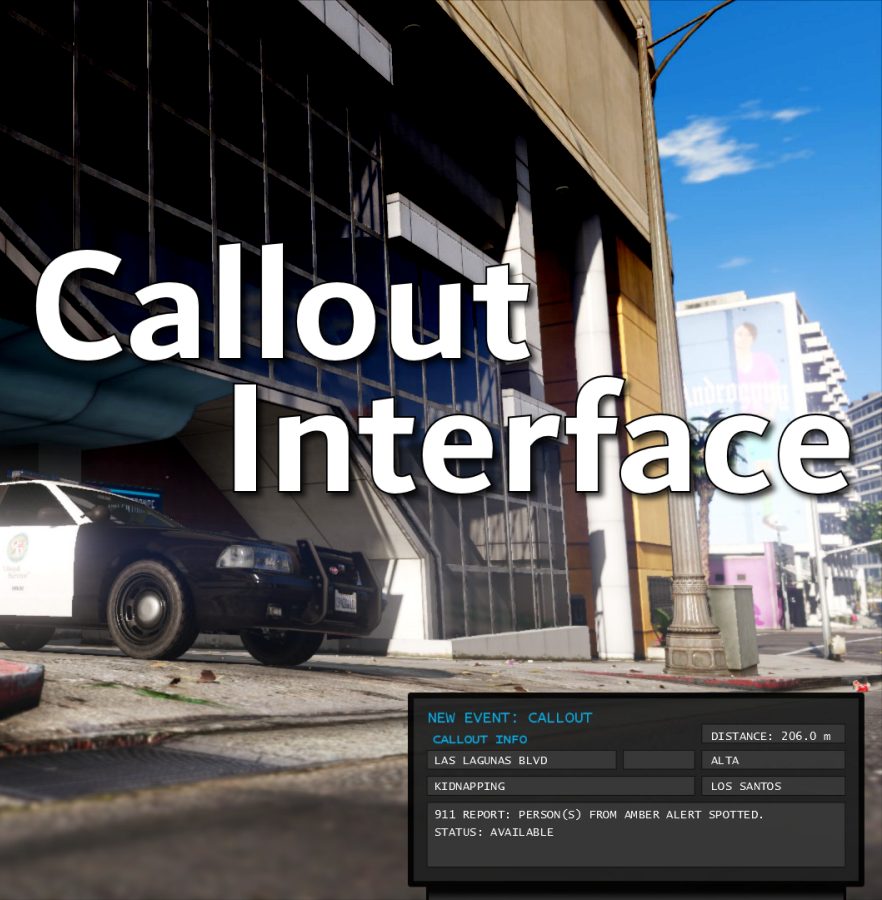
Callout Interface 1.4.1

(46 reviews)

7 Screenshots


Callout Interface
A new way to interact with callouts.
 

Features:

  • RAGENativeUI menu front-end to start a callout
  • Force a random callout via keybind
  • Advanced MDT with multiple status buttons and tabs
  • Callouts can be sent to the MDT while you're on another callout
  • A fully functioning ALPR system with advanced camera layouts
  • External license plate display


Support:
Discord Serverhttps://discord.gg/AuJCUag

Developer API https://github.com/Immersive-Plugins-Team/CalloutInterfaceAPI


Recommended Callout Packs:

686 Callouts  link
Chaos Calloutslink
Super Calloutslink


New in Version 1.4.1


Edited by opus49
added latest dev diary and some new screenshots

What's New in Version 1.4.1

Released

New in Version 1.4.1

Added

  • Dependency checker
  • Hot key for toggling ALPR key on/off
  • Automatic tab switching (when enabled)
  • Automatic blips for ALPR
     

Changed

  • Toggling off MDT will exit interactive mode
  • Delayed and put checks around camera object creation


Fixed

  • Fixed a bug with ALPR debug mode where the graphics would get stuck


New in Version 1.4

Added

  • Realistic multi-camera ALPR system
  • Dynamic traffic stop that nobody someone likes
  • External license plate display widget
  • Silent callout system and log

Changed

  • Completely overhauled the MDT
  • Migrated graphics handling to RawCanvasUI

Short Description

Interface with callouts.

User Feedback

Recommended Comments

GTA Fanatic

Members

THE MOMENT WE HAVE ALL BEEN WAITING FOR HAS ARRIVED !!!!!!!!

HeyPalu

Members

(edited)

Hi, thanks for the great plugin. I just have a minor problem: every time i activate my ALPR, these boxes appear on top of my car. Is it supposed to be like that? And if so, how can I disable them?
Could contain: vehicle, land vehicle, wheel, transport, car, outdoor, tire, auto part, bumper, vehicle registration plate, sedan, police, street

Edited by HeyPalu

opus49

Insiders Author

5 minutes ago, HeyPalu said:

Hi, thanks for the great plugin. I just have a minor problem: every time i activate my ALPR, these boxes appear on top of my car. Is it supposed to be like that? And if so, how can I disable them?
Could contain: vehicle, land vehicle, wheel, transport, car, outdoor, tire, auto part, bumper, vehicle registration plate, sedan, police, street

discord

rnr81gaming

Members

this update is a 10/10 i love it thank you for what you do opus49

Biggrim77

Members

when I select any of the status selections grammer police does not reflect the change.  is there any thing I can do to correct this.


opus49

Insiders Author

10 minutes ago, Biggrim77 said:

when I select any of the status selections grammer police does not reflect the change.  is there any thing I can do to correct this.


you have to update them both

Biggrim77

Members

ok thanks


Tha Mexikan

Members

hey opus do u have to have alpr lite  installed ?

opus49

Insiders Author

3 minutes ago, Tha Mexikan said:

hey opus do u have to have alpr lite  installed ?

no

RPBeefyBoii

Members

I think the mod is incredible, I have tried the mod and think there are some minor improvements that could be made. Maybe for the alpr, have the option to turn off some of the camera's. Just turning off individual cameras so you have a better sense of where your suspect may be going instead of taking a wild guess with the blips off when you have all 4 cameras running at the same time. But overall this is an incredible mod! I made a video on it that will be coming out *cough august cough*.... You can say I am ahead of my upload schedules 😛

I have also made a couple suggestions in your server that may be pretty neat to add. Like the notepad suggestion I made, it would be pretty neat to add it. And very useful too.

javier0911

Members

thank you 🙂 for your hard work !!  cant wait for your next future project 💗  please make more projects like this 🙃

bjackson1991

Members

Happy to see you back, just wanted to say thank you for the FREE updates❤️🍻 I'm about to go down the rabbit hole and update everything to enjoy the new features. Again, Thank You.

CriminalJustice

Members

Just in case anyone needs a guide on how to install this and how it works. 


javier0911

Members

30 minutes ago, CriminalJustice said:

Just in case anyone needs a guide on how to install this and how it works. 


amazing plug ... hopefully  they keep making  more plugs like that in the future..... i wonder what project is next 🙃 

MattCC16

Members

The update is so awesome! Thank you for your hard work!

oppingram

Members

Do the new callout interface update work with police menu ? 

Forbeq

Members

Is grammar police needed or can it run like the previous version???

javier0911

Members

(edited)

 i was thinking if you could add a crime map on the computer in the future , where is  more crime,  or gang, and also the good area, something like this, for example 


Edited by javier0911

OJL Designs

Members

Loving the update Opus, been waiting for a better ALPR system for awhile and this one is perfect!

Fredych

Members


why when I turn on ALPR and for example it notices a violation, then in compu lite all the data (ins, lic, reg) is clean and without violations?

opus49

Insiders Author

11 minutes ago, Fredych said:


why when I turn on ALPR and for example it notices a violation, then in compu lite all the data (ins, lic, reg) is clean and without violations?

because compulite is wrong

Michael21107

Members

how does it work with compulite?

opus49

Insiders Author

10 minutes ago, Michael21107 said:

how does it work with compulite?

it doesn't -- compulite doesn't have an API and doesn't even sync properly with stop the ped

Michael21107

Members

10 minutes ago, opus49 said:

it doesn't -- compulite doesn't have an API and doesn't even sync properly with stop the ped

i see, but is it better to uninstall compulite?

Create an account or sign in to comment

Latest Mods

Account

Navigation

Search

Search

Configure browser push notifications

Chrome (Android)
  1. Tap the lock icon next to the address bar.
  2. Tap Permissions → Notifications.
  3. Adjust your preference.
Chrome (Desktop)
  1. Click the padlock icon in the address bar.
  2. Select Site settings.
  3. Find Notifications and adjust your preference.





