
Skip to content
View in the app

A better way to browse. Learn more.

LCPDFR.com

A full-screen app on your home screen with push notifications, badges and more.

To install this app on iOS and iPadOS
  1. Tap the Share icon in Safari
  2. Scroll the menu and tap Add to Home Screen.
  3. Tap Add in the top-right corner.
To install this app on Android
  1. Tap the 3-dot menu (⋮) in the top-right corner of the browser.
  2. Tap Add to Home screen or Install app.
  3. Confirm by tapping Install.

Callout Interface 1.4.1

(46 reviews)

7 Screenshots


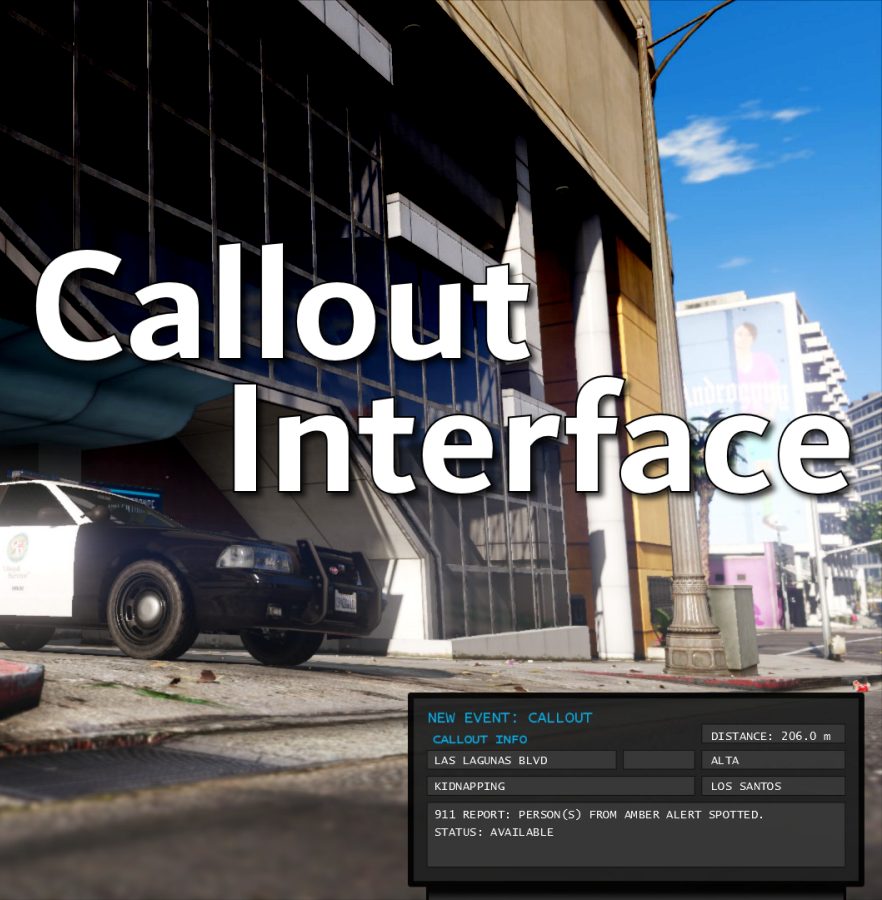
Callout Interface
A new way to interact with callouts.
 

Features:

  • RAGENativeUI menu front-end to start a callout
  • Force a random callout via keybind
  • Advanced MDT with multiple status buttons and tabs
  • Callouts can be sent to the MDT while you're on another callout
  • A fully functioning ALPR system with advanced camera layouts
  • External license plate display


Support:
Discord Serverhttps://discord.gg/AuJCUag

Developer API https://github.com/Immersive-Plugins-Team/CalloutInterfaceAPI


Recommended Callout Packs:

686 Callouts  link
Chaos Calloutslink
Super Calloutslink


New in Version 1.4.1


Edited by opus49
added latest dev diary and some new screenshots

What's New in Version 1.4.1

Released

New in Version 1.4.1

Added

  • Dependency checker
  • Hot key for toggling ALPR key on/off
  • Automatic tab switching (when enabled)
  • Automatic blips for ALPR
     

Changed

  • Toggling off MDT will exit interactive mode
  • Delayed and put checks around camera object creation


Fixed

  • Fixed a bug with ALPR debug mode where the graphics would get stuck


New in Version 1.4

Added

  • Realistic multi-camera ALPR system
  • Dynamic traffic stop that nobody someone likes
  • External license plate display widget
  • Silent callout system and log

Changed

  • Completely overhauled the MDT
  • Migrated graphics handling to RawCanvasUI

Short Description

Interface with callouts.

User Feedback

Recommended Comments

Lapd Code 3

Members

4 minutes ago, opus49 said:

Yes as long as the image size is the same and the text boxes line up, you should be able to replace the image.  In fact, I'd like to add the ability to standardize that so people can make their own "skins" and switch between them in game.

perfect 🙂

AllIsVanity

Members

Great plugin, I have a few suggestions, would it be possible to make the MDT movable across the screen? I'd like to have it at the center bottom, not center right. Also could you add the call description to the MDT box? Like how some calls have the greyed out text description under the notification, it would be nice to see that transfer to the "911 report" box. And my final suggestion is it would be amazing if you could add the officer responding audio to this plugin, I think PeterUCallouts and Traffic Policer have these features but to see it in a more recent plugin would be nice. It's the officer audio that plays after a callout and was also in your showcase video for this.

opus49

Insiders Author

2 minutes ago, AllIsVanity said:

Great plugin

Thanks!


3 minutes ago, AllIsVanity said:

I have a few suggestions

Excellent!


3 minutes ago, AllIsVanity said:

would it be possible to make the MDT movable across the screen?

Yes, you are not the first person to request this and I believe it shouldn't be an issue.


3 minutes ago, AllIsVanity said:

Also could you add the call description to the MDT box?

That is a different problem I'm afraid.  I am limited by what information is available from the Callout object itself.  There have been some discussions about offering an API to callout developers so they can send messages to the terminal.  That's preliminary, though.


4 minutes ago, AllIsVanity said:

it would be amazing if you could add the officer responding audio to this plugin

I wanted to do that but I couldn't remember which audio files I needed to add.  I should have just added them manually and referred to those.  I will probably do that for the next update.

Zack300

Members

Amazing and unique mod. I have some suggestions u could add into future updates, Add an ability to save configs and make the "small" option smaller. In my opinion its still pretty big. Adding more fleshed out call descriptions would also be a cool feature as well. Also, is there anyway to disable the vanilla callout pop up? I would rather receive the callouts through the MDT then the black box that pops up above the map. Overall great work as always

Ndb20

Members

perfect timing since force a callout is now broken. this one is more practical and i enjoy hearing that pinging sound. its very relaxing. thanks

stylez

Members

(edited)

excellent mod, hoping you can add an option to disable certain call out pack or call out....but other than that it's really useful especially the call out radius distance.

Edited by stylez

opus49

Insiders Author

1 hour ago, Zack300 said:

Add an ability to save configs

Yeah I meant to add it in before release but I forgot.


1 hour ago, Zack300 said:

make the "small" option smaller

The font is already pretty small at 550px but I can see what it looks like at 400px wide.


1 hour ago, Zack300 said:

Adding more fleshed out call descriptions would also be a cool feature as well.

I'm limited in that regard (see above).


1 hour ago, Zack300 said:

Also, is there anyway to disable the vanilla callout pop up?

No (Also see above)


1 hour ago, Zack300 said:

Overall great work as always

Thanks!

56 minutes ago, stylez said:

excellent mod, hoping you can add an option to disable certain call out pack or call out....but other than that it's really useful especially the call out radius distance.

Thanks!  Couldn't you just remove the callout pack you want to disable?  I think a lot of callout packs come with the ability to disable individual callouts.

thatmaxplayle

Members

Very interesting concept. As discussed, I'm looking forward to when developers can integrate with this plugin via an API! 

stylez

Members

(edited)

53 minutes ago, opus49 said:

Thanks!  Couldn't you just remove the callout pack you want to disable?  I think a lot of callout packs come with the ability to disable individual callouts.

yes but i would like ito do in in-game without having to unplug lspdfr plug-in and then load it after....coastal callout did something similar where you can set the option to only accept their callouts...so maybe reverse engineer...but im not a modder so i'll leave it to the expert. thanks anyways

Edited by stylez

GeoffreyGamer

Members

Just HAD to do a video on this mod AS SOON as I heard about it!!  Opus49 and ben_hamilton ALWAYS dropping fire mods! THANK YOU! Keep it up!

jacalapar

Members

I love this plug-in a lot I would just love to be able to save my settings so I don't have to enable the MDT sounds when a callout starts and when accepting a call every single time I load the game up. Please make this available in the ini file in the next update. Thank you!

Nemesisx101

Members

Great work! Could you perhaps have the plugin handle callout generation entirely in the future and bypass vanilla LSPDFR ( certainly devs abuse the system). Ideally, like LSPDFR, abiding by set preferences in an ini; distance and multiplier. Many thanks. 

Benjamin255

Members

There seems to be no PlaySoundOnDisplay and
PlaySoundOnAccept option?

Charlie686

Members

2 hours ago, jacalapar said:

I love this plug-in a lot I would just love to be able to save my settings so I don't have to enable the MDT sounds when a callout starts and when accepting a call every single time I load the game up. Please make this available in the ini file in the next update. Thank you!

You can set the sound option in the .ini already if that's what you mean.

jacalapar

Members

7 minutes ago, Charlie686 said:

You can set the sound option in the .ini already if that's what you mean.

you can turn the MDT on but theres no option in the ini for both of these. These 2 options "PlaySoundOnDisplay" and "PlaySoundOnAccept" are not in the ini file to give me the option to automaticaly set both of these options to true. I have to enable both of them from false to true every time i boot my gta v.

jacalapar

Members

2 hours ago, Charlie686 said:

You can set the sound option in the .ini already if that's what you mean.

I would also LOVE the ability to have the Terminal always showing ONLY when I'm in my cruiser. An option for that in the ini file would make this super immersive!

3 hours ago, Wolfx101 said:

Great work! Could you perhaps have the plugin handle callout generation entirely in the future and bypass vanilla LSPDFR ( certainly devs abuse the system). Ideally, like LSPDFR, abiding by set preferences in an ini; distance and multiplier. Many thanks. 

I would love to have the callouts displaying on the left abolished and the terminal taking over completely showing all the callouts. the only problem is that some callouts have long names in them and the words will cut out on the terminal. A fix for this could be to have the text of the callout and any other text that is cut off due to too many characters be scrolling back and forth just like long names in call of duty do.

opus49

Insiders Author

25 minutes ago, jacalapar said:

you can turn the MDT on but theres no option in the ini for both of these. These 2 options "PlaySoundOnDisplay" and "PlaySoundOnAccept" are not in the ini file to give me the option to automaticaly set both of these options to true. I have to enable both of them from false to true every time i boot my gta v.

Hi. You can add those settings to the INI. They were left out of the provided INI accidentally but you can just add them to the MDT section and they'll get picked up. Use the names exactly as they are in the menu. And yes, I will be adding the ability to save as well.

4 minutes ago, jacalapar said:

I would also LOVE the ability to have the Terminal always showing ONLY when I'm in my cruiser. An option for that in the ini file would make this super immersive!

This is a really great idea thank you!

2 hours ago, CC2020 said:

There seems to be no PlaySoundOnDisplay and
PlaySoundOnAccept option?

Hi, same answer 🙂

3 hours ago, Wolfx101 said:

Great work! Could you perhaps have the plugin handle callout generation entirely in the future and bypass vanilla LSPDFR ( certainly devs abuse the system). Ideally, like LSPDFR, abiding by set preferences in an ini; distance and multiplier. Many thanks. 

It would have to be compatible with Grammar Police which also handles player availability... 


Just curious, what would be the benefit?

jacalapar

Members

21 minutes ago, opus49 said:

Hi. You can add those settings to the INI. They were left out of the provided INI accidentally but you can just add them to the MDT section and they'll get picked up. Use the names exactly as they are in the menu. And yes, I will be adding the ability to save as well.

This is a really great idea thank you!

Hi, same answer 🙂

It would have to be compatible with Grammar Police which also handles player availability... 


Just curious, what would be the benefit?

Thanks for the reply boss, yeah it was just a suggestion but i doubt we can get rid of the callout notifications on the left that come with lspdfr to only leave with your terminal showing it im assuming? And when I get a call and not accept it, the status changes to N/A instead of on patrol or available. I think it says Available not On Patrol but yeah thought id point that out there.

opus49

Insiders Author

16 minutes ago, jacalapar said:

Thanks for the reply boss, yeah it was just a suggestion but i doubt we can get rid of the callout notifications on the left that come with lspdfr to only leave with your terminal showing it im assuming? And when I get a call and not accept it, the status changes to N/A instead of on patrol or available. I think it says Available not On Patrol but yeah thought id point that out there.

Thanks. The status was meant to refer to the callout status not the player status. I think it unclear though and should be changed to be more understandable.

Ricky001

Members

Not a complaint or anything, just pointing out in case it was left out, or it's only an issue with me...

The vanilla LSPDFR callout "Arrest Warrant" is not accessible via the menu, only Pursuit and Hold up are available. Also, while forcing this call from the LSPDFR menu (from pause menu), the default callout notification (on the left) doesn't seem to pop up, unlike other calls. Once started, though, the call does work out just fine.

opus49

Insiders Author

1 minute ago, Ricky001 said:

Not a complaint or anything, just pointing out in case it was left out, or it's only an issue with me...

The vanilla LSPDFR callout "Arrest Warrant" is not accessible via the menu, only Pursuit and Hold up are available. Also, while forcing this call from the LSPDFR menu (from pause menu), the default callout notification (on the left) doesn't seem to pop up, unlike other calls. Once started, though, the call does work out just fine.

Hi and thanks.  I do not believe LSPDFR considers "Arrest Warrant" a callout per se, but I could be wrong.  When I was testing, I removed all callout packs and just spammed LSPDFR's force callout from the context menu so I could see which callouts LSPDFR would generate.  I only ever saw the two you mention (Pursuit and Holdup), so those are the ones included manually.  Cheers!

WartyCactus

Members

Will definitely be downloading when MDT display is able to be moved, seems like a super cool concept. ELS owns my bottom right corner right now lol


JBuzz826

Members

If I can make a suggestion, I love the concept of this. I would love to see the settings save in game makes it easier. 😉 Also would it be possible to make the MDT screen smaller? 

opus49

Insiders Author

6 minutes ago, JBuzz826 said:

If I can make a suggestion, I love the concept of this. I would love to see the settings save in game makes it easier. 😉 Also would it be possible to make the MDT screen smaller? 

Hi and thanks.  Yes, next update will have the ability to save settings (meant to be in the first release but I forgot).  Also, the intention is to make the MDT fully customizable (including smaller sizes).

Create an account or sign in to comment

Latest Mods

Account

Navigation

Search

Search

Configure browser push notifications

Chrome (Android)
  1. Tap the lock icon next to the address bar.
  2. Tap Permissions → Notifications.
  3. Adjust your preference.
Chrome (Desktop)
  1. Click the padlock icon in the address bar.
  2. Select Site settings.
  3. Find Notifications and adjust your preference.















