Skip to content
View in the app

A better way to browse. Learn more.

LCPDFR.com

A full-screen app on your home screen with push notifications, badges and more.

To install this app on iOS and iPadOS
  1. Tap the Share icon in Safari
  2. Scroll the menu and tap Add to Home Screen.
  3. Tap Add in the top-right corner.
To install this app on Android
  1. Tap the 3-dot menu (⋮) in the top-right corner of the browser.
  2. Tap Add to Home screen or Install app.
  3. Confirm by tapping Install.

EUP Clothes Pack 0.5

(4 reviews)

15 Screenshots

Descriptions:

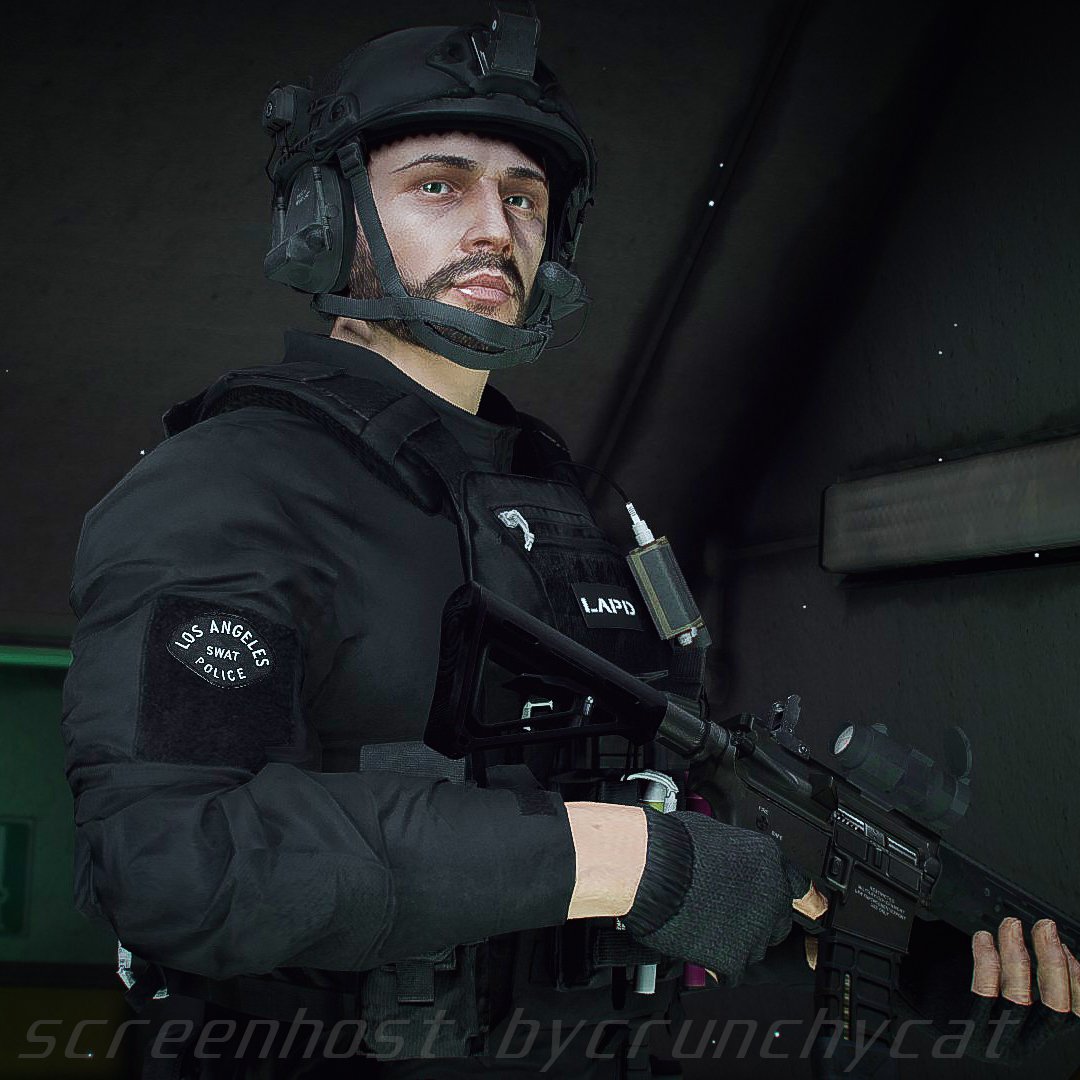
  • This mod is a pack of a variety of clothes extracted from another games
  • More variety of clothes will be added in the future


Awesome video by Crunhycat


Features:

  • All clothes are made to fit my latest vests
  • Patches are easy to edit 
  • Different color variations


Included Contents:

mp_m_freemode_01_mp_m_gunrunning_01

  •  Jbib_014=Tactical Hoodie Jacket (Rolled up sleeves version)
  •  Jbib_015=Tactical Hoodie Jackte (Rolled up Sleeves , Tucked in Version)
  •  Jbib_016=Tactical Hoodie Jacket(For vest)
  •  Jbib_017=Tactical Hoodie Jacket(For vest, Tucked in Version)
  •  Jbib_018=Tactical Hoodie Jacket(Normal)


mp_m_freemode_01_mp_m_vinewood

  •  Jbib_012=Condor Combat Shirt
  •  Jbib_013=Condor Short Sleeve Combat Shirt
  •  lowr_000_u=Joggers1
  • mp_m_freemode_01_mp_m_smuggler_01
  •  jbib_008_u=Hoodie1 


mp_m_freemode_01_p_mp_m_heist3

  •  p_head_002=Fast Helmet with NVGs (flip down)
  •  p_head_003=Fast Helmet with NVGs (flip up)


mp_m_freemode_01_p_mp_m_heist4

  • p_head_001=The North Face Beanie
  • p_head_002=Under Armour Beanie


mp_m_freemode_01_p_mp_m_vinewood

  •  p_head_000=Fast Helmet
  •  p_head_001=Fast Helmet with headset


INSTLLATION:

Please make a backup of eup_componentpeds.rpf before installing this MOD

   [Clothes]

  • 1.install the EUP
  • 2.Drag and drop all folders in "Main" to eup_componentpeds.rpf (mods\update\x64\dlcpacks\eup\dlc.rpf\x64)
  • 3.Change Jbib, Torso2, Shirt Overlay, or Lower(in case of pants) using Trainer Mod in game (you can find at the end of the menu)


   [Accessories]

  • 1.install the EUP
  • 2.Drag and drop all folders in "Accessories" to eup_componentpeds_p.rpf(mods\update\x64\dlcpacks\eup\dlc.rpf\x64)
  • 3.Change Hat,Helmet or glasses(in the case of sunglasses) using Trainer Mod in game (you can find at the end of the menu)


If your character's appearance is changed, you've succeeded


VERSION HISTORY:

Spoiler

0.1

First release


0.2

Added Condor Combat Shirt


0.3

Added 1 Hoodie

1.jpg.37be3f5f8dcda36bfb71fc28150dbe27.jpghelmet1.jpg.9ee368b16912c432e35ffb3c8e588658.jpg


Do not ask me!!

  • Texture request
  • Request to unlock a model
  • Asset Release Request
  • How to install these to FiveM


FREQUENTLY ASKED QUESTIONS

Spoiler


  • Q.Will it work with FiveM?
  • A.If the YDD file size is smaller than 26MB, it should work fine. But DO NOT ASK ME how to install these to FiveM.
  • Q.Can I upload a texture?
  • A.Textures only, no problem.


Credits:

Activision/Infinity Ward

-COD:MW2019 Assets

DICE/Electronic Arts

-Battlefield 4 Assets


Beta-testers:

  • crunchycat, Syther

Screenshots:

  • crunchycat

Alex_Ashfold, EUP team(patch textures)


ATTENTION

  • Do not unlock, edit, leak or sell the file
  • Editing textures at non-profit is allowed
  • Please do not upload any texture mods to sites other than this site and GTA5 MODS


My other mods

https://www.gta5-mods.com/misc/ai-cover-animations-mod-hanako


Highly Recommended


Edited by HANAKO

What's New in Version 0.5

Released

Added 2 beanies

spacer.png


Short Description

Simple Pack of Clothes and Accessories

User Feedback

Recommended Comments

Roman M.

Members

Hey! Me and my friends in the community wanted to use this pack and HANAKO's works. But unfortunately the link to the discord server has expired. Can you send me a new one please?

Jake Brooks

Members

Just trying to install but nothing is in the right folders, any help will be apreciated

EagleHamburg

Members

Does this work for EUP 9.4 ?

JackAM

Members

Thanks for making such masterpiece Hanako!

Icemicky580CZ

Members

Is there a female variant for female model? For the Sherrif (SRT) clothes. I´m looking for clothes for my SRT unit for one RP server on FiveM. And we got some girl-gamers that want to be a part of SRT too.

DarthVader35512

Members

Is there a pack with the showcased drop down pouches. It would be amazing eup for my server.

3mmaPlayz

Members

Where can I find the female EUP at??

I have looked all over and cant find it anywhere.

aarigamerYT

Members

does some one have the discord link

KimchiTrash

Members

(edited)

First off, this is an amazing mod and it's quite impressive. I love it. However, the only issue I have is the fast helmet textures aren't loading correctly and I've tried reinstalling just the helmet and even individually putting each file for the fast helmet. The helmet with nvg is fine but not the other. I don't know what to do

20230409005531_1.jpg

20230409005524_1.jpg

20230409005532_1.jpg

Edited by KimchiTrash

Bloodyy.

Members

On 9/11/2020 at 5:14 PM, J Sterry said:

its on Hanako discord for $15 USD 


 link to his discord

https://discord.com/channels/711399957877489694/711432596910768158 

once on discord go to section call eup swat battle belt 1 under Hanako Listings


if you what to buy it just dm Hanako on discord 

 @J SterryDo you still have the discord? The link doesn’t work anymore and i would really appriciate it if you send me an invite link. Thanks.

Atlas315

Members

So I noticed that the FAST helmets seem to take up the same slots that were used for some of the regular hats with an EUP/Ultimate Backup config file. Now a good chunk of my backup units are showing up with helmets instead of hats. Anyone know of a fix?


Could contain: clothing, outdoor, man, person, sky, footwear, hiking, ground, mountain, trousers, text

PyroCommon.dll

Members

Which combat hoodie is used in the picture with the skull balaclava?

Meepers266

Members

(edited)

Made a comment then fixed my problem

Edited by Meepers266

Lordchanka10

Members

Hello there ! i got a question about this mod, is there a multicam outfit in this pack ? (the FBI H.R.T of his ped pack) 

TrooperPL23

Members

Where does the LASD outfit on the left come from? cause it is most definitely not in the pack954128857_bandicam2020-09-0806-23-48-284.jpg.24c5d4963fb2114db1ad72dd067b8183.jpg

Sgt. Stewart

Members

(edited)

If anyone getting problems with weird helmets and caps models and textures on male character, you should go to dlcpacks>patch2023_01>dlc.rpf>x64>models>cdimages>patch2023_01_male_p.rpf and replace bugged items (p_head_003.ydd into heist3 folder, p_head_002.ydd into heist4, p_head_001.ydd into vinewood)

Edited by Sgt. Stewart

ZackP

Members

Great Job!

FR4CS

Members

(edited)

@HANAKO Hello, will you one day update to add multicam textures for FIB, HRT, SAHP?

Edited by FR4CS

TreyvonC

Members

On 9/9/2020 at 8:28 AM, J Sterry said:


never mind i have found it (my bad) 🙂

Where is it?

Rumba

Members

(edited)

Cool!

Edited by Rumba

FelixL

Members

@HANAKOCan u make the Cry Outfit also for that i'd love that?

fortheiy12

Members

How do I find these clothes in game?

pulpfiction02

Members

On 4/25/2024 at 8:01 AM, Sgt. Stewart said:

If anyone getting problems with weird helmets and caps models and textures on male character, you should go to dlcpacks>patch2023_01>dlc.rpf>x64>models>cdimages>patch2023_01_male_p.rpf and replace bugged items (p_head_003.ydd into heist3 folder, p_head_002.ydd into heist4, p_head_001.ydd into vinewood)

thank you so much for this

Cassifrass

Members

can someone tell me how to load the different pants in?

Gun737

Members

Hi HANAKO! Could you please make some cool jeans and add them to this pack? I guess they would be nice for a plain clothes officer!

Create an account or sign in to comment

Latest Mods

Account

Navigation

Search

Search

Configure browser push notifications

Chrome (Android)
  1. Tap the lock icon next to the address bar.
  2. Tap Permissions → Notifications.
  3. Adjust your preference.
Chrome (Desktop)
  1. Click the padlock icon in the address bar.
  2. Select Site settings.
  3. Find Notifications and adjust your preference.