Skip to content
View in the app

A better way to browse. Learn more.

LCPDFR.com

A full-screen app on your home screen with push notifications, badges and more.

To install this app on iOS and iPadOS
  1. Tap the Share icon in Safari
  2. Scroll the menu and tap Add to Home Screen.
  3. Tap Add in the top-right corner.
To install this app on Android
  1. Tap the 3-dot menu (⋮) in the top-right corner of the browser.
  2. Tap Add to Home screen or Install app.
  3. Confirm by tapping Install.

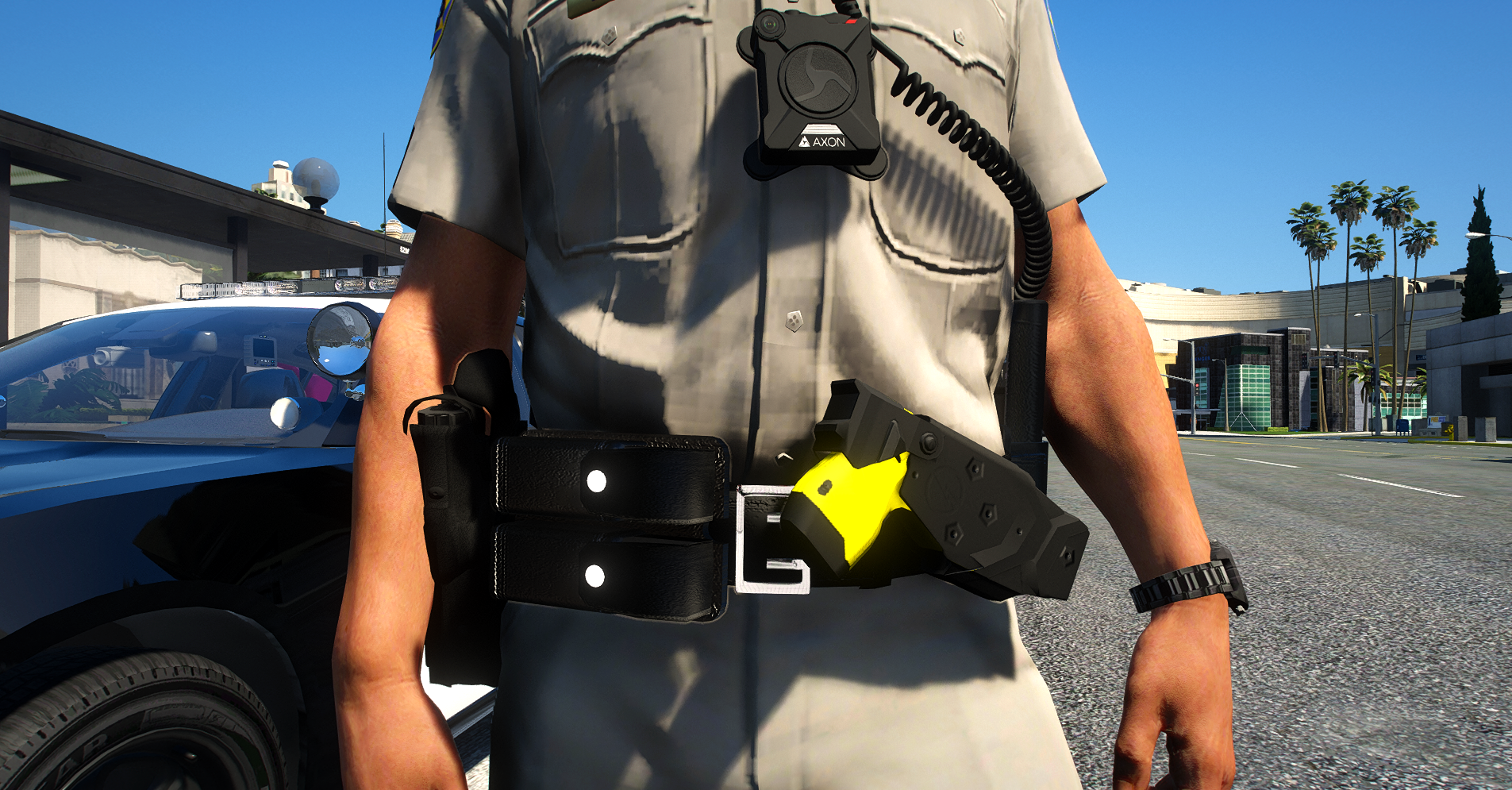
CHP Style Duty Belt (EUP) 1.0.1

(1 review)

2 Screenshots

Hello Guys, this is a CHP Belt. 

when you have a Question contact me on Discord.( https://discord.gg/Rbj6U9v )

if you support me: https://www.patreon.com/Tom199

I have special Right from Xiphos that I can release it!

How i install?

Located in your OpenIV the Path: Grand Theft Auto V\mods\update\x64\dlcpacks\eup\dlc.rpf\x64\eup_componentpeds.rpf\mp_m_freemode_01_male_freemode_hipster

Then Drag and Drop this File.


DO NOT REULOAD THIS FILE


contact for permission to use it on fivem.


Edited by Tom199

What's New in Version 1.0.1

Released

- Texture Bug Fix


Short Description

This is a Belt for EUP.

User Feedback

Recommended Comments

adam enforcers

Members

is free or paid for?

Tom199

Members Author

paid

DonaldsandersV1

Members

Is there a way to have the bodycam and mic on the default custom peds in the LSPD menu? I did it before on accident but I can't remember

hueydown

Members

(edited)

Most CHP Offices do not issue body camera on their officers but there are a few CHP Offices who issue body cameras. CHP Oakland issues Axon Body 2 but it is a rare thing. image.png.3fcfeba119b99742ae69be9ccac30cca.png Goat gets loose on freeway in Oakland, CHP corral it after 'short foot  pursuit' - Connecticut Post

Edited by hueydown

JulianPlayz

Members

Do we need to download both files or just the fix file?

Tom199

Members Author

What do you mean Sorry 😄

Madmacmodding

Members

(edited)

On 8/23/2020 at 3:03 PM, hueydown said:

Most CHP Offices do not issue body camera on their officers but there are a few CHP Offices who issue body cameras. CHP Oakland issues Axon Body 2 but it is a rare thing. image.png.3fcfeba119b99742ae69be9ccac30cca.png Goat gets loose on freeway in Oakland, CHP corral it after 'short foot  pursuit' - Connecticut Post

false they are giving all officer body cams what you are talking about is the pilot program 


Edited by Madmacmodding

blake101

Members

Hello I have tried to install the CHP belt .. I followed the instructions as they state in the LSPDFR link... now I am in LSPDFR looking in the "under coat" section in the EUP menu and I don't see it. I have went into my eup stream and went into the mp_m_freemode_01_male_freemode_hipster folder, check the ydts and it shows the belt in the texture form... but again when I go into game nothing. This isn't my first time installing this, I have done it before the GTA update and its worked fine. Does this belt work with the new update?


OfficerMod

Members


On 2/5/2021 at 1:13 PM, blake101 said:

Hello I have tried to install the CHP belt .. I followed the instructions as they state in the LSPDFR link... now I am in LSPDFR looking in the "under coat" section in the EUP menu and I don't see it. I have went into my eup stream and went into the mp_m_freemode_01_male_freemode_hipster folder, check the ydts and it shows the belt in the texture form... but again when I go into game nothing. This isn't my first time installing this, I have done it before the GTA update and its worked fine. Does this belt work with the new update?


Check the latest patchdayng folder, go to models, cdimages and see if any folder says mphipster, the update may have possibly overwritten your belt.

dsyggy

Members

hey i installed this correctly but its not in game for me?


Reasonable

Members

(edited)

nvm

Edited by Reasonable

Create an account or sign in to comment

Latest Mods

Account

Navigation

Search

Search

Configure browser push notifications

Chrome (Android)
  1. Tap the lock icon next to the address bar.
  2. Tap Permissions → Notifications.
  3. Adjust your preference.
Chrome (Desktop)
  1. Click the padlock icon in the address bar.
  2. Select Site settings.
  3. Find Notifications and adjust your preference.










