


Discord: https://discord.gg/DP2by7B
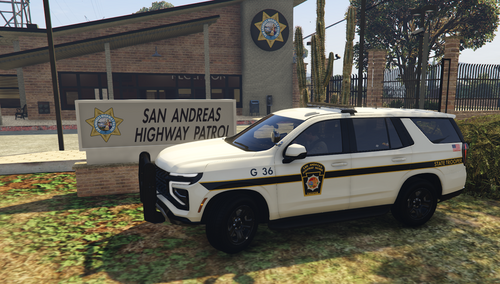
Today I bring to you a Sheriff's Office Mini-Pack featuring a 2016 FPIU, 2019 Dodge Charger, and a 2020 Tahoe PPV. Big thanks to @AvionGaming for allowing me to use his awesome SASO texture pack for you all to enjoy on my models.
As always, I have a terms of service you must abide by:
- My models are not permitted for use in FiveM.
- DO NOT upload my models to any other website.
- DO NOT attempt to unlock or RIP my models.
- DO NOT claim as your own.
K. Thanks.
Any problems that you encounter, you can message me or ask in the comments section and I will assist you ASAP! Thanks
Big thank to @Lapd Code 3 for throwing together this showcase for you all! Featured video may be soon to come.
What's New in Version 1.0.1
Released
- Renamed POLICE1.xml to the proper POLICE.xml for the ELS VCF.
- Added SO2 to the vehicles.meta file. Ooops... forgot to have added it.
All credits for the SASO liveries go to AvionGaming
Base Models:
2019 Dodge Charger:
- Original vehicle model is 2015 Dodge Charger from Forza, edited into the 2018 Dodge Charger Pursuit by Matt with parts from FH3 and Gamemodels
- Seats, center mirror, shifter and dash edits modeled and done by Kane104 - commissioned by Ranger Rick
- Major help from EVI for digital dial information and help to get the dials working and his patience to help me
- Rear bumper diffuser modeled by Patrol 31 Normal edits by Steinberg
- AWD/Charger badge modeled by iansonwheels Converted to V by Matt
- AWD Steelies/Hubcap modeled by iansonwheels Converted to V by Matt
- Big thanks to Cj24 for beta testing the model and help with spec maps and normal maps and his overall knowledge of gta materials
- Interior dial textures made by NeonLazer
- Interior button textures made by Slendis
- Rims from Gamemodels.ru Centercap edited by Matt
- Dome Light modeled by Matt
- A big thanks to Cj24, Kane104, EVI, Patrol 31, Steinberg , Desmond , NeOnLaZeR, Izick, Rekram, HDgamerzPC, and a big thanks to Ranger Rick who bought 3D parts so that i wouldn't give up on this project and bought me a Zmodeler license so that i can keep working on this project Thank you Rick.
- Thank you to everyone who supported me and the project...
- Another big thanks to iansonwheels who had the time to make the AWD steelies and AWD package stuff....
2016 FPIU:
- Ford explorer Base model purchased by Thehurk, GTAxB0SS, Requiem and Windows446
- Poly Crunched, Textured, Converted by Thehurk.
- Interior purchased by TrentMU and FRGamer
- Textures by Taylor Swift, Thehurk, & OfficerUnderwood
- Heavily edited this piece of shit into a polished piece of shit by OfficerUnderwood
- Rims by BxBugs123, Centercap by Carper
- Interceptor Hood text by GTAxB0SS
- I'm not gonna add my fuckin' name 5 billion times to get attention like a crack smokin' faggot
2020 Tahoe PPV:
- 2015 Suburban by Carface converted to a 2019-2020 Tahoe PPV by Dan with da van
- Countless Textures and parts redone and remodeled by Dan with da Van
- Most included parts modeled and textured by Dan with da van
- Door sticker redone by Billy J.
- Thanks to Bigams for providing high quality pictures of a real Tahoe
- Mayor edits by Dan with da Van
- ENV from some lspdfr post oof
- Templated and normals redon by Dan with da van
- A huge thanks to everyone below for helping make this project as good as it is.
Krul, TickleMyElmo, Blaster, HP Deskjet, Bigams, INSAN1TY, Billy J and Maurice97
I Thank every single soul that has supported this project from the start.
It has been such a pleasure working on this tahoe for release, and I hope
to make more quality developer releases like this one.
-I do ask for a few favors when using this base model.
-Do NOT release in a unlocked state.
-Do NOT sell this base model
-Please do NOT use parts of this model or any equiptment off it on other models without permission
-Do NOT reupload this model to any other sites than the ones I have released on, doesnt matter
-if you "fixed" or did something to it.
-Do NOT sell using this base model without special authorization to do so,
-if you are wanting to sell using this base model please DM me on Discord Dan with the Van!#8386
-Please for the love of god take your time and create a nice and quality model instead of rushing a release
this is the way you can respect my work.
________________________________________________________________________________
Equipment:
- Setina PB400 - Twurtleee.
- Coban EDGE Modeled,Textured and UV mapped by Dan with da van.
- Antennas made by Jay.
- CF-54 by OfficerUnderwood.
- Galls Siren Speaker by Billy J Modifications
- Centre Console Models - Jakub
Textures - Jakub & Walters
- Motorola APX 6500 Modeled, Textured and UV mapped by Dan with da van
-Federal Signals LMS Siren Speaker
Modeled by Terry Sloman
Textured by Terry Sloman
Textures created by Terry Sloman
- Pro-gard Partition by Billy J
- Window Cover 3D Modeled and textured by Maryland Modifications
- Unity PAR46 spotlight modeled and textured by Cj24.
________________________________________________________________________________
Lighting:
- Whelen Liberty 48" and 52" by CEO
- Whelen Avengers by 0taku
- Whelen M2
Whelen M2 Super-LED Lighthead scratch modeled by Five0/OfficerFive0
converted to gta 5 by Five0/OfficerFive0
main texture by five0
groove and screw texture by neonlazer
emis textures by Five0/OfficerFive0, based off of CJ24's
a huge thank you to CJ24 for helping me create the textures
commissioned by Dewey
- Whelen IONs by CEO
IF I LEFT ANYTHING OUT PLEASE LET ME KNOW. K THANKS






![🇹🇼 🌍 [LSPDFR AI] NPCI Translation Pack](http://s3-screenshots.int-cdn.lcpdfrusercontent.com/monthly_2026_08/Mod.thumb.png.008e8511c9d76e33ab7e973fd76012b9.png)


![(Addon) [DLS/ULC/ELS] FiveM/SinglePlayer CalFire 2019 PPV](http://s3-screenshots.int-cdn.lcpdfrusercontent.com/resize/500/-/monthly_2026_08/Screenshot2026-08-18232335.thumb.png.60dc0be6757e40d55e5576879da4885f.png)



Recommended Comments
Fixed so Tahoe will spawn now. Latest update has it.
Recommended by Raspy80
Create an account or sign in to comment