
Skip to content
View in the app

A better way to browse. Learn more.

LCPDFR.com

A full-screen app on your home screen with push notifications, badges and more.

To install this app on iOS and iPadOS
  1. Tap the Share icon in Safari
  2. Scroll the menu and tap Add to Home Screen.
  3. Tap Add in the top-right corner.
To install this app on Android
  1. Tap the 3-dot menu (⋮) in the top-right corner of the browser.
  2. Tap Add to Home screen or Install app.
  3. Confirm by tapping Install.

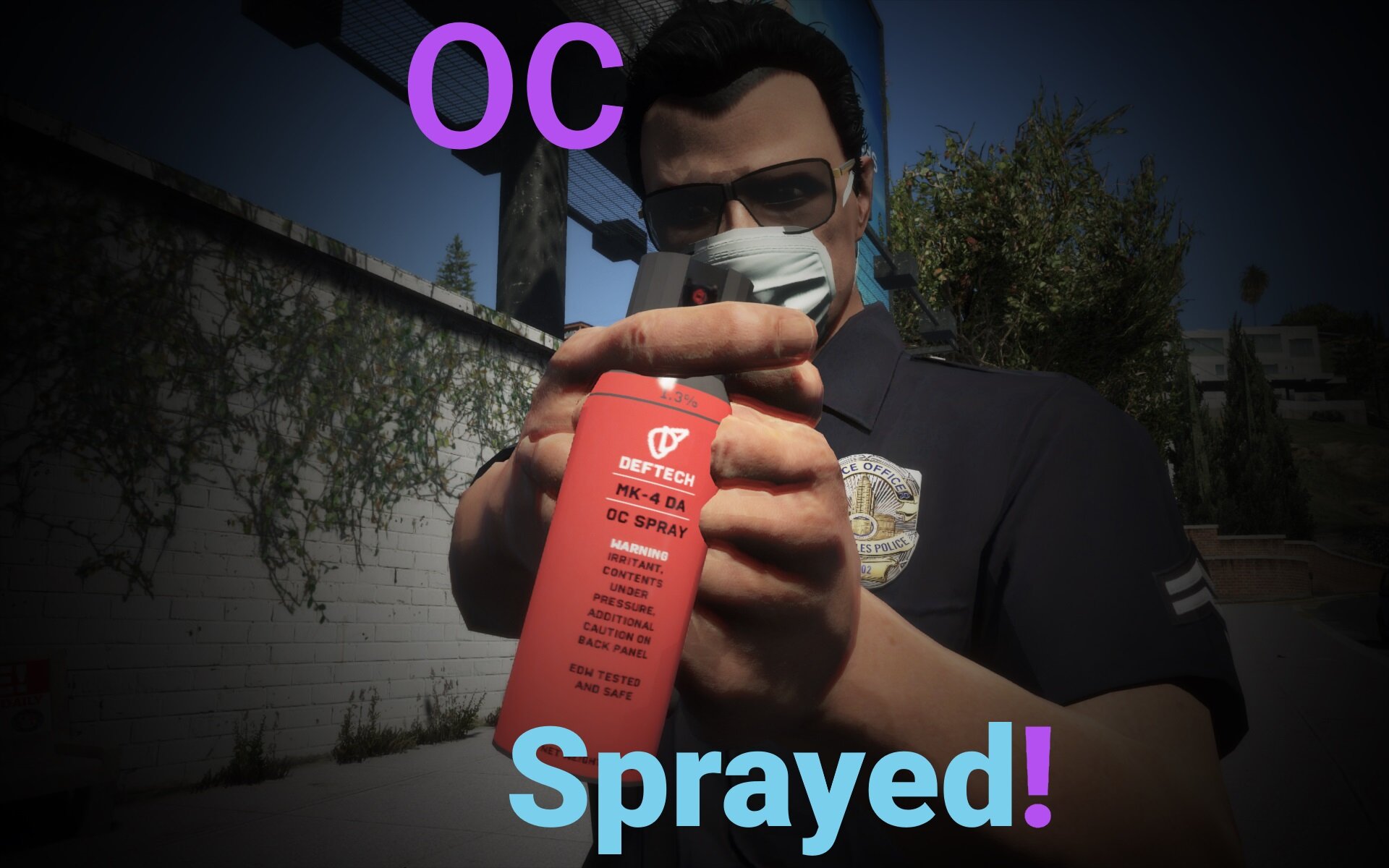
OC Sprayed! 1.1.0

(2 reviews)

6 Screenshots

Description

This is a revamp of smojo's original OC Spray script, picking up where it left off and fixing many of the issues seen in that mod. A new pepper spray can model has been added, NPC use functionality added and interfacing with the LSPDFR API to properly work during pursuits. (Because it uses the LSPDFR API the plugin only works when on duty)


Features

  • New animations and sounds, better emulating the real effect of pepper spray
  • New Spray can model
  • Interfacing with the LSPDFR API to work during pursuits
  • NPCs can now use the OC Spray
  • Much smoother spray animation
  • Small chance the subject will fight back
  • 3 (in-game) metre working distance- You must be close to the target

Install

Simply download with Lenny's Mod Manager

To spawn

It should be automatically added to your inventory when you go on duty. You can also manually add it:

When in game, press F4 to access the RagePluginHook Console and type "GiveWeapon WEAPON_OCSPRAY" without the quotations and press enter. Alternatively, you can add the entry to whatever loadout you want in the inventory xml as seen below.

Setup for NPCs (advanced users)

In "lspdfr\data\custom\inventory_eup.xml", simply add <StunWeapon chance="40">WEAPON_OCSPRAY</StunWeapon> below the stungun entry for patrol (if you want it to spawn with the patrol loadout). Change the chance to whatever you want, although I recommend to keep it below 100 and retain the taser as the OCSpray doesn't cause the suspect to surrender immediately- they'll just keep running until tased or the player arrests them.

Requirements

LSPDFR 0.4.7

RPH 1.74

Lenny's Mod Loader

Demonstration


Known Issues

- If an AI ped is shooting the spray towards the player, whizzing sounds are heard as if bullets are whizzing past

- AI spraying while running is not very accurate

- Sometimes the ped's screaming/coughing sounds don't play

- Ped doesn't surrender immediately if sprayed during a pursuit (LSPDFR API Limitation)

- Any cop sprayed during a pursuit will just stand there after the effects wear off, rendering them useless


Credits

smojo for the original script and dlc files


Usage

Feel free to use this mod in your Youtube videos. This mod is not to be shared on other platforms, any downloads must be linked to this LCPDFR.com page.

The OC Spray Can model is NOT to be used anywhere outside this mod without my explicit permission.


Disclaimer

As with all modifications, use at your own risk. I am not responsible for any game crashes, data loss or anything else that may occur as a result of using this mod.

What's New in Version 1.1.0

Released

Automatically adds the OC spray to the player's inventory when they go on duty.

User Feedback

Recommended Comments

Vladimir17

Members

Nice,very good work! 

Howard03

Members

nice

Blobby

Members Author

4 hours ago, Chief Donavan said:

I have it installed correctly and it loaded successfully in game but how do i spawn it?


Sorry, completely forgot about that part.

Press F4 to access the RagePluginHook Console and type "GiveWeapon WEAPON_OCSPRAY" and press enter

Chief Donavan

Members

This is the message I get it’s still not working for me 

image.jpg

cw5110

Members

I'm not so sure about the install. I've done everything that you have stated, however when I try to spawn the weapon by going threw rage it doesnt even list OC spray in my selections. Is this supposed to be a stand alone plugin? or an LSPDFR plugin?

Blobby

Members Author

55 minutes ago, Chief Donavan said:

This is the message I get it’s still not working for me 


You should have it in your hand when you press F4 to exit the console

42 minutes ago, cw5110 said:

I'm not so sure about the install. I've done everything that you have stated, however when I try to spawn the weapon by going threw rage it doesnt even list OC spray in my selections. Is this supposed to be a stand alone plugin? or an LSPDFR plugin?

It is an addon weapon and RagePluginHook will not list addon weapons in the console. Just type "GiveWeapon WEAPON_OCSPRAY" and it'll work if it was installed properly

It's an LSPDFR plugin by the way, so the spray effects will only work when you're on duty. Although you can still spawn the weapon without LSPDFR running.

Jarco

Members

This looks dope men!

Chief Donavan

Members

I got it working thanks man this is so cool good job creating this mod definitely gonna bring more role play to my YouTube videos 

X4vBond

Members

Why do we need Lenny’s mod?

Tayaso Matador

Members

thank you i been waiting on the update for this mod, it stopped spawing after i updated my lspdfr


(edited)


hi i can give you a new download link please!! 🙂 

give me a new download link i can't download

Edited by JohtajaBuffalo94

Blobby

Members Author

19 hours ago, agent rogers said:

i keep crashing every time i force duty in console  sine i installed this Please help!

RagePluginHook_17052020_145652.log 113.94 kB · 7 downloads

Not sure why the crash occurs, but it doesn't seem to be a direct problem with my mod. Try testing the game with and without certain mods to find the issue.

2 hours ago, JohtajaBuffalo94 said:


hi i can give you a new download link please!! 🙂 

give me a new download link i can't download

You can still download v1.0.0, it's just that you have to manually spawn the OC spray. Otherwise, you can wait until the v1.1.0 file is approved, shouldn't take more than a day.

1 hour ago, Cyanotic said:

really wish this didn't rely on LML. I can't stand LML

If you know how to install dlcs then you can actually manually install this. Just download it, copy the dlc folder to where the other dlcs are (Rename to OCSpray) and add the entry to your dlclist.xml. Copy everything inside gamefiles into your GTA 5 directory.

LML makes it so much easier by simplifying all this to one or two clicks.

manu450

Members

11 hours ago, Blobby said:

Not sure why the crash occurs, but it doesn't seem to be a direct problem with my mod. Try testing the game with and without certain mods to find the issue.

You can still download v1.0.0, it's just that you have to manually spawn the OC spray. Otherwise, you can wait until the v1.1.0 file is approved, shouldn't take more than a day.

If you know how to install dlcs then you can actually manually install this. Just download it, copy the dlc folder to where the other dlcs are (Rename to OCSpray) and add the entry to your dlclist.xml. Copy everything inside gamefiles into your GTA 5 directory.

LML makes it so much easier by simplifying all this to one or two clicks.

LML is for people that don't know how to install DLC. Not mandatory to the mod functionality?

agent rogers

Members

Yeah well when it updates might take another shot at it. heck people are dying faster than than mods getting approved lately! You would think things would be faster.

Lou9896

Insiders

(edited)

I know this is an odd question and from what I can gather the answer is no but the OC Spray have a Weapon hash? I ask as my trainer store load outs like this (See Below) and when ever I save a load out with the spray it doesn't save it. So naturally I have to add it through F4 console every time I load my load out ( which is no big deal). So i figured I ask. Keep up the great work.

Spoiler

<Weapon hash="0xc1b3c3d1" tint="2">
        <Components>
            <Component hash="0xe9867ce3" livery="0x00000000" />
            <Component hash="0x16ee3040" livery="0x00000000" />
        </Components>
    </Weapon>
    <Weapon hash="0x3656c8c1" tint="0">
        <Components />

P.S. I'm more familiar with vehicles then weapons so sorry if this is a dumb question 

Edited by Lou9896

agent rogers

Members

4 hours ago, Lou9896 said:

I know this is an odd question and from what I can gather the answer is no but the OC Spray have a Weapon hash? I ask as my trainer store load outs like this (See Below) and when ever I save a load out with the spray it doesn't save it. So naturally I have to add it through F4 console every time I load my load out ( which is no big deal). So i figured I ask. Keep up the great work.

  Reveal hidden contents

<Weapon hash="0xc1b3c3d1" tint="2">
        <Components>
            <Component hash="0xe9867ce3" livery="0x00000000" />
            <Component hash="0x16ee3040" livery="0x00000000" />
        </Components>
    </Weapon>
    <Weapon hash="0x3656c8c1" tint="0">
        <Components />

P.S. I'm more familiar with vehicles then weapons so sorry if this is a dumb question 

lol trainers relies on the open iv and gta folders  adding it to the open iv directly should fix that problem so when this updates it should work.  

Wikd

Members

Every time i load up the game with this plugin the game crashes.

boomer2840

Members

On 5/17/2020 at 8:48 AM, Chief Donavan said:

I got it working thanks man this is so cool good job creating this mod definitely gonna bring more role play to my YouTube videos 

I have same problem how did u get lt to work? thanks

X4vBond

Members

Can we write another thing except stun?

boomer2840

Members

for some reason it doesn't work it says it loaded but nothing in weapon wheel when on duty. please help

X4vBond

Members

Unfortunately, it doesn't work for me.  Need some help please.

X4vBond

Members

Rectification :  It works, but it takes too much FPS.  It causes frequent crashed game.

Create an account or sign in to comment

Latest Mods

Account

Navigation

Search

Search

Configure browser push notifications

Chrome (Android)
  1. Tap the lock icon next to the address bar.
  2. Tap Permissions → Notifications.
  3. Adjust your preference.
Chrome (Desktop)
  1. Click the padlock icon in the address bar.
  2. Select Site settings.
  3. Find Notifications and adjust your preference.












