Skip to content
View in the app

A better way to browse. Learn more.

LCPDFR.com

A full-screen app on your home screen with push notifications, badges and more.

To install this app on iOS and iPadOS
  1. Tap the Share icon in Safari
  2. Scroll the menu and tap Add to Home Screen.
  3. Tap Add in the top-right corner.
To install this app on Android
  1. Tap the 3-dot menu (⋮) in the top-right corner of the browser.
  2. Tap Add to Home screen or Install app.
  3. Confirm by tapping Install.

Whatevers Callouts 1.2.0

(6 reviews)

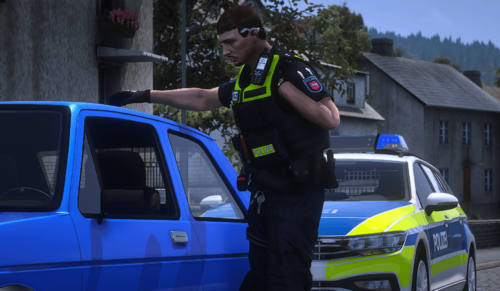
1 Screenshot

Hello my name is whatever.And today i bring you my callouts

callouts include

////////////////////////

Bouncer Needs Help / Security Needs Help
Reports of a Drug Dealer
man wanted for shooting
OFFICER DOWN
Reports Of Reckless Driving

Reports of intoxicated pedestrian

Person Matches Description Of WANTED Suspect

Person not responding

suspicious Person with a knife

Suspect Wanted For Hit And Run

Reports Active Shooter!

////////////////////////////

requirements

Traffic Policer


Better EMS


project files = https://www.dropbox.com/s/hv7bndj28w8taj1/whateverscallouts.rar?dl=0

Discord Server = https://discord.gg/dXpGykQ


have a boss ass day

What's New in Version 1.2.0

Released

rewrote most of the callouts, added in file,added 2 callouts

User Feedback

Recommended Comments

M.Williams

Members

(edited)

3 hours ago, whatever5925 said:

working on a update to fix this problem should be up in a day or 2

Thanks boss. appreciate your work 🙂 Are you planning on adding an .ini file to edit the frequencies and such?

Edited by M.Williams

whatever5925

Members Author

2 minutes ago, M.Williams said:

Thanks boss. appreciate your work 🙂 Are you planning on adding an .ini file to edit the frequencies and such?

Maybe in the near future

James911

Members

Sadly I can't play the callouts as when I want to start your callouts via Calloutmanager or RPH I just get the error that It "failed to load "Blabla" callout" 

I already reinstalled my LSPDFR but it didn't fix the problem... hopefully someone can help me. Thanks in advance

chadc78

Members

6 hours ago, James911 said:

Sadly I can't play the callouts as when I want to start your callouts via Calloutmanager or RPH I just get the error that It "failed to load "Blabla" callout" 

I already reinstalled my LSPDFR but it didn't fix the problem... hopefully someone can help me. Thanks in advance

You installed in GTAV/Plugins/LSPDFR?


redwolf5525

Members

Great callout pack. I really enjoy it. Is there not any audio? And also when a callout comes through it doesnt bring the map up like all the others. Other than those two things. It's really awesome. Thanks for providing it.20191102232735_1.thumb.jpg.e7be0377b85d4b76ac820dbf392d752f.jpg

.G.

Members

17 hours ago, redwolf5525 said:

Great callout pack. I really enjoy it. Is there not any audio? And also when a callout comes through it doesnt bring the map up like all the others. Other than those two things. It's really awesome. Thanks for providing it.20191102232735_1.thumb.jpg.e7be0377b85d4b76ac820dbf392d752f.jpg

Where u get that F-150? Trying to find one for awhile

redwolf5525

Members


1 hour ago, Big G 069 said:

Where u get that F-150? Trying to find one for awhile

It's in BlueGhosts Kentucky pack. He has a lot of cool stuff in it.

Siracusa

Members

this bug happened to me in the bouncer call , with the bouncer I can interact once the callout is closed and using stop the ped , the bouncer stretches out this strange surprized ped a little surreal , even after I arrived and I ordered her to stop , she stops and the bouncer continues to rage, in fact I also stopped after I closed the callout, suddenly the ped splits, I call the backup but it does not work, I apply the cpr, it resumes, the handcuff, it does not work me stop the ped, as if the attacker were invisible, does not recognize it , recognizes the bouncer only 

( I like the other callouts, and I like the idea of this bouncer, only I hope you can fix it better, thanks for the work of the callout  )

Grand Theft Auto V 27_01_2020 18_02_30.png

Grand Theft Auto V 27_01_2020 18_02_42.png

Siracusa

Members

I wanted to ask if the cras came from something in the callouts , thanks in advance


[4/23/2020 12:06:57 AM.444] LSPD First Response: 
[4/23/2020 12:06:57 AM.444] LSPD First Response: ==============================
[4/23/2020 12:06:57 AM.444] LSPD First Response: UNHANDLED EXCEPTION DURING GAME FIBER TICK
[4/23/2020 12:06:57 AM.444] LSPD First Response: ------------------------------
[4/23/2020 12:06:57 AM.444] LSPD First Response: Origin: Game fiber "<UNNAMED THREAD>".
[4/23/2020 12:06:57 AM.444] LSPD First Response: ------------------------------
[4/23/2020 12:06:57 AM.444] LSPD First Response: Exception type: System.InvalidOperationException
[4/23/2020 12:06:57 AM.444] LSPD First Response: Exception message: GameFiber.Wait() can only be called from the active GameFiber.
[4/23/2020 12:06:57 AM.444] LSPD First Response: ------------------------------
[4/23/2020 12:06:57 AM.444] LSPD First Response: Inner exceptions:
[4/23/2020 12:06:57 AM.444] LSPD First Response: ------------------------------
[4/23/2020 12:06:57 AM.444] LSPD First Response: Stack trace:
[4/23/2020 12:06:57 AM.445] LSPD First Response: at Rage.GameFiber.Wait(Int32 duration)
[4/23/2020 12:06:57 AM.445] at whateverscallouts.Main.<>c__DisplayClass16_0.<test>b__0()
[4/23/2020 12:06:57 AM.445] at Rage.GameFiber.Main()
[4/23/2020 12:06:57 AM.445] LSPD First Response: ==============================
[4/23/2020 12:06:57 AM.445] LSPD First Response: 
[4/23/2020 12:06:57 AM.468] LSPD First Response: [FATAL] Forced termination
[4/23/2020 12:06:57 AM.471] LSPD First Response: [TRACE] Released 0 entities from DefaultContentManager
[4/23/2020 12:06:59 AM.949] LSPD First Response: [INFO] LSPDFR has shut down
[4/23/2020 12:07:00 AM.667] LSPD First Response: [MoreRadioChatter] Something went wrong for file 'BLURRY_CHATTER', see error below:
[4/23/2020 12:07:00 AM.667] LSPD First Response: [MoreRadioChatter] ERROR: Thread interrotto.
[4/23/2020 12:07:01 AM.060] LSPD First Response: All signs removed
[4/23/2020 12:07:01 AM.263] LSPD First Response: STP: RELEASE PED FROM STOP (FORCED)
[4/23/2020 12:07:01 AM.271] LSPD First Response: STP cancelled jail drop off to avoid crash

Create an account or sign in to comment

Account

Navigation

Search

Search

Configure browser push notifications

Chrome (Android)
  1. Tap the lock icon next to the address bar.
  2. Tap Permissions → Notifications.
  3. Adjust your preference.
Chrome (Desktop)
  1. Click the padlock icon in the address bar.
  2. Select Site settings.
  3. Find Notifications and adjust your preference.