Skip to content
View in the app

A better way to browse. Learn more.

LCPDFR.com

A full-screen app on your home screen with push notifications, badges and more.

To install this app on iOS and iPadOS
  1. Tap the Share icon in Safari
  2. Scroll the menu and tap Add to Home Screen.
  3. Tap Add in the top-right corner.
To install this app on Android
  1. Tap the 3-dot menu (⋮) in the top-right corner of the browser.
  2. Tap Add to Home screen or Install app.
  3. Confirm by tapping Install.

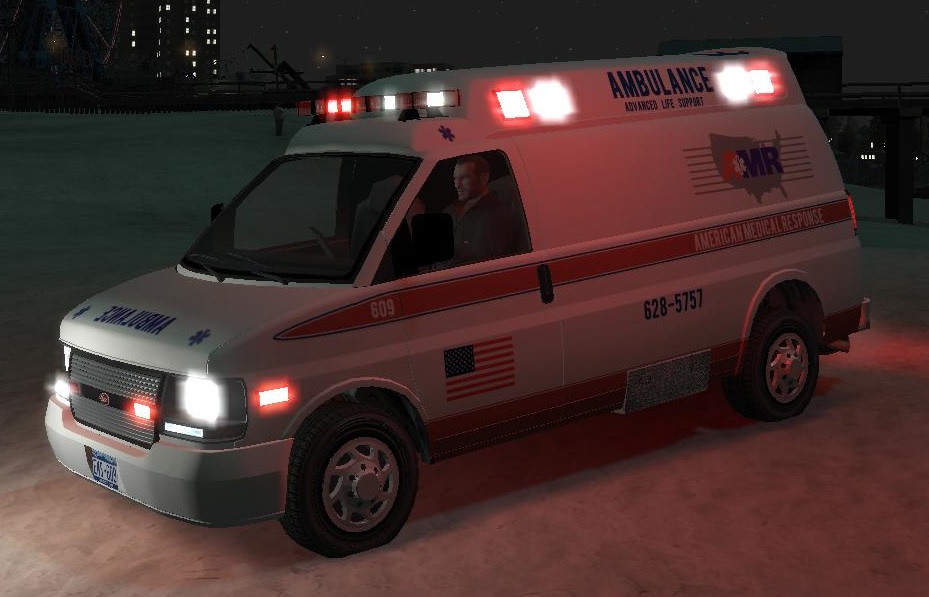
Vapid Speedo Type 2 Ambulance 1.0

(4 reviews)

1 Screenshot

-= VAPID SPEEDO TYPE 2 AMBULANCE =-

- NAME: VAPID SPEEDO AMBULANCE

- VERSION: 1.0

- LIGHT BAR: Whelen Edge

- MULTIPLE LIVERIES: Yes

- OPTIMIZED FOR: Ambulance

- MOD STATUS: Complete - 100%

- CREDITS:

Whelen Edge by KevinDV.

Wheels by Teddy.

AMR paintjob by Break.

Stretcher by Buttlamo.

Original vehicle by Rockstar Games.

Other lights and modifications by corleone.

Do not edit Break's paintjob without his permission!

HANDLING:

AMBULANCE 2500.0 5.0 80 0.0 0.0 -0.10 0.0 5 0.13 1.0 125.0 0.2 0.66 0.7 35.0 1.05 0.80 15.0 0.15 0.48 2.0 1.0 1.0 0.20 -0.15 0.0 0.45 1.0 1.0 0.8 1.5 0.0 20000 444008 0 2

Rembember to add "+livery" @ vehicles.ide.

corleone :)

User Feedback

Recommended Comments

trw1000

Members

Nice mod

Nutronic

Members

Is there anyway to make different registration/license plates for this too so that they are randomised like the liveries?

TheUntouchables

Members

Any chance you could do a LCPD Crime Scene Unit skin for this vehicle, The same paint scheme you would find on a NYPD vehicle

dept.jones

Members

Any chance you could do a LCPD Crime Scene Unit skin for this vehicle, The same paint scheme you would find on a NYPD vehicle

Create an account or sign in to comment

Account

Navigation

Search

Search

Configure browser push notifications

Chrome (Android)
  1. Tap the lock icon next to the address bar.
  2. Tap Permissions → Notifications.
  3. Adjust your preference.
Chrome (Desktop)
  1. Click the padlock icon in the address bar.
  2. Select Site settings.
  3. Find Notifications and adjust your preference.