Skip to content
View in the app

A better way to browse. Learn more.

LCPDFR.com

A full-screen app on your home screen with push notifications, badges and more.

To install this app on iOS and iPadOS
  1. Tap the Share icon in Safari
  2. Scroll the menu and tap Add to Home Screen.
  3. Tap Add in the top-right corner.
To install this app on Android
  1. Tap the 3-dot menu (⋮) in the top-right corner of the browser.
  2. Tap Add to Home screen or Install app.
  3. Confirm by tapping Install.

BCSO Pack [RX2700] 1.0.0

(45 reviews)

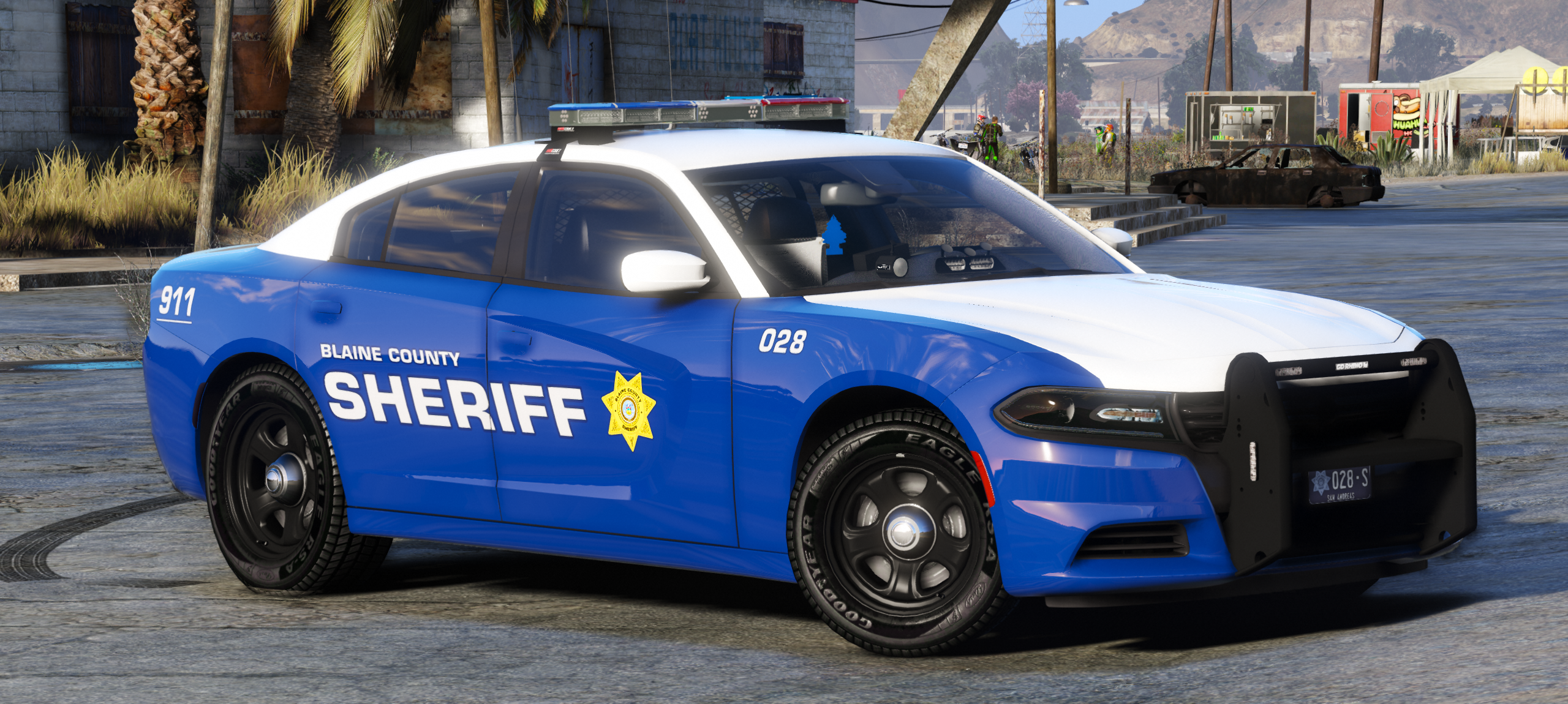
16 Screenshots

ENJOY!!!

 Use the readme


Some models are quite large in file size which i apologize about.


INSTALLATION:

Models:Mods - Update - x64 - DlcPacks - Patchday15/14(Most recent in your game) - dlc.rpf - x64 - levels - gta5 - vehicles.rpf (Replace/Drag and drop)


VCFs:Grand Theft Auto V Directory - ELS - pack_default (Replace/Drag and drop)


Meta for 2016 Explorer.(Also included in the file)

Spoiler

-To install the vehicles meta file, navigate to:
C:\Program Files (x86)\Steam\steamapps\common\Grand Theft Auto V\mods\update\update.rpf\common\data\levels\gta5
Or the spot you put your metas in. Simply copy over this line over the existing police3 line.

 <Item>
      <modelName>POLICE3</modelName>
      <txdName>POLICE3</txdName>
      <handlingId>POLICE3</handlingId>
      <gameName>POLICE</gameName>
      <vehicleMakeName />
      <expressionDictName>null</expressionDictName>
      <expressionName>null</expressionName>
      <animConvRoofDictName>null</animConvRoofDictName>
      <animConvRoofName>null</animConvRoofName>
      <animConvRoofWindowsAffected />
      <ptfxAssetName>null</ptfxAssetName>
      <audioNameHash />
      <layout>LAYOUT_STD_EXITFIXUP</layout>
      <coverBoundOffsets>POLICE3_COVER_OFFSET_INFO</coverBoundOffsets>
      <explosionInfo>EXPLOSION_INFO_DEFAULT</explosionInfo>
      <scenarioLayout />
      <cameraName>DEFAULT_FOLLOW_VEHICLE_CAMERA</cameraName>
      <aimCameraName>MID_BOX_VEHICLE_AIM_CAMERA</aimCameraName>
      <bonnetCameraName>VEHICLE_BONNET_CAMERA_MID_NEAR</bonnetCameraName>
      <povCameraName>DEFAULT_POV_CAMERA</povCameraName>
      <FirstPersonDriveByIKOffset x="0.000000" y="-0.060000" z="-0.030000" />
      <FirstPersonDriveByUnarmedIKOffset x="0.000000" y="0.000000" z="-0.020000" />
      <FirstPersonProjectileDriveByIKOffset x="0.055000" y="-0.075000" z="-0.045000" />
      <FirstPersonProjectileDriveByPassengerIKOffset x="-0.055000" y="-0.075000" z="-0.045000" />
      <FirstPersonProjectileDriveByRearLeftIKOffset x="0.000000" y="0.000000" z="0.000000" />
      <FirstPersonProjectileDriveByRearRightIKOffset x="0.000000" y="0.000000" z="0.000000" />
      <FirstPersonDriveByLeftPassengerIKOffset x="0.000000" y="0.000000" z="0.000000" />
      <FirstPersonDriveByRightPassengerIKOffset x="0.000000" y="-0.060000" z="-0.030000" />
      <FirstPersonDriveByRightRearPassengerIKOffset x="0.000000" y="0.000000" z="0.000000" />
      <FirstPersonDriveByLeftPassengerUnarmedIKOffset x="0.000000" y="0.000000" z="0.000000" />
      <FirstPersonDriveByRightPassengerUnarmedIKOffset x="0.000000" y="0.000000" z="0.000000" />
      <FirstPersonMobilePhoneOffset x="0.130000" y="0.275000" z="0.530000" />
      <FirstPersonPassengerMobilePhoneOffset x="0.136000" y="0.223000" z="0.425000" />
      <FirstPersonMobilePhoneSeatIKOffset>
        <Item>
            <Offset x="0.136000" y="0.156000" z="0.445000" />
            <SeatIndex value="2" />
        </Item>
        <Item>
            <Offset x="0.136000" y="0.156000" z="0.445000" />
            <SeatIndex value="3" />
        </Item>
      </FirstPersonMobilePhoneSeatIKOffset> 
      <PovCameraOffset x="0.000000" y="-0.175000" z="0.675000" />
      <PovCameraVerticalAdjustmentForRollCage value="0.000000" />
      <PovPassengerCameraOffset x="0.000000" y="0.000000" z="0.000000" />
      <PovRearPassengerCameraOffset x="0.000000" y="0.000000" z="0.000000" />
      <vfxInfoName>VFXVEHICLEINFO_CAR_GENERIC</vfxInfoName>
      <shouldUseCinematicViewMode value="true" />
      <shouldCameraTransitionOnClimbUpDown value="false" />
      <shouldCameraIgnoreExiting value="false" />
      <AllowPretendOccupants value="true" />
      <AllowJoyriding value="false" />
      <AllowSundayDriving value="false" />
      <AllowBodyColorMapping value="false" />
      <wheelScale value="0.244000" />
      <wheelScaleRear value="0.244000" />
      <dirtLevelMin value="0.000000" />
      <dirtLevelMax value="0.300000" />
      <envEffScaleMin value="0.000000" />
      <envEffScaleMax value="1.000000" />
      <envEffScaleMin2 value="0.000000" />
      <envEffScaleMax2 value="1.000000" />
      <damageMapScale value="0.600000" />
      <damageOffsetScale value="1.000000" />
      <diffuseTint value="0x00FFFFFF" />
      <steerWheelMult value="1.000000" />
      <HDTextureDist value="5.000000" />
      <lodDistances content="float_array">
        15.000000
        30.000000
        70.000000
        140.000000
        500.000000
        500.000000
      </lodDistances>
      <minSeatHeight value="0.83" />
      <identicalModelSpawnDistance value="100" />
      <maxNumOfSameColor value="10" />
      <defaultBodyHealth value="1000.000000" />
      <pretendOccupantsScale value="1.000000" />
      <visibleSpawnDistScale value="1.000000" />
      <trackerPathWidth value="2.000000" />
      <weaponForceMult value="2.000000" />
      <frequency value="100" />
      <swankness>SWANKNESS_0</swankness>
      <maxNum value="2" />
      <flags>FLAG_HAS_LIVERY FLAG_EXTRAS_ALL FLAG_EXTRAS_REQUIRE FLAG_LAW_ENFORCEMENT FLAG_EMERGENCY_SERVICE FLAG_NO_RESPRAY FLAG_DONT_SPAWN_IN_CARGEN FLAG_HAS_INTERIOR_EXTRAS FLAG_REPORT_CRIME_IF_STANDING_ON FLAG_EXTRAS_STRONG</flags>
      <type>VEHICLE_TYPE_CAR</type>
      <plateType>VPT_BACK_PLATES</plateType>
      <dashboardType>VDT_GENTAXI</dashboardType>
      <vehicleClass>VC_EMERGENCY</vehicleClass>
      <wheelType>VWT_SPORT</wheelType>
      <trailers />
      <additionalTrailers />
      <drivers>
        <Item>
          <driverName>S_M_Y_Cop_01</driverName>
          <npcName />
        </Item>
      </drivers>
      <extraIncludes />
      <doorsWithCollisionWhenClosed />
      <driveableDoors />
      <bumpersNeedToCollideWithMap value="false" />
      <needsRopeTexture value="false" />
      <requiredExtras>EXTRA_3</requiredExtras>
      <requiredExtras>EXTRA_7</requiredExtras>
      <rewards>
        <Item>REWARD_WEAPON_PUMPSHOTGUN</Item>
        <Item>REWARD_AMMO_PUMPSHOTGUN_ENTER_VEHICLE</Item>
        <Item>REWARD_STAT_WEAPON</Item>
      </rewards>
      <cinematicPartCamera>
        <Item>WHEEL_FRONT_RIGHT_CAMERA</Item>
        <Item>WHEEL_FRONT_LEFT_CAMERA</Item>
        <Item>WHEEL_REAR_RIGHT_CAMERA</Item>
        <Item>WHEEL_REAR_LEFT_CAMERA</Item>
      </cinematicPartCamera>
      <NmBraceOverrideSet />
      <buoyancySphereOffset x="0.000000" y="0.000000" z="0.000000" />
      <buoyancySphereSizeScale value="1.000000" />
      <pOverrideRagdollThreshold type="NULL" />
      <firstPersonDrivebyData>
        <Item>STD_POLICE3_FRONT_LEFT</Item>
        <Item>STD_POLICE3_FRONT_RIGHT</Item>
        <Item>STD_POLICE2_REAR_LEFT</Item>
        <Item>STD_POLICE2_REAR_RIGHT</Item>
      </firstPersonDrivebyData>
    </Item>


Massive thanks again to @Sinnisa for that awesome skin.Check his amazing work out http://www.lcpdfr.com/profile/319377-sinnisa/?do=content&type=downloads_file&change_section=1

Also massive thanks to @jumperman09 for the sexy lightbar.Check his stuff out here.http://www.lcpdfr.com/profile/266107-jumperman09/content/?type=downloads_file

Also thanks to @Giordano for Beta testing

.Credits are included.Pls message me if there are bugs or if i forgot someone in the credits.


Showcase: 


THX to @aJ1399


FREQUENTLY ASKED QUESTIONS:

Q: Why r ur lights so shiny pls help :(

A: I use RadianceV to make my lights bright, you will need something like this or another mod like it to make your lights as bright as mine.


Q: Can you please make an ELS pack for my own personal town?

A: Not even a little sorry bb 


Q: X isn't working why?

A: You may be doing something wrong, or I may have fucked something up. If you do find a bug or have a question please comment with a screenshot or video to give me a better idea of what is wrong and I will get back to you.


Q: My lightbar and windows are tinted :(

I try to fix those but sometimes it still happens. Go into vehicles.metafind the line that says diffusetint for the model and find the diffusetint value and replace the value with this<diffuseTint value="0x00FFFFFF" />


Please do not redistribute this pack, or any part of it including the liveries, or models, or screenshots, or use them in clans or public/private servers. Please do not upload this file or a part of it to any other site unless given explicit credit. Thanks for downloading ;) Please report the bugs in the comments before posting a review about them, it may be a misunderstanding or just an easy fix. Enjoy!


What's New in Version 1.0.0

Released

Added CVPI

User Feedback

Recommended Comments

Have I gone blind or is there no way to fix the tint in the lightbars?

mhulcio576

Members

amazing pack man always love ur work. I love how you added the impala to your newest pack do you think you could add it to this pack aswell? Its the only thing missing that i love to us.

techgamer15

Members

The ford explorer keeps flipping over when going round sharp bends at speed, but I cannot find any handling lines related to it. Any help?

Miniz

Members

Is the crown vic meant to have a 3 step lightbar (meaning you need to press J 3 times using ELS, opposed to once on other vehicles)? The yellow traffic director is also overlapping lights on lightbar. I don't use the vic for that reason.

Oatmeal

Members

16 minutes ago, Minimanz said:

Is the crown vic meant to have a 3 step lightbar (meaning you need to press J 3 times using ELS, opposed to once on other vehicles)? The yellow traffic director is also overlapping lights on lightbar. I don't use the vic for that reason.

The VCF in the download is the default, just use the VCF for the charger if you want the same lighting setup as the other cars.

Miniz

Members

21 hours ago, Oatmeal said:

The VCF in the download is the default, just use the VCF for the charger if you want the same lighting setup as the other cars.

Okay, thanks!

heavydriver

Members

Can someone help? 100% me being idiot but the cars in the FBI slot show black instead of white... any ideas? 
My favorite pack btw!
Thanks,

20180806180218_1.jpg

Petroph

Members

(edited)

On 6/21/2018 at 7:23 AM, techgamer15 said:

The ford explorer keeps flipping over when going round sharp bends at speed, but I cannot find any handling lines related to it. Any help?

Ya, I'm having this issue as well. And I know I installed the Meta correctly for the vehicle as provided. This is literally the best pack imo and I cant use the Explorer to its full potential. 😢

On 8/6/2018 at 12:05 PM, heavydriver said:

Can someone help? 100% me being idiot but the cars in the FBI slot show black instead of white... any ideas? 
My favorite pack btw!
Thanks,

20180806180218_1.jpg


I didn't even notice this too until just now. I thought it was originally in the pack. Obviously it wasn't >_<

Edited by Petroph

Bertram Quist

Members

Can someone help me and tell where I have to put .XML files ?? Please 😕

Officer LarseN

Members

(edited)

Cant delete. Would do otherwise

Edited by Officer LarseN

Kreemerz

Members

Where are the spotlights?  For goodness sake, what police units have no spotlights.


At least make them extra... geeze

Dylan H.

Members

Hey Maurice97 Great pack i was wondering if I have your persimmon to make this into a non els fivem pack. I will make sure to include a link to this pack on lspdfr.com in the fivem forum and will also include a file in the pack with credits explicitly giving you credit for the skins. I will also but your name in the fivem forum post credits in big bold letters if you don't want me to i totally understand!!

l3ubba

Members

On 4/26/2019 at 12:10 PM, Kreemerz said:

Where are the spotlights?  For goodness sake, what police units have no spotlights.


At least make them extra... geeze

He already said he's not putting them on there. I'm not sure why you feel the need to come back a year later and continue to complain about it. If it is that big of a deal to you then go download a different pack.

Kreemerz

Members

57 minutes ago, l3ubba said:

He already said he's not putting them on there. I'm not sure why you feel the need to come back a year later and continue to complain about it. If it is that big of a deal to you then go download a different pack.


I'm not sure why you felt the need to reply with that. I'm trying to determine if it was helpful.

Nope. Not helpful.


Making components an 'extra' would address common posts, hence the number of posts asking for it.

It's a perfect compromise. Options versus 'no-options'.


l3ubba

Members

1 minute ago, Kreemerz said:


I'm not sure why you felt the need to reply with that. I'm trying to determine if it was helpful.

Nope. Not helpful.


Making components an 'extra' would address common posts, hence the number of posts asking for it.

It's a perfect compromise. Options versus 'no-options'.


I'm not sure why you felt the need to complain a year later about something the creator already said he isn't going to do. Was that helpful or constructive? Nope. This isn't the only pack of vehicles like this. There are several other options for vehicles with similar setups, you can go download those if you don't like this one.

Kreemerz

Members

5 minutes ago, l3ubba said:

I'm not sure why you felt the need to complain a year later about something the creator already said he isn't going to do. Was that helpful or constructive? Nope. This isn't the only pack of vehicles like this. There are several other options for vehicles with similar setups, you can go download those if you don't like this one.


Because my suggestion may help others including the original poster develop models with optional components as 'extras'. Suggesting ways to help other users by adding more options. On the other hand, your reply was not helpful at all. And comes off as 'toxic'.

l3ubba

Members

2 minutes ago, Kreemerz said:


Because my suggestion may help others including the original poster develop models with optional components as 'extras'. Suggesting ways to help other users by adding more options. On the other hand, your reply was not helpful at all. And comes off as 'toxic'.

You posted your suggestion over a year ago, the OP replied and said he wasn't going to change his model. Instead of leaving it at that you decided to come back and post the same repetitive complaint again, and you didn't even post it in a constructive manner. If anyone's post here is toxic it is yours.

Kreemerz

Members

(edited)

9 minutes ago, l3ubba said:

You posted your suggestion over a year ago, the OP replied and said he wasn't going to change his model. Instead of leaving it at that you decided to come back and post the same repetitive complaint again, and you didn't even post it in a constructive manner. If anyone's post here is toxic it is yours.


Maybe you confused a response he had for someone else? B'cause I don't see any responses to me. In any case, creating optional components seems like such a simple fix for users who want vehicles with spotlights, albeit a year or month later.


Perhaps you may want to develop this models with spotlights?


Edited by Kreemerz

criscl173

Members

Does anyone have a problem with the wheels of 2015 Tahoe?

Kreemerz

Members

10 hours ago, criscl173 said:

Does anyone have a problem with the wheels of 2015 Tahoe?


What problem?

criscl173

Members

On 6/1/2019 at 1:12 AM, Kreemerz said:


What problem?

my wheels going out like this, while the orther side is normal

fix.png

Kreemerz

Members

On 6/7/2019 at 11:49 AM, criscl173 said:

my wheels going out like this, while the orther side is normal

fix.png


What model is that?

Include the link.

criscl173

Members

15 hours ago, Kreemerz said:


What model is that?

Include the link.

this pack

 and a 15 Tahoe model

Kreemerz

Members

(edited)

On 6/12/2019 at 3:33 AM, criscl173 said:

this pack

 and a 15 Tahoe model


This is only happening with this vehicle? The Tahoe? 

1) First question is in regards to your install method. Did you just unzip the file and drag the files into the patchday folder? No renaming of the files or anything like that? Which patchday folder did you put the files in?


2) Did you add any of the other vehicles?

I noticed that there are 2 different Tahoes in each of those zipped packages. There's a 2013 Tahoe and a 2015 Tahoe. Have you tried both Tahoes?


3) The developer has 3 files that you can download. I'm not sure why he has 3 of them because it may confuse people. But see if you have the same problem with the Tahoes from all of the download packages.


Edited by Kreemerz

criscl173

Members

On 6/13/2019 at 8:19 PM, Kreemerz said:


This is only happening with this vehicle? The Tahoe? 

1) First question is in regards to your install method. Did you just unzip the file and drag the files into the patchday folder? No renaming of the files or anything like that? Which patchday folder did you put the files in?


2) Did you add any of the other vehicles?

I noticed that there are 2 different Tahoes in each of those zipped packages. There's a 2013 Tahoe and a 2015 Tahoe. Have you tried both Tahoes?


3) The developer has 3 files that you can download. I'm not sure why he has 3 of them because it may confuse people. But see if you have the same problem with the Tahoes from all of the download packages.


1, I turned the pack to add-on so might be that is problem, anyway I use that 2015 Tahoe vehicle.meta the same with another 2013 Tahoe that I got in different pack.
2, 2013 Tahoe is fine, all the cars is fine except that Tahoe.
3,I'm pretty sure that I downloaded the right pack.

Create an account or sign in to comment

Account

Navigation

Search

Search

Configure browser push notifications

Chrome (Android)
  1. Tap the lock icon next to the address bar.
  2. Tap Permissions → Notifications.
  3. Adjust your preference.
Chrome (Desktop)
  1. Click the padlock icon in the address bar.
  2. Select Site settings.
  3. Find Notifications and adjust your preference.