Skip to content
View in the app

A better way to browse. Learn more.

LCPDFR.com

A full-screen app on your home screen with push notifications, badges and more.

To install this app on iOS and iPadOS
  1. Tap the Share icon in Safari
  2. Scroll the menu and tap Add to Home Screen.
  3. Tap Add in the top-right corner.
To install this app on Android
  1. Tap the 3-dot menu (⋮) in the top-right corner of the browser.
  2. Tap Add to Home screen or Install app.
  3. Confirm by tapping Install.

ProLaser 4 Radar Gun 2.0.0

(17 reviews)

2 Screenshots

If you are looking for a functional radar gun, check out the new mod by @opus49 that uses this radar gun model. Thanks for the good work Opus!


I don't actively visit this site anymore. You can do anything you want with the model/texture including reuploading to other sites, repackaging, and just about anything else you can think of.


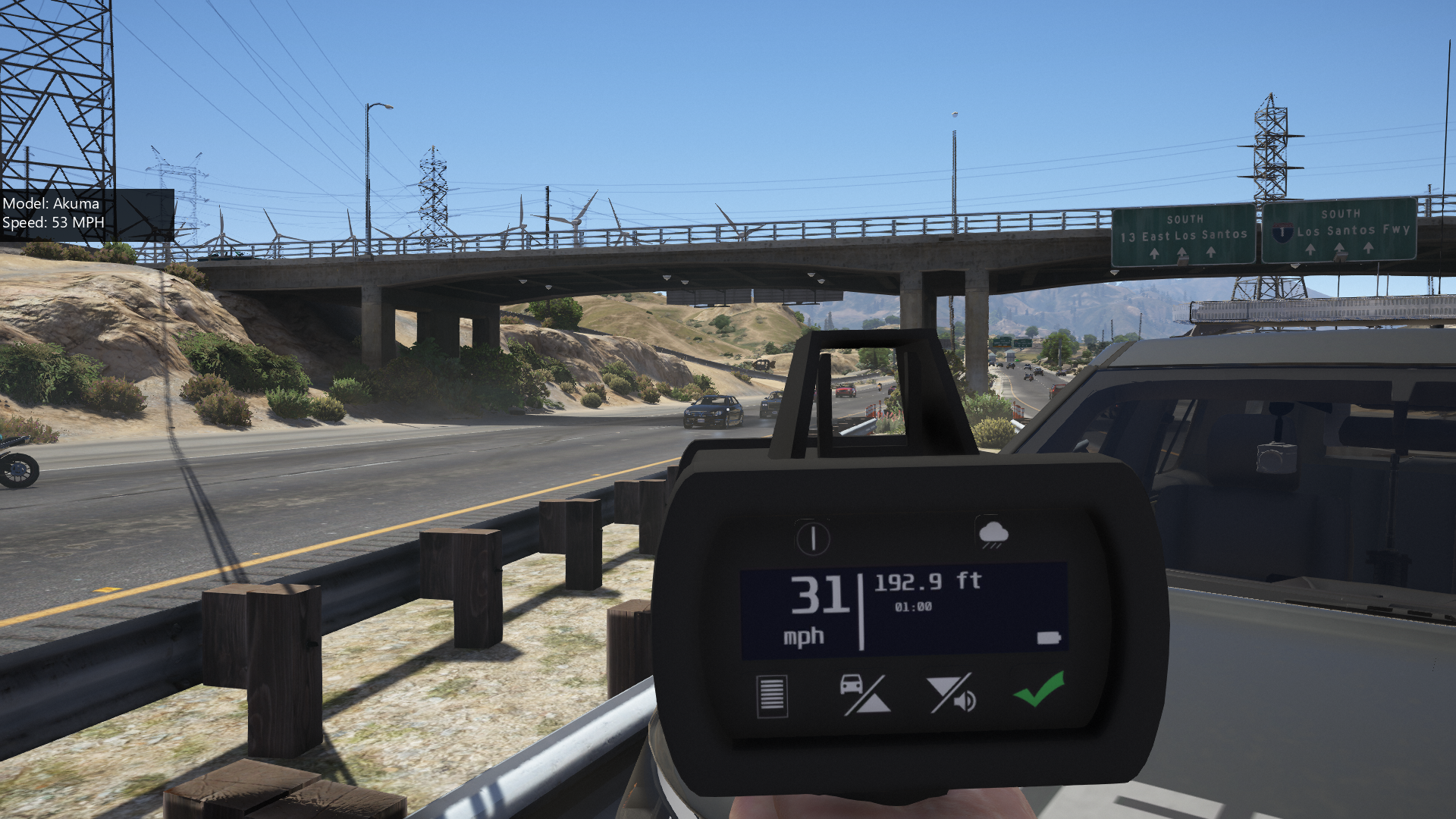
The ProLaser 4 Radar Gun is here! Combine this mod with Albo's Traffic Policer for great RP.


Installation:

  1. Use OpenIV to copy all four files into mods > update > x64 > dlcpacks > patchday8ng > dlc.rpf > x64 > models > cdimages > weapons.rpf
  2. (Optional) Install Claude_III's mod to allow marksman pistol use in a vehicle. https://www.gta5-mods.com/weapons/driveby-marksman-pistol


Thanks to Narobic for letting me know about the driveby mod!

Edited by Scaarus
Added a link to Opus' radar gun script

What's New in Version 2.0.0

Released

  • Adjusted the position of the gun in the hand.
  • Fixed LOD issue
  • Remapped the texture, should have higher quality where it's needed.
  • Replaced the marksman pistol instead of the vintage pistol.

Short Description

A radar gun replacer model for screenshot posing

User Feedback

Recommended Comments

Works amazingly except in car, it doesn't even let you pull it up in vehicle if it's equipped on the character !

Scaarus

Members Author

26 minutes ago, ZacharyMatthewSipe said:

Works amazingly except in car, it doesn't even let you pull it up in vehicle if it's equipped on the character !

Did you have it replace the vintage pistol like I had set as default? It should allow you to use it in a car just fine. I had it working on my bike with no issues.

4 hours ago, Scaarus said:

Did you have it replace the vintage pistol like I had set as default? It should allow you to use it in a car just fine. I had it working on my bike with no issues.

i replaced the marksman pistol with it. It just doesn't let me select it when cycling through weapons in my car.

Scaarus

Members Author

Just now, ZacharyMatthewSipe said:

i replaced the marksman pistol with it. It just doesn't let me select it when cycling through weapons in my car.

That's what I was originally going to replace but I found that the marksman pistol cant be used in a vehicle.

3 hours ago, Scaarus said:

That's what I was originally going to replace but I found that the marksman pistol cant be used in a vehicle.

hmmm... maybe i'll replace with the vintage too and see what happens, i don't use either for my duty weapons.

the question is how to we word it in Albos INI file to work correctly for the vintage pistol ?


Scaarus

Members Author

1 minute ago, ZacharyMatthewSipe said:

hmmm... maybe i'll replace with the vintage too and see what happens, i don't use either for my duty weapons.

the question is how to we word it in Albos INI file to work correctly for the vintage pistol ?


Which mod of his?

3 hours ago, Scaarus said:

Which mod of his?

traffic policer... also this is what it looks like in vehicle, its the radar gun model, but it shoots bullets and doesn't work as a radar gun...

IMG_4637.JPG

weapons choice for radar gun.PNG

Scaarus

Members Author

Just now, ZacharyMatthewSipe said:

traffic policer... also this is what it looks like in vehicle, its the radar gun model, but it shoots bullets and doesn't work as a radar gun...


Yea, it's just a model. It wont work as an actual radar, just for RP. You can use it with one of the many radar scripts though. For Traffic Policer, use "WEAPON_VINTAGEPISTOL" in the ini.

3 hours ago, Scaarus said:

Yea, it's just a model. It wont work as an actual radar, just for RP. You can use it with one of the many radar scripts though. For Traffic Policer, use "WEAPON_VINTAGEPISTOL" in the ini.

ok, makes total sense now, i was like why is it working when out of the vehicle, but not in the vehicle. His update says it works in the vehicle.

Narobic

Members

(edited)

54 minutes ago, ZacharyMatthewSipe said:

i replaced the marksman pistol with it. It just doesn't let me select it when cycling through weapons in my car.


53 minutes ago, Scaarus said:

That's what I was originally going to replace but I found that the marksman pistol cant be used in a vehicle.

Hey guys, use this. I honestly don't know why Albo didn't include a link in the Traffic Policer mod post (considering this is the mod he uses)

It lets you use the marksman pistol in your car. (I'd suggest adding a link in this post since this is where everyone will be flocking after downloading Traffic Policer)

https://www.gta5-mods.com/weapons/driveby-marksman-pistol

----------------------------------------------------------------

39 minutes ago, ZacharyMatthewSipe said:

traffic policer... also this is what it looks like in vehicle, its the radar gun model, but it shoots bullets and doesn't work as a radar gun...

You have to pull out the weapon outside of your vehicle in order to activate albo's mod. Then after it's activated, get back in your vehicle and it will work.

Edited by Narobic

Scaarus

Members Author

1 hour ago, Narobic said:


Hey guys, use this. I honestly don't know why Albo didn't include a link in the Traffic Policer mod post (considering this is the mod he uses)

It lets you use the marksman pistol in your car. (I'd suggest adding a link in this post since this is where everyone will be flocking after downloading Traffic Policer)

https://www.gta5-mods.com/weapons/driveby-marksman-pistol

I appreciate that info. When I get the LODs done I'll switch over to using the marksman pistol and put that link in the description.

Narobic

Members

(edited)

39 minutes ago, Scaarus said:

I appreciate that info. When I get the LODs done I'll switch over to using the marksman pistol and put that link in the description.

Also, if I may make a suggestion for the model, make our hands hold it closer to the body of the weapon. It's too far above our hands imo.

Edited by Narobic

Schecter004

Members

Well, your description makes no sense.

I thought i have to replace the marksmanpistol?

Instead the name of the radar is slingshot.

And in patchday10 is only a flaregun to replace.

I'm totally confused, now.

Scaarus

Members Author

4 hours ago, Schecter004 said:

Well, your description makes no sense.

I thought i have to replace the marksmanpistol?

Instead the name of the radar is slingshot.

And in patchday10 is only a flaregun to replace.

I'm totally confused, now.

The in game name is the Marksman Pistol. The file name is singleshot. If you drop all of the files in patchday10 it will be loaded after the original marksman pistol and override it. Sorry for the confusion.

Chris B.

Members

(edited)

4 hours ago, Schecter004 said:

Well, your description makes no sense.

I thought i have to replace the marksmanpistol?

Instead the name of the radar is slingshot.

And in patchday10 is only a flaregun to replace.

I'm totally confused, now.

Yeah he probably should update the installation instructions to fit the marksman pistol


EDIT* It's in patchday 8.

Edited by Chris B 1B 86

Scaarus

Members Author

12 minutes ago, Chris B 1B 86 said:

Yeah he probably should update the installation instructions to fit the marksman pistol


EDIT* It's in patchday 8.

I always add it to the newest patchday I can, it's all just preference though. Either way you do it should work.

Narobic

Members

(edited)

4 hours ago, Chris B 1B 86 said:

Yeah he probably should update the installation instructions to fit the marksman pistol


EDIT* It's in patchday 8.

No matter which folder you add the weapon file to (so long as it's a dlc file added past the date of the source weapon file, and the weapon file has the same name) it will replace the weapon.

---------------------------------------

Any chance of getting a SpeedLaser S? I love the look of it.

Spoiler

See the source image


Edited by Narobic

GabLeGamer

Members

On 2/20/2018 at 10:43 PM, ZacharyMatthewSipe said:

hmmm... maybe i'll replace with the vintage too and see what happens, i don't use either for my duty weapons.

the question is how to we word it in Albos INI file to work correctly for the vintage pistol ?


the weapon name is WEAPON_VINTAGEPISTOL

Sebo

Members

A very well designed and good looking model. 

Excellent work :)


4.jpg

3.jpg

spacewin

Members

hello ,  very nice radar gun and I Install Claude_III's mod but dont know why its still cant pull out marksman pistol  in a vehicle

spacewin

Members

On 2018/2/25 at 10:09 PM, spacewin said:

hello ,  very nice radar gun and I Install Claude_III's mod but dont know why its still cant pull out marksman pistol  in a vehicle

sorry,I put it wrong place...

tobiw83

Insiders

HI, how can I get the gun? When I go through the console, there is no entry named Vintagepistol. Or do I have to buy the on duty where? Thanks Tobias


Scaarus

Members Author

3 hours ago, tobiw83 said:

HI, how can I get the gun? When I go through the console, there is no entry named Vintagepistol. Or do I have to buy the on duty where? Thanks Tobias


It depends on what version you are using. The first one is WEAPON_VINTAGEPISTOL. The second version uses the marksman pistol, though I don't remember what it's called it game.

tobiw83

Insiders


HI, I do not have any of these pistols in the console to select ...
 

Create an account or sign in to comment

Latest Mods

Account

Navigation

Search

Search

Configure browser push notifications

Chrome (Android)
  1. Tap the lock icon next to the address bar.
  2. Tap Permissions → Notifications.
  3. Adjust your preference.
Chrome (Desktop)
  1. Click the padlock icon in the address bar.
  2. Select Site settings.
  3. Find Notifications and adjust your preference.










