



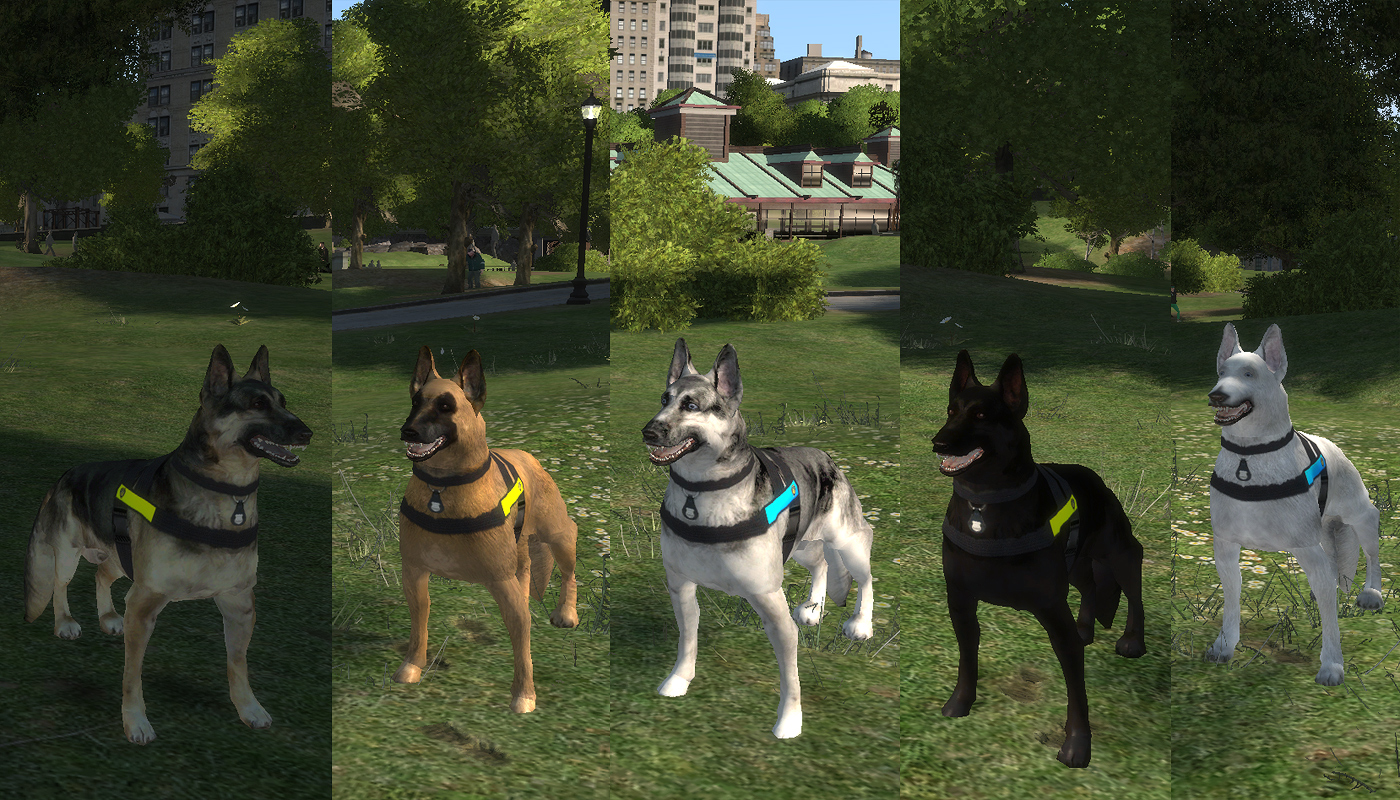

This mod was created to add K-9 unit experience to LCPD:FR. Professionally trained dog can attack, search for firearms, drugs and cadaver in cars, perform passive search. Go on duty with your loyal four legged partner.
If you found any bugs, grammar errors etc. make sure to tell me ;) Please write in rather than in file comments. It's easier to trace posts than comments.
Be sure to check read me and settings file!
Features:
- Spawn police dog that will follow you
- Point your gun at suspect and order dog to attack
- Perform "quick attack" and dog will attack closest person with weapon or fleeing one. Can be dangerous for pedestrians!
- Dog can search stopped and parked cars for drugs, firearms, cadaver and explosives (bomb squad included)
- Passive ped search for drugs while patrolling on foot
- "Stay", "stay in car", "come here" commands
- Dog know how to act while travelling by subway
- Status icon and prompt system to avoid conflict with other mods
- In-car dog position editor
- Woof woof sounds!
- Many settings in INI file! Be sure to check it out!
- 5 new police dog skins
- Support for EFLC
- Compatible with vdh METT/Coroner Mod (1.0.0 and above)
- Future compatibility with some PoliceHelper callouts (person tracking and checking suspicious packages)
- API
Video Installation & User Guide HERE »
Controls (can be changed in INI):
- Period = "quick attack", Jerry Lee will attack the closest person with weapon or fleeing (can be dangerous for pedestrians)
- Period + targeting with firearm = Jerry Lee will attack targeted suspect
- LCtrl + Period = stay / stay in car / come here command
- LAlt + Period = perform car search on the closest car
- LCtrl + LAlt + Period = spawn / despawn Jerry Lee
- LCtrl + LAlt + LShift + Period = dog offset position editor (only in police car)
KNOWN ISSUES
Because GTAIV was never designed to have dogs, the dog model has collisions of human model. That means if you shoot above the dog he will be hit. Some animations may look weird too as they are not prepared for 4 legged model.
Also I can't block the dog from LCPD:FR arrest or frisk functions. After gun point arrest dog will be deleted and spawned again immediately. On normal arrest-then cancel he will act as usual but with arrow above. DO NOT perform frisk on dog or it will crash LCPD:FR. Sadly, for now, I can't fix that as scripts can't communicate with each other without an API.
Installation
REMEMBER TO DO BACKUP OF ALL FILES THAT YOU WILL BE CHANGING!
- Get GTAIV or EFLC with latest patches (you know, that awesome game)
- If you haven't already, download and install HazardX's .Net ScriptHook from here: http://www.hazardx.com/details.php?file=83 (if you have LCPD:FR installed you have it already)
- Extract files from scripts folder of this zip into scripts folder in your main GTA directory.
- Using OpenIV or SparkIV open models/cdimages/componentpeds.img file
- Replace m_y_cowboy_01.wdd, m_y_cowboy_01.wft, m_y_cowboy_01.wtd with files from Model folder of this zip
- Using OpenIV or SparkIV open audio/Sfx/SCRIPT_MISSION.rtf audio bank and replace (or add if you have EFLC, but only with OpenIV) PX2_DECONSTRUCTION file from Sounds direcotry in this zip file
- That's all!
Dedicated to all K-9 dogs.


What's New in Version 1.0.0
Released
- v.1.0.0
- bug fixes in position editor
- fixed bug causing crash while choosing patrol car in LCPD:FR
- 2x smaller dog texture file (lighter normals and spec textures)
- v.0.9.9.0 BETA (not public)
- added icons and prompts system
- added explosives to list of things to find in cars
- added bomb squad for neutralising explosives
- added types of drugs and firearms found in car boot
- added dog offset position editor
- added API for future missing/wanted person tracking
- added API for future suspicious package check
- more reliable attack feature
- improved stability
- included dog model (2x less polygons with same quality)
AC.Amir - dog model
Ridgerunner - script idea
jacko999 - knowledge










![OCRP Postal Map - Fixed Duplicate Postals and Atlas Style [FiveM]](http://s3-screenshots.int-cdn.lcpdfrusercontent.com/resize/500/-/monthly_2026_07/624688352-f61f6a95-cab2-4dbf-8e15-eac238807cc7.thumb.jpg.f9356ce9ac807f74bb9d897e93a8242d.jpg)


Recommended Comments
Create an account or sign in to comment