
Skip to content
View in the app

A better way to browse. Learn more.

LCPDFR.com

A full-screen app on your home screen with push notifications, badges and more.

To install this app on iOS and iPadOS
  1. Tap the Share icon in Safari
  2. Scroll the menu and tap Add to Home Screen.
  3. Tap Add in the top-right corner.
To install this app on Android
  1. Tap the 3-dot menu (⋮) in the top-right corner of the browser.
  2. Tap Add to Home screen or Install app.
  3. Confirm by tapping Install.

vdH METT/Coroner Mod 1.0.0

(40 reviews)

3 Screenshots

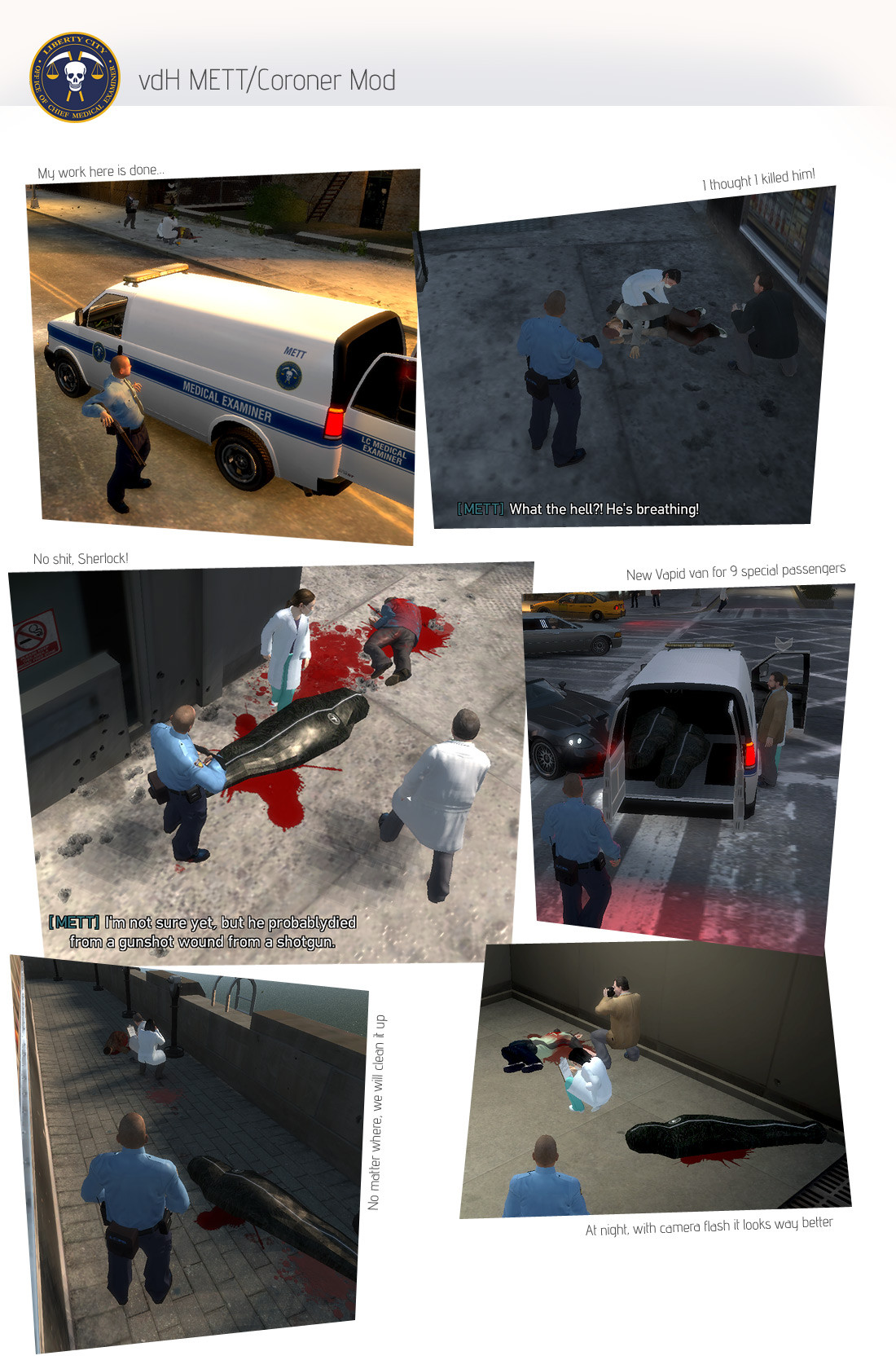
Finally there is someone in Liberty City who can deal with dead bodies.

vdH METT/Coroner Mod gives you ability to call Medical Examiner Transportation team, or Coroner.

This mod is LCPDFR.com exclusive, so please don't upload it anywhere else.

If you find any bugs, grammar errors etc. make sure to tell me ;) Please write in rather than in file comments. It's easier to trach posts than comments.

Be sure to check read me and settings file!

Features:

  • Call for METT/Coroner to get rid of bodies
  • 2 Speedo models for METT/Coroner van, with and without lightbar
  • 4 skin packs for Speedo (11 skins!) (see Skinpacks.jpg for details)

    • LC without lightbar

      • LC METT
      • Pizza This! (changeable colour)
      • RS Haul
      • clear (changeablecolour)

      [*]LC with lightbar

      • LC METT
      • Whiz repair unit
      • deepHole Road Works (changeable colour)
      • clear (changeable colour)

      [*]NYC with lightbar

      • NYC METT
      • DHL
      • FedEx Home Delivery
      • clear (changeable colour)

      [*]NYC with lightbar

      • NYC METT
      • ConEdison
      • NationalGrid
      • clear (changeable colour)

    [*]Body bag models for both Liberty and New York

[*]Works also indoors, on roofs, with victims in cars etc.

[*]Examiners will try to tell the cause of death (not always successfully)

[*]They will try to rescue victim if he/she is still alive

[*]Highly customisable

[*]Teleport system to prevent van or examiners from being stuck

[*]K-9 Script support

[*]PoliceHelper support

[*]SafeMode for people with memory overload issues

Installation:

This one only looks scary. Read ead and everything will be fine.

What you need:

1. GTAIV or EFLC with latest patches (you know, that awesome game)

2. HazardX's .Net ScriptHook from here: http://www.hazardx.c...ils.php?file=83

3. OpenIV or SparkIV (for installing custom Speedo and body bags, not required)

Installation:

  1. Copy scripts folder from this zip file to your main GTA/EFLC directory

    Next steps are not required but HIGHLY RECOMMENDED.
    REMEMBER TO BACK UP YOUR FILES!
  2. Choose preferred Speedo model and replace speedo.wtf file in models/vehicles.img by OpenIV or SparkIV
    (Liveries are compatible also with )
  3. Choose preferred Speedo texture pack and replace speedo.wtd file in models/vehicles.img by OpenIV or SparkIV (See preview of packs in Skinpacks.jpg)
  4. Pick preferred body bag and replace cj_bin_bag_pickup2.wdr file in data/maps/props/roadside/rubbish.img by OpenIV or SparkIV

    Next steps are for advanced users
  5. Skip this step if you have installed Speedo with no lighbar, or ELS version. To make lighbar on Speedo, to appear randomly on civilian Speedos go to YourGTADirectory/common/data, open vehicles.ide file with notepad, find line with Speedo and remove "ext_all" flag
  6. To get Speedo vans in various colours go to YourGTADirectory/common/data, open carcols.dat with notepad find Speedo line and replace it with following:
    speedo, 112,112,112, 109,109,109, 88,88,88, 80,80,80, 72,72,72, 26,26,26, 7,7,7, 6,6,6, 1,1,1, 0,0,0,

That's all. Oh, default key is Shift+M.

Peview video by AussieMerc:

http://www.youtube.c...wLc30jQ#t=1486s

What's New in Version 1.0.0

Released

  • fixed chances to revive person, now they are a lot lower
  • added stretcher
  • many small bug fixes
  • stability improvements
  • added support for K-9 script
  • added API

User Feedback

Recommended Comments

Wait! Why does the title say 0.9.5 and my .ini file says 0.9.4?

Abraxas

Members Author

Don't worry Sheriff I might forgot to change that number in INI.

ROYKIRK

Members

For some reason when you call them it puts a hit on backup units call under crime stats, if anyone cares...

Abraxas

Members Author

Maybe key setting conflict with some LCPD:FR key binding.

lovkal

Members

How about an ELS AI for the coroner's vehicle?

Abraxas

Members Author

As far as I know you can install ELS vehicle as coroner van and it will work. Didn't test that but I heard from others that it is possible.

Sonny236

Members

i need some help. i installed (only used step 1 cause i dont want to replace any other crap right now) the mett coroner mod like in step 1, But it doesnt work. Shift+M doesnt call the coroner and i looked in the ini file, Still says shift+M but is not working. Am i installing it wrong? ( I put the files in the scripts folder for my gta 4 EFLC) please help me asap :)

Abraxas

Members Author

Do you get any errors? See into your main EFLC folder for vdH_Errors.log file and send me it. It is better to contact me for support by PM or official thread (link in description above) as tracking replies in download comments is way harder. Also to see if mod started check your scripthookdotnet.log and see the list of started mods.

DREYDUS

Members

It works.

Abraxas

Members Author

Nostalgia I will PM you latest test version. It should work for you.

3w3RtOn_Br

Members

another, awesome mod man. u fu... nice. thx man for nices mods u created :)

mattchew1296

Members

I have ELS enabled on my SPEEDO and I was wondering how I can make the ELS come on with the hazard lights when I call for them. Right now only the Hazard lights are flashing when they come.

Luna

Members

I have the same problem as nostalgia, I call the coroner and its says responding then poof, GTA crashes, I also have a problem with the speedo, I think the coroner mod crashes GTA cause of this, when I requested a bait car as a speedo I crashes, Im using the one you have in the installation so I think the Speedo crashes it.

Future Trooper

Members

Can't get mett to come to scene.. installed scripts correctly. Tried shift-m and command callMETT but still nothing

Abraxas

Members Author

Future Trooper I will contact you via PM, because it's hard to talk in file comments for me.

McAwesome6934

Members

Will I crash if I use this online and no one else has it?

Abraxas

Members Author

I'm sorry but I just have no idea. I heard that it works quite well online. You have to find out by yourself, because I'm not able to test my mods online.

DREYDUS

Members

Yeah i dunno what happened.. I have used this corner mod

Abraxas

Members Author

Maybe some other mod is interfering with it? It's weird it crashes. Can you send me your scripthookdotnet.log and vdh_errors.log?

DREYDUS

Members

I deleted the mod again and this time redownloaded the script mod from this site( not just re install the copy I had saved on my PC)

Roadnuts

Members

Once again, awesome work! Can't belive this stuff was possible. Had a blast playing with the "CSi" team last night. Keep it up!

OfficerMatthew

Members

dose anybody no how to download spark 4 i did an d it wont open

ziipzaaapM16A4

Insiders

Its Bug Free!?! OMG IST BUG FREE!! haha HAAHAHAH OH JEAH YOU DONE IT AGAIN!

i do everything with the vdH_Policehelper! Jeeeeee! and now i can call a METT.

MUHAHAHA! if there are a Explosion i know what a must call the: fire truck, Medic, METT/Coroner and the tow Service! i the same minute and that bug free.

ahhhh

OfficerWouhero

Members

Installed the mod + Cars and the game crashed after 30s playing. Had to Uninstall and Reinstall the game + Mods

ProPolak

Members

at the pick the body bag, do i replace the rubbish.img with cj_bin or do i rename the bin to rubbish.img

Create an account or sign in to comment

Latest Mods

Account

Navigation

Search

Search

Configure browser push notifications

Chrome (Android)
  1. Tap the lock icon next to the address bar.
  2. Tap Permissions → Notifications.
  3. Adjust your preference.
Chrome (Desktop)
  1. Click the padlock icon in the address bar.
  2. Select Site settings.
  3. Find Notifications and adjust your preference.


