Skip to content
View in the app

A better way to browse. Learn more.

LCPDFR.com

A full-screen app on your home screen with push notifications, badges and more.

To install this app on iOS and iPadOS
  1. Tap the Share icon in Safari
  2. Scroll the menu and tap Add to Home Screen.
  3. Tap Add in the top-right corner.
To install this app on Android
  1. Tap the 3-dot menu (⋮) in the top-right corner of the browser.
  2. Tap Add to Home screen or Install app.
  3. Confirm by tapping Install.

Emergency Lighting System 1.05

(234 reviews)

3 Screenshots

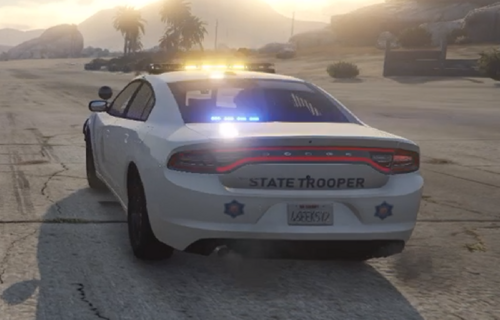
Emergency Lighting System V brings one of the most popular modifications ever created for a GTA title (ELS-IV) to Grand Theft Auto V. ELS-V will add a whole new dimension to  your patrols. With a fresh look and many more features than its predecessor, it's also sure to brighten up your game and satisfy the emergency lighting enthusiast in anyone.


DESCRIPTION
− ELS provides an alternate and incredibly in-depth way of controlling emergency vehicle lights and sounds.
− ELS requires vehicle models specifically designed to make use of its features.
− ELS includes over 200 unique lighting patterns scattered across 4 light groups and lighting formats.


NOTES
Please consult the ELS USER GUIDE and other provided documentation prior to using ELS.

− As of V1.00 ELS is not compatible with any form of multiplayer.
− A visual enhancement mod is recommended to improve the appearance of ELS lights in game.


BASIC INSTALLATION
− A GTAV ScriptHook must be installed for any .asi modification to work. The original may be found HERE.
− Using script modifications in GTA Online can result in a temporary or permanent ban from the service.

− 1. Place ELS.asi, ELS.ini, the ELS folder, and  AdvancedHookV.dll inside your main GTA V game directory.
− 2. Download and install (a) pro-ELS vehicle model(s).
− 3. Start your game.


CREDITS
− ELS is coded by Lt.Caine.

− AdvancedHookV and vehicle damage feature coded by LMS.
− ELS-V testing team (alphabetical order): Albo1125, BxBugs123, GravelRoadCop, PoliceWag, and Prophet.

What's New in Version 1.05

Released

  • Removed auto deletion of discarded ELS vehicles to prevent crashes when using certain LSPDFR plugins.
  • Removed ELS manipulation of AI vehicles as persistent/not persistent for same reason.
  • Removed strobe corona flash sounds (while retaining sound effects for halogen patterns).
  • Toggling the ELS information panel will now reload everything in the ELS.ini.
  • Fixed error in ELS User Guide that incorrectly associated SCNL with extra_11 and TKDL with extra_12 (the opposite is true).
  • Updated ELS User Guide to reflect new changes.
  • ELS.ini change: Added "AllowController" option to CONTROL section to allow enabling/disabling controller input for ELS.
  • ELS.ini change: Added "TogKeysLock" option to CONTROL section to allow changing ELS key lock button.


Please download the AdvancedHookV fix if you are using game build 3258.

User Feedback

Recommended Comments

Boston87

Members

On 9/23/2015 at 9:51 AM, orgBeaTzZ said:

For me too, Anyone?

Found a Fix, extract the whole archive and try it again.

umm what. I just have that message message on bottom corner. nothing happens when i press "ctrl p" and i tried re-installing this mod and doesnt help 

KnightHawkOne

Members

@Lt.Caine

I have tried everything to get ELS not to crash before writing you, but I have no choice now. ELS is a wonderful mod when it worked for me but since the last update, I continually crash with it. I have tested with and without ELS. Without lspdfr by @Sam worked perfectly with all mods installed which include mods by @Albo1125 @Darkmyreand others now I crash directly back to the desktop with ELS installed I am including my logs and a photo. Any help you can give would be awesome. Side note I have Albo1125 DLC pack installed.

RagePluginHook_15052017_073607.log

RagePluginHook_15052017_063528.log

8610573a86ec7d7f286c16c87c1c9da7.png

OfficerTurtle

Members

Yah non of the lights will turn on... Have an ELS Car, scroll lock works, thats really it..

No CTRL+P

No J

E only sounds the sirens

What am I missing

viperwolf

Members

I dont get it either, bc nothing has changed as far as i know for ELS. Something had to change somewhere else for this to happen. I have so many mods i cant remember what callout is which now. The ELS in my game works good, so im lost aswell. I really wish i knew how to help, bc i know this sucks for you guys.

MostlyPalone

Members

When are we going to get to download those cars in the pictures 😂!? Great mod though!

Hoopsur

Members

Would it be possible to implement some sort of support in future for Siren Mastery so if we have a ton of custom vehicles we don't have to go through every single config file and change them so they can work with siren mastery? Like maybe the mod could disable its siren audio stuff if it detects Siren Mastery has been installed?

jasonn214

Members

How would I change the button to lock ELS? I would like to use something else than scroll lock.

LukeBugg

Members

On 2017-4-10 at 7:09 PM, marrioman13 said:


If I remember correctly, you'll need to make sure your carvariations.meta has the vehicles down as cop ones, just copy a police one and see if this works, if it's not that, check the vehicles.meta. I managed to get highway vehicles to work by fumbling around with these for a bit

Thanks for the advice, but all my vehicle meta files I add are from police variants. I'll keep trying

MostlyPalone

Members

17 hours ago, jasonn214 said:

How would I change the button to lock ELS? I would like to use something else than scroll lock.

Change the els.ini file via the GTAV main directory.

viperwolf

Members

17 hours ago, jasonn214 said:

How would I change the button to lock ELS? I would like to use something else than scroll lock.

In the ELS.ini file (that Kevin17 mentioned) you will scroll down and see toggles and snds = to a number. Incase of the scroll lock its 145. So you need to open up the documentation- default controls in the Keyboard Control Key ID Chart. You will see a list of numbers for keys. Just change 145 to a new number/key that you want.

ChaseB

Members

I can pop up the CTRL P ELS Panel And Use The Sirens But My Lights Wont Work

jasonn214

Members

On 5/17/2017 at 10:22 AM, viperwolf said:

In the ELS.ini file (that Kevin17 mentioned) you will scroll down and see toggles and snds = to a number. Incase of the scroll lock its 145. So you need to open up the documentation- default controls in the Keyboard Control Key ID Chart. You will see a list of numbers for keys. Just change 145 to a new number/key that you want.

Thank you!

CallumW

Members

Where in the files can I change vehicle despawn with ELS? I can't use two ELS vehicles at once.

viperwolf

Members

38 minutes ago, Chirpy said:

Where in the files can I change vehicle despawn with ELS? I can't use two ELS vehicles at once.

What do you mean? Ive had all my car "lit up" with ELS, just walking around looking at them. I guess i don't understand what you mean.

CallumW

Members

5 hours ago, viperwolf said:

What do you mean? Ive had all my car "lit up" with ELS, just walking around looking at them. I guess i don't understand what you mean.

What I mean is that if you leave an ELS car with lights on, then spawn another ELS car and use the lights, the previous one despawns.

viperwolf

Members

11 hours ago, Chirpy said:

What I mean is that if you leave an ELS car with lights on, then spawn another ELS car and use the lights, the previous one despawns.

OK im not sure why it would do that, Like i said, Ive spawned all of my cars with ElS running.  I do have the persistent entity mod installed. Im not sure if that would make a difference. I dont think your problem is ELS, i could be wrong of course.

CallumW

Members

2 hours ago, viperwolf said:

OK im not sure why it would do that, Like i said, Ive spawned all of my cars with ElS running.  I do have the persistent entity mod installed. Im not sure if that would make a difference. I dont think your problem is ELS, i could be wrong of course.

Sorry, the cars don't despawn, the ELS simply stops working on previous cars. Until I get in them and turn it back on.

viperwolf

Members

(edited)

7 hours ago, Chirpy said:

Sorry, the cars don't despawn, the ELS simply stops working on previous cars. Until I get in them and turn it back on.

Yeah that makes sense now, are all your vehicles by the same modder?

Edited by viperwolf

CallumW

Members

2 hours ago, viperwolf said:

Yeah that makes sense now, are all your vehicles by the same modder?

Currently, yes. 

Anyone know the key that turns on the dome light (Red) inside the car?  Like in IV when you could press the key and it'd illuminate the inside of the cruiser 

zacht180

Members

I'm having an issue where my lights won't work, nor will my controls or CTRL+P menu (I changed it to U to avoid interfering with my pause button, still no luck). As you can see here:

only half of my lightbar is lit. I can't change the lights in anyways, and they just stay like that. The breaklights will alternate flashing when I press G but that's it. I tried pressing ScrLk so I don't have the toggle on or off. All of my files are in the correct location, vehicle is compatible with ELS and installed correctly, and I've tried reinstalling scripthook and ASI loader via openiv with no luck. Any suggestions or ideas would be greatly appreciated.

viperwolf

Members

9 hours ago, Chirpy said:

Currently, yes. 

Have you tried two cars at the same time by a different modeler? Just trying to rule out that part. I know that im not helping much, i was hoping someone with alot more understanding would chime in for you.


8 hours ago, LCSO Sergeant Jester said:

Anyone know the key that turns on the dome light (Red) inside the car?  Like in IV when you could press the key and it'd illuminate the inside of the cruiser 

The key binding for that is Alt+\    The entire list is in the documents if you want to print it out. thats what i do, then highlight the keys need to remember

1 hour ago, zacht180 said:

I'm having an issue where my lights won't work, nor will my controls or CTRL+P menu (I changed it to U to avoid interfering with my pause button, still no luck). As you can see here:

only half of my lightbar is lit. I can't change the lights in anyways, and they just stay like that. The breaklights will alternate flashing when I press G but that's it. I tried pressing ScrLk so I don't have the toggle on or off. All of my files are in the correct location, vehicle is compatible with ELS and installed correctly, and I've tried reinstalling scripthook and ASI loader via openiv with no luck. Any suggestions or ideas would be greatly appreciated.

The only time i have had a problem like that is when the XML is was not right.

ChaseB

Members

I Cant Get My Light Patterns To Work I Try Pressing J 3 Times They Come On But Lights Don't Show Up And Then I Am Able To Turn The Steady Burns On And Illumination On But No Light Patterns

viperwolf

Members

10 minutes ago, LCPS Chase said:

I Cant Get My Light Patterns To Work I Try Pressing J 3 Times They Come On But Lights Don't Show Up And Then I Am Able To Turn The Steady Burns On And Illumination On But No Light Patterns

Make sure you have the correct xml loaded with the correct name/slot

ChaseB

Members

13 minutes ago, viperwolf said:

Make sure you have the correct xml loaded with the correct name/slot

i have everything in the right spot i have reinstalled everything twice and both of those times it has not worked i'm working on installing it for the third time

Create an account or sign in to comment

Latest Mods

Account

Navigation

Search

Search

Configure browser push notifications

Chrome (Android)
  1. Tap the lock icon next to the address bar.
  2. Tap Permissions → Notifications.
  3. Adjust your preference.
Chrome (Desktop)
  1. Click the padlock icon in the address bar.
  2. Select Site settings.
  3. Find Notifications and adjust your preference.