Skip to content
View in the app

A better way to browse. Learn more.

LCPDFR.com

A full-screen app on your home screen with push notifications, badges and more.

To install this app on iOS and iPadOS
  1. Tap the Share icon in Safari
  2. Scroll the menu and tap Add to Home Screen.
  3. Tap Add in the top-right corner.
To install this app on Android
  1. Tap the 3-dot menu (⋮) in the top-right corner of the browser.
  2. Tap Add to Home screen or Install app.
  3. Confirm by tapping Install.

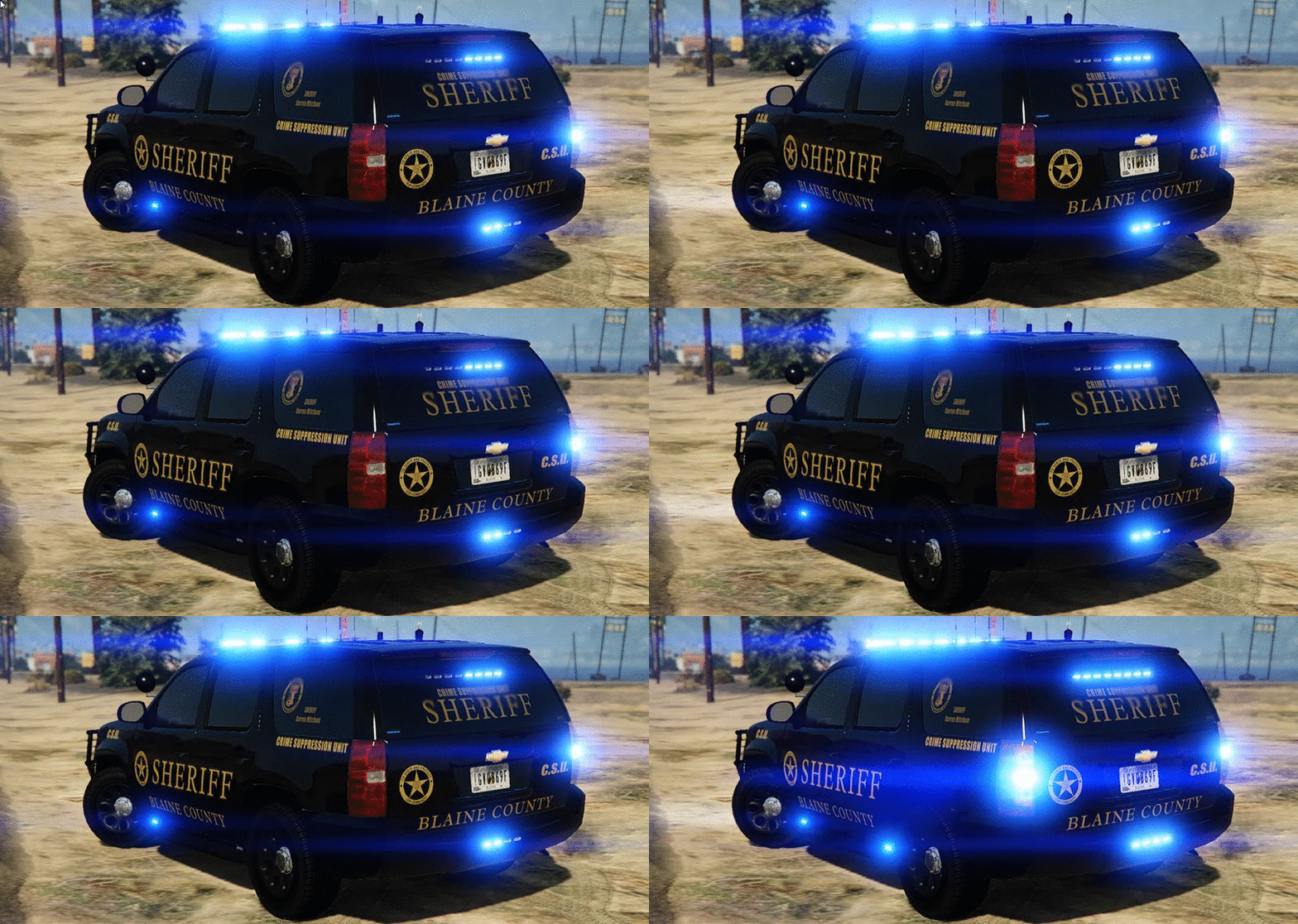
Blaine County COBRA(CSU) Tahoe w/Liberty II

(28 reviews)

4 Screenshots

324f7e3b72edd36edf0c2d8f1eb5c9c3.gif

d2f763a1f00f96d40b64349166dfd5bc.gif

I know what you're thinking....Good Lord....There is drugs,prostitution and DWI's going on in Blaine County right now...But, I don't have a Tahoe to combat it! Well, today is your lucky day kid....The Blaine County Crime Suppression Unit Tahoe is now available to download!

You will have 8 extra's to choose from:
extra_1 -Stalker Radar
extra_2 -Wraparound
extra_3 -Spotlgiht
extra_4 -Antenna's
extra_5 -Cb antenna
extra_6 -Right side ALPR
extra_7 -FS Speaker boxes on rambar
extra_8 -Left side ALPR

 Installation:
You can rename the .yft and .ytd to whatever you want,you don't have to use police.yft.

    For RDE users: Install into update.rpf\update\x64\dlcpacks\rde\dlc.rpf\x64\levels\gta5\vehicles.rpf\
    Non-RDE users will have to rename the cars to whatever you want, then place in the latest patchday: update.rpf\update\x64\dlcpacks\patchday9(or 10)\dlc.rpf\x64\levels\gta5\vehicles.rpf\
        The sirensettings is 1, so change the .metas accordingly, if you need to(Probably won't at this point)


To edit handling for the tahoe:


Go to the necessary vehicles.meta, and change the handling id of the slot your using for the tahoe. Replace the handling id with "baller" or "baller2"


Credits:
-  Model from free 3D site, author unknown.
-  Converted and edited by GeorgieMoon.
-  Interior by 4x4 Hummer merged and textured by GeorgieMoon.
-  Interior converted by FightingNote
-  Wheels by BxBugs123
-  Initiative Tahoe Wraparound by Carper
-  DigitalAlly 500 Dashcamera/Mirror by Carper
-  Stalker Radar by Carper
-  Livery by getinmybelly0627
-  Whelen TIR 6 by tomcat8492
-  Whelen PAR 36 by Bueno
-  Spotlight by BlackJesus
-  ALPR by Molex
-  Antenna's by Vertex3D,lGump and Priman
-  Watchgard 4RE by CAP N' CRUNCH
-  Federal Signal AS124 by TheHurk
-  Console by Sheriffvandyke
-  Handcuff by Solo
-  Whelen Liberty II by Dannyboy
-  Toughbook CF31 by Ridgerunner
-  Whelen Dominator by Tomcat8492
-  Whelen Avenger by Trumapak



Stay vigil and thirsty my friends..


User Feedback

Recommended Comments

minddriver

Members

(edited)

First off all BIG THANKS to @Gump for awesome model! I watched couple of episodes by @STEVETHEGAMER where the Tahoe's rims are white (if I see it corectly) not black as default. White rims looks really good, How can I change it as on the video? I tried to use a different color with trainer but stock rims cannot be recolored. What rims/wheels he uses in the video?

BUG REPORT: Try to turn the car to one side with rurn on emergency lights and see the reflection.

Edited by minddriver

againstallodds

Members

not sure if its the update or just me but i literally tried everything to make this mod work (as sheriff2) and nothing

i changed around the carvar and vehicles files however the bar on top was still cover by some dark tint that i could remove via the trainer + the car was flipping like crazy

i think that its not finding the vehicles.meta file because this lines you provided should have fixed the tint and flipping 

if anyone has any ideas on how to get this work as sheriff2 pls let me know, thanks (i already watched that video and tried doing it EXACTLY like that but it still didn't work)

JamFan

Members

On 7/21/2016 at 2:46 PM, howardchris40 said:

First off let me say what an amazing model this is and the lighting setup is incredible. So I've renamed the files to replace the sheriff2 slot and placed them in patchday11, the vehicle comes spawns in-game perfectly but the lightbar on top of the vehicle seems to have a black tint over it and you cannot see any lights coming out of it when you activate the sirens, I've tried editing the window tint in the trainer, editing the windows file in the ytd to just a clear glass, and also putting in the sheriff2+hi.ytd in patchday11 as well, nothing seems to work and the lightbar is still black. Any help or suggestions would be greatly appreciated.

20160721130911_1.jpg

20160721130931_1.jpg

same thing is happening to me have you fixed it yet? if so what did u do

Reddington

Members

(edited)

ATTENTION TO ALL HAVING THE LIGHTBAR ISSUE: Go into your trainer, find vehicle mod menu, change TINT to NONEThis fixes the lightbar.

I was actually wanting to make this my Sheriff2.  Is there anyway to make it so the lightbar spawns with normal tint/not broken?

Edited by Arariel

akaGODFATHER

Members

On ‎7‎/‎22‎/‎2016 at 0:31 AM, Techengage said:

Also for patientzero00 and howardchris40,

I have attached the .meta coding I am using for this model. You can copy and paste the contents of both and add them to the following:

For carvariations.meta: mods > update > x64 > dlcpacks > patchday11ng > dlc.rpf > common > data > copy into carvariations.meta

For vehicles.meta: mods > update > x64 > dlcpacks > patchday11ng > dlc.rpf > common > data > levels > gta v > copy into vehicles.meta


Once you have those two copied and pasted into the proper place, it should work just fine (as long as you put the .ytd's and .ytf's in patchday11ng like howardchris40 says he did).

Also note I am using GRESLEY handling, fbi2 audionamehash, black liveries, and all extras when spawned; but you can change that all, of course.

Please let me know as well if I should not post this. Credits to F5544 for the original .metas (from the State Trooper Pack), I just edited them for this truck.


vehicles.meta

carvariations.meta

Question, the truck lights are not bright at all even without the tint. How can I make them brighter? All my other police car lights are bright but not this Tahoe? Please help!!!

JZersche

Members

(edited)

Yeah the Tahoe lightbar isn't bright', changing defaultlight in visualsetting which would normally increase brightness on the lightbar has no effect, model wasn't put together right.

Edited by JZersche

chridmill

Members

(edited)

On 7/30/2016 at 4:52 PM, Techengage said:

Hey, shonole.

In the carvariations.meta, you'll see multiple lines that look like this:
 

  Hide contents


<indices content='char array">

0

0

1

0

</indices>


Change all of those numbers to 134, 134, 156, 156 to make the truck white.

I also attached a new carvariations.meta below for you.


carvariations.meta

Hey Techengage i looked in my carvariations.meta you posted a while ago to fix dim blue lights issue (Which worked great btw) and and the numbers for me are as follows all the way down the file page:

<indices content='char array">

0

0

1

0

</indices>

and the truck is still spawning white how can i make it spawn black?


Edited by chridmill

Techengage

Members

5 hours ago, chridmill said:

Hey Techengage i looked in my carvariations.meta you posted a while ago to fix dim blue lights issue (Which worked great btw) and and the numbers for me are as follows all the way down the file page:

<indices content='char array">

0

0

1

0

</indices>

and the truck is still spawning white how can i make it spawn black?


Here, try my carvariations I use for the truck. Don't forget to change your model name and sirensetting values.


Also, check your vehicles.meta and make sure it has this flag:


"FLAG_HAS_LIVERY"

chridmill

Members

3 hours ago, Techengage said:


Here, try my carvariations I use for the truck. Don't forget to change your model name and sirensetting values.


Also, check your vehicles.meta and make sure it has this flag:


"FLAG_HAS_LIVERY"

thx for getting back to me so fast man! unfortunately this mod is a little too broken for my taste and it seems the author isnt active enough for me to deal with it so im gunna DL another mod but much thx anyway!:thumbsup:

Techengage

Members

7 minutes ago, chridmill said:

thx for getting back to me so fast man! unfortunately this mod is a little too broken for my taste and it seems the author isnt active enough for me to deal with it so im gunna DL another mod but much thx anyway!:thumbsup:


No problem. I recommend Captain14's Tahoe, or his BCSO sheriff pack. It also has a great Tahoe model.

chridmill

Members

i actually switched to his FBI & Sheriff Pack XD and considering his LSPD Pack

akaGODFATHER

Members

Love this truck!! I placed it in policeold1. The only issue is that the lights will not turn on even though carver is on 1. Can someone please help?

Chris B.

Members

On ‎2016‎-‎10‎-‎27 at 10:25 PM, akaGODFATHER said:

Love this truck!! I placed it in policeold1. The only issue is that the lights will not turn on even though carver is on 1. Can someone please help?

Spoiler

<Item>
 <modelName>policeold1</modelName>
 <colors>
 <Item>
 <indices content="char_array">
 134
 134
 156
 156
 </indices>
 <liveries>
 <Item value="true" />
 <Item value="false" />
 <Item value="false" />
 <Item value="false" />
 <Item value="false" />
 <Item value="false" />
 <Item value="false" />
 <Item value="false" />
 </liveries>
 </Item>
 <Item>
 <indices content="char_array">
 134
 134
 156
 156
 </indices>
 <liveries>
 <Item value="false" />
 <Item value="true" />
 <Item value="false" />
 <Item value="false" />
 <Item value="false" />
 <Item value="false" />
 <Item value="false" />
 <Item value="false" />
 </liveries>
 </Item>
 <Item>
 <indices content="char_array">
 134
 134
 156
 156
 </indices>
 <liveries>
 <Item value="false" />
 <Item value="false" />
 <Item value="false" />
 <Item value="false" />
 <Item value="true" />
 <Item value="false" />
 <Item value="false" />
 <Item value="false" />
 </liveries>
 </Item>
 <Item>
 <indices content="char_array">
 134
 134
 156
 156
 </indices>
 <liveries>
 <Item value="false" />
 <Item value="false" />
 <Item value="true" />
 <Item value="false" />
 <Item value="false" />
 <Item value="false" />
 <Item value="false" />
 <Item value="false" />
 </liveries>
 </Item>
 <Item>
 <indices content="char_array">
 134
 134
 156
 156
 </indices>
 <liveries>
 <Item value="false" />
 <Item value="false" />
 <Item value="false" />
 <Item value="true" />
 <Item value="false" />
 <Item value="false" />
 <Item value="false" />
 <Item value="false" />
 </liveries>
 </Item>
 </colors>
 <kits>
 <Item>157_massacaro2_modkit</Item>
 </kits>
 <windowsWithExposedEdges />
 <plateProbabilities>
 <Probabilities />
 </plateProbabilities>
 <lightSettings value="1" />
 <sirenSettings value="1" />
</Item>

Try using that carvariations I added into mpvalentines2

akaGODFATHER

Members

16 hours ago, mursec said:
  Reveal hidden contents

<Item>
 <modelName>policeold1</modelName>
 <colors>
 <Item>
 <indices content="char_array">
 134
 134
 156
 156
 </indices>
 <liveries>
 <Item value="true" />
 <Item value="false" />
 <Item value="false" />
 <Item value="false" />
 <Item value="false" />
 <Item value="false" />
 <Item value="false" />
 <Item value="false" />
 </liveries>
 </Item>
 <Item>
 <indices content="char_array">
 134
 134
 156
 156
 </indices>
 <liveries>
 <Item value="false" />
 <Item value="true" />
 <Item value="false" />
 <Item value="false" />
 <Item value="false" />
 <Item value="false" />
 <Item value="false" />
 <Item value="false" />
 </liveries>
 </Item>
 <Item>
 <indices content="char_array">
 134
 134
 156
 156
 </indices>
 <liveries>
 <Item value="false" />
 <Item value="false" />
 <Item value="false" />
 <Item value="false" />
 <Item value="true" />
 <Item value="false" />
 <Item value="false" />
 <Item value="false" />
 </liveries>
 </Item>
 <Item>
 <indices content="char_array">
 134
 134
 156
 156
 </indices>
 <liveries>
 <Item value="false" />
 <Item value="false" />
 <Item value="true" />
 <Item value="false" />
 <Item value="false" />
 <Item value="false" />
 <Item value="false" />
 <Item value="false" />
 </liveries>
 </Item>
 <Item>
 <indices content="char_array">
 134
 134
 156
 156
 </indices>
 <liveries>
 <Item value="false" />
 <Item value="false" />
 <Item value="false" />
 <Item value="true" />
 <Item value="false" />
 <Item value="false" />
 <Item value="false" />
 <Item value="false" />
 </liveries>
 </Item>
 </colors>
 <kits>
 <Item>157_massacaro2_modkit</Item>
 </kits>
 <windowsWithExposedEdges />
 <plateProbabilities>
 <Probabilities />
 </plateProbabilities>
 <lightSettings value="1" />
 <sirenSettings value="1" />
</Item>

Try using that carvariations I added into mpvalentines2

But the carvar for policeold1 is in mplux2?

Chris B.

Members

4 hours ago, akaGODFATHER said:

But the carvar for policeold1 is in mplux2?

Yes this is true, but mpvalentines2 trumps mplux2. Any carver that's not a custom pack install will work for sure in mpvalentines2. Just copy and paste into it. tell me if it doesn't work.

bstites776

Members

So I have sifted through the comments and haven't found a solution to the dark tinted lightbar issue. I use this vehicle in my sheriff2 slot and will patrol with it every so often. When I do this, I just fix the tinted lightbar issue with the trainer and it's good. But when I call for a transport unit, most of the time, they will bring the Tahoe out to pick up my prisoner. When this happens, the only lights that are blinking are the ones in the grille and such and not the lightbar because of the tint. Is there a way that I can change a file that will make it so the Tahoe will spawn with no tint already? Probably the best Tahoe model out there!

Kilyin

Members

24 minutes ago, bstites776 said:

So I have sifted through the comments and haven't found a solution to the dark tinted lightbar issue. I use this vehicle in my sheriff2 slot and will patrol with it every so often. When I do this, I just fix the tinted lightbar issue with the trainer and it's good. But when I call for a transport unit, most of the time, they will bring the Tahoe out to pick up my prisoner. When this happens, the only lights that are blinking are the ones in the grille and such and not the lightbar because of the tint. Is there a way that I can change a file that will make it so the Tahoe will spawn with no tint already? Probably the best Tahoe model out there!


try this in update\update.rpf\common\data\levels\gta5


SpartanIV

Members

(edited)

Is anyone else experiencing an unbreakable back windshield? Shooting at the back windshield doesn't do anything to it, but crashing into stuff does.

https://www.youtube.com/watch?v=q2Cd5wodi6s

^^^^^^^^^^^^^^^^^^^^^^^^^^^^^^^^^^^^^^^^
I pretty much installed the tahoe just like in this vid, In patchday 3 with the carvariation.meta and vehicle.meta files too. So yeah, I was just wondering what all that was about. Still one of the best Tahoe mods out there :thumbsup:

Edited by SpartanIV

Qanpicho

Members

Best looking Tahoe in the world. Thanks.

It looks great, I love it so much and Im obsessed with the spec of this Tahoe but, the only thing is, I cant drive it more than 10 feet without it rolling over, I've done a lot to the vehicles.meta, handling line, and carveriations file to make this work but I've had no luck. Wondering if anyone has a work around or something that makes this tahoe able to maneuver around a corner without flipping.  thanks

ModHD

Members

On 12/13/2016 at 6:04 PM, bstites776 said:

So I have sifted through the comments and haven't found a solution to the dark tinted lightbar issue. I use this vehicle in my sheriff2 slot and will patrol with it every so often. When I do this, I just fix the tinted lightbar issue with the trainer and it's good. But when I call for a transport unit, most of the time, they will bring the Tahoe out to pick up my prisoner. When this happens, the only lights that are blinking are the ones in the grille and such and not the lightbar because of the tint. Is there a way that I can change a file that will make it so the Tahoe will spawn with no tint already? Probably the best Tahoe model out there!


On 10/9/2016 at 4:41 PM, grizzleftw said:

same thing is happening to me have you fixed it yet? if so what did u do


On 10/7/2016 at 6:49 PM, Dominic Kuchera said:

not sure if its the update or just me but i literally tried everything to make this mod work (as sheriff2) and nothing

i changed around the carvar and vehicles files however the bar on top was still cover by some dark tint that i could remove via the trainer + the car was flipping like crazy

i think that its not finding the vehicles.meta file because this lines you provided should have fixed the tint and flipping 

if anyone has any ideas on how to get this work as sheriff2 pls let me know, thanks (i already watched that video and tried doing it EXACTLY like that but it still didn't work)


TINT FIX:

Go to:

Grand Theft Auto V\mods\update\update.rpf\common\data\levels\gta5

Right click & Edit:

 Vehicles.Meta

Search:

Sheriff 2

Scroll until you find:

<diffuseTint value="0x00000088" />

Replace with

<diffuseTint value="0x00FFFFFF" />

Mercenary22

Members

We can't get the lights to work, does anyone have a working carcols for this model? @Gump

Taterbug

Members

I'm having some issues with this model, hoping someone here can help. I have replaced the vehicles.meta line with Baller, Baller2, Gresley, Sandking, Police, Sheriff and so far haven't found a single line that doesn't cause the vehicle to flip. Gresley so far has been the best one (in terms of the least aggressive flipping) but all of them still have the same problem. I can't take a corner more than 5mph or the truck rolls over. It's been very frustrating as this is an amazing model but I can't seem to get it to work. Everything else on it is fine, just can't get the handling to work right. I'm experience with editing vehicles.meta files so if anyone can suggest some edits please reply or pm me. Thanks!

LtSnoDawg69

Members

Whenever i install this mod, i open it in openiv, and all the lights appear underneath the vehicle. Does anyone know of a solution or a fix to this? Does anyone else have this problem? Does Gump know what to do about this?

Create an account or sign in to comment

Latest Mods

Account

Navigation

Search

Search

Configure browser push notifications

Chrome (Android)
  1. Tap the lock icon next to the address bar.
  2. Tap Permissions → Notifications.
  3. Adjust your preference.
Chrome (Desktop)
  1. Click the padlock icon in the address bar.
  2. Select Site settings.
  3. Find Notifications and adjust your preference.








