Skip to content
View in the app

A better way to browse. Learn more.

LCPDFR.com

A full-screen app on your home screen with push notifications, badges and more.

To install this app on iOS and iPadOS
  1. Tap the Share icon in Safari
  2. Scroll the menu and tap Add to Home Screen.
  3. Tap Add in the top-right corner.
To install this app on Android
  1. Tap the 3-dot menu (⋮) in the top-right corner of the browser.
  2. Tap Add to Home screen or Install app.
  3. Confirm by tapping Install.

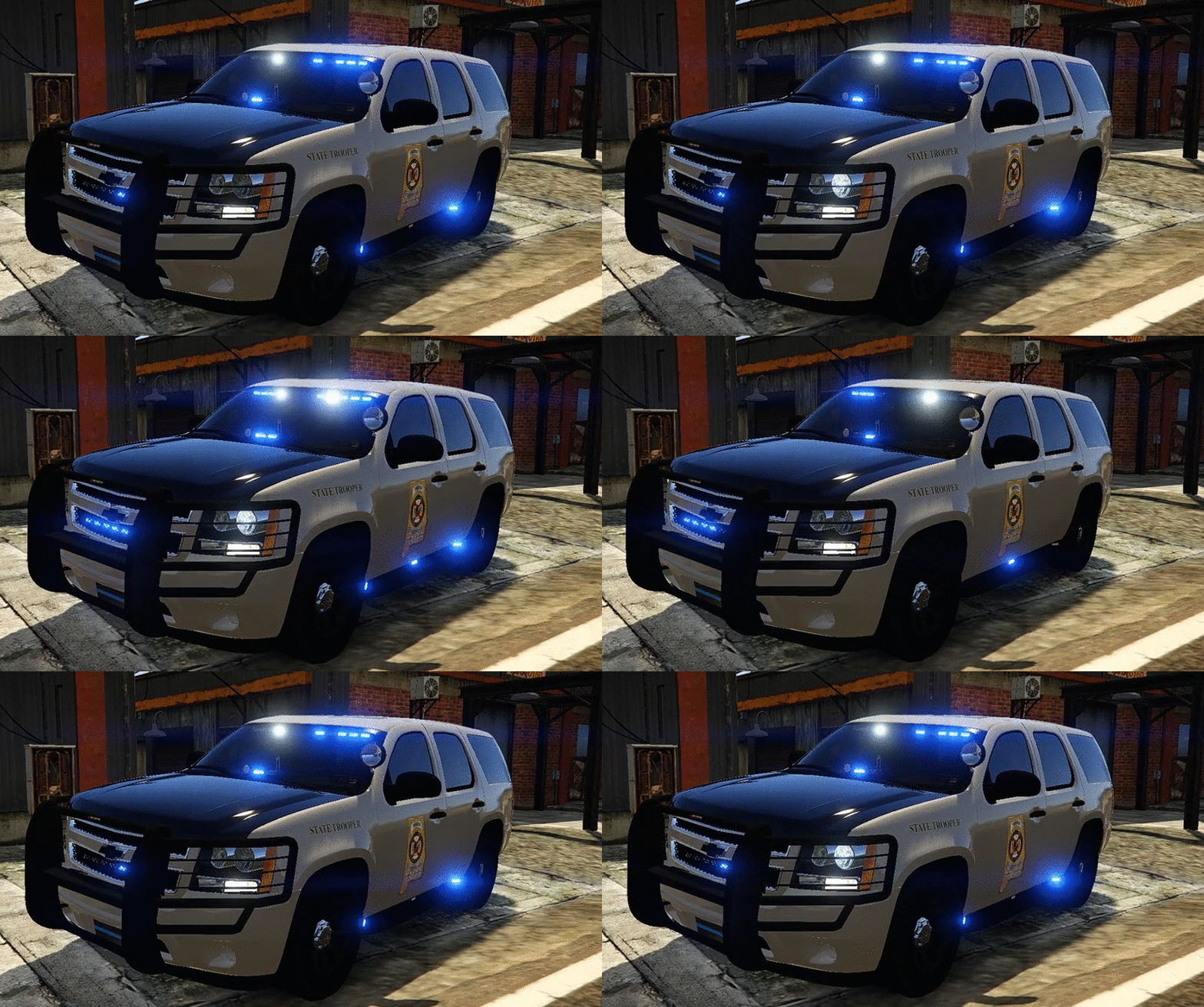
Andreas State Patrol Slicktop Tahoe

(23 reviews)

3 Screenshots

tJ5gHQ4.png
456ee0afd07351bea6b8fc1310f0dd2b.gif

I'm very happy to present to you guys the 2013 Chevrolet Tahoe Andreas State Patrol with the livery made to look like Alabama SP.


You will have 5 extra's to choose from:
extra_1 -Wilson CB Antenna
extra_2 -ALPR's
extra_3 -Spotlight
extra_4 -Stalker Radar
extra_5 -Rambar with wrap


 Installation:
You can rename the .yft and .ytd to whatever you want,you don't have to use police.yft.

    For RDE users: Install into update.rpf\update\x64\dlcpacks\rde\dlc.rpf\x64\levels\gta5\vehicles.rpf\
    Non-RDE users will have to rename the cars to whatever you want, then place in the latest patchday: update.rpf\update\x64\dlcpacks\patchday9(or 10)\dlc.rpf\x64\levels\gta5\vehicles.rpf\
        The sirensettings is 1, so change the .metas accordingly, if you need to(Probably won't at this point)


To edit handling for the tahoe:


Go to the necessary vehicles.meta, and change the handling id of the slot your using for the tahoe. Replace the handling id with "baller" or "baller2"


Credits:
-  Model from free 3D site, author unknown.
-  Converted and edited by GeorgieMoon.
-  Interior by 4x4 Hummer merged and textured by GeorgieMoon.
-  Interior converted by FightingNote
-  Wheels by BxBugs123
-  Livery by Gump
-  Spotlight by BlackJesus
-  ALPR's by BxBuggs123
-  Antenna's by Gump,Priman and Vertex3D
-  Rambar and wrap by Carper
-  Watchgard 4RE by CAP N' CRUNCH
-  Console by Sheriffvandyke
-  Toughbook CF31 by Ridgerunner
-  Stalker radar by CAP N' CRUNCH with edits by Gump
-  Whelen Dominator by Tomcat8492
-  Whelen Avenger by Trumapak
-  Code 3 XT3 by Macgregor
-  Federal Signal Solaris ILS by M67v



Stay vigil and thirsty my friends..

User Feedback

Recommended Comments

Deactivated Member

Deactivated

1 hour ago, nichankinson said:

didnt you put this same comment on of prophets pics of bxbugs123 cvpi lmao

Yeah. Seems they both did it for some weird reason.

ErikB26

Members

Can somebody please tell me how I can find the police 4 .meta?

Sans titre.png

@GumpThere's an issue with the searchlight glass appearing when on the side of the vehicle. You can see the transparent semi circle on the wind shield.


mets1fan

Members

I tried to replace fbi slot but it rolls over. i tried to replace fbi 2 to see if it will remedy this but it didn't. Any way i cacn get the vehicle to not roll over cause this an awesome looking tahoe and i really want to use it. thanks.

has307

Members

For anyone having stability issues ( car rolling over), the solution I found is to change handling id to  BALLER OR BALLER2  in vehicle.meta  that fixed the issue. The car is very stable and usable now!  the difference is that baller2 seems a bit faster.

Happy patrolling

ErikB26

Members

35 minutes ago, has307 said:

For anyone having stability issues ( car rolling over), the solution I found is to change handling id to  BALLER OR BALLER2  in vehicle.meta  that fixed the issue. The car is very stable and usable now!  the difference is that baller2 seems a bit faster.

Happy patrolling

I understand, but where can I find the vehicles.meta?? For police4 for example ( vehicle that spawns when you ask for state back-up)

tragicEM

Members

1 hour ago, has307 said:

For anyone having stability issues ( car rolling over), the solution I found is to change handling id to  BALLER OR BALLER2  in vehicle.meta  that fixed the issue. The car is very stable and usable now!  the difference is that baller2 seems a bit faster.

Happy patrolling

thanks I had a crazy roll over caught me by surprise lolol thanks tho.

3 hours ago, mets1fan said:

I tried to replace fbi slot but it rolls over. i tried to replace fbi 2 to see if it will remedy this but it didn't. Any way i cacn get the vehicle to not roll over cause this an awesome looking tahoe and i really want to use it. thanks.

thanks I was gonna try that also

Alter481

Members

What about the white light coming from inside the Tahoe from the speed gages?  Any fix?

mets1fan

Members

(edited)


1 hour ago, has307 said:

For anyone having stability issues ( car rolling over), the solution I found is to change handling id to  BALLER OR BALLER2  in vehicle.meta  that fixed the issue. The car is very stable and usable now!  the difference is that baller2 seems a bit faster.

Happy patrolling

i tried looking for the fbi/fbi2 meta file but i cant seem to locate it. Any idea where it would be? 

Update i just found it if you want to use it for fbi/fbi 2 the meta file are here

Mods\update\update.rpf\common\data\levels\gta5 

Edited by mets1fan

has307

Members

1 hour ago, ErikB26 said:

I understand, but where can I find the vehicles.meta?? For police4 for example ( vehicle that spawns when you ask for state back-up)

- mods\update\update.rpf\common\data\levels\gta5       **for all vanilla police cars including fbi and sheriff

- mods\update\x64\dlcpacks\rde\dlc.rpf\common\data\levels\gta5    **if you added cars in any DLC, just change " rde " to any dlc you want 

cheers

Lima2108

Members

Love the model, can someone upload their carvar or vehicle metas to see if that permanently fixes the all black window issue. Using in the sheriff2 slot.

lucianboi

Members

17 hours ago, Alter481 said:

What about the white light coming from inside the Tahoe from the speed gages?  Any fix?

I'm having the same problem as well

Versace

Members

On 6/25/2016 at 11:30 PM, adamszyszko0722 said:

yeah I replaced the Police4 and I flip with the slightest turn which Vehicle.meta should I go into to fix that (P.S Im a noob at this so I dont know where anything is and where it should go). 

same im having the same problem and im new at this as well

EthanO

Members


1 hour ago, Versace said:

same im having the same problem and im new at this as well


On June 25, 2016 at 11:30 PM, adamszyszko0722 said:

yeah I replaced the Police4 and I flip with the slightest turn which Vehicle.meta should I go into to fix that (P.S Im a noob at this so I dont know where anything is and where it should go). 

Open OpenIV, then follow this path: update>update.rpf>common>data>levels>gta5, then right click on "vehicles.meta" and choose "Extract..." and extract it to your desktop. Next open the "vehicles" on your desktop via notepad and go to "Edit" then "Find Next" and type in whatever you replaced; for example you would type in police4 then click "Find Next", you will then look to the third line and it will say "<handlingId>POLICE</handlingId>" replace the "POLICE" with "baller2" (no quotations) and then go to "File" then "Save". Next navigate back to the OpenIV path from earlier and drag the "vehicles" from your desktop into OpenIV and bam, no more flips.

Meow Overlord

Members

1 minute ago, emanoneal said:


Open OpenIV, then follow this path: update>update.rpf>common>data>levels>gta5, then right click on "vehicles.meta" and choose "Extract..." and extract it to your desktop. Next open the "vehicles" on your desktop via notepad and go to "Edit" then "Find Next" and type in whatever you replaced; for example you would type in police4 then click "Find Next", you will then look to the third line and it will say "<handlingId>POLICE</handlingId>" replace the "POLICE" with "baller2" (no quotations) and then go to "File" then "Save". Next navigate back to the OpenIV path from earlier and drag the "vehicles" from your desktop into OpenIV and bam, no more flips.

Hey thanks man I appreciate that Im too dumb to figure that out so again thank you.

EthanO

Members

Just now, adamszyszko0722 said:

Hey thanks man I appreciate that Im too dumb to figure that out so again thank you.

No problem, I used to have no idea too, you'll get the hang of it.

LemonOne

Members

The both rear side windows (3/4 panel view window) is blocking the lights inside

They will not blink or show blinking unless windows are broken open.

I think you need to fix that.

EthanO

Members

On 6/26/2016 at 0:43 PM, mets1fan said:

I tried to replace fbi slot but it rolls over. i tried to replace fbi 2 to see if it will remedy this but it didn't. Any way i cacn get the vehicle to not roll over cause this an awesome looking tahoe and i really want to use it. thanks.

Open OpenIV, then follow this path: update>update.rpf>common>data>levels>gta5, then right click on "vehicles.meta" and choose "Extract..." and extract it to your desktop. Next open the "vehicles" on your desktop via notepad and go to "Edit" then "Find Next" and type in whatever you replaced; for example you would type in police4 then click "Find Next", you will then look to the third line and it will say "<handlingId>POLICE</handlingId>" replace the "POLICE" with "baller2" (no quotations) and then go to "File" then "Save". Next navigate back to the OpenIV pathfrom earlier and drag the "vehicles" from your desktop into OpenIV and bam, no more flips.

On 6/25/2016 at 8:00 PM, skilled123456 said:

Quick question does anyone here know where to edit the Police Ranger in the vehicles.meta because thats what I put this tahoe as and it flips on every turn lol.

Open OpenIV, then follow this path: update>update.rpf>common>data>levels>gta5, then right click on "vehicles.meta" and choose "Extract..." and extract it to your desktop. Next open the "vehicles" on your desktop via notepad and go to "Edit" then "Find Next" and type in whatever you replaced; for example you would type in police4 then click "Find Next", you will then look to the third line and it will say "<handlingId>POLICE</handlingId>" replace the "POLICE" with "baller2" (no quotations) and then go to "File" then "Save". Next navigate back to the OpenIV pathfrom earlier and drag the "vehicles" from your desktop into OpenIV and bam, no more flips.

Versace

Members

Thanks man, I greatly appreciate the information!

OMGDenk

Members

Amazing model! i love it and always use now, always been looking for another great tahoe! One thing, the black windows? like "limo" how can i fix it to wear i can have stock window tint when i spawn it?

EthanO

Members

15 hours ago, LemonOne said:

The both rear side windows (3/4 panel view window) is blocking the lights inside

They will not blink or show blinking unless windows are broken open.

I think you need to fix that.

Are they completely black or no?

xxjonoxx

Members

Super great model. My old request would be to have the front push bar side guards as an option.

Lima2108

Members

3 hours ago, emanoneal said:

Are they completely black or no?

Mine are.. not my post, but yes all windows including windshield are black.. suggestions??

EthanO

Members

16 minutes ago, Lima2108 said:

Mine are.. not my post, but yes all windows including windshield are black.. suggestions??

Trainer>Vehicle Options>Mod Menu>Window Tint>None 

That should solve the problem but they will always spawn black, just once you spawn it always un-tint the windows!

ErikB26

Members

On 28-6-2016 at 10:05 PM, emanoneal said:

Trainer>Vehicle Options>Mod Menu>Window Tint>None 

That should solve the problem but they will always spawn black, just once you spawn it always un-tint the windows!

Put on "Stock" works for me also

Create an account or sign in to comment

Latest Mods

Account

Navigation

Search

Search

Configure browser push notifications

Chrome (Android)
  1. Tap the lock icon next to the address bar.
  2. Tap Permissions → Notifications.
  3. Adjust your preference.
Chrome (Desktop)
  1. Click the padlock icon in the address bar.
  2. Select Site settings.
  3. Find Notifications and adjust your preference.











