Skip to content
View in the app

A better way to browse. Learn more.

LCPDFR.com

A full-screen app on your home screen with push notifications, badges and more.

To install this app on iOS and iPadOS
  1. Tap the Share icon in Safari
  2. Scroll the menu and tap Add to Home Screen.
  3. Tap Add in the top-right corner.
To install this app on Android
  1. Tap the 3-dot menu (⋮) in the top-right corner of the browser.
  2. Tap Add to Home screen or Install app.
  3. Confirm by tapping Install.

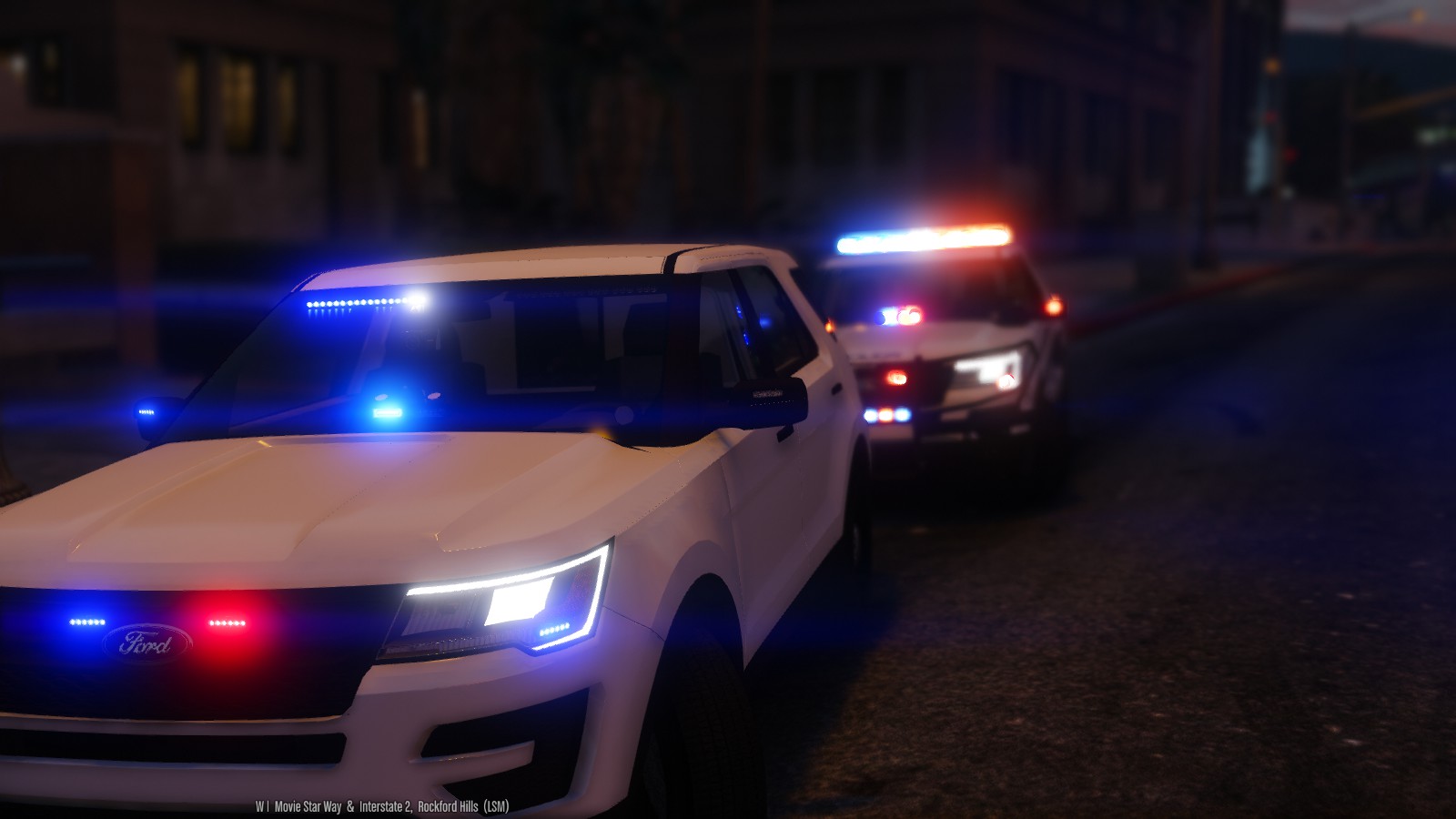
2016 LSPD FPIU 1.2.0

(67 reviews)

10 Screenshots


THIS MODEL IS NOW OUTDATED, AND I DO NOT RECCOMEND USING IT! I HAVE UPLOADED A BRAND NEW MODEL

OF THE 2016 UTILITY WITH A HQ INTERIOR, WITH GENERALLY THE SAME LIGHT SETUP. FIND IT HERE:


MODEL OVERVIEW
=================================
- NAME: 2016 LSPD FPIU
- VERSION: V1.0
- EXTRA PARTS: N/A
- OPTIMIZED FOR: ANY 

!!!!!IMPORTANT NOTE!!!!!!

iF YOU WISH TO HAVE THIS VEHICLE AS ANY OTHER SLOT YOU MUST INSTALL THE FILE 
NAMED: use this file to make any slot act like sheriff2

IF YOU DO NOT USE THIS FILE, THEN THE VEHICLE WILL NOT LIGHT UP PROPERLY

Instillation Instructions
=================================
To install this model, all you have to do is just put it in 
Mods>Update>x64>dlcpacks>patchday9>dlc.rpf>x64>levels>gta5>vehicles.rpf

To install the CarVariations line, all you have to do is go to:
mods\update\x64\dlcpacks\mpvalentines2\dlc.rpf\common\data

Add what i put in the carvar.txt to the end of your carvariations.

If you dont have patch day 9 in your mods folder, then just copy it from the base files

Extras List
=================================
Extra 1: Hood Interceptor Text
Extra 2: Whelen Inner Edge 
Extra 3: Whelen Legacy
Extra 4: Westin Rambar
Extra 5: Rambar Wrap Lower
Extra 6: Rambar Wrap Upper
Extra 7: Spotlight
Extra 8: Traffic Advisor 
Extra 9: Boot Whelen Ions

Model Notes
=================================
- "YA FUCKIN CUNTS" -Goose, The man who Flys

- YOU MUST HAVE RADIANCE V INSTALLED FOR THE LIGHTS TO HAVE BLOOM AND LOOK GOOD!!!!!!!

- This is probably one of the most customizable vehicles i have ever made, and it actually features
the use of every single siren available to GTA V.

- There has been over 30 hours to get this vehicle to be in its current state. There are a few small bugs,
but they aren't too noticable.

- The interior is nothing how I want it to be, which is unfortunate but I have nothing better to put in the 
vehicle.

- If there are any bugs with the model, please feel free to let me know.

- This model is very highpoly, around 220k pollys. The file size is also on the larger size, around 6.5mb,
I apologize for this.

- I have included Multiple skins that you can install with the model, or you can install them all if you want to. 
**To install the skins, you must name them explorer_sign_# (replace # with whatever number you want)**

- All skins are in 4k, so adding them all will increase file size

- The file size of this model is quite large, as is the poly count (220k). If you cant use the vehicle, i'm sorry
but i cant make it any lower for what i have on the vehicle.

- Please check the extras folder for anything you need with the model, including templates, extra files, etc...

- A huge thank you to everyone who made this vehicle possible to convert; Jasonct203, GTAxB0SS, and IronicRainbow

- Enjoy! And before you ask, yes i will be doing a 13-15 Utility with a lightbar.

Disclaimer
=================================
-You are not to attempt to modify or rip this model in any way shape or form.
-I (Thehurk) am not resposible for any damages done to your game. Please make a backup of any edited files!
-Do not attempt to make a profit off this model in any way shape or form.
-Do not upload this file to any other site, claiming it as your own. 
-Do not re-upload this file, make a link to it.
-If you want to use this file in a clan, PLEASE ask me before doing so. 


Enjoy!!

BEAUTIFUL video of the utility by MrOxPlay


visualsettings.dat

What's New in Version 1.2.0

Released

- Updated lights not being bright at a distance
- Updated headlights/running lights

User Feedback

Recommended Comments

Toxsor

Members

@Thehurk If you can, what font is it that you used? I want to add some additional unit numbers in for personal use if that's ok.

Thehurk

Members Author

39 minutes ago, Bulldog said:

@Thehurk If you can, what font is it that you used? I want to add some additional unit numbers in for personal use if that's ok.

Have fun, just make sure to say that i did the base skin if you ever port it to another vehicle

2016 utility skin.psd

AdenStewart

Members

Hmmmmmmm..... Did everything right.......Capture.PNG

Thehurk

Members Author

23 minutes ago, MisterJester said:

Hmmmmmmm..... Did everything right.......
-snip-

Thats the way its supposed to be

AdenStewart

Members

Just now, Thehurk said:

Thats the way its supposed to be

But when I go in game, its just white lights, and when my car flips over, I can see the red and blue lights floating in the air.

Example

Capture.PNG

Jibril

Members

@MisterJester

Yes, this happens to me as well.

@Thehurk

Why did you choose to make the secondary car color purple?

17455574301678764032_20160422002208_1.png

17455574301678764032_20160422002219_1.png

17455574301678764032_20160422002233_1.png

17455574301678764032_20160422002243_1.png

rybak04

Members

How do I make the vehicle spawn for the AI with the light-bar on top? For AI always spawns without it.

Thehurk

Members Author

8 hours ago, MisterJester said:

But when I go in game, its just white lights, and when my car flips over, I can see the red and blue lights floating in the air.

Example

-snip-

The way you have to set up the sirens means you have to scale them below the vehicle, im not going into the nitty gritty but its something that is necessary, i moved them low enough to where if you catch some air driving, you wont see them. My suggestion is, dont flip the car.

Why the lights are all white? I dont know. 


7 hours ago, Jibril said:

@MisterJester

Yes, this happens to me as well.

@Thehurk

Why did you choose to make the secondary car color purple?

-snip-

Thats what your game chose for the color. Its simply easy to change the color of it with trainer

PoliceWomen

Members

give a sheriff skin for this car

Munch1431

Members

Sorry new to this, how do I use the extra skin traffic enforcement as it's a png. I want to use this rather than the current supervisor please, how do I do this?

Jibril

Members

4 hours ago, Thehurk said:

Thats what your game chose for the color. Its simply easy to change the color of it with trainer

@Thehurk No, this is the *car's default color. Unless you mean edit your car mod?

PoliceWomen

Members

(edited)

edit  the car slot ytd file


Edited by PoliceWomen

Munch1431

Members

Yeah in Extras then extra skins there's a traffic enforcement.png I wanna use that rather than the supervisor one but Im not sure how.

Jibril

Members

@Munch1431 You use simple trainer, go to vehicle options, vehicle liveries, and you can rotate through the different ones.

My problem is I can CHANGE the vehicle from traffic enforcement, to supervisor & etc... But the car itself has a purple as it's secondary color and I can't change that because the creator mode it that way.

AdenStewart

Members

7 hours ago, Thehurk said:

The way you have to set up the sirens means you have to scale them below the vehicle, im not going into the nitty gritty but its something that is necessary, i moved them low enough to where if you catch some air driving, you wont see them. My suggestion is, dont flip the car.

Why the lights are all white? I dont know. 


Thats what your game chose for the color. Its simply easy to change the color of it with trainer

But what about the white lights...? There is also lights floating in front of the vehicle. Hate to bug you, but I want to figure this out.

OfficerFive0

Members

44 minutes ago, MisterJester said:

But what about the white lights...? There is also lights floating in front of the vehicle. Hate to bug you, but I want to figure this out.

do you have radiance v, and post op on high?

Brian Lu

Members

when will working interior coming?

Thehurk

Members Author

2 hours ago, Brian Lu said:

when will working interior coming?

I dont know

shlog44

Members

the red lights on the light bar look orange is there any way it can be more red is it a setting i can do


Thehurk

Members Author

4 minutes ago, shlog44 said:

the red lights on the light bar look orange is there any way it can be more red is it a setting i can do


Open the texures in photoshop and make them more red.

AdenStewart

Members

4 hours ago, OfficerFive0 said:

do you have radiance v, and post op on high?

Yes.

nh1256

Members

would you be able to make the rear interior lightbar an extra?

Jibril

Members

@Thehurk


Can you instruct me exactly which file i need to modify the car so that it's not purple?

Thehurk

Members Author

56 minutes ago, Jibril said:

@Thehurk


Can you instruct me exactly which file i need to modify the car so that it's not purple?

Why does it matter? just change it in the trainer

1 hour ago, nichankinson said:

would you be able to make the rear interior lightbar an extra?

No, i've already used up every siren slot.

Jibril

Members

@Thehurk

Could you please tell me how to do it in the trainer?

Under "Vehicle Options Menu ", changing the "Vehicle Livery" doesn't change the purple part of the car, I tried every option under "Vehicle Color Menu" and I even went so far to try random colors and I still can't change the purple color

Point me in the right direction please, thanks.

Create an account or sign in to comment

Latest Mods

Account

Navigation

Search

Search

Configure browser push notifications

Chrome (Android)
  1. Tap the lock icon next to the address bar.
  2. Tap Permissions → Notifications.
  3. Adjust your preference.
Chrome (Desktop)
  1. Click the padlock icon in the address bar.
  2. Select Site settings.
  3. Find Notifications and adjust your preference.










