Skip to content
View in the app

A better way to browse. Learn more.

LCPDFR.com

A full-screen app on your home screen with push notifications, badges and more.

To install this app on iOS and iPadOS
  1. Tap the Share icon in Safari
  2. Scroll the menu and tap Add to Home Screen.
  3. Tap Add in the top-right corner.
To install this app on Android
  1. Tap the 3-dot menu (⋮) in the top-right corner of the browser.
  2. Tap Add to Home screen or Install app.
  3. Confirm by tapping Install.

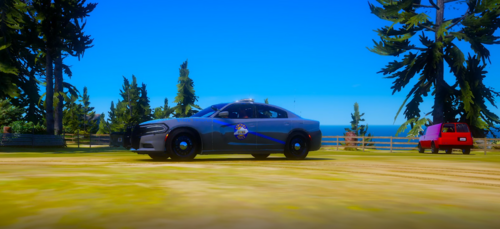
[4K] Blaine County/ Bone County 22Durango and 20Fpiu based off of NavajoAZ 1.0.0

(0 reviews)

5 Screenshots

based off of Navajo county AZ

More of my work - 
https://discord.gg/UTJp6G6HHn

No leaking or redistributing or editing

Livery's included 

2022 Durango- Blaine county and Bone 
2020 FPIU - Blaine county and Bone 
Works with GM21-24 Durango 
and Kane104 2020 Fpiu


Might add more in the future. 

Edited by tequila0o


Short Description

[4K] Blaine County/ Bone County 22Durango and 20Fpiu based off of NavajoAZ

User Feedback

Recommended Comments

Sheriff943

Members

Love these! My new favorite BCSO skins! Can we get links to the vehicles used in the pictures? 

tequila0o

Members Author

33 minutes ago, Sheriff943 said:

Love these! My new favorite BCSO skins! Can we get links to the vehicles used in the pictures? 

https://discord.gg/p3NtaXHjdU

Sheriff943

Members

3 hours ago, tequila0o said:

It invites me to his page and the when I hit accept it says there is an error. If you get bored 😜, this K-9 unit from Navajo county is pretty cool. Could contain: land vehicle, wheel, transport, tire, car, sky, sport utility vehicle, automotive exterior, bumper, outdoor, text, auto part, roof rack, compact sport utility vehicle, automotive luggage rack, automotive carrying rack, automotive tire, crossover suv, motor vehicle, fender, automotive design, land rover, law enforcement, suv, jeep, police, vehicle

Create an account or sign in to comment

Account

Navigation

Search

Search

Configure browser push notifications

Chrome (Android)
  1. Tap the lock icon next to the address bar.
  2. Tap Permissions → Notifications.
  3. Adjust your preference.
Chrome (Desktop)
  1. Click the padlock icon in the address bar.
  2. Select Site settings.
  3. Find Notifications and adjust your preference.