Skip to content
View in the app

A better way to browse. Learn more.

LCPDFR.com

A full-screen app on your home screen with push notifications, badges and more.

To install this app on iOS and iPadOS
  1. Tap the Share icon in Safari
  2. Scroll the menu and tap Add to Home Screen.
  3. Tap Add in the top-right corner.
To install this app on Android
  1. Tap the 3-dot menu (⋮) in the top-right corner of the browser.
  2. Tap Add to Home screen or Install app.
  3. Confirm by tapping Install.

Port Of Los Santos Liveries (Fictional) 1.0.0

(0 reviews)

13 Screenshots

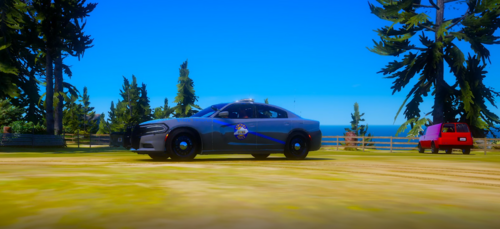
Port of Los Santos Police Liveries (Fictional)


These liveries are fictional... well kinda. This was based off of some police department that I don't remember the name of and it was not a port lol. Please feel free to use these for either FiveM or LSPDFR. If you are a developer wanting to sell a car with this skin please contact me directly via discord. The cars featured in this pack are from Cartres. You must contact him directly to purchase them, please do not message me and ask me to get you an invite or etc! 


SUPPORTED VEHICLES

GM'S 2018 FPIS

Kane's 2016 FPIU

Desmond's 2014 FPIU

OfficerUnderwood's 2011 CVPI


MY DISCORD AND SERVER


https://discord.gg/8WTHyxJFwa

DOC#5056


DO NOT JOIN MY DISCORD AND OPEN TICKETS FOR SUPPORT OR YOU WILL BE BANNED.

USE THE PROPER CHANNEL AND ASK FOR HELP. 


Short Description

DOC Designs Port Police Livery Package.

User Feedback

Recommended Comments

MostlyPalone

Members

(edited)

Great liveries!

Edited by MostlyPalone

ImRealityZ

Members

Can you link their cars? I can't find the supported vehicles you meantioned

vojt1s3k

Members

can i get that 2014 fpiu link please???


Create an account or sign in to comment

Account

Navigation

Search

Search

Configure browser push notifications

Chrome (Android)
  1. Tap the lock icon next to the address bar.
  2. Tap Permissions → Notifications.
  3. Adjust your preference.
Chrome (Desktop)
  1. Click the padlock icon in the address bar.
  2. Select Site settings.
  3. Find Notifications and adjust your preference.